
memex README

The project's README from github.com/nicosuave/memex. As one markdown file: README.md.

memex

Search, browse, and revisit your local agent history. Memex indexes conversations from coding tools so you and your agents can find previous work, read the original transcripts, and resume sessions in their original tool where supported.

Keyword search uses BM25. Optional local embeddings add semantic and hybrid search. You can also search saved Claude and Codex memories, query history across machines over SSH, and track token usage from local logs.

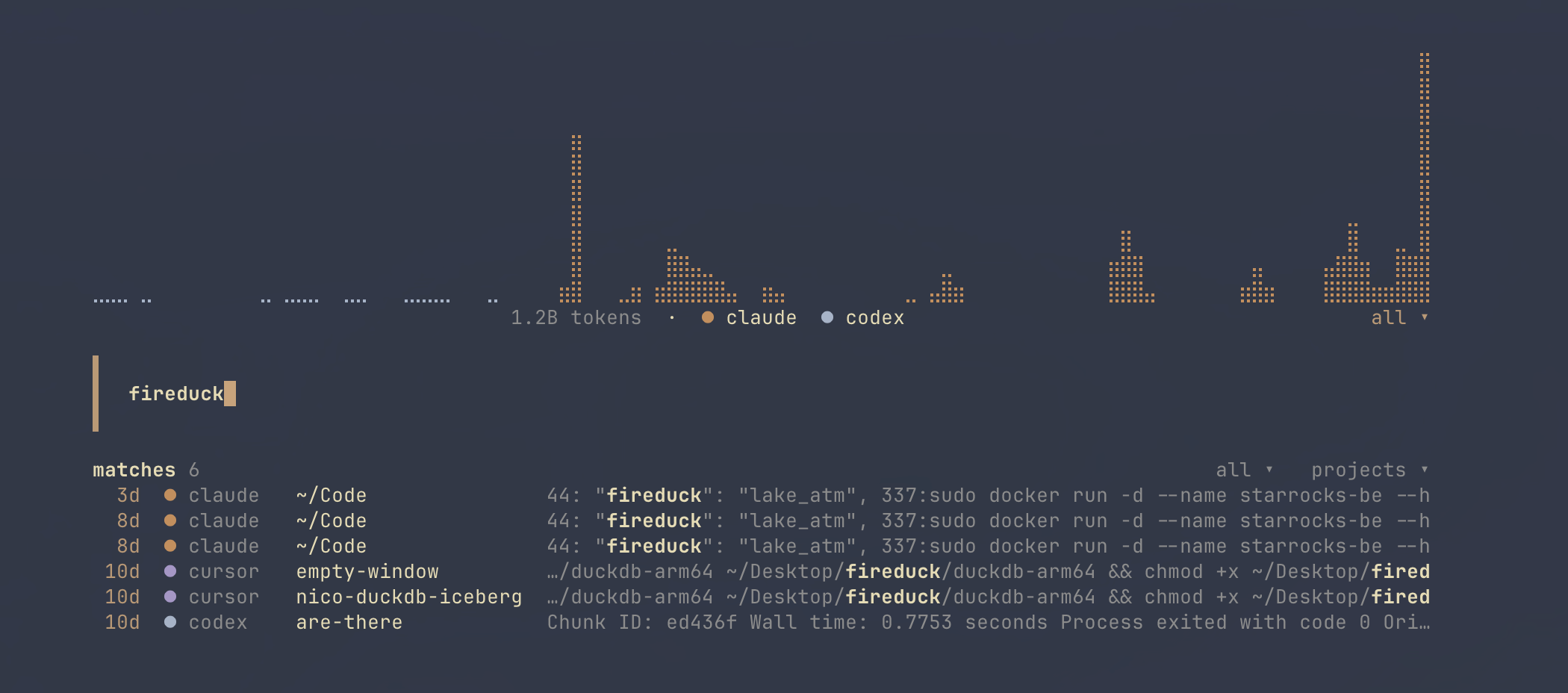
Memex terminal session browser

Install

brew install nicosuave/tap/memex

Or use the installer:

curl -fsSL https://raw.githubusercontent.com/nicosuave/memex/main/scripts/setup.sh | sh

See installation and updates for Arch Linux, Nix, Cargo, source builds, and upgrade behavior.

Quickstart

memex index                              # Index local agent history
memex                                    # Browse sessions in the terminal
memex search "deployment rollback" --format text
memex session SESSION_ID                 # Read a transcript page

In the TUI, select a session to read it or use its resume action to continue in the original agent. Resume requires that agent to be installed and its session data to remain available. See the engine support table for exceptions.

Indexing discovers supported sources automatically. To select specific engines:

memex index --only-source claude --only-source codex
memex search "deployment rollback" --source codex --project my-project

Search defaults to conversations and JSONL output. Embeddings, plaintext reasoning, and token tracking are off by default. Searches refresh stale indexes automatically; for background indexing, run memex daemon enable --continuous.

Engine support

Support varies by capability. History means indexing, searching, and reading locally available conversations. Resume opens an existing session in its original tool. Import into creates a conversation in another tool using the experimental transfer feature.

Engine History Token usage Resume Saved memories Import into
Claude Code Yes Yes Yes Yes Experimental
Codex Yes Yes Yes Yes Experimental
Cursor Yes Yes CLI sessions No Experimental
OpenCode Yes Yes Yes No Experimental
Pi Yes Yes Yes No Experimental
Oh My Pi Yes Yes Yes No No
OpenClaw Yes Yes No No No
GitHub Copilot CLI Yes Yes Yes No Experimental
Grok Yes Yes Yes No No
Jcode Yes Yes Yes No No
Muse Yes Yes Yes No No
Antigravity Yes No Yes No No
IBM Bob Yes Yes Yes No No
ZCode Yes Yes No No No
Kiro CLI Yes Credits only No No No
Hermes No Yes No No No

See source discovery and memory retrieval and usage details for formats, paths, and limitations.

Ways to use Memex

Interface Use it for
CLI Search, bounded transcript reads, indexing, usage reports, and scripts
TUI Browse, search, preview, and resume sessions; view activity
Web UI Browse and search from a local authenticated browser
macOS app Native project and session browsing, lexical search, and local resume
Qt app Native desktop browsing, lexical search, and conversation reading
MCP server Give agents structured search and transcript retrieval tools
Search skill Teach agents to use the Memex CLI for source-backed recall
herdr plugin Browse and resume sessions from a herdr pane

The interfaces share Memex's data, but expose different workflows. The native app READMEs describe their capabilities and platform requirements.

For the macOS app:

brew install nicosuave/tap/memex-app

The native macOS app:

Memex native macOS app

The Qt companion:

Memex Qt companion

For the browser:

memex web serve

To keep indexing and the browser running in the background:

memex daemon enable --web-ui
memex web open

See background indexing and Web UI authentication.

Search and read

memex search "migration failure" --format text
memex search "migration failure" --source claude --limit 10
memex search "deployment decision" --content all
memex search "project conventions" --content memories
memex sessions --cwd . --limit 5
memex session SESSION_ID
memex show --record-id RECORD_ID --machine local

Search results identify the session, source, and machine so you can retrieve the original records. Transcript reads are bounded by default and return continuation information for longer content.

For semantic or hybrid search, first generate local embeddings:

memex index --embeddings
memex search "how we handled retries" --mode hybrid --format text

See search and reading for filters, output formats, pagination, reasoning inclusion, and memory retrieval; see embeddings and configuration for models and CPU, CoreML, or CUDA execution.

Agent integration

Install the shared search skill for Codex, OpenCode, Pi, and Oh My Pi:

memex skill install --target shared

For Claude Code:

memex skill install --target claude

Restart the agent after installing or updating its skill. The skill guides it to search progressively and verify relevant source records.

For MCP clients that launch a local process:

{
  "mcpServers": {
    "memex": { "command": "memex", "args": ["mcp", "--transport", "stdio"] }
  }
}

Memex also serves authenticated Streamable HTTP with memex mcp, or alongside background indexing with memex daemon enable --mcp. See the MCP guide for client setup, OAuth, remote access, and the retrieval tool contracts.

Multiple machines over SSH

Each machine keeps its own index. Memex queries configured machines over SSH and returns results with their originating machine attached. Unavailable machines produce partial results with a warning.

memex search "deployment rollback" --machine mini
memex session SESSION_ID --machine mini

Install Memex on each machine and add its SSH configuration to ~/.memex/config.toml. See multiple-machine setup for a complete example and remote reading and resume behavior.

Token usage

Enable local usage tracking in ~/.memex/config.toml:

token_usage = true
memex usage
memex usage --source codex --since 2026-09-01

Usage is reconstructed from each engine's local records. Costs prefer recorded request prices and otherwise use a built-in price catalog; calculated values are API-equivalent estimates, not subscription charges. Missing prices remain visibly unpriced. See usage and cost estimates for details.

Experimental session transfers

memex transfer imports an indexed conversation into Codex, Claude Code, Copilot CLI, Cursor, OpenCode, or Pi. This is experimental, and compatibility depends on the destination tool's version and storage format.

Transfers reconstruct conversation content; they do not migrate the complete agent runtime, workspace files, permissions, or executable tool state. Use native resume when you want to continue the original session in the same tool.

# Generate an intermediate transcript without importing into the destination
memex transfer SESSION_ID --source claude --to codex --dry-run

# Import the conversation into the destination tool
memex transfer SESSION_ID --source claude --to codex

The command reads the local Memex index. A dry run still writes a generated transcript file, but does not import it into the target. A successful import prints the destination information and a resume command; it does not validate that the destination can reproduce the original session's behavior.

Reference

Guide Contents
Installation and updates Package managers, source builds, Nix, skill updates, daemon upgrade migration
Indexing, search, and reading Sources, memories, filters, formats, record budgets, pagination
Configuration and embeddings Config file, models, execution providers, exclusions, resume templates
Background indexing and Web UI Services, browser authentication, index cleanup
Multiple machines SSH setup, remote reads, batch retrieval
MCP server Transports, authentication, client setup, retrieval tools
Token usage Counters, pricing, cache estimates, Hermes coverage
herdr integration Installation, actions, key bindings
Developer profiling Index/search traces and flamegraphs

memex (nicosuave/memex)

Searching Database…

266 ·GitHub
What is this?Memex indexes your local coding-agent conversations (Claude Code, Codex, Cursor, and more) so you can search past work, read original transcripts, and resume sessions in the original tool.
Is it just a CLI, or does it have an interface?A CLI and TUI first, with the same data exposed through a local Web UI, a native macOS app, a Qt desktop app, an MCP server for agents, and a herdr plugin.
How do I get it running?Run the installer script (or use Cargo, Nix, Arch packages, or build from source), then run memex: supported sources are discovered automatically, and the TUI lets you read or resume any session.
Which coding agents can it search?Sixteen engines, including Claude Code, Codex, Cursor, OpenCode, Pi, OpenClaw, GitHub Copilot CLI, Grok, and Antigravity. History works for all; resume, saved memories, and token stats vary by engine.
Can every past session be resumed?No — resume needs the original agent installed and its session data still on disk, and support varies: OpenClaw and ZCode sessions cannot be resumed, Hermes is usage stats only, and transfers are experimental.
Does my conversation data leave my machine?Everything stays local: each machine keeps its own index, the Web UI is a local authenticated browser, and cross-machine search only reaches machines you list in ~/.memex/config.toml over SSH.
Can I move a Claude Code session into Codex or another tool?Yes, via the experimental memex transfer command, which imports into Codex, Claude Code, Copilot CLI, Cursor, OpenCode, or Pi. Modes: compact (cleaned text, default) or strict (adds tool activity as notes); --turns limits included history. It is not a lossless migration.
How can my coding agents use Memex themselves?Run memex as an MCP server to give agents structured search and transcript retrieval, or install the shared search skill for Codex, OpenCode, Pi, Oh My Pi, and Claude Code so agents do source-backed recall through the CLI.
Can it tell me how many tokens I have burned?Yes, token tracking is opt-in and reconstructed from each engine's local logs. Costs use recorded request prices or a built-in price catalog and are API-equivalent estimates, not subscription charges or quota balances.
Does it search saved agent memories too?Yes — Claude project memories and Codex memory files are discovered separately from transcripts. Search them with --content memories, or mix them with conversations using --content all.
Creator
nicosuave
Size
8.5 MB
Stars
266
Age
9mo
Commits · 90 Days