

Что это такое?
 Официальная реализация NeRF на TensorFlow — система с конференции ECCV 2020 (получила почётное упоминание в номинации «лучшая статья»), которая учит нейросетевое представление одной сцены и рендерит её с новых ракурсов.
Официальная реализация NeRF на TensorFlow — система с конференции ECCV 2020 (получила почётное упоминание в номинации «лучшая статья»), которая учит нейросетевое представление одной сцены и рендерит её с новых ракурсов.Это библиотека, которую я импортирую, или исследовательский код, который я запускаю сам?Исследовательский код: Python-скрипты (run_nerf.py) плюс Jupyter-ноутбуки с демонстрациями и извлечением мешей. Вы клонируете репозиторий, создаёте его conda-окружение и запускаете обучение из командной строки — pip-пакета нет.
Исследовательский код: Python-скрипты (run_nerf.py) плюс Jupyter-ноутбуки с демонстрациями и извлечением мешей. Вы клонируете репозиторий, создаёте его conda-окружение и запускаете обучение из командной строки — pip-пакета нет.Как мне всё запустить?Создайте conda-окружение nerf из приложенного файла настройки, запустите прилагаемый скрипт, чтобы скачать примеры данных для обучения, стартуйте обучение и наблюдайте, как тренируется сцена Fern, в Tensorboard на localhost:6006.
Создайте conda-окружение nerf из приложенного файла настройки, запустите прилагаемый скрипт, чтобы скачать примеры данных для обучения, стартуйте обучение и наблюдайте, как тренируется сцена Fern, в Tensorboard на localhost:6006.Что должно быть установлено до начала работы?Python 3 с TensorFlow 1.15, matplotlib, numpy, imageio и configargparse — conda-файл всё это охватывает. Загрузчику данных LLFF дополнительно нужен ImageMagick, а для обучения на своих реальных сценах потребуется код LLFF плюс COLMAP для поз камер.
Python 3 с TensorFlow 1.15, matplotlib, numpy, imageio и configargparse — conda-файл всё это охватывает. Загрузчику данных LLFF дополнительно нужен ImageMagick, а для обучения на своих реальных сценах потребуется код LLFF плюс COLMAP для поз камер.Сколько ждать, пока я увижу обученную сцену?Закладывайте серьёзное время: примеры из репозитория обучаются 200 тысяч итераций, это около 15 часов при низком разрешении. К тому же NeRF привязан к одной сцене, так что каждая новая сцена — это ещё один полный прогон обучения.
Закладывайте серьёзное время: примеры из репозитория обучаются 200 тысяч итераций, это около 15 часов при низком разрешении. К тому же NeRF привязан к одной сцене, так что каждая новая сцена — это ещё один полный прогон обучения.Мне нужна мощная видеокарта для этого?Всего одна — в README сказано, что для оптимизации NeRF достаточно одной GPU. Рендеринг кадров уже обученной модели по сравнению с этим быстрый: от менее чем секунды до примерно 30 секунд на изображение.
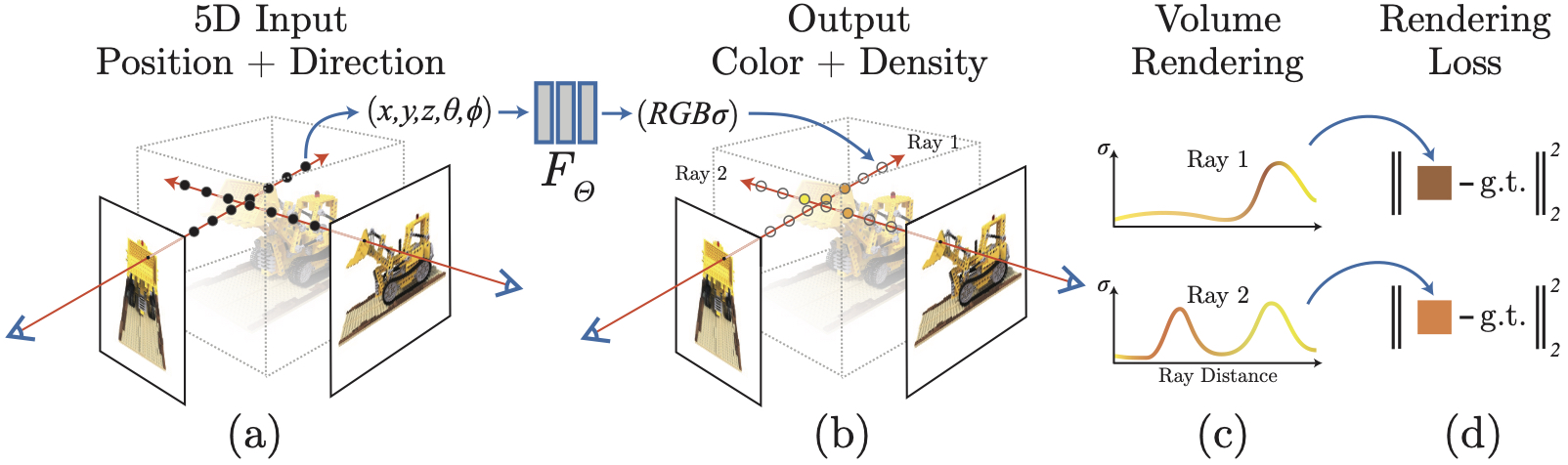
Всего одна — в README сказано, что для оптимизации NeRF достаточно одной GPU. Рендеринг кадров уже обученной модели по сравнению с этим быстрый: от менее чем секунды до примерно 30 секунд на изображение.Что такое нейронное поле излучения (neural radiance field)?Небольшая полносвязная сеть (около 5 МБ весов), которая отображает 5-мерный вход — координату в пространстве плюс направление взгляда — в цвет и прозрачность. Если рассматривать её как объём, её можно дифференцируемо отрендерить, чтобы воспроизвести и синтезировать новые ракурсы одной сцены.
Небольшая полносвязная сеть (около 5 МБ весов), которая отображает 5-мерный вход — координату в пространстве плюс направление взгляда — в цвет и прозрачность. Если рассматривать её как объём, её можно дифференцируемо отрендерить, чтобы воспроизвести и синтезировать новые ракурсы одной сцены.Можно ли обучить её на своих фотографиях?Да. Вычислите позы камер скриптом imgs2poses.py из кода LLFF (он использует COLMAP), затем укажите обучающему скрипту на вашу папку через --datadir и --datasettype llff; для съёмки с охватом 360 градусов добавьте флаги --nondc --spherify --lindisp.
Да. Вычислите позы камер скриптом imgs2poses.py из кода LLFF (он использует COLMAP), затем укажите обучающему скрипту на вашу папку через --datadir и --datasettype llff; для съёмки с охватом 360 градусов добавьте флаги --nondc --spherify --lindisp.Можно ли получить из обученного NeRF настоящий 3D-меш?Да — extractmesh.ipynb запускает marching cubes и извлекает треугольный меш из обученной сети. Для этого нужен пакет PyMCubes, а также trimesh и pyrender, если хотите отрендерить меш прямо в ноутбуке.
Да — extractmesh.ipynb запускает marching cubes и извлекает треугольный меш из обученной сети. Для этого нужен пакет PyMCubes, а также trimesh и pyrender, если хотите отрендерить меш прямо в ноутбуке.Обязательно ли обучать с нуля, чтобы увидеть результаты?Нет — в репозитории есть ссылка на предобученный NeRF высокого разрешения для сцены Fern, а renderdemo.ipynb рендерит с него новые ракурсы. Для результатов уровня статьи берите за основу конфигурации из paperconfigs/.
Нет — в репозитории есть ссылка на предобученный NeRF высокого разрешения для сцены Fern, а renderdemo.ipynb рендерит с него новые ракурсы. Для результатов уровня статьи берите за основу конфигурации из paperconfigs/.What are similar projects?instant-ngp, nerfstudio, Open3D, TRELLIS.2, gaussian-splatting, DeepLearningExamples, Virgilio, vggt
instant-ngp, nerfstudio, Open3D, TRELLIS.2, gaussian-splatting, DeepLearningExamples, Virgilio, vggtWhich topics is it in?3d-graphics, computer-graphics, numpy, tensorflow, rendering, jupyter notebook, 3d, computer-vision, deep-learning, research, gpu, machine-learning
3d-graphics, computer-graphics, numpy, tensorflow, rendering, jupyter notebook, 3d, computer-vision, deep-learning, research, gpu, machine-learning