
Unlimited OCR Works
Welcome the Era of One-shot Long-horizon Parsing.
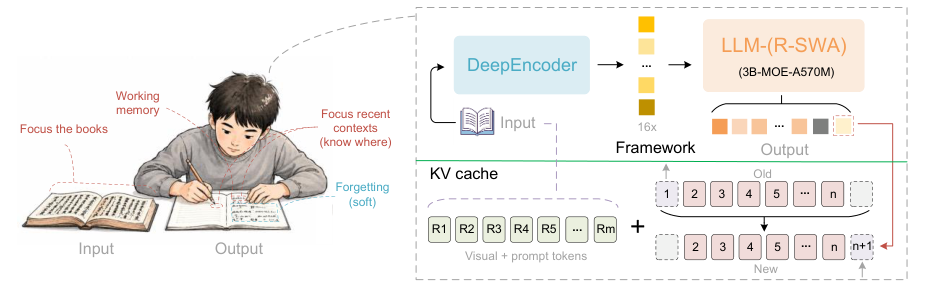
Release
Inference
Inference using Huggingface transformers on NVIDIA GPUs. Requirements tested on python 3.12.3 + CUDA12.9:
torch==2.10.0
torchvision==0.25.0
transformers==4.57.1
Pillow==12.1.1
matplotlib==3.10.8
einops==0.8.2
addict==2.4.0
easydict==1.13
pymupdf==1.27.2.2
psutil==7.2.2
import os
import torch
from transformers import AutoModel, AutoTokenizer

model_name = 'baidu/Unlimited-OCR'

tokenizer = AutoTokenizer.from_pretrained(model_name, trust_remote_code=True)
model = AutoModel.from_pretrained(
    model_name,
    trust_remote_code=True,
    use_safetensors=True,
    torch_dtype=torch.bfloat16,
)
model = model.eval().cuda()

# ── Single image supports two configs: gundam or base ──
# gundam: base_size=1024, image_size=640, crop_mode=True
# base: base_size=1024, image_size=1024, crop_mode=False
model.infer(
    tokenizer,
    prompt='<image>document parsing.',
    image_file='your_image.jpg',
    output_path='your/output/dir',
    base_size=1024, image_size=640, crop_mode=True,
    max_length=32768,
    no_repeat_ngram_size=35, ngram_window=128,
    save_results=True,
)

# ── Multi page / PDF only uses base (image_size=1024) ──
model.infer_multi(
    tokenizer,
    prompt='<image>Multi page parsing.',
    image_files=['page1.png', 'page2.png', 'page3.png'],
    output_path='your/output/dir',
    image_size=1024,
    max_length=32768,
    no_repeat_ngram_size=35, ngram_window=1024,
    save_results=True,
)

# ── PDF (convert pages to images, then multi-page parsing) ──
import tempfile, fitz  # PyMuPDF

def pdf_to_images(pdf_path, dpi=300):
    doc = fitz.open(pdf_path)
    tmp_dir = tempfile.mkdtemp(prefix='pdf_ocr_')
    mat = fitz.Matrix(dpi / 72, dpi / 72)
    paths = []
    for i, page in enumerate(doc):
        out = os.path.join(tmp_dir, f'page_{i+1:04d}.png')
        page.get_pixmap(matrix=mat).save(out)
        paths.append(out)
    doc.close()
    return paths

model.infer_multi(
    tokenizer,
    prompt='<image>Multi page parsing.',
    image_files=pdf_to_images('your_doc.pdf', dpi=300),
    output_path='your/output/dir',
    image_size=1024,
    max_length=32768,
    no_repeat_ngram_size=35, ngram_window=1024,
    save_results=True,
)
vLLM
Please refer to the official vLLM recipe for deployment details:
Recipe: https://recipes.vllm.ai/baidu/Unlimited-OCR
Docker Images
Use the following Docker images depending on your GPU platform:
Default (CUDA 13.0):
docker pull vllm/vllm-openai:unlimited-ocr
For Hopper GPUs (CUDA 12.9)
docker pull vllm/vllm-openai:unlimited-ocr-cu129
SGLang
Set up the environment (uv-managed virtualenv). Install the local SGLang wheel first,
then pin kernels==0.9.0 and install PyMuPDF for PDF-to-image conversion:
uv venv --python 3.12
source .venv/bin/activate

uv pip install wheel/sglang-0.0.0.dev11416+g92e8bb79e-py3-none-any.whl
uv pip install kernels==0.11.7
uv pip install pymupdf==1.27.2.2
Start the SGLang server:
python -m sglang.launch_server \
    --model baidu/Unlimited-OCR \
    --served-model-name Unlimited-OCR \
    --attention-backend fa3 \
    --page-size 1 \
    --mem-fraction-static 0.8 \
    --context-length 32768 \
    --enable-custom-logit-processor \
    --disable-overlap-schedule \
    --skip-server-warmup \
    --host 0.0.0.0 \
    --port 10000
Send streaming requests to the OpenAI-compatible API:
import base64
import json
import os
import tempfile

import fitz
import requests
from sglang.srt.sampling.custom_logit_processor import DeepseekOCRNoRepeatNGramLogitProcessor

server_url = "http://127.0.0.1:10000"

session = requests.Session()
session.trust_env = False


def pdf_to_images(pdf_path, dpi=300):
    doc = fitz.open(pdf_path)
    tmp_dir = tempfile.mkdtemp(prefix="pdf_ocr_")
    mat = fitz.Matrix(dpi / 72, dpi / 72)
    image_paths = []
    for i, page in enumerate(doc):
        image_path = os.path.join(tmp_dir, f"page_{i + 1:04d}.png")
        page.get_pixmap(matrix=mat).save(image_path)
        image_paths.append(image_path)
    doc.close()
    return image_paths


def encode_image(image_path):
    ext = os.path.splitext(image_path)[1].lower()
    mime = "image/jpeg" if ext in (".jpg", ".jpeg") else f"image/{ext.lstrip('.')}"
    with open(image_path, "rb") as f:
        data = base64.b64encode(f.read()).decode("utf-8")
    return {"type": "image_url", "image_url": {"url": f"data:{mime};base64,{data}"}}


def build_content(prompt, image_paths):
    return [{"type": "text", "text": prompt}] + [encode_image(path) for path in image_paths]


def generate(prompt, image_paths, image_mode, ngram_window):
    payload = {
        "model": "Unlimited-OCR",
        "messages": [{"role": "user", "content": build_content(prompt, image_paths)}],
        "temperature": 0,
        "skip_special_tokens": False,
        "images_config": {"image_mode": image_mode},
        "custom_logit_processor": DeepseekOCRNoRepeatNGramLogitProcessor.to_str(),
        "custom_params": {
            "ngram_size": 35,
            "window_size": ngram_window,
        },
        "stream": True,
    }
    response = session.post(
        f"{server_url}/v1/chat/completions",
        headers={"Content-Type": "application/json"},
        data=json.dumps(payload),
        timeout=1200,
        stream=True,
    )
    response.raise_for_status()

    chunks = []
    for line in response.iter_lines(chunk_size=1, decode_unicode=True):
        if not line or not line.startswith("data: "):
            continue
        data = line[len("data: "):]
        if data == "[DONE]":
            break
        event = json.loads(data)
        delta = event["choices"][0].get("delta", {}).get("content", "")
        if delta:
            print(delta, end="", flush=True)
            chunks.append(delta)
    print()
    return "".join(chunks)


# Single image supports two configs: gundam or base. Example below uses gundam.
generate("document parsing.", ["your_image.jpg"], image_mode="gundam", ngram_window=128)

# Multi image (base only)
generate("Multi page parsing.", ["page1.png", "page2.png"], image_mode="base", ngram_window=1024)

# PDF (base only)
generate("Multi page parsing.", pdf_to_images("your_doc.pdf", dpi=300), image_mode="base", ngram_window=1024)
For batch inference, infer.py starts the SGLang server automatically and sends concurrent requests for an image directory or PDF:
# Image directory
python infer.py \
    --image_dir ./examples/images \
    --output_dir ./outputs \
    --concurrency 8 \
    --image_mode gundam

# PDF pages
python infer.py \
    --pdf ./examples/document.pdf \
    --output_dir ./outputs \
    --concurrency 8 \
    --image_mode gundam
Useful options:
--model_dir baidu/Unlimited-OCR   # Local path or Hugging Face model ID
--gpu 0                           # CUDA_VISIBLE_DEVICES value
--server_log ./log/sglang_server.log
For OmniDocBench evaluation, you need to perform the following post-processing.
DET_RE = re.compile(r'<\|det\|>([^<\s]+)(?:\s*\[[^\]]*\])?\s*<\|/det\|>(.*)', re.DOTALL)

def remove_det(raw: str) -> str:
    """
    Strip <|det|>type [bbox]<|/det|> markers, group lines belonging to the
    same block with \\n, and separate different blocks with \\n\\n.
    """
    blocks = []
    cur = None
    for line in raw.splitlines():
        line = line.rstrip()
        if not line:
            continue
        m = DET_RE.match(line)
        if m:
            category, content = m.group(1).strip(), m.group(2).strip()
            if category == 'image':
                continue
            if cur is not None:
                blocks.append(cur)
            cur = [content] if content else []
            continue
        if cur is None:
            cur = []
        cur.append(line)
    if cur is not None:
        blocks.append(cur)
    text = '\n\n'.join('\n'.join(b) for b in blocks).strip()
    return text
Visualization
Acknowledgement
We would like to thank Deepseek-OCR, Deepseek-OCR-2, PaddleOCR for their valuable models and ideas.
Citation
@misc{yin2026unlimitedocrworks,
      title={Unlimited OCR Works},
      author={Youyang Yin and Huanhuan Liu and YY and Qunyi Xie and Chaorun Liu and Shiqi Yang and Shaohua Wang and Zhanlong Liu and Hao Zou and Jinyue Chen and Shu Wei and Jingjing Wu and Mingxin Huang and Zhen Wu and Guibin Wang and Tengyu Du and Lei Jia},
      year={2026},
      eprint={2606.23050},
      archivePrefix={arXiv},
      primaryClass={cs.CV},
      url={https://arxiv.org/abs/2606.23050},
}





 这是百度开源的一个 OCR 模型,专为一次性解析长文档而设计——团队称它把 Deepseek-OCR 又往前推进了一步,并且有一篇 arXiv 论文作为技术支撑。