🚧 While I no longer actively update this repo, you can find me continuously pushing this tech forward to good side and open-source. I'm also building an optimized and cloud hosted version: https://noiz.ai/ and we're hiring.


English | 中文| 中文Linux
Features
🌍 Chinese supported mandarin and tested with multiple datasets: aidatatang_200zh, magicdata, aishell3, data_aishell, and etc.
🤩 PyTorch worked for pytorch, tested in version of 1.9.0(latest in August 2021), with GPU Tesla T4 and GTX 2060
🌍 Windows + Linux run in both Windows OS and linux OS (even in M1 MACOS)
🤩 Easy & Awesome effect with only newly-trained synthesizer, by reusing the pretrained encoder/vocoder
🌍 Webserver Ready to serve your result with remote calling
Quick Start
1. Install Requirements
1.1 General Setup
Follow the original repo to test if you got all environment ready.
**Python 3.7 or higher ** is needed to run the toolbox.
- Install PyTorch.
If you get an ERROR: Could not find a version that satisfies the requirement torch==1.9.0+cu102 (from versions: 0.1.2, 0.1.2.post1, 0.1.2.post2 ) This error is probably due to a low version of python, try using 3.9 and it will install successfully
- Install ffmpeg.
- Run
pip install -r requirements.txt to install the remaining necessary packages.
The recommended environment here is Repo Tag 0.0.1 Pytorch1.9.0 with Torchvision0.10.0 and cudatoolkit10.2 requirements.txt webrtcvad-wheels because requirements. txt was exported a few months ago, so it doesn't work with newer versions
- Install webrtcvad
pip install webrtcvad-wheels(If you need)
or
install dependencies with conda or mamba
conda env create -n env_name -f env.yml
mamba env create -n env_name -f env.yml
will create a virtual environment where necessary dependencies are installed. Switch to the new environment by conda activate env_name and enjoy it.
env.yml only includes the necessary dependencies to run the project,temporarily without monotonic-align. You can check the official website to install the GPU version of pytorch.
1.2 Setup with a M1 Mac
The following steps are a workaround to directly use the original demo_toolbox.pywithout the changing of codes.
Since the major issue comes with the PyQt5 packages used in demo_toolbox.py not compatible with M1 chips, were one to attempt on training models with the M1 chip, either that person can forgo demo_toolbox.py, or one can try the web.py in the project.
1.2.1 Install PyQt5, with ref here.
1.2.2 Install pyworld and ctc-segmentation
Both packages seem to be unique to this project and are not seen in the original Real-Time Voice Cloning project. When installing with pip install, both packages lack wheels so the program tries to directly compile from c code and could not find Python.h.
Install pyworld
brew install python Python.h can come with Python installed by brewexport CPLUS_INCLUDE_PATH=/opt/homebrew/Frameworks/Python.framework/Headers The filepath of brew-installed Python.h is unique to M1 MacOS and listed above. One needs to manually add the path to the environment variables.pip install pyworld that should do.
Installctc-segmentation
Same method does not apply to ctc-segmentation, and one needs to compile it from the source code on github.
git clone https://github.com/lumaku/ctc-segmentation.gitcd ctc-segmentationsource /PathToMockingBird/venv/bin/activate If the virtual environment hasn't been deployed, activate it.cythonize -3 ctc_segmentation/ctc_segmentation_dyn.pyx/usr/bin/arch -x86_64 python setup.py build Build with x86 architecture./usr/bin/arch -x86_64 python setup.py install --optimize=1 --skip-buildInstall with x86 architecture.
1.2.3 Other dependencies
/usr/bin/arch -x86_64 pip install torch torchvision torchaudio Pip installing PyTorch as an example, articulate that it's installed with x86 architecturepip install ffmpeg Install ffmpegpip install -r requirements.txt Install other requirements.
To run the project on x86 architecture. ref.
2. Prepare your models
Note that we are using the pretrained encoder/vocoder but not synthesizer, since the original model is incompatible with the Chinese symbols. It means the demo_cli is not working at this moment, so additional synthesizer models are required.
You can either train your models or use existing ones:
2.1 Train encoder with your dataset (Optional)
Preprocess with the audios and the mel spectrograms:
python encoder_preprocess.py <datasets_root> Allowing parameter --dataset {dataset} to support the datasets you want to preprocess. Only the train set of these datasets will be used. Possible names: librispeech_other, voxceleb1, voxceleb2. Use comma to sperate multiple datasets.
Train the encoder: python encoder_train.py my_run <datasets_root>/SV2TTS/encoder
For training, the encoder uses visdom. You can disable it with --no_visdom, but it's nice to have. Run "visdom" in a separate CLI/process to start your visdom server.
2.2 Train synthesizer with your dataset
Download dataset and unzip: make sure you can access all .wav in folder
Preprocess with the audios and the mel spectrograms:
python pre.py <datasets_root>
Allowing parameter --dataset {dataset} to support aidatatang_200zh, magicdata, aishell3, data_aishell, etc.If this parameter is not passed, the default dataset will be aidatatang_200zh.
Train the synthesizer:
python train.py --type=synth mandarin <datasets_root>/SV2TTS/synthesizer
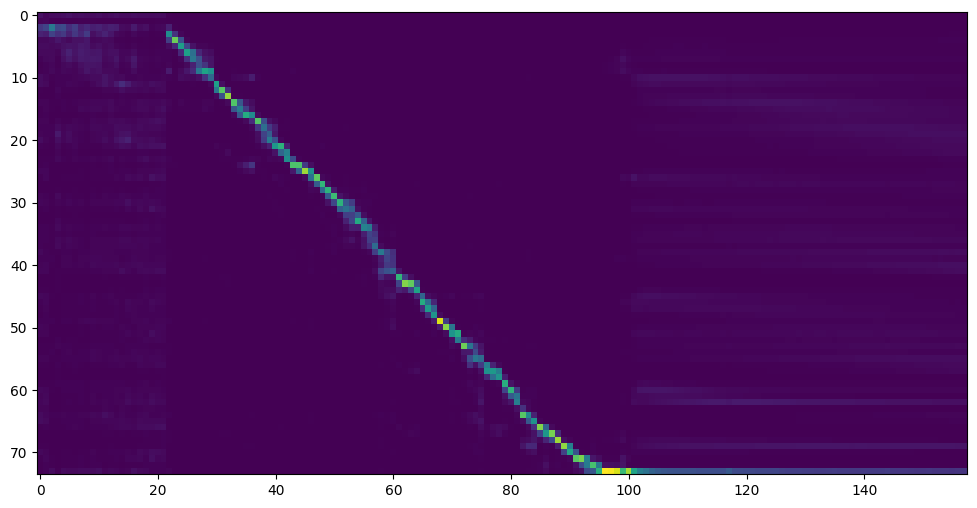
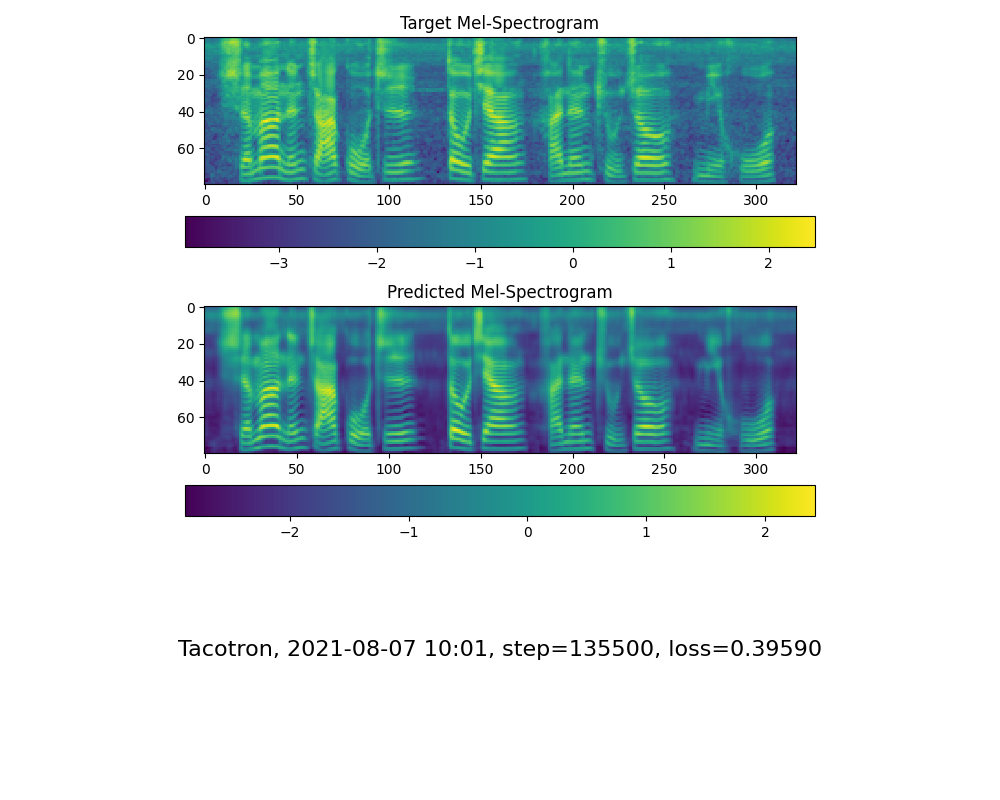
Go to next step when you see attention line show and loss meet your need in training folder synthesizer/saved_models/.
2.3 Use pretrained model of synthesizer
Thanks to the community, some models will be shared:
2.4 Train vocoder (Optional)
note: vocoder has little difference in effect, so you may not need to train a new one.
Preprocess the data:
python vocoder_preprocess.py <datasets_root> -m <synthesizer_model_path>
<datasets_root> replace with your dataset root,<synthesizer_model_path>replace with directory of your best trained models of sythensizer, e.g. sythensizer\saved_mode\xxx
Train the wavernn vocoder:
python vocoder_train.py mandarin <datasets_root>
Train the hifigan vocoder
python vocoder_train.py mandarin <datasets_root> hifigan
3. Launch
3.1 Using the web server
You can then try to run:python web.py and open it in browser, default as http://localhost:8080
You can then try the toolbox:
python demo_toolbox.py -d <datasets_root>
3.3 Using the command line
You can then try the command:
python gen_voice.py <text_file.txt> your_wav_file.wav
you may need to install cn2an by "pip install cn2an" for better digital number result.
Reference
This repository is forked from Real-Time-Voice-Cloning which only support English.
| URL |
Designation |
Title |
Implementation source |
| 1803.09017 |
GlobalStyleToken (synthesizer) |
Style Tokens: Unsupervised Style Modeling, Control and Transfer in End-to-End Speech Synthesis |
This repo |
| 2010.05646 |
HiFi-GAN (vocoder) |
Generative Adversarial Networks for Efficient and High Fidelity Speech Synthesis |
This repo |
| 2106.02297 |
Fre-GAN (vocoder) |
Fre-GAN: Adversarial Frequency-consistent Audio Synthesis |
This repo |
| 1806.04558 |
SV2TTS |
Transfer Learning from Speaker Verification to Multispeaker Text-To-Speech Synthesis |
This repo |
| 1802.08435 |
WaveRNN (vocoder) |
Efficient Neural Audio Synthesis |
fatchord/WaveRNN |
| 1703.10135 |
Tacotron (synthesizer) |
Tacotron: Towards End-to-End Speech Synthesis |
fatchord/WaveRNN |
| 1710.10467 |
GE2E (encoder) |
Generalized End-To-End Loss for Speaker Verification |
This repo |
F Q&A
1.Where can I download the dataset?
After unzip aidatatang_200zh, you need to unzip all the files under aidatatang_200zh\corpus\train
2.What is<datasets_root>?
If the dataset path is D:\data\aidatatang_200zh,then <datasets_root> isD:\data
3.Not enough VRAM
Train the synthesizer:adjust the batch_size in synthesizer/hparams.py
//Before
tts_schedule = [(2,  1e-3,  20_000,  12),   # Progressive training schedule
                (2,  5e-4,  40_000,  12),   # (r, lr, step, batch_size)
                (2,  2e-4,  80_000,  12),   #
                (2,  1e-4, 160_000,  12),   # r = reduction factor (# of mel frames
                (2,  3e-5, 320_000,  12),   #     synthesized for each decoder iteration)
                (2,  1e-5, 640_000,  12)],  # lr = learning rate
//After
tts_schedule = [(2,  1e-3,  20_000,  8),   # Progressive training schedule
                (2,  5e-4,  40_000,  8),   # (r, lr, step, batch_size)
                (2,  2e-4,  80_000,  8),   #
                (2,  1e-4, 160_000,  8),   # r = reduction factor (# of mel frames
                (2,  3e-5, 320_000,  8),   #     synthesized for each decoder iteration)
                (2,  1e-5, 640_000,  8)],  # lr = learning rate
Train Vocoder-Preprocess the data:adjust the batch_size in synthesizer/hparams.py
//Before
### Data Preprocessing
        max_mel_frames = 900,
        rescale = True,
        rescaling_max = 0.9,
        synthesis_batch_size = 16,                  # For vocoder preprocessing and inference.
//After
### Data Preprocessing
        max_mel_frames = 900,
        rescale = True,
        rescaling_max = 0.9,
        synthesis_batch_size = 8,                  # For vocoder preprocessing and inference.
Train Vocoder-Train the vocoder:adjust the batch_size in vocoder/wavernn/hparams.py
//Before
# Training
voc_batch_size = 100
voc_lr = 1e-4
voc_gen_at_checkpoint = 5
voc_pad = 2

//After
# Training
voc_batch_size = 6
voc_lr = 1e-4
voc_gen_at_checkpoint = 5
voc_pad =2
4.If it happens RuntimeError: Error(s) in loading state_dict for Tacotron: size mismatch for encoder.embedding.weight: copying a param with shape torch.Size([70, 512]) from checkpoint, the shape in current model is torch.Size([75, 512]).
Please refer to issue #37
5. How to improve CPU and GPU occupancy rate?
Adjust the batch_size as appropriate to improve
6. What if it happens the page file is too small to complete the operation
Please refer to this video and change the virtual memory to 100G (102400), for example : When the file is placed in the D disk, the virtual memory of the D disk is changed.
7. When should I stop during training?
FYI, my attention came after 18k steps and loss became lower than 0.4 after 50k steps.

 MockingBird 是一个基于 PyTorch 的语音克隆工具箱:它能从一小段音频中学习某个人的声音,并实时生成任意普通话语音。这个仓库已经不再活跃更新了——作者正在转而开发一个优化过的云端版本。