





604 ·GitHub
What is this?
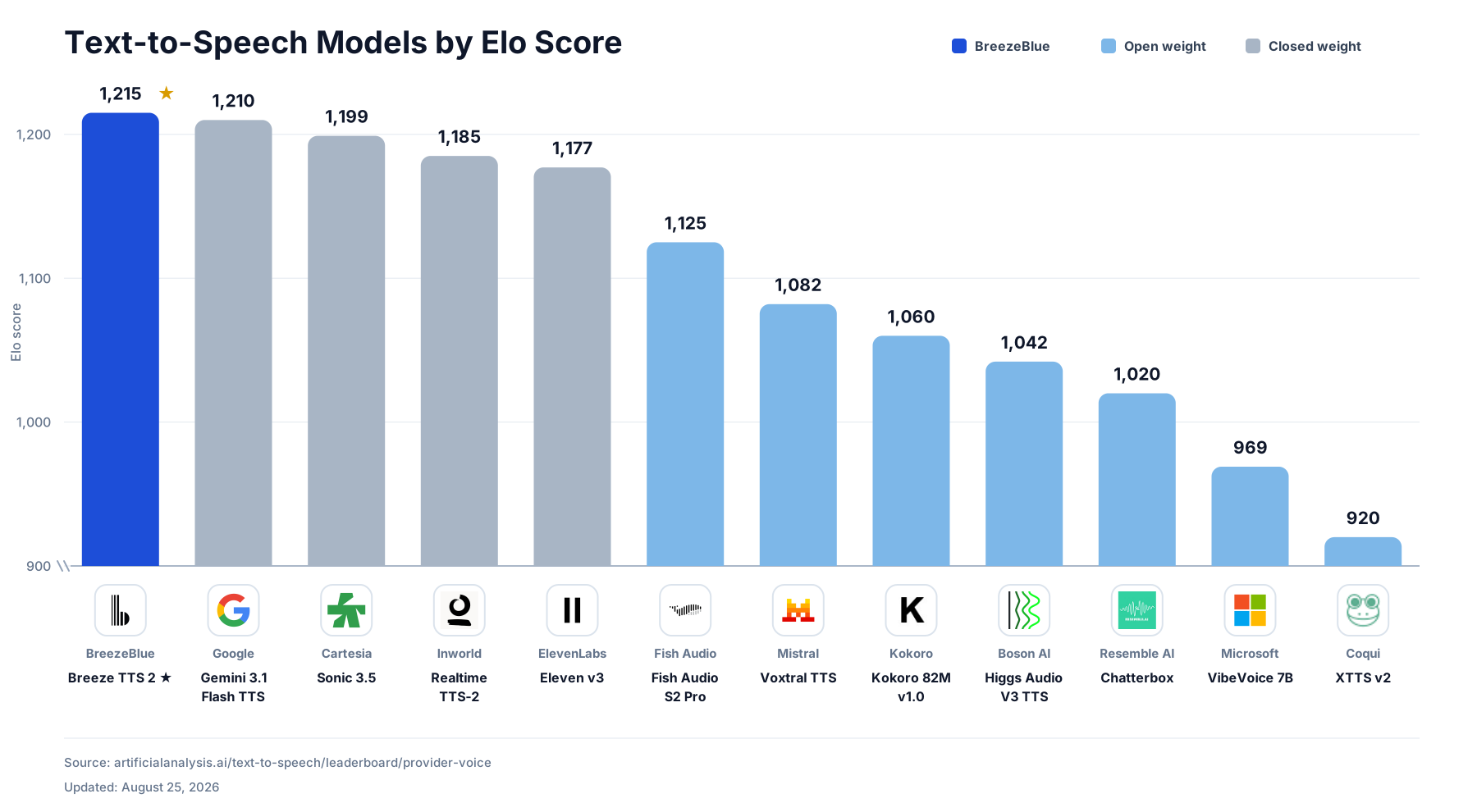
 Breeze TTS 2 is an open-weight text-to-speech model built for real-time interaction, and this repo is the official PyTorch inference code for it. It ranks #1 among open-weight models on the Artificial Analysis TTS leaderboard and outperforms some proprietary systems.
Breeze TTS 2 is an open-weight text-to-speech model built for real-time interaction, and this repo is the official PyTorch inference code for it. It ranks #1 among open-weight models on the Artificial Analysis TTS leaderboard and outperforms some proprietary systems.Is this a library I import, or a standalone CLI/server?It is both: a command-line tool for Voice Clone, Voice Design and Voice Direction, plus a streaming inference API server that uses the same PyTorch runtime.
It is both: a command-line tool for Voice Clone, Voice Design and Voice Direction, plus a streaming inference API server that uses the same PyTorch runtime.How do I get it running?Download the inference code, install its dependencies, then download the Breeze TTS 2 checkpoint (it bundles all required model components). A Docker image is also provided for the tested CUDA environment, with separate builds targeting H100/Hopper or A100.
Download the inference code, install its dependencies, then download the Breeze TTS 2 checkpoint (it bundles all required model components). A Docker image is also provided for the tested CUDA environment, with separate builds targeting H100/Hopper or A100.What hardware and software do I need?Linux with Python 3.10+ and a CUDA-capable NVIDIA GPU. Eager inference needs about 7.7 GiB of GPU memory (12 GB GPU minimum), and the fast path needs about 14.4 GiB (24 GB GPU recommended).
Linux with Python 3.10+ and a CUDA-capable NVIDIA GPU. Eager inference needs about 7.7 GiB of GPU memory (12 GB GPU minimum), and the fast path needs about 14.4 GiB (24 GB GPU recommended).Can I use the generated voices for a commercial product?No, not by default: the code is Apache 2.0, but the model weights and any self-hosted outputs fall under a separate Research and Non-Commercial License. Commercial use of outputs is only allowed through a paid subscription on BreezeBlue's hosted platform.
No, not by default: the code is Apache 2.0, but the model weights and any self-hosted outputs fall under a separate Research and Non-Commercial License. Commercial use of outputs is only allowed through a paid subscription on BreezeBlue's hosted platform.Does it run on Windows or macOS too?No, the README specifies Linux and Python 3.10+ as a requirement, with no Windows/macOS support mentioned.
No, the README specifies Linux and Python 3.10+ as a requirement, with no Windows/macOS support mentioned.Do I need a specific GPU to run this?Yes, an NVIDIA CUDA GPU is required; eager mode needs roughly 7.7 GiB of VRAM (12 GB card minimum), while the fast CUDA-graph path needs around 14.4 GiB (24 GB card recommended).
Yes, an NVIDIA CUDA GPU is required; eager mode needs roughly 7.7 GiB of VRAM (12 GB card minimum), while the fast CUDA-graph path needs around 14.4 GiB (24 GB card recommended).What is the difference between Voice Clone, Voice Design, and Voice Direction?Voice Clone reproduces a reference speaker's exact timbre and style from audio plus its transcript. Voice Design generates a brand-new voice purely from a natural-language description, no reference audio needed. Voice Direction clones a reference voice but lets you steer tone, emotion, pace, and delivery with an instruction.
Voice Clone reproduces a reference speaker's exact timbre and style from audio plus its transcript. Voice Design generates a brand-new voice purely from a natural-language description, no reference audio needed. Voice Direction clones a reference voice but lets you steer tone, emotion, pace, and delivery with an instruction.How fast is the speech generation?On a warmed-up NVIDIA H100 with the fast path, it achieves under 40 ms time to first audio and a real-time factor of 0.32, meaning it generates audio about 3.1x faster than real time.
On a warmed-up NVIDIA H100 with the fast path, it achieves under 40 ms time to first audio and a real-time factor of 0.32, meaning it generates audio about 3.1x faster than real time.Can I add things like laughter or sighs to the speech?Yes, the Vocal Events feature lets you insert expressive cues inline in the text, using parentheses in English (e.g. '(laugh)', '(cough)') or square brackets in Chinese (e.g. '[笑]', '[叹气]').
Yes, the Vocal Events feature lets you insert expressive cues inline in the text, using parentheses in English (e.g. '(laugh)', '(cough)') or square brackets in Chinese (e.g. '[笑]', '[叹气]').What languages does it support?Breeze TTS 2 is bilingual, generating natural English and Chinese speech from a single model.
Breeze TTS 2 is bilingual, generating natural English and Chinese speech from a single model.What are similar projects?fish-speech, dia, VoxCPM, MOSS-TTS, Speech, Spark-TTS, OmniVoice, MockingBird
fish-speech, dia, VoxCPM, MOSS-TTS, Speech, Spark-TTS, OmniVoice, MockingBirdWhich topics is it in?voice-ai, bilingual, voice-cloning, speech-synthesis, tts, multilingual, real-time, audio, streaming, inference, nvidia, cuda
voice-ai, bilingual, voice-cloning, speech-synthesis, tts, multilingual, real-time, audio, streaming, inference, nvidia, cuda