SCM — Screen Memories
Deep AI search for every photo and every frame of video in any folder on macOS.
Local-first — no accounts, no cloud, no uploads. Inference runs on your Mac.
What makes it different
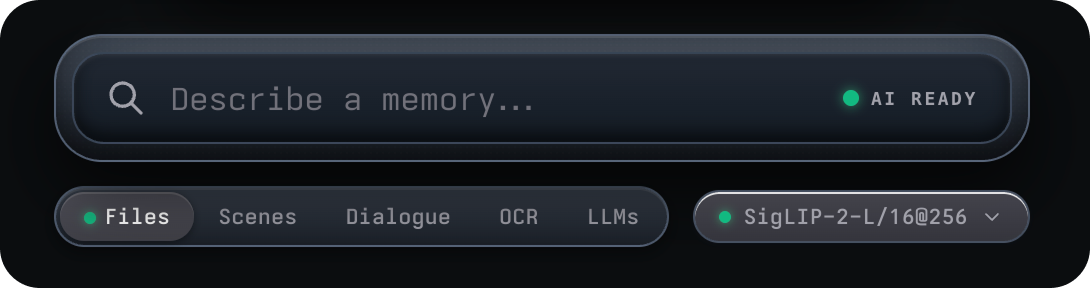
- Search like you think — describe a memory in plain language; a local
vision model does the rest.
- Video, down to the moment — scenes are segmented and embedded, so you
land on the shot, not just the file.
- Text and dialogue too — OCR over visible text; exact spoken-line search
via Whisper, each as its own mode.
- Your tabs, your prompts — save any query as a tab; Screenshots and
Email tabs are toggleable.
- Self-maintaining library — watched folders auto-import, content hashes
dedupe renames, and model switches re-embed in the background without
blocking search.
- Truly private — your media never leaves the machine. Weights download
once; everything after that is offline.
Five ways to search
| Mode |
Finds |
| Files |
Whole photos/videos by meaning — vision rank with filename and phrase boosts |
| Scenes |
Moments inside video — search a shot, jump to its timecode |
| OCR |
Text visible in images and frames, matched literally (Tesseract; eng + 35 language toggles) |
| Dialogue |
Exact spoken words in videos (Whisper), tiered exactness |
| LLMs (opt-in) |
Local chat over the dialogue, OCR, and filenames your Mac already extracted — cited answers |
Requirements
- macOS (packaged with electron-builder; menu-bar/tray features are
macOS-only)
- Bun — the project uses
bun as package manager and
runner
- Node modules installed:
bun install
- First use of a model downloads its weights (~435MB for the default CLIP);
after that, fully offline.
Download
The easiest install is via Homebrew (Apple Silicon, macOS 12+). The tap's
cask clears the macOS quarantine flag automatically on every install and
upgrade, so the app launches with no manual Gatekeeper steps:
brew tap allenv0/scm
brew trust allenv0/scm
brew install --cask allenv0/scm/scm
Upgrades keep the same behavior:
brew upgrade --cask allenv0/scm/scm
The tap lives at
allenv0/homebrew-scm.
Development
bun run dev     # build the renderer bundle, then launch the Electron app
bun start       # launch the Electron app without rebuilding
bun run build   # just rebuild the renderer bundle into dist/
Building the app package (DMG / ZIP)
bun run dist            # signed if an identity is in the keychain
bun run dist:unsigned   # skip code-sign discovery
This runs two steps in sequence:
vite build — compiles the React renderer into dist/ (picks up all
changes under src/).electron-builder --mac — packages the app. It bundles the fresh
dist/ bundle together with main.js, preload.js, main-lib/, and
indexer/ (the file list is configured under build.files in
package.json), then produces the installers.
Output: the installers land in dist-app/ (see build.directories.output
in package.json) — look for SCM-0.2.4.dmg and SCM-0.2.4.zip.
Features
Files
Typing starts an instant filename-keyword pre-pass, then the vision model
takes over: results are scored by cosine similarity against image
embeddings, with gated phrase and filename boosts, an honesty floor
calibrated per model, and a near-duplicate diversity filter. Every tile
carries a "why it matched" badge (Visual match / Filename match / …) and a
hover tooltip with the per-component score breakdown. CJK queries search as
overlapping bigrams ("台北車站" also matches 台北, 車站).
Scenes
Every scene segment across all videos is scored, so a hit lands on the exact
shot: tiles show the scene poster with a timecode badge, and opening the
video jumps straight to that moment. A noise gate returns "no scene match"
instead of flooding the grid with gibberish, and each video contributes at
most 3 scenes.
OCR
Matches the fraction of query tokens literally visible in each image's OCR
text — the filename is ignored and no vision model is involved, so it works
even while the AI engine is warming up or offline. Matched words are boxed
in amber on tiles and in the lightbox.
Dialogue
Exact literal retrieval over Whisper transcripts — no embeddings, no
thresholds, works with the AI engine down. Results come in three tiers:
Exact line (contiguous phrase in one utterance), Exact words (all
words in one utterance or an ≤8s window), and Words spoken (all words in
the same video). Matching words are highlighted in a speech snippet; opening
a result seeks straight to the line.
LLMs (Ask)
Opt-in — nothing downloads or runs until enabled in Settings → LLMs Chat. A
llama.cpp sidecar bound to loopback answers your question from evidence the
app already extracted — dialogue lines, OCR text, and filename keyword hits
— with numbered citations you can click, streamed token-by-token with a live
tok/s readout. Leading /screenshots, /videos, /email narrow the
corpus; Stop keeps the partial answer; empty evidence short-circuits before
the model ever runs.
| Chat model |
Size |
Notes |
| Qwen3 1.7B (default) |
~1.1GB |
Fast everyday chat; fits 8GB Macs |
| Llama 3.2 3B |
~2GB |
Stronger long answers; needs headroom |
Tabs & library views
- Built-in browse tabs: All, Videos, plus Screenshots and
Email — the latter two toggleable in Settings → Smart Tabs. Selecting
Videos auto-enables Scenes mode.
- Save any query as a tab: the pin pill under the search bar saves the
current prompt with its mode (Files/Scenes/OCR/Dialogue) — up to 20 tabs,
renameable, each restored exactly as saved.
- Five semantic views behind remappable shortcuts (⌘1–⌘5 by default), plus
⌘I import / AI Insights, ⌘, for Settings.
- Search stays in the selected tab: pick Screenshots, Email, Videos, or
any saved tab and results are filtered to it — scope first, then search.
In LLMs chat the same idea is explicit: leading
/screenshots, /videos,
/email narrow the corpus before the model ever runs.
Email tab
Surfaces photos whose visible OCR text contains an email address — an
overlapping view (a photo keeps its category too). Detection is
OCR-tolerant: it reassembles addresses Tesseract fractures across word
boxes, and handles comma-for-dot noise ("gmail,com"), split TLDs
("gmail. com"), bracketed obfuscation ("allen [at] gmail [dot] com"), and
dictated addresses ("allen at gmail dot com"). Tiles show a contact strip;
expand it to copy or compose.
Screenshots tab
Screenshot classification is rename-proof. Four signals, in priority order:
a manual override (right-click any tile) → filename vocabulary (30+
localized OS screenshot names in 20+ languages) → a PNG/JPEG metadata probe
(reads "screenshot" from PNG text chunks / EXIF UserComment, so a renamed
Bildschirmfoto still classifies) → source-folder hint. Everything else lands
in Projects.
Vision models
Four switchable models via ONNX Runtime; the active one is chosen per
library:
| Model |
Role |
Speed (CPU) |
Download |
| CLIP ViT-L/14@336 (default) |
Best real-world video scene-search |
~480–570ms/img |
~435MB |
| SigLIP-2-B/16 |
Fastest bulk import |
~50–100ms/img |
~412MB |
| SigLIP-2-L/16@256 |
High-detail (1024-dim) — small objects, signs, on-screen text |
~200ms/img |
~850MB |
| SigLIP-B/16@384 |
Maximum detail |
~480ms/img |
~214MB |
Switching models re-embeds the whole library: the flip lands instantly with
the tail filled in the background, and search falls back to filename
keywords until it completes. Per-model text-mean centering de-biases text
embeddings so similarity scores stay honest across models.
Video search pipeline
ffmpeg scans each video for shot boundaries and builds a segment plan
sampled to the density you pick in Settings → Video Search — each preset
shows its measured time and disk cost before you commit:
| Preset |
Seconds per point |
Segment budget |
| Eco |
60 |
4–32 |
| Balanced (default) |
30 |
8–128 |
| Detailed |
15 |
12–256 |
| Ultra |
5 |
16–1024 |
| Ultra Pro |
2.5 |
24–2048 (confirm required) |
Each segment embeds its midpoint frame and keeps a poster; shot plans are
cached per file (path + size + mtime + config fingerprint), so re-imports
skip detection entirely.
Dialogue transcription: Whisper tiny.en (150MB, default) or base.en
(300MB) — switching re-transcribes every video. Whole videos embed three
frames (20/50/80%) averaged; GIFs embed an average of middle frames.
OCR
Tesseract runs in its own worker, separate from the vision model. English is
always on; 35 more languages are toggleable in Settings → Photo Search
(default: Simplified + Traditional Chinese, Japanese, Korean). Each language
pack downloads once (~2.4–5MB; ~17MB for the default set), then everything
is offline. Word boxes are stored with the text so matches highlight in
place; CJK text is joined without spaces and email fragments fractured
across word boxes are reassembled.
Import & library management
- Import via ⌘I, drag-and-drop, or watched folders — importing a folder
starts watching it (live
fs.watch plus a re-sync at every launch).
Problem files retry up to 3 times, then sit out watch-syncs until they
change.
- Rename-proof dedupe: every file is content-hashed (SHA-256) before
copy, and lying extensions are normalized by MIME sniffing.
- Named embedding versions (Settings → Library): point-in-time snapshots
of the entire searchable state — the index, every model's embedding bins,
scene and transcript sidecars — with restore (auto-backup first) and a
Fresh Start danger zone. Cap: 10.
- Everything lives under
~/Library/Application Support/scm
(MEMORIES_DATA_DIR overrides it): the index JSON, Float32 embedding bins
per model, scene and transcript sidecars, thumbnails, and posters.
Privacy by construction
- The renderer is a sandboxed
app:// bundle — contextIsolation, OS
sandbox, and a CSP pinned to 'self' (+ Google Fonts CDN for display
type, with a monospace fallback when offline).
- Only main-process workers ever download, once per thing: vision weights
(Hugging Face), OCR language packs (Tesseract CDN), Whisper weights, and —
only if you opt in — the llama.cpp sidecar and GGUF chat models (GitHub +
Hugging Face), sha256-verified at download time.
- Media is copied into the app-managed library and streamed from disk. No
telemetry, no accounts, no uploads.
Settings & polish
A macOS-style settings sheet with ten panels (Library, Appearance, Grid,
Smart Tabs, Photo Search, Video Search, LLMs Chat, Global Shortcut,
Keyboard, Menu Bar). Around the core: light/dark/system theme, a CRT screen
effect for the lightbox, 6 alternate app icons, menu-bar-only mode, a
recordable global shortcut, a first-run onboarding tour, background-work
trays (scenes / transcripts / OCR) with a global pause, and a status bar
with version and indexed-video counts.
Notes
- First build is slow: electron-builder downloads the Electron binary and
ffmpeg once on its first run; subsequent builds are much faster.
- Code signing: without an Apple Developer identity configured in the
keychain, the DMG builds unsigned. The app still runs locally, but macOS may
require right-click → Open the first time it's launched.
- Rebuilds pick up changes automatically: since
main.js, preload.js,
main-lib/, and indexer/ are packaged from source (not cached), a
bun run dist after editing any of them produces a fresh package.
Testing
bun run test:all         # the full verification battery (unit + smoke suites)
bun run smoke:indexer    # headless smoke test of the CLIP indexer
bun test test/           # unit tests (pure modules, no Electron needed)
bun run lint             # eslint
bun run format:check     # prettier
- Unit tests cover the pure cores: ranking, dialogue exact-match, CJK
tokens, the Whisper model ladder, MIME sniffing, transcript fusion, and
more (see the
test:* scripts in package.json).
- E2E smoke tests run inside the Electron app via
ELECTRON_SMOKE_*
environment variables — a dozen-plus scenarios from boot/protocol checks
to search matrices, model migration, and Ask mode (drivers in
scripts/e2e/, dispatched in main.js; e.g. bun run smoke:ask,
smoke:deep, smoke:grid).
- Benchmarks:
bun run bench:inference, bench:enrich, and
bench:detect write JSON reports into MDs/bench-*.
Project layout
main.js             Electron main process: library, IPC, indexer worker pool, app:// protocol
preload.js          contextBridge — exposes window.memories to the renderer
main-lib/           main-process modules split out of main.js (settings, library store,
                    rank search, Ask retrieval, LLM sidecar config, embedding versions, …)
indexer/            vision/OCR/ASR workers (utility processes) + video utils + model registry
src/                React renderer (grid, search modes, lightbox, tabs, settings, onboarding)
scripts/            bench scripts, E2E drivers, the smoke battery (smoke-all.sh)
test/               unit + integration tests
MDs/                design docs, bench reports, plans
dist/               vite build output (renderer bundle)
dist-app/           electron-builder output (DMG / ZIP)

 SCM (Screen Memories) — настольное приложение macOS, которое запускает глубокий ИИ-поиск локально по всем фотографиям и каждому кадру видео в выбранной папке: искать можно по смыслу, тексту на экране или произнесённым диалогам — и всё без облака.