Recursive Language Models (RLMs)
Full Paper •
Blogpost •
Documentation •
RLM Minimal


Overview
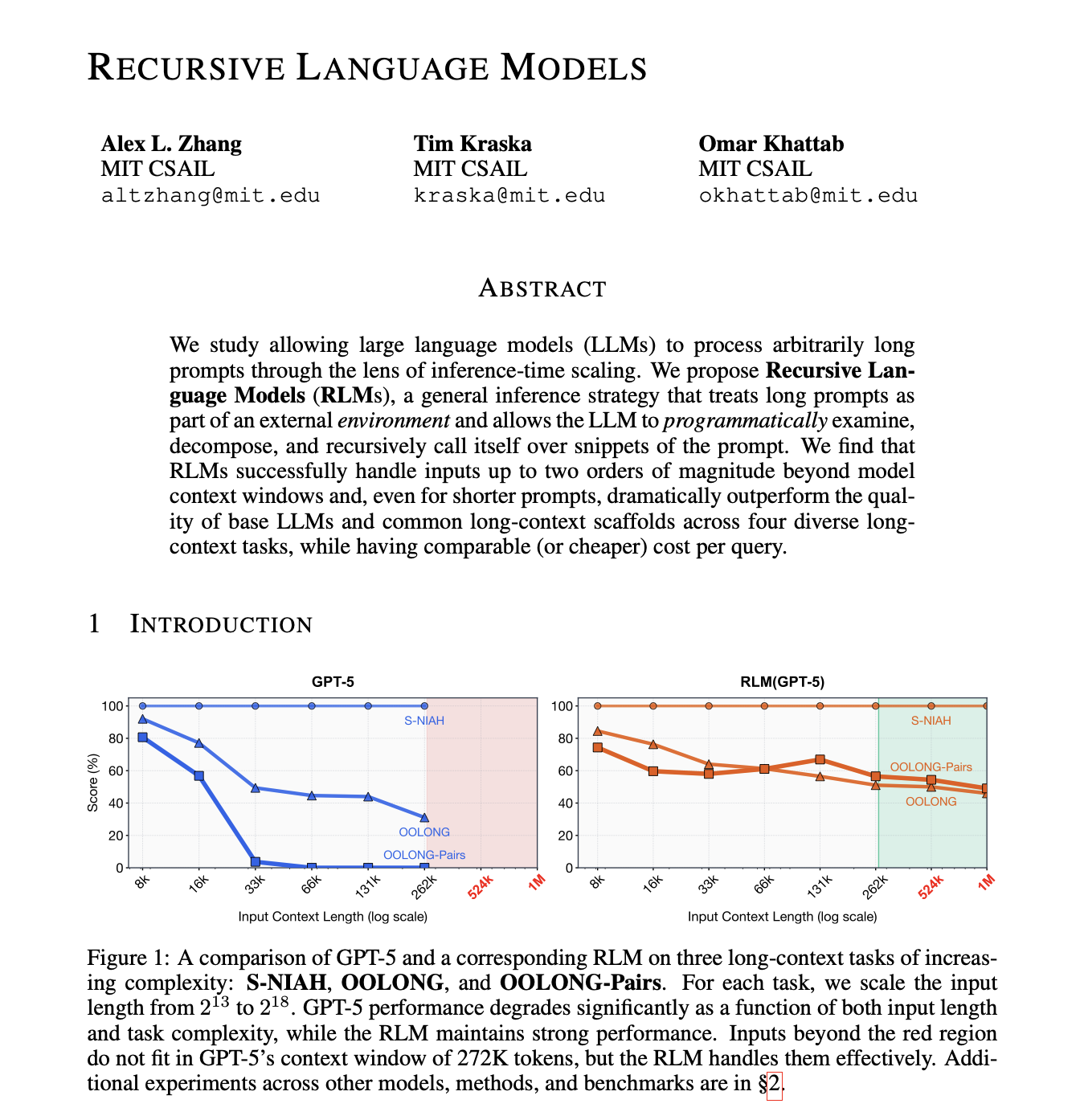
Recursive Language Models (RLMs) are a task-agnostic inference paradigm for language models (LMs) to handle near-infinite length contexts by enabling the LM to programmatically examine, decompose, and recursively call itself over its input. RLMs replace the canonical llm.completion(prompt, model) call with a rlm.completion(prompt, model) call, acting as a "language model". RLMs offload the context as a variable in a REPL environment that the LM can interact with and launch sub-LM calls inside of.
RLMs are a bet on future "language model" design choices. We argue for a CodeAct-style harness (i.e. all language models should have access to a code environment) with sub-(R)LM calls as functions in code, and context / prompts as objects in code. RLMs explicitly defer code execution with sub-calls as functions to the language model itself, which is incredibly flexible and lends itself well to scale if trained correctly. We want to move away from the JSON tool-calling standard for both sub-agents and generic tool calls. The naming comes from the fact that such a system is itself a "language model" (a probabilistic mapping from text to text) that builds around and relies on recursive sub-LLM calls.
This repository provides both an extensible inference engine and training environment for using RLMs around standard API-based and local LLMs. The initial experiments and idea were proposed in a blogpost in 2025, with expanded results in an arXiv preprint.
We now also include a verifiers training environment based on Prime Intellect's prime-rl in the training/ folder. Train your own RLMs, which directly can be plugged into our inference engine!
[!NOTE]
This repository contains inference code for RLMs with support for various sandbox environments. Open-source contributions are welcome. This repository is maintained by the authors of the paper from the MIT OASYS lab.
Quick Setup
[!NOTE]
rlms requires Python 3.11 or later.
You can try out RLMs quickly by installing from PyPi:
pip install rlms
The default RLM client uses a REPL environment that runs on the host process through Python exec calls. It uses the same virtual environment as the host process (i.e. it will have access to the same dependencies), but with some limitations in its available global modules. As an example, we can call RLM completions using GPT-5-nano:
from rlm import RLM

rlm = RLM(
    backend="openai",
    backend_kwargs={"model_name": "gpt-5-nano"},
    verbose=True,  # For printing to console with rich, disabled by default.
)

print(rlm.completion("Print me the first 100 powers of two, each on a newline.").response)
Manual Setup
Set up the dependencies with uv (or your virtual environment of choice):
curl -LsSf https://astral.sh/uv/install.sh | sh
uv init && uv venv --python 3.12  # change version as needed
uv pip install -e .
This project includes a Makefile to simplify common tasks.
make install: Install base dependencies.make check: Run linter, formatter, and tests.
To run a quick test, the following will run an RLM query with the OpenAI client using your environment variable OPENAI_API_KEY (feel free to change this). This will generate console output as well as a log which you can use with the visualizer to explore the trajectories.
make quickstart
REPL Environments
We support two types of REPL environments -- isolated, and non-isolated. Non-isolated environments (default) run code execution on the same machine as the RLM (e.g. through exec), which is pretty reasonable for some local low-risk tasks, like simple benchmarking, but can be problematic if the prompts or tool calls can interact with malicious users. Fully isolated environments use cloud-based sandboxes (e.g. Prime Sandboxes, Modal Sandboxes) to run code generated by the RLM, ensuring complete isolation from the host process. Environments can be added, but we natively support the following: local (default), ipython, docker, modal, prime, daytona, e2b.
rlm = RLM(
    environment="...", # "local", "ipython", "docker", "modal", "prime", "daytona", "e2b"
    environment_kwargs={...},
)
Local Environments
The default local environment LocalREPL runs in the same process as the RLM itself, with specified global and local namespaces for minimal security. Using this REPL is generally safe, but should not be used for production settings. It also shares the same virtual environment (e.g. Conda or uv) as the host process.
IPython (requires pip install 'rlms[ipython]')
IPythonREPL runs cells inside a real IPython session — either in-process (default) or in a separate ipykernel subprocess. Subprocess mode adds hard cell_timeout enforcement and full namespace isolation from the RLM host. See the IPythonREPL docs for details.
We also support a Docker-based environment called DockerREPL that launches the REPL environment as a Docker image. By default, we use the python:3.11-slim image, but the user can specify custom images as well. The container runs fully isolated from the host; a lightweight host-side proxy bridges LM access back into the container.
DockerREPL supports the full feature set of the local environment: single LM calls (llm_query / llm_query_batched), recursive sub-RLM calls (rlm_query / rlm_query_batched, including parallel batched sub-calls bounded by max_concurrent_subcalls), custom_tools / custom_sub_tools, persistent=True multi-turn sessions (versioned context_N / history_N reused across completion() calls), and compaction=True auto-summarization of the running history. For isolated environments, custom tools should be passed as Python code strings or JSON-serializable values (host callables cannot cross the process boundary).
Isolated Environments
We support several different REPL environments that run on separate, cloud-based machines. Whenever a recursive sub-call is made in these instances, it is requested from the host process.
Modal Sandboxes 
To use Modal Sandboxes as the REPL environment, you need to install and authenticate your Modal account.
uv add modal  # add modal library
modal setup   # authenticate account
Prime Intellect Sandboxes 
[!NOTE]
Prime Intellect Sandboxes are currently a beta feature. See the documentation for more information. We noticed slow runtimes when using these sandboxes, which is currently an open issue.
To use Prime Sandboxes, install the SDK and set your API key:
uv pip install -e ".[prime]"
export PRIME_API_KEY=...
Model Providers
We currently support most major clients (OpenAI, Anthropic), as well as the router platforms (OpenRouter, Portkey). For local models, we recommend using vLLM (which interfaces with the OpenAI client). To view or add support for more clients, start by looking at rlm/clients/.
Training
We provide a simple RL training harness for training RLMs used in this repo (specifically the local REPL). The implementation uses no sandboxes for simplicity and slots easily your use case, but an ideal setup would use sandboxes for safety. Training logic is isolated to the training/ folder, which exposes rlm.RLM as a verifiers Environment and plugs straight into prime-rl. See the training README for the launch command. The harness uses subprocess-isolated local REPL execution (no cloud sandboxes), matching the local environment above.
A worked example with an example .toml lives in training/environments/oolong/ (OOLONG long-context QA). New training environments can be added the same way — author a verifiers env that wraps your task (see the verifiers docs), then reference it from a config.
Relevant Reading
If you use this code or repository in your research, please cite:
@misc{zhang2026recursivelanguagemodels,
      title={Recursive Language Models},
      author={Alex L. Zhang and Tim Kraska and Omar Khattab},
      year={2026},
      eprint={2512.24601},
      archivePrefix={arXiv},
      primaryClass={cs.AI},
      url={https://arxiv.org/abs/2512.24601},
}
RLMs being used in the wild
There are many amazing demos and production-ready use cases of RLMs. We provide a list of notable examples that explicitly use RLMs as a central piece of their design.
RLMChatCompletion has an optional metadata field (default None) that holds the full trajectory (run config + all iterations and sub-calls) so you can reconstruct the run. Pass an RLMLogger to capture it:
- In-memory only (trajectory on
completion.metadata): logger=RLMLogger() (no log_dir).
- Also save to disk (JSONL for the visualizer):
logger=RLMLogger(log_dir="./logs").
Visualizing logs. We also provide a simple visualizer to inspect code, sub-LM, and root-LM calls. Use RLMLogger(log_dir="./logs") so each completion writes a .jsonl file:
from rlm.logger import RLMLogger
from rlm import RLM

logger = RLMLogger(log_dir="./logs")
rlm = RLM(..., logger=logger)
To run the visualizer locally, we use Node.js and shadcn/ui:
cd visualizer/
npm run dev        # default localhost:3001
 (requires



 RLM 是一个推理库,实现了递归语言模型(Recursive Language Models)。在这种范式下,LLM 会把上下文卸载到 REPL 环境中,并递归地调用自身(或子 LLM),来检查、拆分和推理近乎无限长的输入。