AIPOCH Open-Science
Open-source, local-first, model-agnostic AI research workbench for reproducible science.



AIPOCH Open-Science is an open-source, local-first, model-agnostic AI research workbench developed by AIPOCH for scientists and researchers. It enables reproducible, inspectable research with scientific AI agents, Python and R execution, scientific data connectors, and cross-platform support for macOS, Windows, and Linux. Create a project, describe your research goal in plain language, and let the agents read files, search the web, run code, query scientific data sources, and produce reports, tables, and figures with traceable provenance—all in one workspace.
AIPOCH Open-Science supports computational and data-intensive research across disciplines, including machine learning, statistics, life sciences, chemistry, materials science, physics and environmental science. It supports the research process from literature review and hypothesis development to code execution, data analysis, simulation, visualization, and the production of traceable research outputs.
💡 AIPOCH Open-Science v0.27.0 released (last updated September 2026). AIPOCH Open-Science v0.27.0 scales the literature workspace and lets long work run in the background: import many PDFs in one pass with per-file progress and retry, run Notebook and shell jobs in the background that deliver results automatically, and rely on a broad literature stability pass covering cross-client sync, data relocation, and import integrity. Core application skills stay always enabled, the headless CLI and Task SDK gain connector management, mermaid diagrams render more smoothly, and headless Linux deployments gain an explicit credential file store. See the latest release notes for full details.

Table of Contents
🚀 Quick Start
Get AIPOCH Open-Science running in three steps: download the installer for your platform, complete the guided first-run setup, and create a research project.
1. Download the app
Open the latest release, expand Assets, and choose the installer for your computer:
| Your computer |
Choose |
| macOS — Apple Silicon (M1 or newer) |
The macOS DMG for Apple Silicon / ARM64 |
| macOS — Intel |
The macOS DMG for Intel / x64 |
| Windows x64 |
The Windows x64 installer |
| Linux x64 |
The Linux x64 AppImage or Debian package |
Review the assets and verification information published on the release page. See Verifying your download before installation if you need to validate a package.
If macOS or Windows shows an unidentified-developer or unknown-publisher warning, verify that the package came from the official Releases page before continuing.
On macOS, you can also install with Homebrew:
brew install --cask open-science
Homebrew selects the Apple Silicon or Intel package automatically.
2. Complete first-time setup
The first launch has five guided steps:
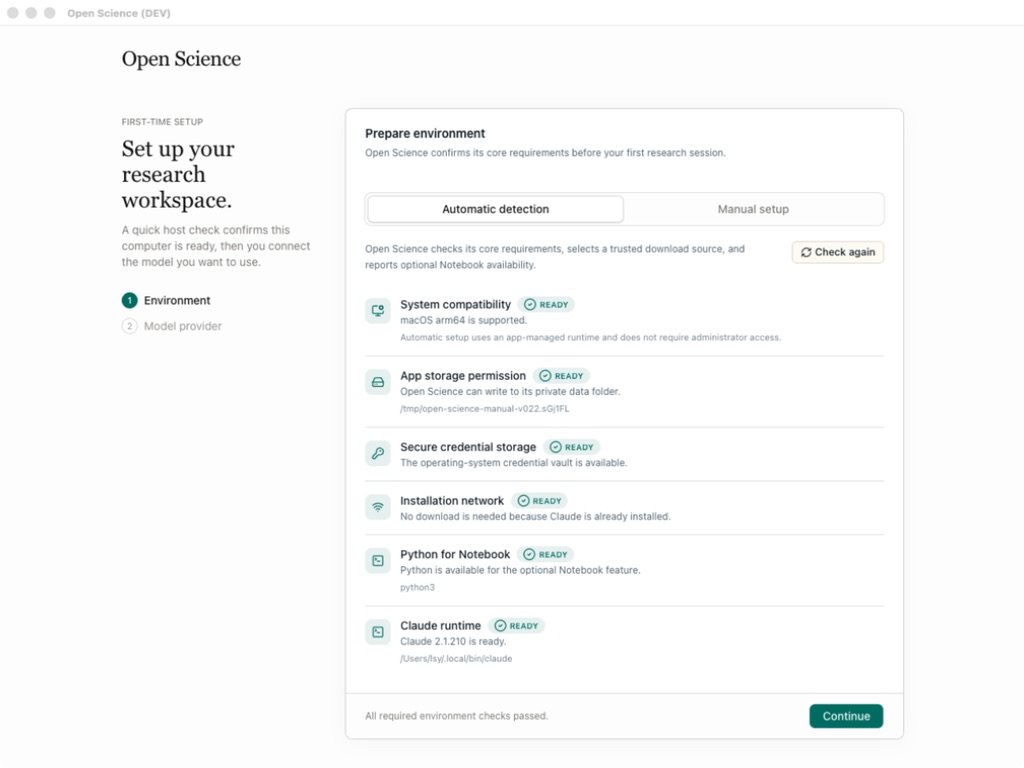
- Environment checks compatibility, app storage, secure credential storage, and network access.
- Data location chooses where large artifacts, notebooks, uploads, and environments are stored.
- Agent runtime selects and prepares Claude Code, OpenCode, Codex, or CodeBuddy. App-managed runtimes can be installed without requiring Node.js, npm, or an administrator password.
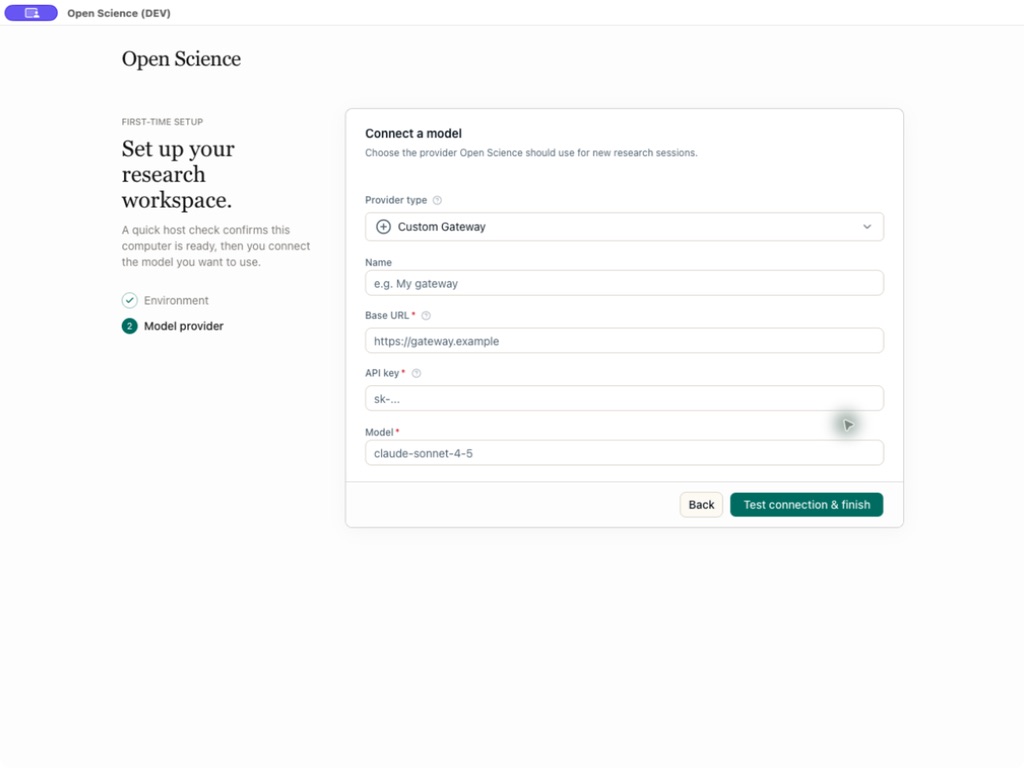
- Model provider connects and tests the model you want to use. Choose a built-in provider, a custom gateway, or an existing Claude or Codex subscription login.
- Notebook runtime optionally prepares app-managed Python and R environments or enables detected and manually registered interpreters for either language.
 |
 |
| Host compatibility, storage, and network checks |
Provider, API Key, endpoint, and model validation |
Notebook execution is optional. Every required environment and agent-runtime check must pass before Continue becomes available, and the model connection must pass before setup finishes. Notebook and data-location settings can keep their defaults and be changed later in Settings. While a kernel is running, a Variables view can inspect the live Python or R namespace — names, types, shapes, and previews — read-only, refreshed after each execution.
3. Start a research project
- Click New project and give the project a stable research name and optional description.
- Open a session and describe the goal, input data, constraints, desired outputs, and how the result should be checked.
- Attach source files, select a verified model, and choose an approval mode.
- Send the task. Inspect the agent's tool activity, approve sensitive actions, and open generated artifacts in the preview panel.
- To explore a different direction, edit an earlier user message and resend it on a new branch; use the message revision controls to return to either path.
- Open an artifact's Provenance view to inspect its versions and the available evidence behind the selected result.
- Continue the work in later sessions. Use
@ to reference an existing project file and / to explicitly select an enabled skill.
Screenshots in this README illustrate the workflow. Labels, catalogs, and other interface details may differ from the version you install.
Product Tour
From a research request to a traceable result
Consider a representative bioinformatics task: reproduce a published differential-expression analysis, compare the regenerated results with the paper, and deliver the report, tables, and figures needed for review. The screenshots below are representative views from documented AIPOCH Open-Science workflows; they illustrate each stage rather than one continuous session.
1. Define the research task and evidence
Describe the research question, source paper and datasets, required methods or thresholds, expected outputs, and acceptance criteria. Upload supporting files or reference an existing project artifact with @, so the agent starts from explicit inputs instead of hidden context.

The agent can combine scientific skills, permissioned research connectors, searches, file operations, and Python or R code in the shared Notebook. Generated figures can be reviewed beside the research summary, while the artifact record exposes captured producer code and execution evidence for inspection.

The final response summarizes what reproduced, what differed, and which limitations matter. Generated Markdown reports, CSV tables, images, and other research artifacts remain attached to the session and are collected in the project file library, where they can be previewed beside the conversation and reused in follow-up work.

4. Trace every artifact back to its evidence
Each generated artifact is stored as an immutable, checksummed version. Its Provenance view can expose the producing code and execution history, referenced inputs, observed environment inventory, producing conversation branch, and version-scoped Reviewer findings. Evidence that could not be verified is marked unavailable rather than inferred.

🏆 #1 on BiomniBench-DA Public 50
AIPOCH Open-Science achieved the highest ranking score in the compiled BiomniBench-DA Public 50 comparison, earning 79.05 with gpt-5.6-sol (xhigh). The result combines a Gemini 3.1 Pro judge score of 81.04 and a DeepSeek v4-pro judge score of 77.06 through an equal-weight mean, placing AIPOCH Open-Science #1 among the collected Public 50 results. Explore the BiomniBench-DA dataset.

Why AIPOCH Open-Science
AIPOCH Open-Science turns fragmented chats, notebooks, scripts, scientific databases, files, and reporting tools into one persistent, local-first AI research workbench where execution and evidence stay together.
- Persistent execution. Projects, sessions, files, previews, and run history survive restarts, while approved agents can run commands, Python, and R and generate artifacts.
- Traceable results. Immutable artifact versions preserve verifiable production evidence and clearly mark what is unavailable.
- Model-agnostic choice. Connect built-in cloud providers, compatible custom gateways, or Claude and Codex subscriptions, then choose the model and reasoning effort for each session.
- Local-first control. Application and project state stay on your computer; external calls use only services you configure or approve.
- Open and extensible. The independent Apache-2.0 codebase, skills, connectors, tool activity, and generated files are inspectable, and you can add skills and MCP connectors.
Core Capabilities
AIPOCH Open-Science combines project management, multi-model agent execution, Python and R notebooks, scientific data connectors, immutable artifact versions with provenance, and permissioned human-in-the-loop control in one local workspace. The installed app and latest release notes are the source of truth for changing catalogs, packaging details, and newly added options.
| Area |
Core capability |
| Projects and sessions |
Create and organize projects with pinned sessions, persistent message branches and side conversations, and editable session details. Edit completed prompts into persistent, selectable message branches without deleting the original downstream path, and recover recent work, drafts, conversation history, and preview state. |
| Agent workflow |
Natural-language sessions with streamed responses, purpose-grouped tool activity, approval and stop controls, queued follow-ups, context compaction, and restart recovery. Branch completed work into new sessions; use structured clarifications, text, image, and PDF annotations, linked-PDF reading context, project memory, session references, and review-gated plans. Notifications, live status, timing and token details, the command palette, source previews, and project switching keep long-running research visible and manageable. |
| Models and agent backends |
Use built-in cloud providers including Apodex, NVIDIA Build with a curated agent-capable catalog, and the latest OpenAI and Anthropic model catalogs (GPT-6 Astra and Claude Fable 5.1), custom compatible gateways, or Claude and Codex subscription logins. Select Claude Code, OpenCode, Codex, or the login-free CodeBuddy runtime as the agent backend, with validated model and API compatibility, multimodal image input, reasoning controls, and dedicated subagent, reviewer, and Vision policies. |
| Specialists and delegation |
Create personal specialist agents with scoped capabilities, conversational customization, package import/export, and immediate handoff from the main agent. The signed-package marketplace supports official and user-approved GitHub sources, conflict-aware imports, and 64 built-in capability icons; production delegation adds durable messaging, recovery, and a per-session delegation switch. |
| Python, R, notebooks, and HPC |
Run persistent Python, R, and REPL kernels alongside recorded shell commands, using managed offline environments or your own interpreters. Work locally or connect to remote hosts over SSH and submit Notebook runs through Slurm on HPC clusters; protected network access, encrypted credentials, package and variable inspection, a shared terminal, and progressive history keep compute controlled and observable. Long Notebook, REPL, and shell work can run in the background — releasing the agent turn while keeping exact run identity, cancellation, and provenance, and delivering results automatically across local runs and remote compute jobs. Package management for external R runtimes remains manual. |

 AIPOCH Open-Science 是一个开源、本地优先、与模型无关的 AI 研究工作台,它运行科学 AI 智能体,帮助完成文献综述、数据分析、代码执行,以及生成可追溯的研究报告、表格和图表。