⚡️- Image
An Efficient Image Generation Foundation Model with Single-Stream Diffusion Transformer
✨ Z-Image
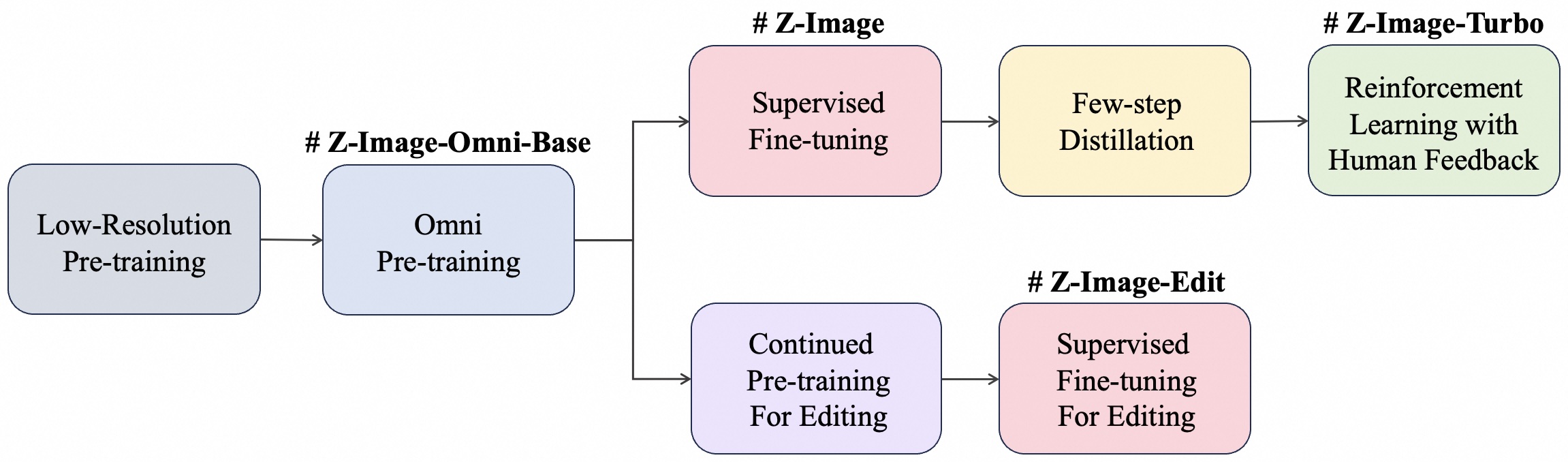
Z-Image is a powerful and highly efficient image generation model family with 6B parameters. Currently there are four variants:
🚀 Z-Image-Turbo – A distilled version of Z-Image that matches or exceeds leading competitors with only 8 NFEs (Number of Function Evaluations). It offers ⚡️sub-second inference latency⚡️ on enterprise-grade H800 GPUs and fits comfortably within 16G VRAM consumer devices. It excels in photorealistic image generation, bilingual text rendering (English & Chinese), and robust instruction adherence.
🎨 Z-Image – The foundation model behind Z-Image-Turbo. Z-Image focuses on high-quality generation, rich aesthetics, strong diversity, and controllability, well-suited for creative generation, fine-tuning, and downstream development. It supports a wide range of artistic styles, effective negative prompting, and high diversity across identities, poses, compositions, and layouts.
🧱 Z-Image-Omni-Base – The versatile foundation model capable of both generation and editing tasks. By releasing this checkpoint, we aim to unlock the full potential for community-driven fine-tuning and custom development, providing the most "raw" and diverse starting point for the open-source community.
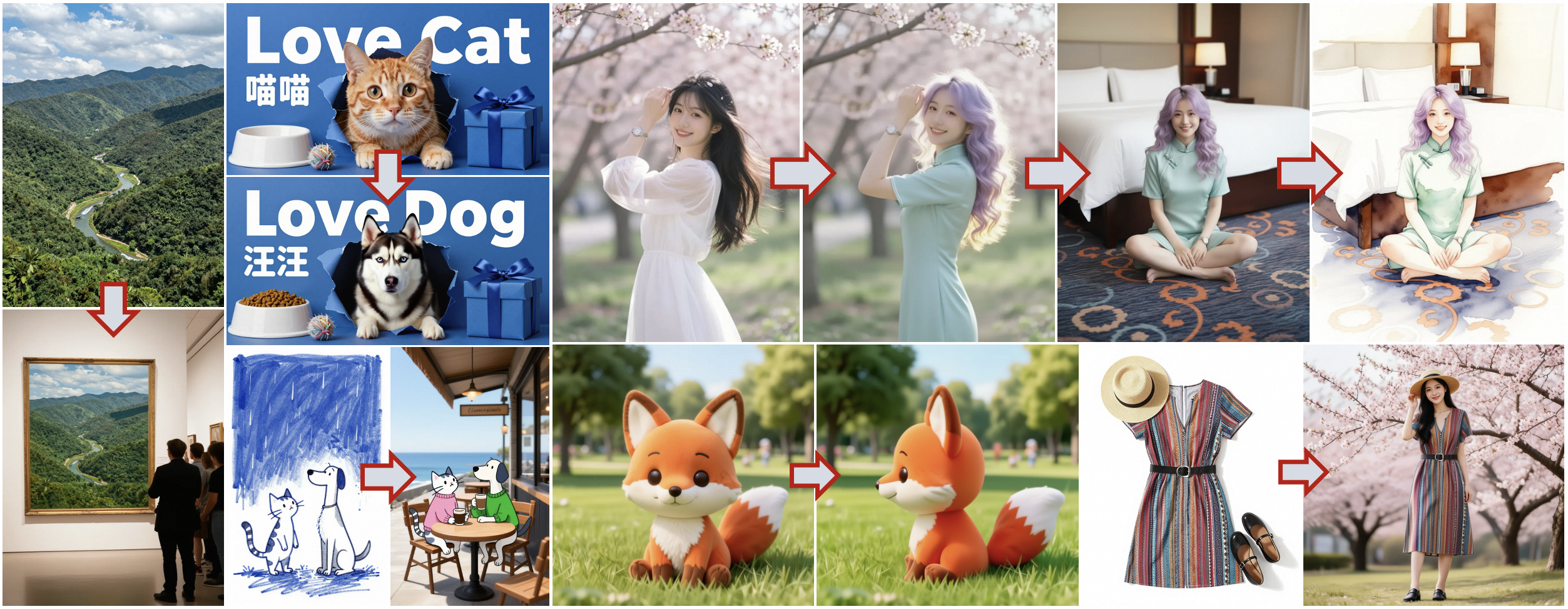
✍️ Z-Image-Edit – A variant fine-tuned on Z-Image specifically for image editing tasks. It supports creative image-to-image generation with impressive instruction-following capabilities, allowing for precise edits based on natural language prompts.
📣 News
- [2026-01-27] 🔥 Z-Image is released! We have released the model checkpoint on Hugging Face and ModelScope. Try our online demo!
- [2025-12-08] 🏆 Z-Image-Turbo ranked 8th overall on the Artificial Analysis Text-to-Image Leaderboard, making it the 🥇 #1 open-source model! Check out the full leaderboard.
- [2025-12-01] 🎉 Our technical report for Z-Image is now available on arXiv.
- [2025-11-26] 🔥 Z-Image-Turbo is released! We have released the model checkpoint on Hugging Face and ModelScope. Try our online demo!
📥 Model Zoo
| Model |
Pre-Training |
SFT |
RL |
Step |
CFG |
Task |
Visual Quality |
Diversity |
Fine-Tunability |
Hugging Face |
ModelScope |
| Z-Image-Omni-Base |
✅ |
❌ |
❌ |
50 |
✅ |
Gen. / Editing |
Medium |
High |
Easy |
To be released |
To be released |
| Z-Image |
✅ |
✅ |
❌ |
50 |
✅ |
Gen. |
High |
Medium |
Easy |

 |

 |
| Z-Image-Turbo |
✅ |
✅ |
✅ |
8 |
❌ |
Gen. |
Very High |
Low |
N/A |

 |

 |
| Z-Image-Edit |
✅ |
✅ |
❌ |
50 |
✅ |
Editing |
High |
Medium |
Easy |
To be released |
To be released |
The figure below illustrates at which training stage each model is produced.
🖼️ Showcase
📸 Photorealistic Quality: Z-Image-Turbo delivers strong photorealistic image generation while maintaining excellent aesthetic quality.

📖 Accurate Bilingual Text Rendering: Z-Image-Turbo excels at accurately rendering complex Chinese and English text.

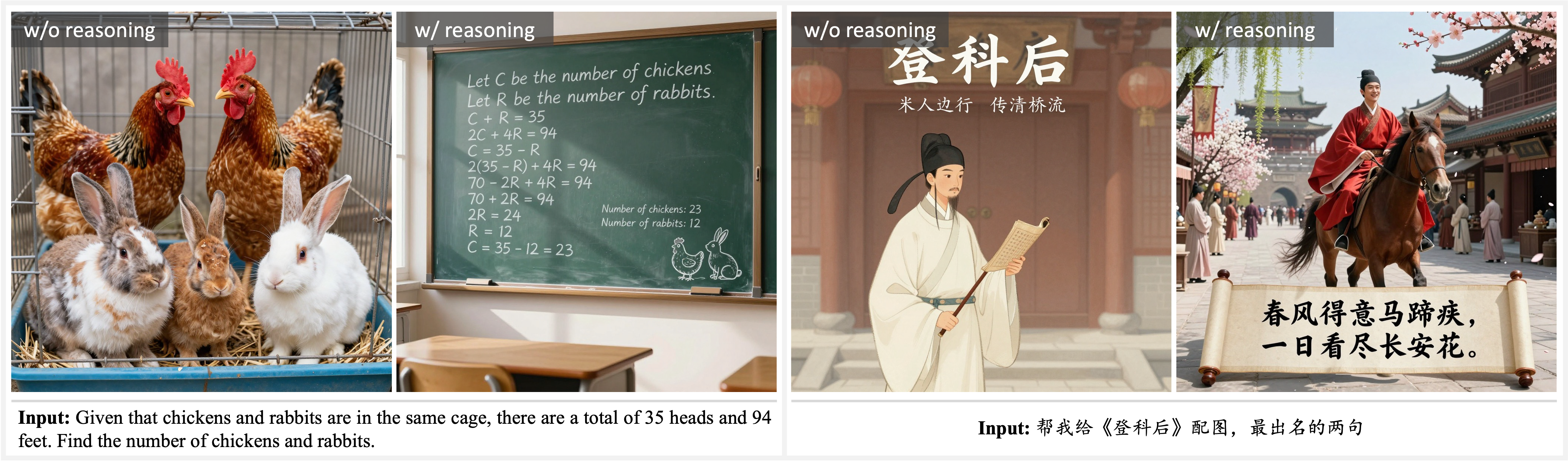
💡 Prompt Enhancing & Reasoning: Prompt Enhancer empowers the model with reasoning capabilities, enabling it to transcend surface-level descriptions and tap into underlying world knowledge.
🧠 Creative Image Editing: Z-Image-Edit shows a strong understanding of bilingual editing instructions, enabling imaginative and flexible image transformations.
🏗️ Model Architecture
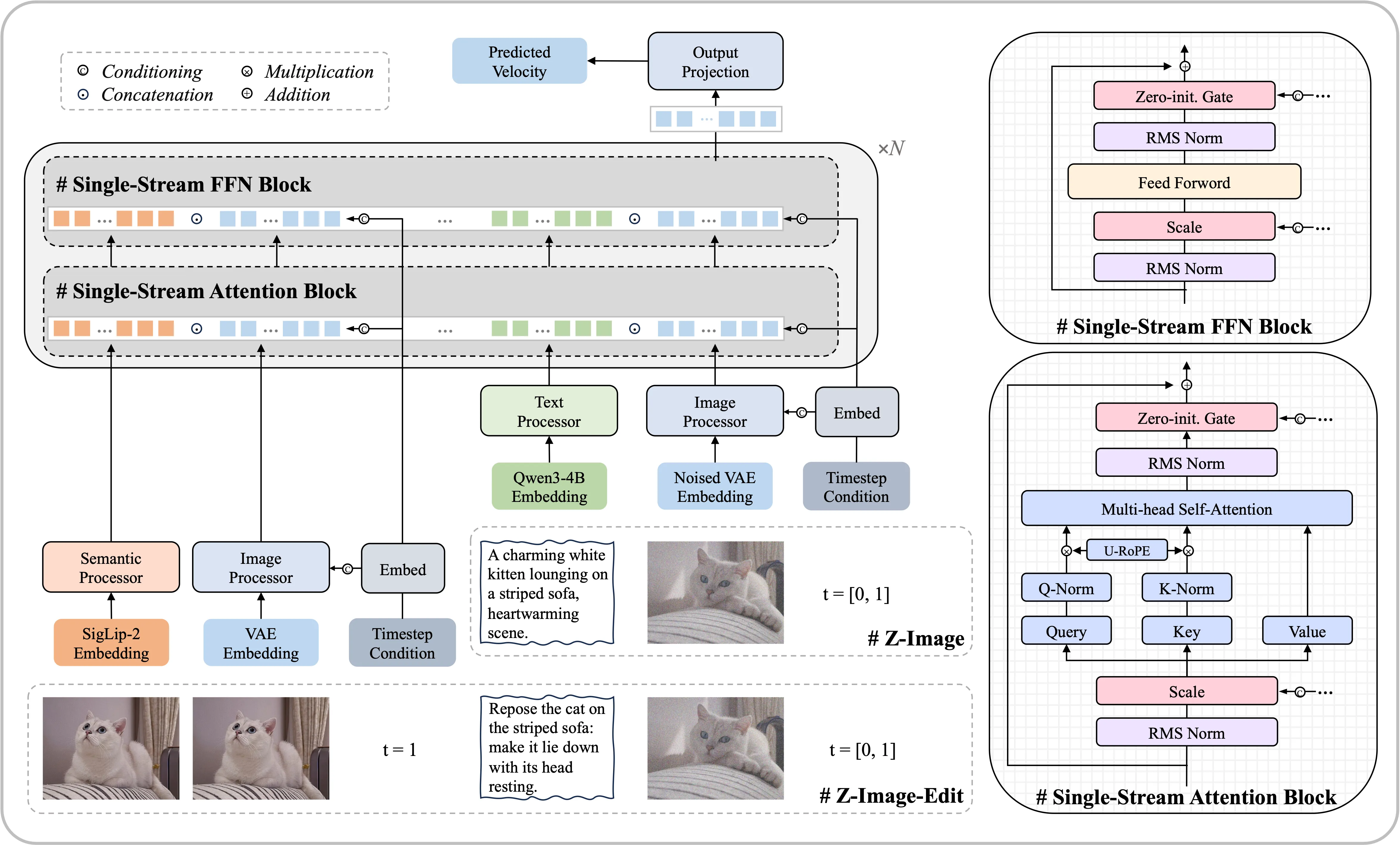
We adopt a Scalable Single-Stream DiT (S3-DiT) architecture. In this setup, text, visual semantic tokens, and image VAE tokens are concatenated at the sequence level to serve as a unified input stream, maximizing parameter efficiency compared to dual-stream approaches.
Z-Image-Turbo's performance has been validated on multiple independent benchmarks, where it consistently demonstrates state-of-the-art results, especially as the leading open-source model.
Artificial Analysis Text-to-Image Leaderboard
On the highly competitive Artificial Analysis Leaderboard, Z-Image-Turbo ranked 8th overall and secured the top position as the 🥇 #1 Open-Source Model, outperforming all other open-source alternatives.
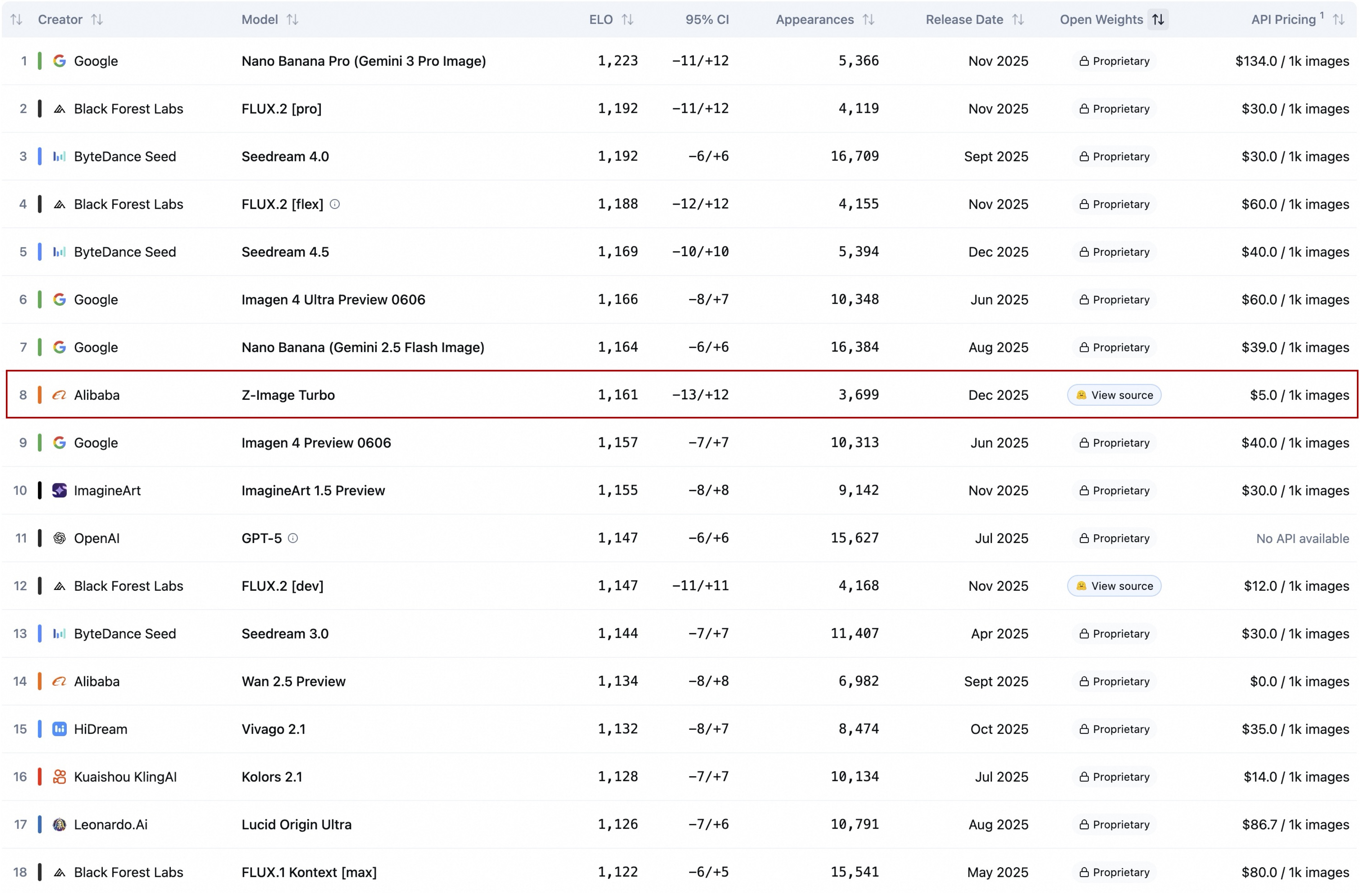
Artificial Analysis Leaderboard
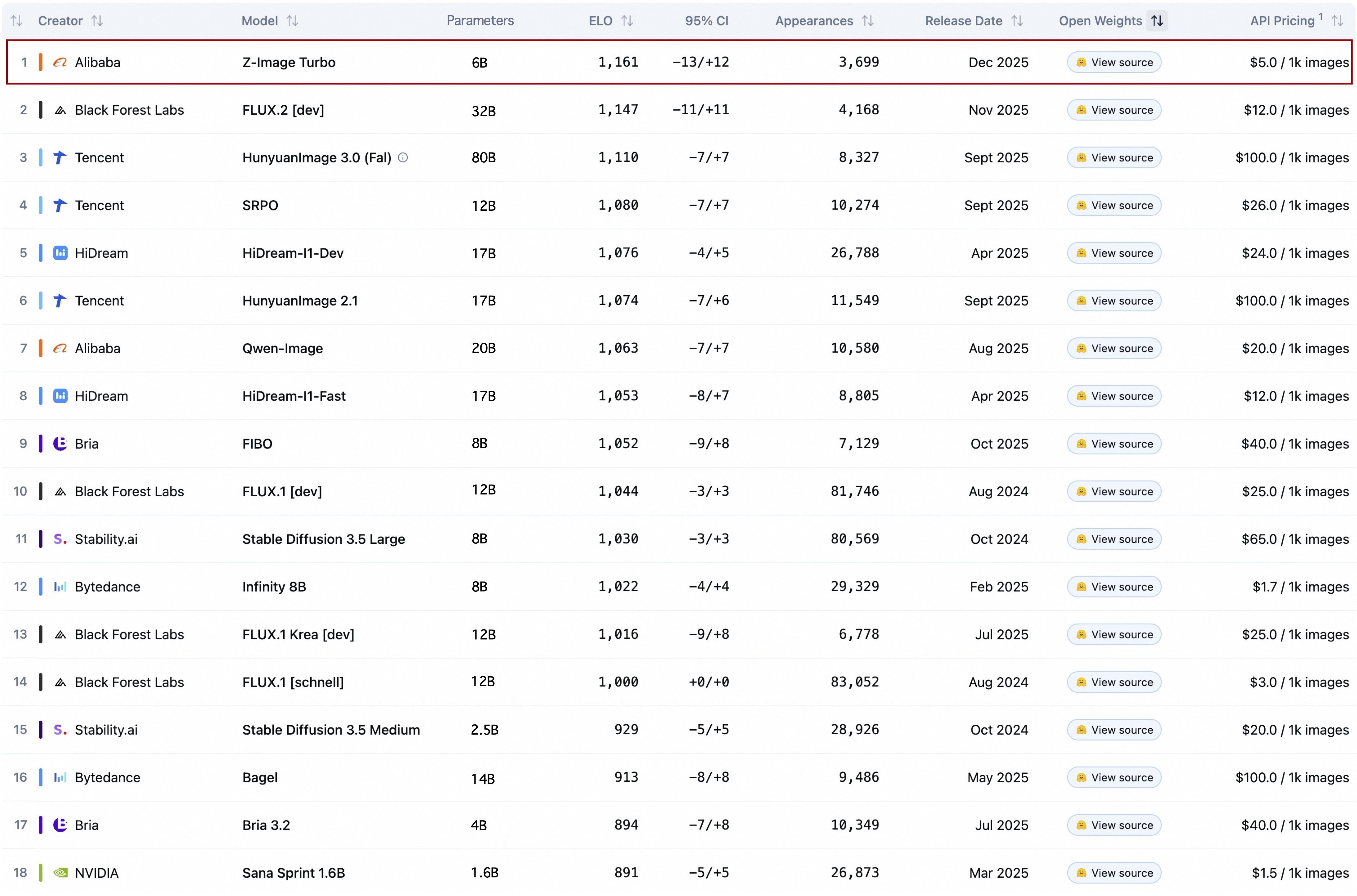
Artificial Analysis Leaderboard (Open-Source Model Only)
Alibaba AI Arena Text-to-Image Leaderboard
According to the Elo-based Human Preference Evaluation on Alibaba AI Arena, Z-Image-Turbo also achieves state-of-the-art results among open-source models and shows highly competitive performance against leading proprietary models.
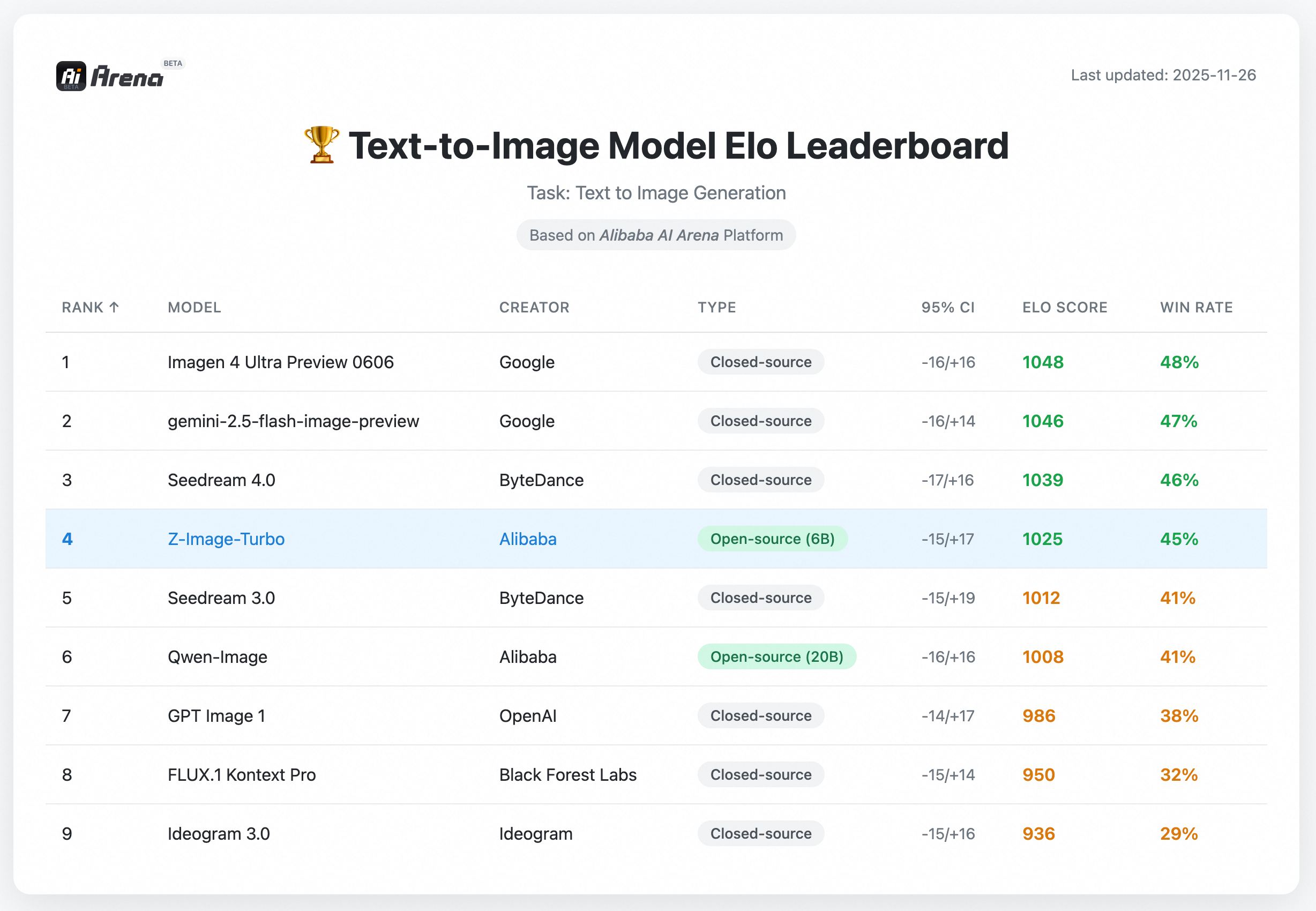
Alibaba AI Arena Text-to-Image Leaderboard
🚀 Quick Start
(1) PyTorch Native Inference
Build a virtual environment you like and then install the dependencies:
pip install -e .
Then run the following code to generate an image:
python inference.py
(2) Diffusers Inference
Install the latest version of diffusers, use the following command:
Click here for details for why you need to install diffusers from source
We have submitted two pull requests (#12703 and #12715) to the 🤗 diffusers repository to add support for Z-Image. Both PRs have been merged into the latest official diffusers release.
Therefore, you need to install diffusers from source for the latest features and Z-Image support.
pip install git+https://github.com/huggingface/diffusers
Z-Image-Turbo - Click to expand
Then, try the following code to generate an image:
import torch
from diffusers import ZImagePipeline

# 1. Load the pipeline
# Use bfloat16 for optimal performance on supported GPUs
pipe = ZImagePipeline.from_pretrained(
    "Tongyi-MAI/Z-Image-Turbo",
    torch_dtype=torch.bfloat16,
    low_cpu_mem_usage=False,
)
pipe.to("cuda")

# [Optional] Attention Backend
# Diffusers uses SDPA by default. Switch to Flash Attention for better efficiency if supported:
# pipe.transformer.set_attention_backend("flash")    # Enable Flash-Attention-2
# pipe.transformer.set_attention_backend("_flash_3") # Enable Flash-Attention-3

# [Optional] Model Compilation
# Compiling the DiT model accelerates inference, but the first run will take longer to compile.
# pipe.transformer.compile()

# [Optional] CPU Offloading
# Enable CPU offloading for memory-constrained devices.
# pipe.enable_model_cpu_offload()

prompt = "Young Chinese woman in red Hanfu, intricate embroidery. Impeccable makeup, red floral forehead pattern. Elaborate high bun, golden phoenix headdress, red flowers, beads. Holds round folding fan with lady, trees, bird. Neon lightning-bolt lamp (⚡️), bright yellow glow, above extended left palm. Soft-lit outdoor night background, silhouetted tiered pagoda (西安大雁塔), blurred colorful distant lights."

# 2. Generate Image
image = pipe(
    prompt=prompt,
    height=1024,
    width=1024,
    num_inference_steps=9,  # This actually results in 8 DiT forwards
    guidance_scale=0.0,     # Guidance should be 0 for the Turbo models
    generator=torch.Generator("cuda").manual_seed(42),
).images[0]

image.save("example.png")
Z-Image - Click to expand
Recommended Parameters:
- Resolution: 512×512 to 2048×2048 (total pixel area, any aspect ratio)
- Guidance scale: 3.0 – 5.0
- Inference steps: 28 – 50
- Negative prompts: Strongly recommended for better control
- CFG normalization:
False for general stylism, True for realism
Then, try the following code to generate an image:
import torch
from diffusers import ZImagePipeline

# Load the pipeline
pipe = ZImagePipeline.from_pretrained(
    "Tongyi-MAI/Z-Image",
    torch_dtype=torch.bfloat16,
    low_cpu_mem_usage=False,
)
pipe.to("cuda")

# Generate image
prompt = "两名年轻亚裔女性紧密站在一起,背景为朴素的灰色纹理墙面,可能是室内地毯地面。左侧女性留着长卷发,身穿藏青色毛衣,左袖有奶油色褶皱装饰,内搭白色立领衬衫,下身白色裤子;佩戴小巧金色耳钉,双臂交叉于背后。右侧女性留直肩长发,身穿奶油色卫衣,胸前印有"Tun the tables"字样,下方为"New ideas",搭配白色裤子;佩戴银色小环耳环,双臂交叉于胸前。两人均面带微笑直视镜头。照片,自然光照明,柔和阴影,以藏青、奶油白为主的中性色调,休闲时尚摄影,中等景深,面部和上半身对焦清晰,姿态放松,表情友好,室内环境,地毯地面,纯色背景。"
negative_prompt = "" # Optional, but would be powerful when you want to remove some unwanted content

image = pipe(
    prompt=prompt,
    negative_prompt=negative_prompt,
    height=1280,
    width=720,
    cfg_normalization=False,
    num_inference_steps=50,
    guidance_scale=4,
    generator=torch.Generator("cuda").manual_seed(42),
).images[0]

image.save("example.png")
🔬 Decoupled-DMD: The Acceleration Magic Behind Z-Image

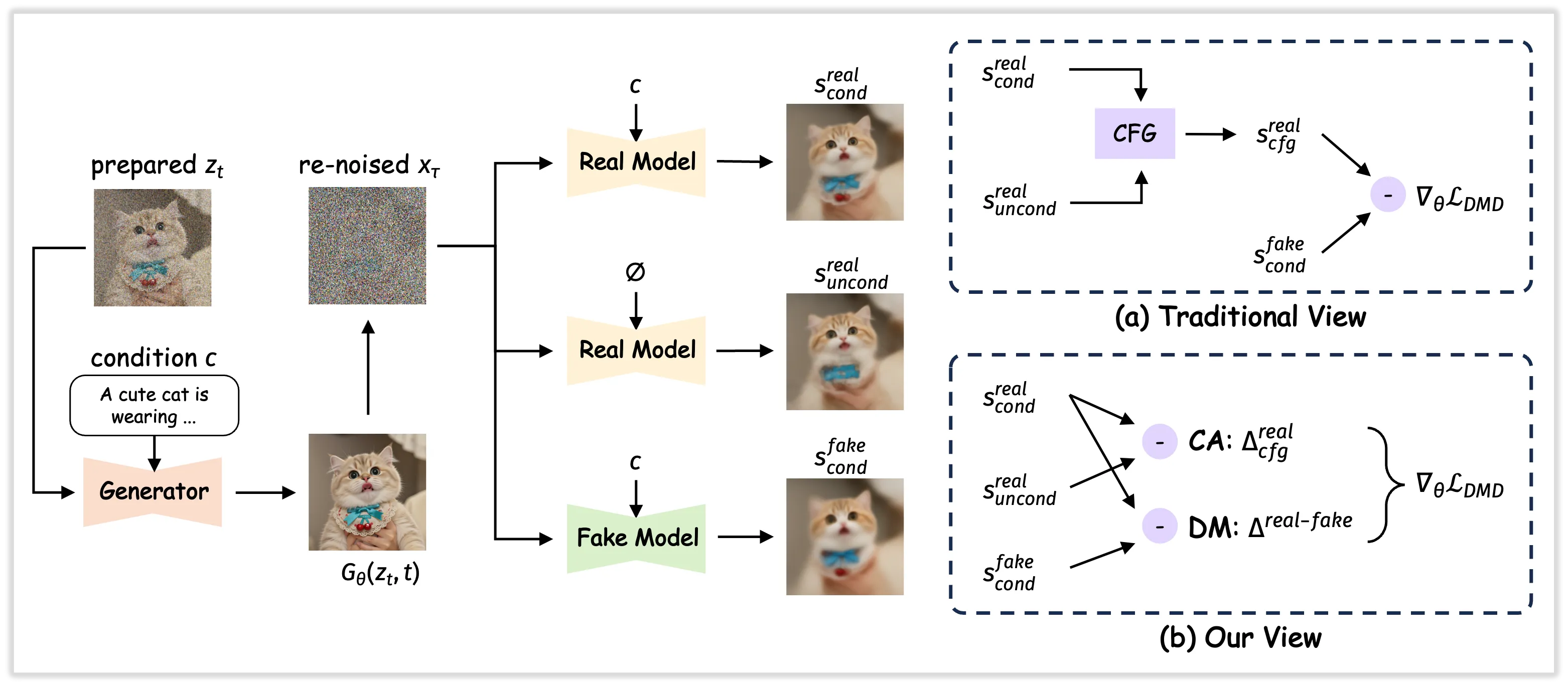
Decoupled-DMD is the core few-step distillation algorithm that empowers the 8-step Z-Image model.
Our core insight in Decoupled-DMD is that the success of existing DMD (Distribution Matching Distillation) methods is the result of two independent, collaborating mechanisms:
- CFG Augmentation (CA): The primary engine 🚀 driving the distillation process, a factor largely overlooked in previous work.
- Distribution Matching (DM): Acts more as a regularizer ⚖️, ensuring the stability and quality of the generated output.
By recognizing and decoupling these two mechanisms, we were able to study and optimize them in isolation. This ultimately motivated us to develop an improved distillation process that significantly enhances the performance of few-step generation.
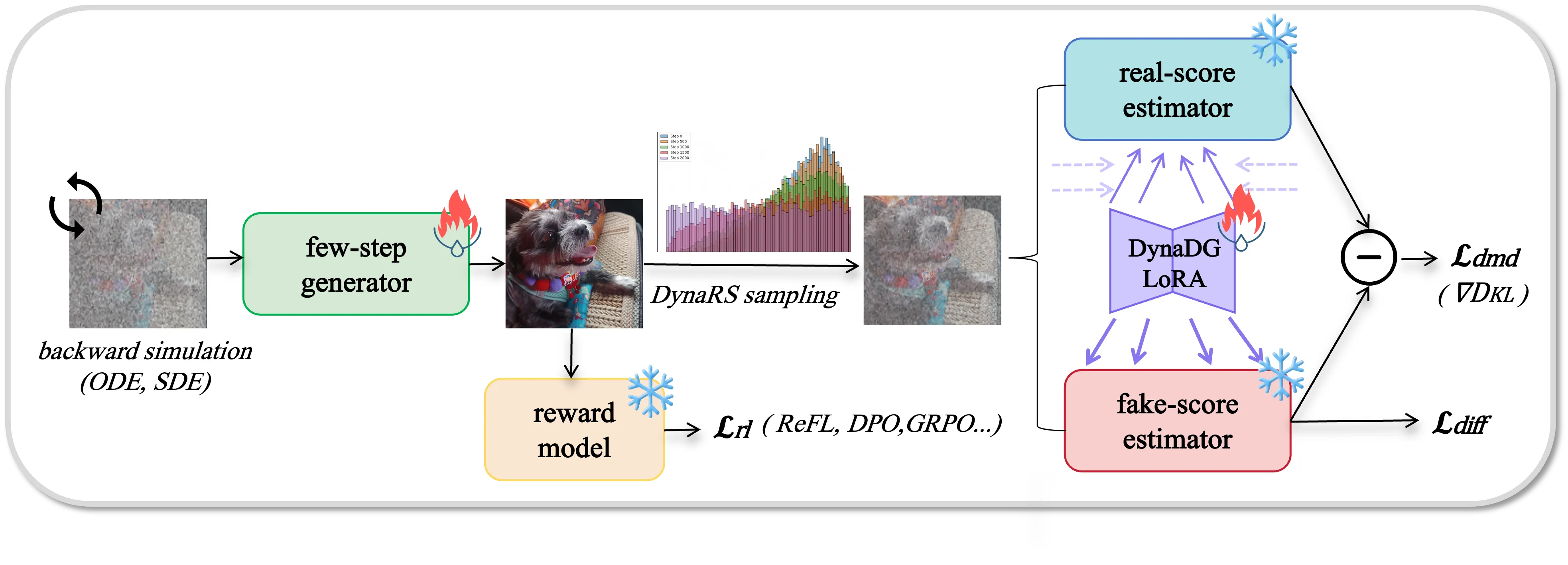
🤖 DMDR: Fusing DMD with Reinforcement Learning

Building upon the strong foundation of Decoupled-DMD, our 8-step Z-Image model has already demonstrated exceptional capabilities. To achieve further improvements in terms of semantic alignment, aesthetic quality, and structural coherence—while producing images with richer high-frequency details—we present DMDR.
Our core insight behind DMDR is that Reinforcement Learning (RL) and Distribution Matching Distillation (DMD) can be synergistically integrated during the post-training of few-step models. We demonstrate that:
- RL Unlocks the Performance of DMD 🚀
- DMD Effectively Regularizes RL ⚖️
- Cache-DiT provides inference acceleration for Z-Image and Z-Image-ControlNet via DBCache, Context Parallelism and Tensor Parallelism. It achieves nearly 4x speedup on 4 GPUs with negligible precision loss. Please visit their example for more details.
- stable-diffusion.cpp is a pure C++ diffusion model inference engine that supports fast and memory-efficient Z-Image inference across multiple platforms (CUDA, Vulkan, etc.). You can use stable-diffusion.cpp to generate images with Z-Image on machines with as little as 4GB of VRAM. For more information, please refer to How to Use Z‐Image on a GPU with Only 4GB VRAM.
- stable-diffusion.cpp is a pure C++ diffusion model inference engine that supports fast and memory-efficient Z-Image inference across multiple platforms (CUDA, Vulkan, etc.). You can use stable-diffusion.cpp to generate images with Z-Image on machines with as little as 4GB of VRAM. For more information, please refer to How to Use Z‐Image on a GPU with Only 4GB VRAM.
- LeMiCa provides a training-free, timestep-level acceleration method that conveniently speeds up Z-Image inference. For more details, see LeMiCa4Z-Image.
- ComfyUI ZImageLatent provdes an easy to use latent of the official Z-Image resolutions.
- DiffSynth-Studio has provided more support for Z-Image, including LoRA training, full training, distillation training, and low-VRAM inference. Please refer to the document of DiffSynth-Studio.
- vllm-omni, a framework that extends its support for omni-modality model fast inference and serving, now supports Z-Image.
- SGLang-Diffusion brings SGLang's state-of-the-art performance to accelerate image and video generation for diffusion models, now supporting Z-Image.
- Candle is a minimalist machine learning (ML) framework launched by Huggingface for Rust, which now supports Z-Image.
- [MeanCache](https://github.com/UnicomAI













 Z-Image is a family of efficient image generation models with 6B parameters, built around a single-stream diffusion transformer architecture, developed by Alibaba's Tongyi team.