中文阅读

HunyuanVideo: A Systematic Framework For Large Video Generation Model
👋 Join our WeChat and Discord
This repo contains PyTorch model definitions, pre-trained weights and inference/sampling code for our paper exploring HunyuanVideo. You can find more visualizations on our project page.
HunyuanVideo: A Systematic Framework For Large Video Generation Model
🔥🔥🔥 News!!
- Nov 21, 2025: 🎉 We release the HunyuanVideo-1.5, a highly efficient and powerful new foundation model.
- May 28, 2025: 💃 We release the HunyuanVideo-Avatar, an audio-driven human animation model based on HunyuanVideo.
- May 09, 2025: 🙆 We release the HunyuanCustom, a multimodal-driven architecture for customized video generation based on HunyuanVideo.
- Mar 06, 2025: 🌅 We release the HunyuanVideo-I2V, an image-to-video model based on HunyuanVideo.
- Jan 13, 2025: 📈 We release the Penguin Video Benchmark.
- Dec 18, 2024: 🏃♂️ We release the FP8 model weights of HunyuanVideo to save more GPU memory.
- Dec 17, 2024: 🤗 HunyuanVideo has been integrated into Diffusers.
- Dec 7, 2024: 🚀 We release the parallel inference code for HunyuanVideo powered by xDiT.
- Dec 3, 2024: 👋 We release the inference code and model weights of HunyuanVideo. Download.
🎥 Demo
If you develop/use HunyuanVideo in your projects, welcome to let us know.
📑 Open-source Plan
- HunyuanVideo (Text-to-Video Model)
- Inference
- Checkpoints
- Multi-gpus Sequence Parallel inference (Faster inference speed on more gpus)
- Web Demo (Gradio)
- Diffusers
- FP8 Quantified weight
- Penguin Video Benchmark
- ComfyUI
- HunyuanVideo (Image-to-Video Model)
Contents
Abstract
We present HunyuanVideo, a novel open-source video foundation model that exhibits performance in video generation that is comparable to, if not superior to, leading closed-source models. In order to train HunyuanVideo model, we adopt several key technologies for model learning, including data curation, image-video joint model training, and an efficient infrastructure designed to facilitate large-scale model training and inference. Additionally, through an effective strategy for scaling model architecture and dataset, we successfully trained a video generative model with over 13 billion parameters, making it the largest among all open-source models.
We conducted extensive experiments and implemented a series of targeted designs to ensure high visual quality, motion diversity, text-video alignment, and generation stability. According to professional human evaluation results, HunyuanVideo outperforms previous state-of-the-art models, including Runway Gen-3, Luma 1.6, and 3 top-performing Chinese video generative models. By releasing the code and weights of the foundation model and its applications, we aim to bridge the gap between closed-source and open-source video foundation models. This initiative will empower everyone in the community to experiment with their ideas, fostering a more dynamic and vibrant video generation ecosystem.
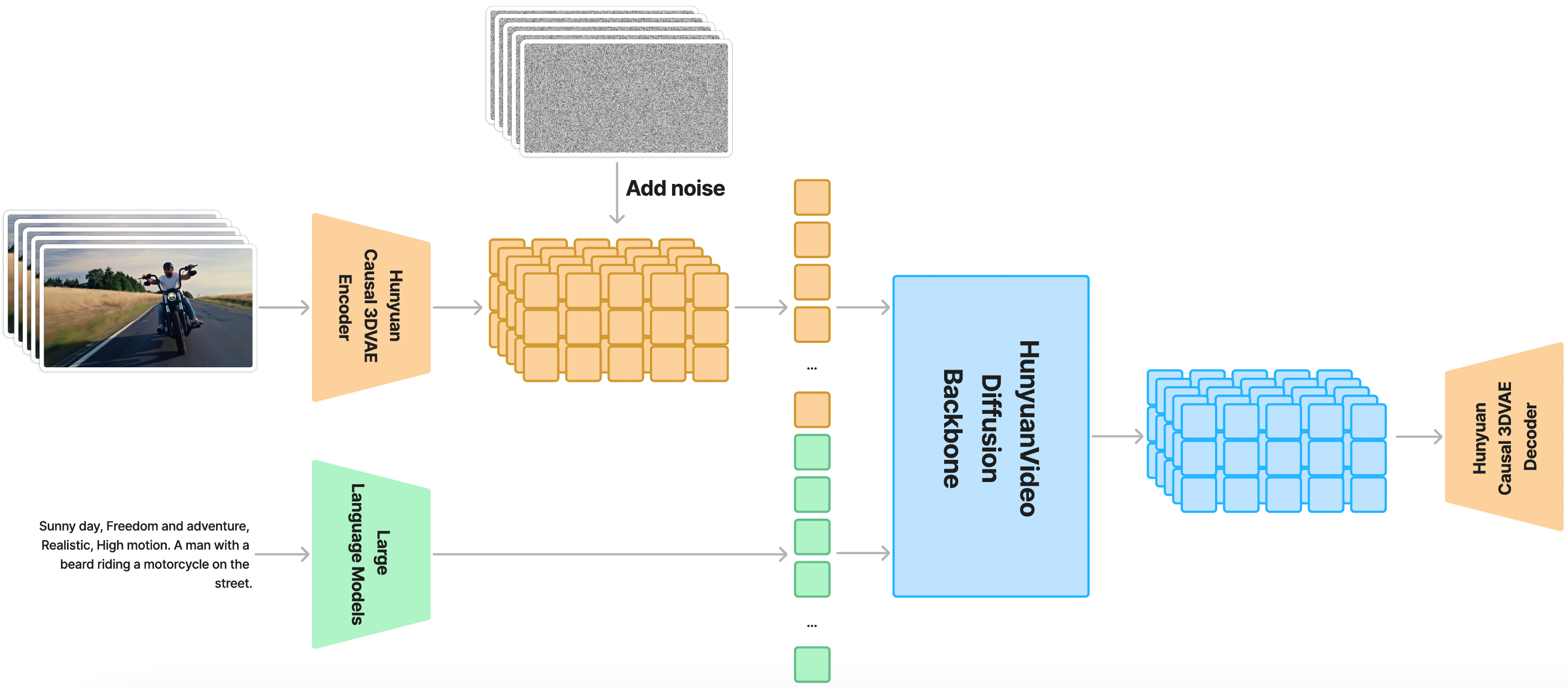
HunyuanVideo Overall Architecture
HunyuanVideo is trained on a spatial-temporally
compressed latent space, which is compressed through a Causal 3D VAE. Text prompts are encoded
using a large language model, and used as the conditions. Taking Gaussian noise and the conditions as
input, our generative model produces an output latent, which is then decoded to images or videos through
the 3D VAE decoder.
🎉 HunyuanVideo Key Features
Unified Image and Video Generative Architecture
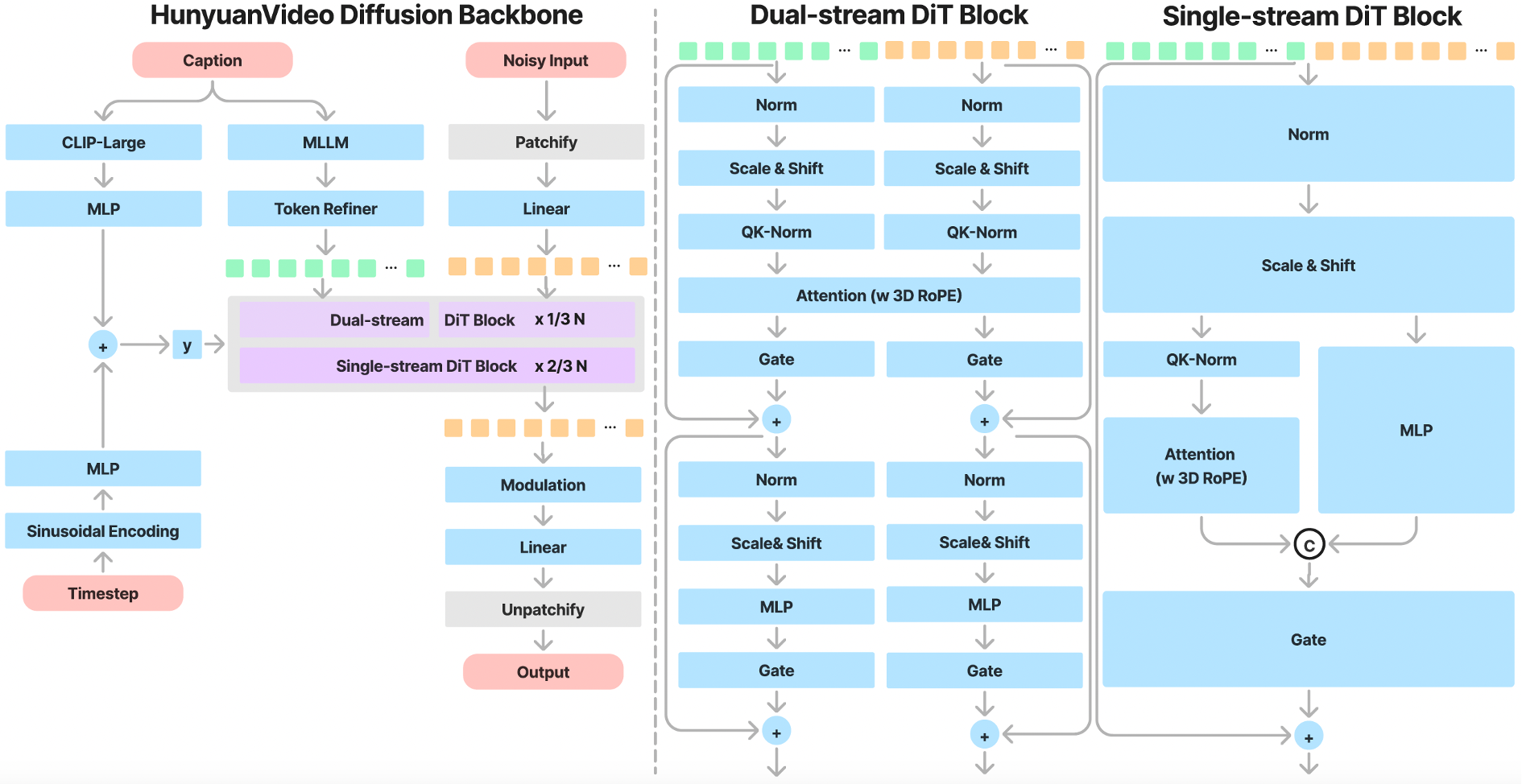
HunyuanVideo introduces the Transformer design and employs a Full Attention mechanism for unified image and video generation.
Specifically, we use a "Dual-stream to Single-stream" hybrid model design for video generation. In the dual-stream phase, video and text
tokens are processed independently through multiple Transformer blocks, enabling each modality to learn its own appropriate modulation mechanisms without interference. In the single-stream phase, we concatenate the video and text
tokens and feed them into subsequent Transformer blocks for effective multimodal information fusion.
This design captures complex interactions between visual and semantic information, enhancing
overall model performance.
MLLM Text Encoder
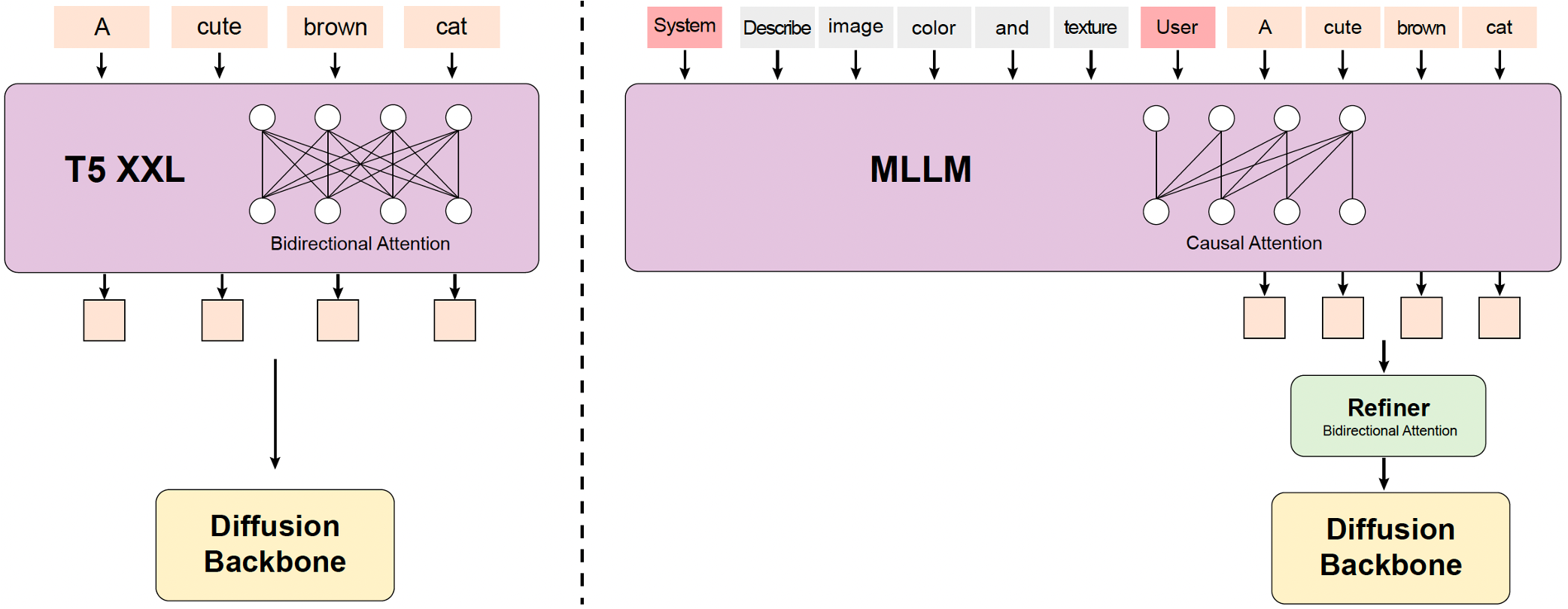
Some previous text-to-video models typically use pre-trained CLIP and T5-XXL as text encoders where CLIP uses Transformer Encoder and T5 uses an Encoder-Decoder structure. In contrast, we utilize a pre-trained Multimodal Large Language Model (MLLM) with a Decoder-Only structure as our text encoder, which has the following advantages: (i) Compared with T5, MLLM after visual instruction finetuning has better image-text alignment in the feature space, which alleviates the difficulty of the instruction following in diffusion models; (ii)
Compared with CLIP, MLLM has demonstrated superior ability in image detail description
and complex reasoning; (iii) MLLM can play as a zero-shot learner by following system instructions prepended to user prompts, helping text features pay more attention to key information. In addition, MLLM is based on causal attention while T5-XXL utilizes bidirectional attention that produces better text guidance for diffusion models. Therefore, we introduce an extra bidirectional token refiner to enhance text features.
3D VAE
HunyuanVideo trains a 3D VAE with CausalConv3D to compress pixel-space videos and images into a compact latent space. We set the compression ratios of video length, space, and channel to 4, 8, and 16 respectively. This can significantly reduce the number of tokens for the subsequent diffusion transformer model, allowing us to train videos at the original resolution and frame rate.

Prompt Rewrite
To address the variability in linguistic style and length of user-provided prompts, we fine-tune the Hunyuan-Large model as our prompt rewrite model to adapt the original user prompt to model-preferred prompt.
We provide two rewrite modes: Normal mode and Master mode, which can be called using different prompts. The prompts are shown here. The Normal mode is designed to enhance the video generation model's comprehension of user intent, facilitating a more accurate interpretation of the instructions provided. The Master mode enhances the description of aspects such as composition, lighting, and camera movement, which leans towards generating videos with a higher visual quality. However, this emphasis may occasionally result in the loss of some semantic details.
The Prompt Rewrite Model can be directly deployed and inferred using the Hunyuan-Large original code. We release the weights of the Prompt Rewrite Model here.
📈 Comparisons
To evaluate the performance of HunyuanVideo, we selected five strong baselines from closed-source video generation models. In total, we utilized 1,533 text prompts, generating an equal number of video samples with HunyuanVideo in a single run. For a fair comparison, we conducted inference only once, avoiding any cherry-picking of results. When comparing with the baseline methods, we maintained the default settings for all selected models, ensuring consistent video resolution. Videos were assessed based on three criteria: Text Alignment, Motion Quality, and Visual Quality. More than 60 professional evaluators performed the evaluation. Notably, HunyuanVideo demonstrated the best overall performance, particularly excelling in motion quality. Please note that the evaluation is based on Hunyuan Video's high-quality version. This is different from the currently released fast version.
| Model | Open Source | Duration | Text Alignment | Motion Quality | Visual Quality | Overall | Ranking |
| HunyuanVideo (Ours) | ✔ | 5s | 61.8% | 66.5% | 95.7% | 41.3% | 1 |
| CNTopA (API) | ✘ | 5s | 62.6% | 61.7% | 95.6% | 37.7% | 2 |
| CNTopB (Web) | ✘ | 5s | 60.1% | 62.9% | 97.7% | 37.5% | 3 |
| GEN-3 alpha (Web) | ✘ | 6s | 47.7% | 54.7% | 97.5% | 27.4% | 4 |
| Luma1.6 (API) | ✘ | 5s | 57.6% | 44.2% | 94.1% | 24.8% | 5 |
| CNTopC (Web) | ✘ | 5s | 48.4% | 47.2% | 96.3% | 24.6% | 6 |
📜 Requirements
The following table shows the requirements for running HunyuanVideo model (batch size = 1) to generate videos:
| Model |
Setting
(height/width/frame) |
GPU Peak Memory |
| HunyuanVideo |
720px1280px129f |
60GB |
| HunyuanVideo |
544px960px129f |
45GB |
- An NVIDIA GPU with CUDA support is required.
- The model is tested on a single 80G GPU.
- Minimum: The minimum GPU memory required is 60GB for 720px1280px129f and 45G for 544px960px129f.
- Recommended: We recommend using a GPU with 80GB of memory for better generation quality.
- Tested operating system: Linux
🛠️ Dependencies and Installation
Begin by cloning the repository:
git clone https://github.com/Tencent-Hunyuan/HunyuanVideo
cd HunyuanVideo
Installation Guide for Linux
We recommend CUDA versions 12.4 or 11.8 for the manual installation.
Conda's installation instructions are available here.
# 1. Create conda environment
conda create -n HunyuanVideo python==3.10.9

# 2. Activate the environment
conda activate HunyuanVideo

# 3. Install PyTorch and other dependencies using conda
# For CUDA 11.8
conda install pytorch==2.6.0 torchvision==0.19.0 torchaudio==2.4.0 pytorch-cuda=11.8 -c pytorch -c nvidia
# For CUDA 12.4
conda install pytorch==2.6.0 torchvision==0.19.0 torchaudio==2.4.0 pytorch-cuda=12.4 -c pytorch -c nvidia

# 4. Install pip dependencies
python -m pip install -r requirements.txt

# 5. Install flash attention v2 for acceleration (requires CUDA 11.8 or above)
python -m pip install ninja
python -m pip install git+https://github.com/Dao-AILab/[email protected]

# 6. Install xDiT for parallel inference (It is recommended to use torch 2.6.0 and flash-attn 2.6.3)
python -m pip install xfuser==0.4.0
In case of running into float point exception(core dump) on the specific GPU type, you may try the following solutions:
# Option 1: Making sure you have installed CUDA 12.4, CUBLAS>=12.4.5.8, and CUDNN>=9.00 (or simply using our CUDA 12 docker image).
pip install nvidia-cublas-cu12==12.4.5.8
export LD_LIBRARY_PATH=/opt/conda/lib/python3.8/site-packages/nvidia/cublas/lib/

# Option 2: Forcing to explictly use the CUDA 11.8 compiled version of Pytorch and all the other packages
pip uninstall -r requirements.txt  # uninstall all packages
pip uninstall -y xfuser
pip install torch==2.6.0 --index-url https://download.pytorch.org/whl/cu118
pip install -r requirements.txt
pip install ninja
pip install git+https://github.com/Dao-AILab/[email protected]
pip install xfuser==0.4.0
Additionally, HunyuanVideo also provides a pre-built Docker image. Use the following command to pull and run the docker image.
# For CUDA 12.4 (updated to avoid float point exception)
docker pull hunyuanvideo/hunyuanvideo:cuda_12
docker run -itd --gpus all --init --net=host --uts=host --ipc=host --name hunyuanvideo --security-opt=seccomp=unconfined --ulimit=stack=67108864 --ulimit=memlock=-1 --privileged hunyuanvideo/hunyuanvideo:cuda_12

# For CUDA 11.8
docker pull hunyuanvideo/hunyuanvideo:cuda_11
docker run -itd --gpus all --init --net=host --uts=host --ipc=host --name hunyuanvideo --security-opt=seccomp=unconfined --ulimit=stack=67108864 --ulimit=memlock




&color=red)


 HunyuanVideo is Tencent's open-source video foundation model, a 13B+ parameter diffusion transformer that generates videos from text (and images) at quality the authors claim matches or beats closed-source competitors like Runway Gen-3 and Luma 1.6.