Running more than a couple of agents quickly turns into an operations problem: who calls whom,
which key does each agent hold, what did that call cost, why did it fail?
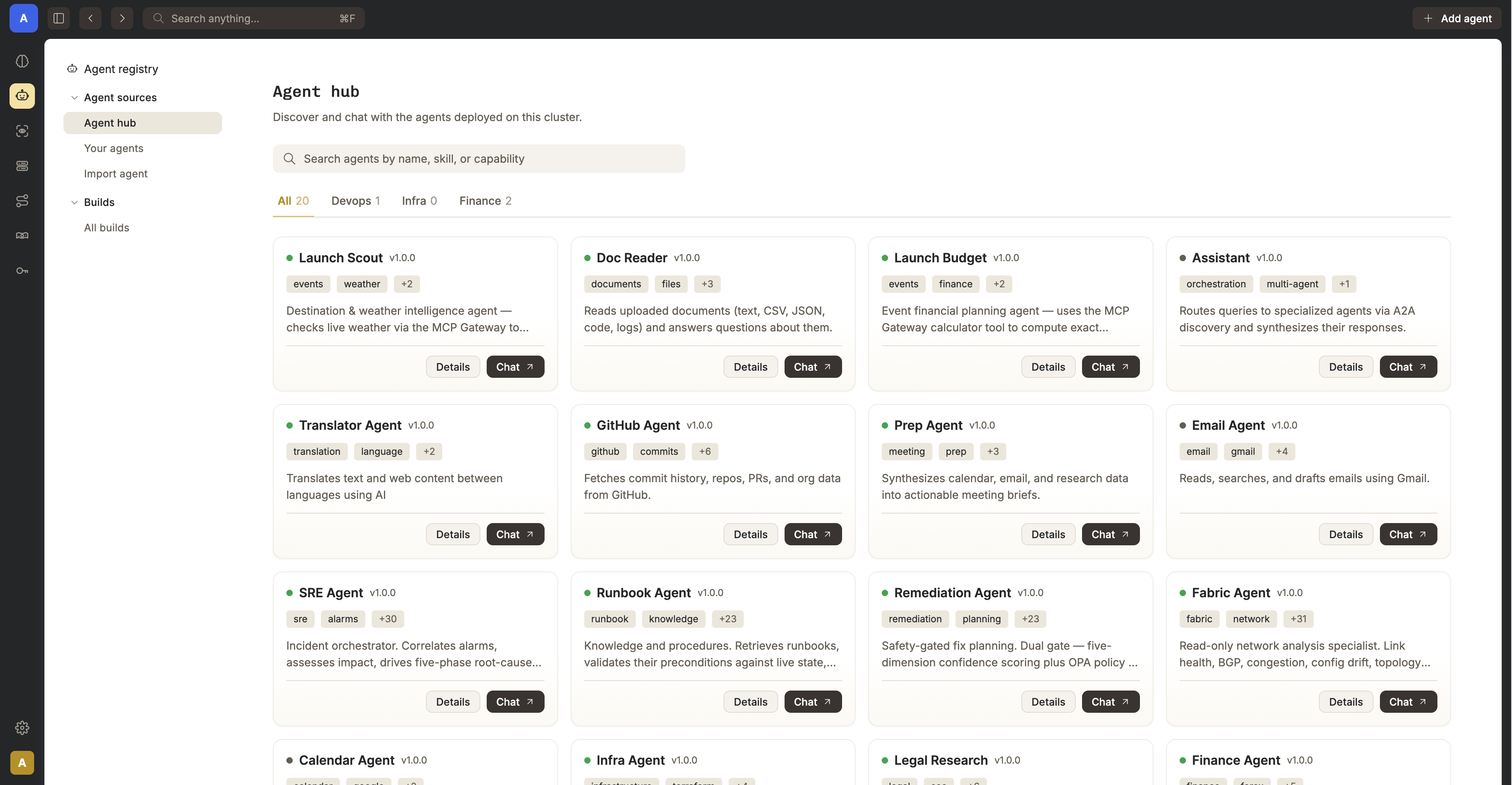
Nasiko is a single control-plane process that sits in front of every agent and answers all of that.
It terminates TLS, authenticates every request, and proxies all agent-to-agent traffic itself, so agents
are never publicly reachable — every hop is a checkpoint for rate limits, ACLs, and tracing.
Different language, same A2A protocol — bring your own agents in Python, Rust, Go, or TypeScript.
No proprietary agent format, no lock-in.
nasiko deploy builds, pushes to the embedded registry, and runs it. No external registry required.
Intelligent routing engine
3-stage pipeline — shortlist by embedding similarity, rerank on conversation context, then LLM final pick. Callers don't need to know your fleet.
Single ingress, always proxied
Agents are never publicly reachable; every agent-to-agent call is proxied through the server.
MCP Gateway
One permanent URL gives every agent a merged, permission-filtered view of Composio toolkits and custom MCP servers — without the agent holding the credentials.
LLM Router
Agents get an OPENAI_BASE_URL + a short-lived identity token instead of a real key. The router resolves provider/model/key server-side. No agent or log ever sees a real API key.
Full observability
Every dispatch and proxy hop emits a real OTel span -> one end-to-end trace. Token usage & cost are auto-collected from gen_ai.* attributes.
Per-agent secrets are AES-256-GCM encrypted at rest, injected only at deploy time.
Access control
User to-agent ownership/grants and an agent-to-agent allowlist gate every proxy call, independently.
Embedded OCI registry
Self-hosted, S3-backed registry with layer dedup — nasiko push / nasiko deploy need nothing external.
CLI-first, no lock-in
nasiko new, run, chat, deploy. Bring your own LLM provider.
Architecture
Nasiko is a single process — there is no separate gateway. Every inter-agent call is proxied back
through the server, the single chokepoint where flow limits, ACLs, and observability are enforced.
Durable state lives in Postgres, Redis, and S3 (RustFS), with optional observability via
Tempo / Loki / the OTel Collector.
Every request to an agent is either dispatched by the routing engine or proxied generically — both
paths originate inside the server. Agents never receive a direct, public request, and both call
back out into the LLM Router and MCP Gateway rather than holding real API keys or tool credentials.
Requirements
Component
Minimum version
Why
Docker Engine + Compose V2
Compose V2 plugin (the docker compose command — not the legacy standalone docker-compose v1 binary)
docker-compose.yml uses the extended depends_on: condition: service_healthy syntax; the Docker-only path needs nothing else.
Rust
1.85+ (stable)
The workspace targets edition = "2024" (see Cargo.toml), stabilized in Rust 1.85 — only needed for the CLI / Path B developer setup, not the Docker-only path.
A2A protocol
Spec v1.0 exactly (latest upstream release: v1.0.1, Linux Foundation)
Nasiko requires and hardcodes the A2A-Version: 1.0 header on every request; agents on older/pre-1.0 spec versions (e.g. 0.2.x, 0.3.0) are rejected with -32009 VersionNotSupported (see docs/A2A_PROTOCOL.md). Any agent speaking v1.0 works, regardless of its implementation language.
Quick Start — Docker only (no Rust needed)
The fastest way to run Nasiko requires only Docker (with Compose).
The server builds itself from source inside Docker.
1. Clone and configure
git clone https://github.com/Nasiko-Labs/nasiko.git
cd nasiko
cp .env.example .env
Edit .env and set at minimum:
OPENAI_API_KEY — your OpenAI key (used by the routing engine and injected into agents)
ADMIN_PASSWORD — password for the bootstrap admin account
2. Start the platform
docker compose up -d
This builds the server image and starts the full stack:
Postgres · Redis · RustFS (S3) · OTel Collector · Tempo · Loki · nasiko-server.
First build takes a few minutes (compiles Rust inside Docker) — subsequent builds are fast.
Open http://localhost:8080 for the dashboard and log in with ADMIN_USERNAME / ADMIN_PASSWORD
(default admin / changeme).
docker compose logs -f server   # follow server logs
docker compose down             # stop everything
docker compose up -d --build    # rebuild after pulling new changes
Open Docker Desktop and wait until the engine is running.
In a terminal (PowerShell or Git Bash):
git clone https://github.com/Nasiko-Labs/nasiko.git
cd nasiko
Copy-Item .env.example .env
# edit .env -> set OPENAI_API_KEY and ADMIN_PASSWORD
docker compose up -d
git clone https://github.com/Nasiko-Labs/nasiko.git
cd nasiko
cp .env.example .env
# edit .env -> set OPENAI_API_KEY and ADMIN_PASSWORD
docker compose up -d
git clone https://github.com/Nasiko-Labs/nasiko.git
cd nasiko
cp .env.example .env
# edit .env -> set OPENAI_API_KEY and ADMIN_PASSWORD
docker compose up -d
Linux note: native Docker does not provide host.docker.internal automatically. If agents
report [Errno -2] Name or service not known, run Docker with
--add-host host.docker.internal:host-gateway or set MCP_GATEWAY_PUBLIC_URL to the bridge IP
(see Troubleshooting).
Toolchain setup — Rust, just, etc. (for the CLI / Path B)
Windows
# 1. Rust (installs rustup + stable toolchain)
winget install --id Rustlang.Rustup -e
# (reopen your terminal, then verify)
rustc --version; cargo --version

# 2. `just` command runner + cargo-watch (after Rust is installed)
cargo install just cargo-watch

# 3. If you plan to build native Windows binaries, also install the C++ linkers:
winget install Microsoft.VisualStudio.2022.BuildTools --override "--wait --quiet --add Microsoft.VisualStudio.Workload.VCTools --includeRecommended"
Building the CLI does not require the C++ Build Tools — it uses a pure-Rust toolchain. The
C++ linkers are only needed if native crates (e.g. ring) fail to link on the MSVC toolchain.
macOS
# 1. Xcode Command Line Tools (provides the C toolchain/linker)
xcode-select --install

# 2. Rust
curl --proto '=https' --tlsv1.2 -sSf https://sh.rustup.rs | sh
source "$HOME/.cargo/env"

# 3. `just` + cargo-watch
cargo install just cargo-watch
# 1. Start infrastructure only (Postgres, Redis, RustFS, OTel stack)
just infra

# 2. Configure the server env
cp server/.env.example server/.env
# edit server/.env -> set OPENAI_API_KEY at minimum

# 3. Run the server natively (hot-reload)
just dev
# ...or without hot-reload:
just run
just check        # cargo check --workspace
just clippy       # lint (zero-warnings policy)
just test-unit    # fast hermetic unit tests (no infra needed)
just test         # unit + integration tests (needs: just infra)
The CLI needs Rust to build from source (it is a separate cli/ crate). You also need
Docker to build/deploy agent images.
Install the CLI
# from the repo root
cargo install --path cli/
# ...or build a standalone binary
cargo build --release -p nasiko
Add it to your PATH if it is not already (Cargo's bin dir: ~/.cargo/bin).
Deploy your first agent
nasiko connect http://localhost:8080
nasiko auth login                          # log in with ADMIN_USERNAME / ADMIN_PASSWORD
nasiko new openai my-agent && cd my-agent  # scaffold from a template
nasiko deploy .                            # build, push, and deploy
nasiko chat "Hello there"                  # talk to your agent (message must contain a space,
                                            # or use --agent: nasiko chat --agent my-agent "Hello")
You can also deploy agents directly from the dashboard UI — upload source, import from GitHub, or
pull from the artifact registry.
Handy CLI commands
Command
Description
nasiko connect <url>
Register a control plane and switch to it
nasiko auth login
Authenticate with the active cluster
nasiko new [template] [name]
Scaffold a new agent project
nasiko build / nasiko run
Build the agent image / build + run it locally
nasiko push / nasiko deploy <image>
Push image / build-push-deploy to the cluster
nasiko upload [source]
Upload source; the server builds it (no local Docker)
nasiko ps
List running agents
nasiko logs <agent> -f
Stream (and follow) agent logs
nasiko stop / start / restart / scale <n>
Agent lifecycle
nasiko rm --name <agent>
Terminate + deregister an agent (positional id only accepts a UUID)
nasiko chat <agent>
Interactive or one-shot A2A chat
nasiko secrets set
Configure encrypted per-agent secrets
nasiko mcp
Manage MCP Gateway connectors and tool permissions
What is this?Nasiko is a single control-plane server that deploys, routes, secures, and observes AI agents built on the A2A protocol, acting as the one checkpoint every agent-to-agent call passes through.
Is this a gateway I add in front of my agents, or something I run instead of one?It replaces a gateway/sidecar setup entirely: Nasiko is one server process that proxies every agent-to-agent call itself, so there's no separate gateway container or glue code to maintain.
How do I get it running?Clone the repo, edit .env to set OPENAI_API_KEY and ADMIN_PASSWORD, then run the Docker Compose stack; it builds the server image and starts Postgres, Redis, RustFS (S3), the OTel Collector, Tempo, Loki and nasiko-server, after which you log into the dashboard.
What do I need installed before I can run it?Just Docker Engine with the Compose V2 plugin for the quick-start path. Building the CLI or running from source instead needs Rust 1.85+ (edition 2024) plus the 'just' command runner.
Will any A2A agent work with it out of the box?No — Nasiko hardcodes the A2A-Version: 1.0 header on every request, so agents built against older spec drafts like 0.2.x or 0.3.0 get rejected with a VersionNotSupported error, regardless of the language they're written in.
How does the MCP Gateway keep tool credentials safe?It gives every agent one permanent URL exposing a merged, permission-filtered view of Composio toolkits and custom MCP servers, without the agent ever holding the underlying credentials itself.
How does the LLM Router avoid exposing real API keys to agents?Agents are given an OPENAI_BASE_URL plus a short-lived identity token instead of a real key; the router resolves the actual provider, model, and key server-side, so no agent or log ever sees the real credential.
What stops one misbehaving agent from spawning a runaway loop?Redis-backed flow guards enforce cascade limits on call depth, fan-out, token budget, timeout, and cycle detection to stop runaway multi-agent chains.
Can agents be written in different programming languages?Yes — any agent that speaks the A2A protocol v1.0 works, so you can mix agents written in Python, Rust, Go, or TypeScript in the same fleet.



 Nasiko is a single control-plane server that deploys, routes, secures, and observes AI agents built on the A2A protocol, acting as the one checkpoint every agent-to-agent call passes through.