Mesh LLM pools GPUs and memory across machines and exposes the result as one
OpenAI-compatible API at http://localhost:9337/v1. Start one node, add more
nodes later, and let the mesh decide whether a model runs locally, routes to a
peer, or uses Skippy stage splits for models that are too large for one box.
Mesh and standalone Skippy
Skippy owns model management, native inference, split
execution and OpenAI serving. Mesh adds peer discovery,
transport, routing, plugins and the console around the same Skippy serving
implementation.
The source lives in those two product trees. They share one root Cargo workspace
and lockfile. Product crates, authored docs, scripts and evaluations live with
their owner; Mesh also owns the website and SDKs. Root docs/ is generated
website output.
Bare just (or just build) builds the standalone Skippy product (patched
llama.cpp runtime and skippy CLI) first, then the MeshLLM host and console.
Use just skippy to build Skippy alone, just mesh to rebuild only MeshLLM,
or just skippy-cli-build for only the Skippy CLI. Skippy's separately packaged
native runtime can be supplied with --runtime-bundle. See
Skippy configuration
and split serving.
Install the Apple Silicon Homebrew formula with
brew install Mesh-LLM/tap/mesh-llm. Versioned formulas, Ubuntu and Arch
packages, checksums, SBOMs, and OCI images are produced by the public
Mesh-LLM/mesh-packaging
repository. See the platform install guides
for the supported package matrix and install commands.
Finish setup:
mesh-llm setup
On Windows PowerShell, use mesh-llm.exe setup. (For native Windows notes, and for the optional WSL2 setup and multi-node LAN clustering, see the Windows & WSL2 Troubleshooting Guide.)
To remove an executable install later, preview the cleanup first:
Uninstall preserves ~/.mesh-llm configuration and identity data unless you
explicitly pass --purge-config.
Join the public mesh and start serving:
mesh-llm serve --auto
That command chooses a backend flavor, downloads a suitable model if needed,
joins the best discovered public mesh, starts the local API on port 9337, and
starts the web console on port 3131.
Single-machine fit first. If one node can host the full model, it serves
the model locally without stage traffic.
Mesh routing. Every node exposes the same /v1 API. Requests are routed
by the model field to the peer that can serve that model.
Encrypted peer transport. QUIC end-to-end encrypts traffic between Mesh
nodes, including inference requests, responses, and split-model activations.
Iroh relays forward encrypted packets without reading their payload.
Owner-control plane. Operator config and inventory actions use an
additive mesh-llm-control/2 lane with explicit endpoint bootstrap, while
public mesh join, gossip, routing, and inference stay on the public mesh
plane for mixed-version compatibility.
Skippy stage splits. Large dense models can load as package-backed layer
stages. The coordinator plans contiguous layer ranges, starts downstream
stages first, waits for readiness, then publishes the stage-0 route.
Layer packages. Package repositories contain model-package.json plus
GGUF fragments so peers fetch only the pieces needed for their assigned stage.
Public discovery. Published meshes advertise through Nostr discovery;
private meshes stay invite-token based.
For a deeper operator guide, see docs/USAGE.md. For every CLI
command and switch, see docs/CLI.md.
Local model-only serving
Debugging and development endpoint.--local-model-only wires the OpenAI
frontend directly to one local Skippy instance and bypasses mesh networking
entirely. The supported path for OpenAI clients in production — including tool
calls — is the regular mesh inference port, which includes the host-runtime
normalizer. Use --local-model-only when you want a lightweight single-process
setup without joining a mesh, not as a drop-in for the full serving path.
Use the direct topology when a process should expose one complete local model
through the OpenAI API without becoming a mesh node:
Use --gguf <absolute-path> to serve a specific GGUF file directly. --model <absolute-path> also works. Note that --model <catalog-name> does not work
here — catalog and HF-ref resolution is a mesh function and is not available in
the direct topology; the resulting error is not obvious. See the path requirements
below.
This mode starts the OpenAI frontend and one local Skippy model runtime. It does
not start QUIC, discovery, peer maintenance, split planning, plugins, release
lookup, the web console, or the management API. Add --listen-all only when the
OpenAI endpoint must bind beyond loopback. Startup fails if the complete model
does not fit within detected local capacity (or --max-vram); it never falls
back to distributed serving.
Values passed to --model, --gguf, and --mmproj must be absolute paths and
must not be symlinks. If you downloaded a model through
Hugging Face, resolve the cache symlink before passing the path:
realpath <path-from-hf-cache>.
Automatic model selection (model: "mesh")
Send model: "mesh" (or the compatibility alias auto) to select one
capability-compatible model. Streaming and non-streaming requests both use
core single-model routing by default. The Mixture-of-Agents committee
(crates/mesh-llm-moa-plugin) ships in the binary but is off by default;
enable it with a [[plugin]] entry named mesh-moa in ~/.mesh-llm/config.toml, and
non-streaming text chat to mesh is then answered by the committee instead
(see docs/design/MOA_GATEWAY.md). Any
installed virtual-model plugin can override mesh the same way.
Supported model families
Mesh LLM's Skippy runtime tracks llama.cpp family parity with reviewed GGUF
representatives. The current reviewed support set covers 72 P0/P1 family rows,
with 89 certified rows in the full parity inventory, including Qwen, Llama,
Gemma, Mistral, DeepSeek, GLM, MiniMax, Phi, Granite, Hunyuan, EXAONE, Cohere,
Falcon, RWKV, and many others.
Split multimodal serving is certified for Qwen2-VL, Qwen3-VL,
Qwen3-VL-MoE, HunyuanOCR/Hunyuan-VL, and DeepSeek-OCR using real GGUF plus
projector fixtures. DeepSeek3 and EXAONE-MoE use package-backed stages because
the full GGUFs are too large for the cheap local baseline.
Tagged releases publish macOS bundles plus Linux CPU, Linux ARM64 CPU, Linux
ARM64 CUDA, Linux CUDA, Linux CUDA Blackwell, Linux ROCm, Linux Vulkan, Windows
CPU, Windows CUDA, Windows ROCm, and Windows Vulkan bundles. Metal is
macOS-only. Every flavor is composed from the same backend-neutral host for its
OS/architecture plus one versioned native runtime. The Linux ARM64 CPU artifact is
mesh-llm-aarch64-unknown-linux-gnu.tar.gz; the Linux ARM64 CUDA artifact is
mesh-llm-aarch64-unknown-linux-gnu-cuda.tar.gz. In install and release
contexts, arm64 and aarch64 mean the same 64-bit ARM target. Portable
archives work offline: the host discovers the adjacent
native-runtimes/<runtime-id> tree before consulting the user cache.
Build from source with just:
git clone https://github.com/Mesh-LLM/mesh-llm
cd mesh-llm
just build
Source builds require just, cmake, Rust, sccache, the platform fast linker
(mold on Linux and lld on macOS/Windows), and Node.js 24 + npm. Cargo uses
these defaults from the checked-in configuration, including plain cargo build. See CONTRIBUTING.md for installation commands and
linker fallback behavior. To exercise the release boundary locally, build the
neutral host and one runtime:
just release-host-build
just release-runtime-build metal # or cpu, cuda, rocm, vulkan
MESH_LLM_NATIVE_RUNTIME_BUNDLE_DIR="$PWD/dist/native-runtimes" \
MESH_LLM_NATIVE_RUNTIME_CACHE_DIR="$(mktemp -d)" \
  ./target/release/mesh-llm runtime list
CUDA runtimes need nvcc, ROCm runtimes need ROCm/HIP, and Vulkan runtimes need
Vulkan development files plus glslc. See
docs/design/NATIVE_RUNTIMES.md for the
manifest, discovery, and compatibility contract.
The shipped mesh-llm executable uses embedded release attestation for
provenance and admission hardening only. It does not apply to SDK, XCFramework,
or other native artifacts, and it is not a runtime integrity proof. Verify a
stamped packaged executable with cargo run -p xtask -- release-attestation inspect --binary <path-to-packaged-mesh-llm> --public-key-file <release-signing-public-key.json>.
A packaged release binary reports valid, an unstamped local or dev build
reports missing, and a binary that changed after packaging reports invalid.
Bare inspect --binary ... is only enough to classify an unstamped binary as
missing; stamped binaries require --public-key-file and otherwise report
invalid with an explicit error. Post-download mutation can flip a stamped
binary to invalid, but default startup still allows it.
🪟 Windows & WSL2 Troubleshooting
Running natively on Windows (NVIDIA)
Native Windows CUDA works, including on CUDA 13.x drivers: GPU detection (mesh-llm gpus) and full-speed CUDA inference have been verified on driver 610.74 (CUDA UMD 13.3) with an RTX 4070 Ti. The earlier advice to switch to WSL2 when mesh-llm reported 0 GPUs on CUDA 13 drivers predates the cuda12-runtime compatibility fix (#1127) and no longer applies to current releases.
The stable release works natively: the installer puts the product bundle and its CPU runtime in place, then add the CUDA runtime for your release and serve. No prerelease is needed, and no manual PATH edit for the runtime's DLLs:
RTX 50-series and other Blackwell (SM 120) cards aren't covered by the stable release on native Windows yet: its only Windows CUDA runtime is CUDA 12, built for architectures up to SM 90, so mesh-llm runtime install cuda finds no compatible runtime for them. Use WSL2 with the Linux CUDA 13 runtime until a Windows CUDA 13 runtime ships.
--local-model-only requires an absolute path to a local .gguf file; catalog and Hugging Face refs are rejected in this mode.
Models download to %LOCALAPPDATA%\huggingface\hub (the Rust hf-hub convention) — a separate cache from the Python tools' ~\.cache\huggingface.
mesh-llm.exe is not code-signed yet, so SmartScreen may prompt when launching it manually.
Running under WSL2 (alternative)
WSL2 remains a solid alternative if you prefer the Linux CUDA runtimes or want the multi-node LAN setups described below.
1. Install CUDA 13.0 Toolkit inside WSL2
Inside your Ubuntu WSL2 terminal, install cuda-toolkit-13-0 to supply libcudart.so.13:
2. Enable Hyper-V & Windows Firewall for WSL2 Mirrored Mode
If you use WSL2 networkingMode=mirrored in %UserProfile%\.wslconfig, Windows 11 manages a separate Hyper-V VM Firewall that defaults to Block for inbound network traffic when third-party security software (e.g. Norton, McAfee) is present.
2.1 Configure Mirrored Networking (.wslconfig) Part 1
Create or edit C:\Users\<username>\.wslconfig on the Windows host:
notepad $env:USERPROFILE\.wslconfig
2.2 Configure Mirrored Networking (.wslconfig) Part 2
[wsl2]
networkingMode=mirrored
autoProxy=true
2.3 Restart WSL in Powershell
Restart WSL in PowerShell:
wsl --shutdown
2.4 Enable Windows Firewall Needs
To allow incoming LAN connections to the Web UI (3131) and P2P QUIC mesh transport (9337), run PowerShell as Administrator on the Windows host:
# 1. Allow Inbound Traffic through the WSL Hyper-V VM Firewall Container
$vmCreatorId = '{40E0AC32-46A5-438A-A0B2-2B479E8F2E90}'
Set-NetFirewallHyperVVMSetting -Name $vmCreatorId -DefaultInboundAction Allow

# 2. Allow MeshLLM Ports in Windows Defender Firewall
New-NetFirewallRule -DisplayName "MeshLLM TCP In" -Direction Inbound -Action Allow -Protocol TCP -LocalPort 3131,9337 -Profile Any
New-NetFirewallRule -DisplayName "MeshLLM UDP In" -Direction Inbound -Action Allow -Protocol UDP -LocalPort 9337,5353 -Profile Any
3. Match Model Paths for Direct LAN Reading
To ensure worker nodes load GGUF model shards directly off local NVMe/SSD storage without streaming tens of gigabytes over the network, ensure the --gguf file path string is identical across all nodes (or use symlinks/bind mounts):
# Example: Mount or symlink model path on worker nodes
sudo mkdir -p /mnt/d/models/
sudo mount --bind /path/to/local/fast/nvme/ /mnt/d/models/

# Launch Master and Worker with matching path strings
mesh-llm --llama-flavor cuda serve \
  --console 3131 \
  --gguf "/mnt/d/models/model.gguf" \
  --mesh-name "MainMesh" \
  --listen-all \
  --auto
Installer/bootstrap and setup command behavior spec
CI infrastructure
Trusted main Linux jobs may use Depot's managed GitHub Actions
runners through the checked-in
runner policy. Pull requests remain on GitHub-hosted runners until the cache
isolation and protected-workflow gates in ci/DEPOT_MIGRATION.md
are proven. Hardware-qualified GPU tests remain on dedicated runners.
Mesh LLM is experimental distributed-systems software. When you report bugs,
include the command you ran, platform/backend flavor, /api/status output if
available, and whether the node was private, published, or joined with --auto.
Support
The Mesh LLM project thanks spiral.xyz for their support.
怎样才能让它运行起来?下载最新版本的可执行文件(或者在 Apple Silicon 芯片的 Mac 上运行 brew install Mesh-LLM/tap/mesh-llm),然后运行 mesh-llm serve --auto。该命令会自动选择后端,需要时下载模型,加入发现的最佳公共 mesh 网络,并在 9337 端口启动 API,在 3131 端口启动网页控制台。
有哪些需要注意的粗糙之处吗?在 v0.76.0-rc8 版本中,原生 Windows CUDA 仍存在三个分发和加载方面的 bug,导致开箱即用的原生运行方式无法使用,需要手动变通处理。另外,混合智能体(Mixture-of-Agents)网关(model: 'mesh')明确标注为实验性功能,其路由和错误处理行为可能还会变化。
它支持哪些操作系统和 GPU 后端?正式发布的版本提供 macOS(Metal)安装包,以及 Linux 的 CPU、ARM64、CUDA、ROCm、Vulkan 版本,还有 Windows 的 CPU、CUDA、ROCm、Vulkan 版本。

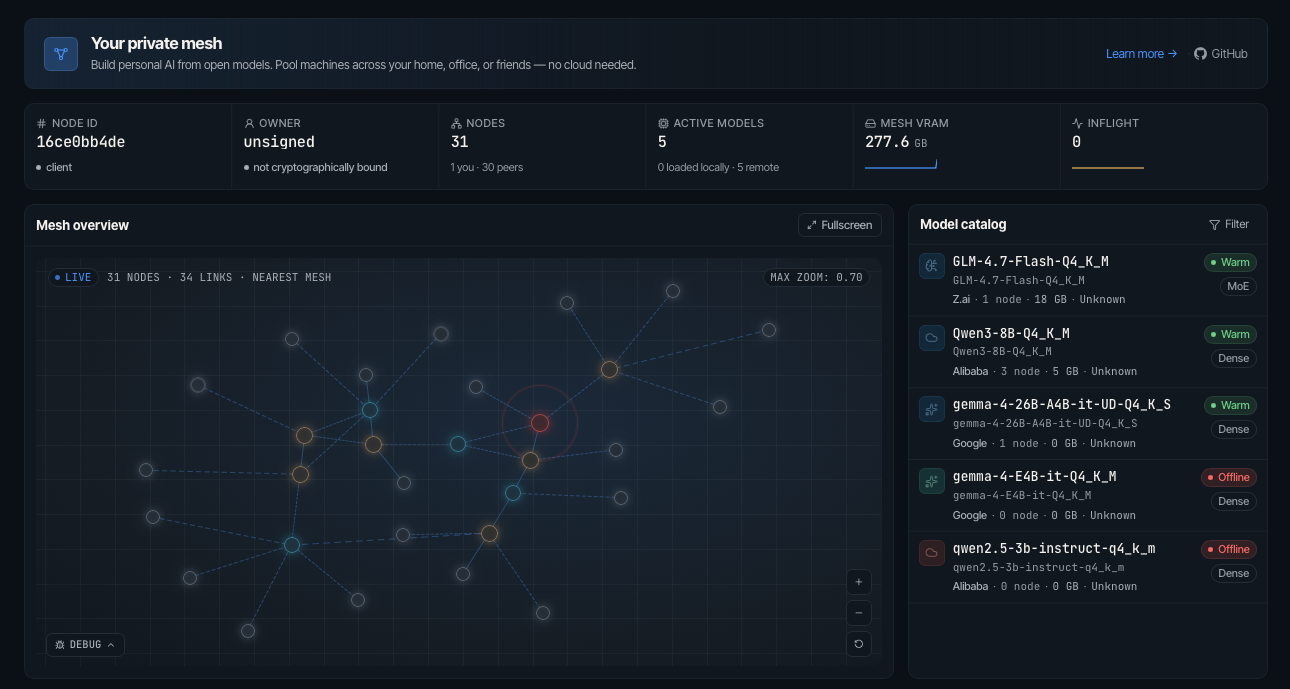


 Mesh LLM 可以把多台机器上的 GPU 和内存资源汇集起来,并将整个集群以一个兼容 OpenAI 接口的 API 对外提供。这样,模型可以在本地运行,也可以转发给其他节点处理;如果模型太大,一台机器装不下,还能拆分到多台机器上运行。