
aegis-spreadwatch README

项目的 README,来自 github.com/Lavagroabide/aegis-spreadwatch。合并为一个 markdown 文件:README.md。

Aegis SpreadWatch

Tauri v2 Rust React License: MIT

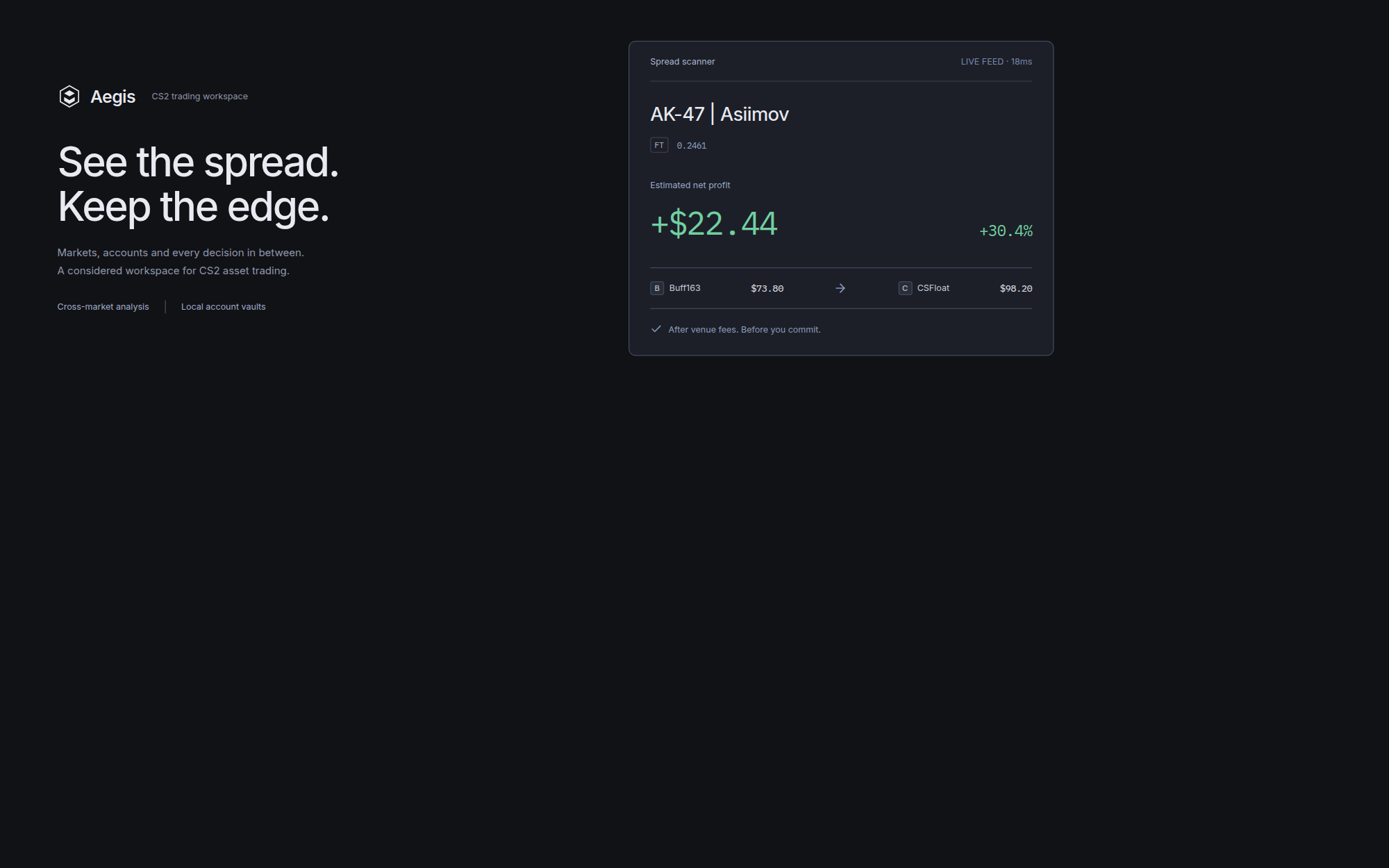
Aegis SpreadWatch hero

Aegis SpreadWatch is a native, local-first CS2 trading workspace for people who want the numbers to stay legible. It separates market opportunities, account access, buy plans and fee assumptions into calm, purpose-built workspaces instead of one overloaded dashboard.

The UI ships with a deterministic 15-item market fixture so the terminal is useful immediately in development. Venue requests are isolated behind Rust commands and can be connected to authenticated adapters without changing the React surface.

Download

One zip, attached to the latest release. It carries Main.exe, its update settings and the Aegis SpreadWatch runtime, so nothing else has to be installed:

System File
Windows 10 and 11 aegis-spreadwatch.zip

Unpack the whole folder and start Main.exe. No installer, no admin rights.

Main.exe is code-signed, so Windows starts it without a warning. Keep Aegis SpreadWatch next to it: they ship together.

Product surface

Workspace Purpose Primary action
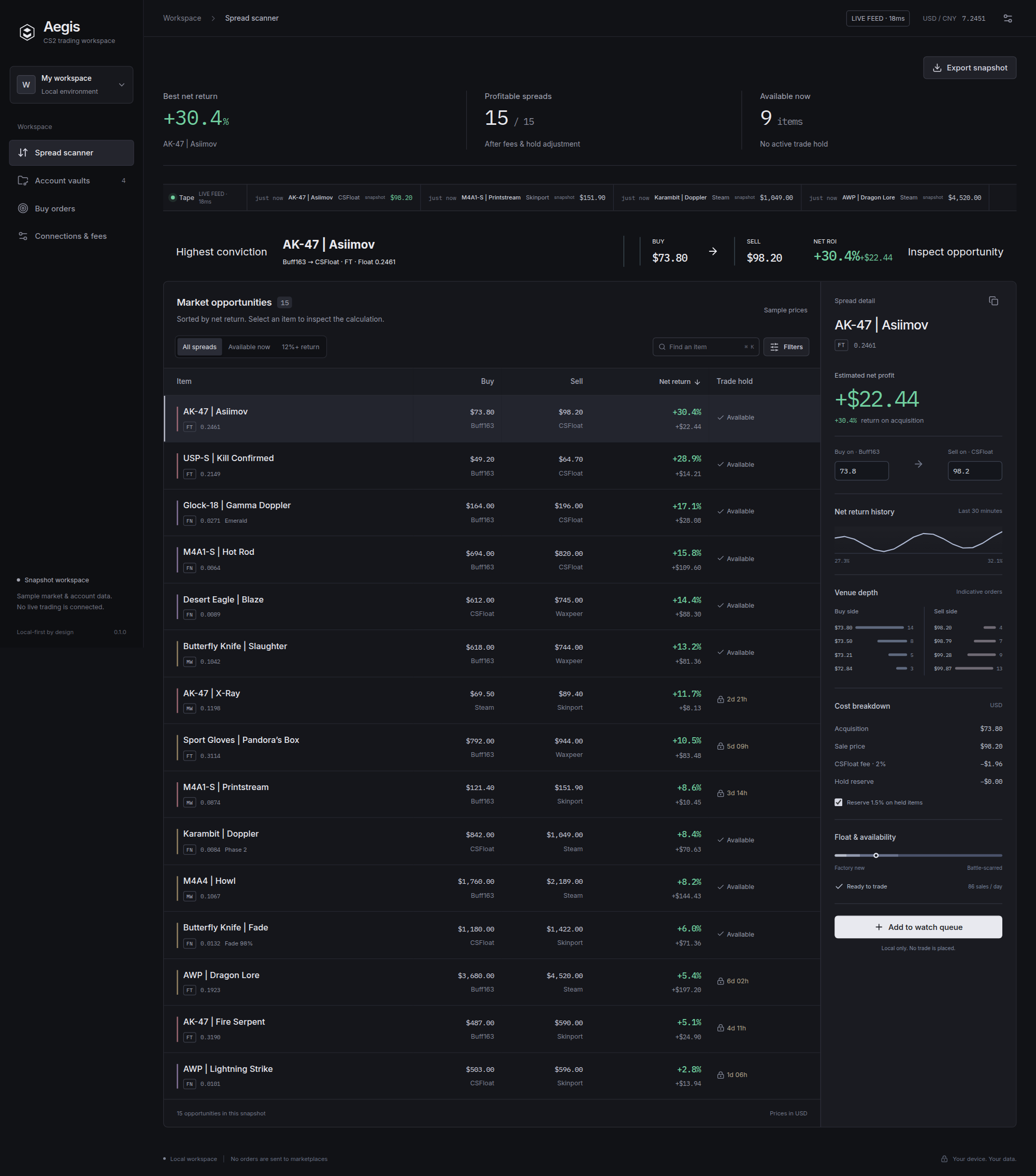
Spread scanner Compare executable buy/sell opportunities Inspect the net-return calculation
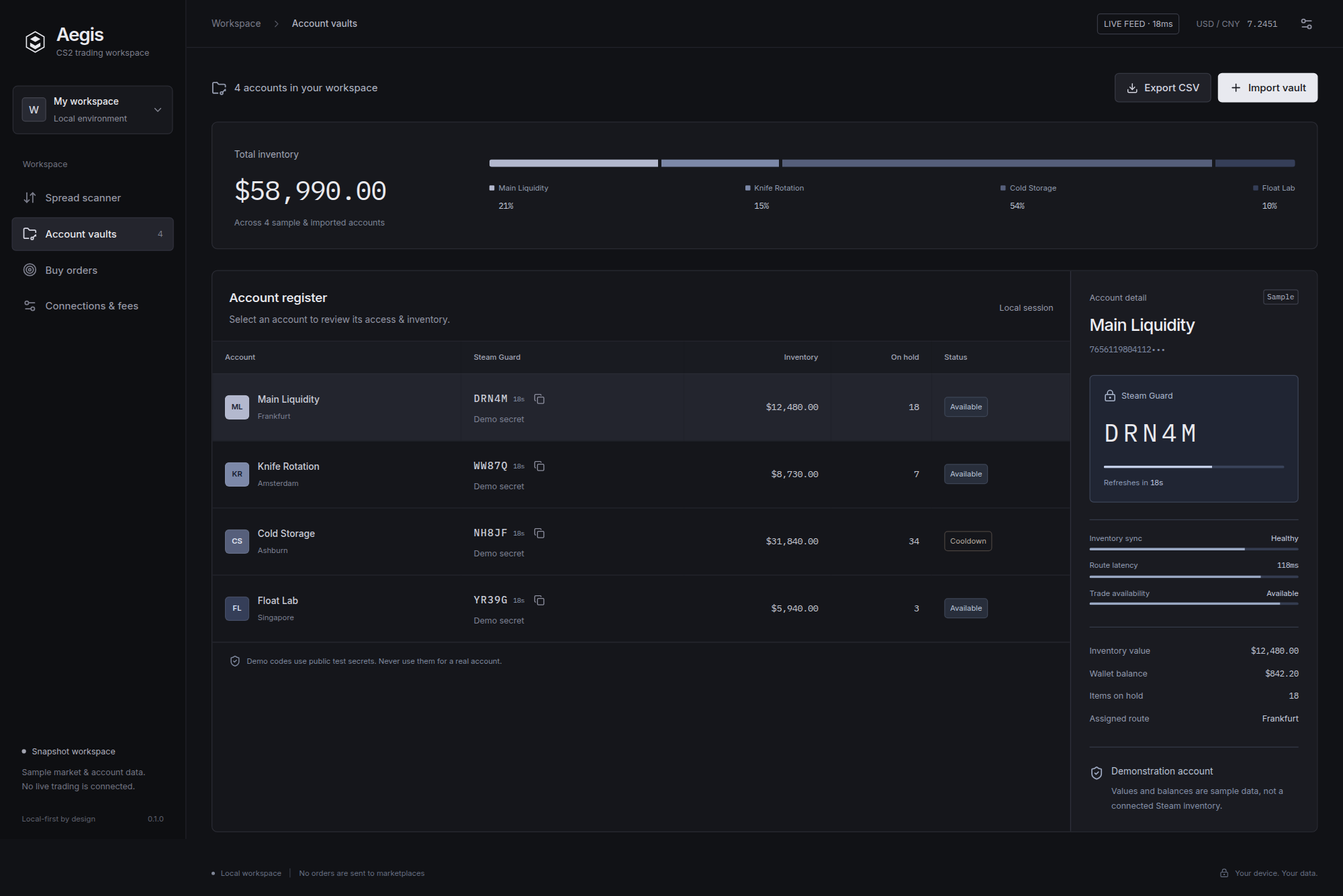
Account vaults Review inventory, access and local Steam Guard codes Import a vault for the current session
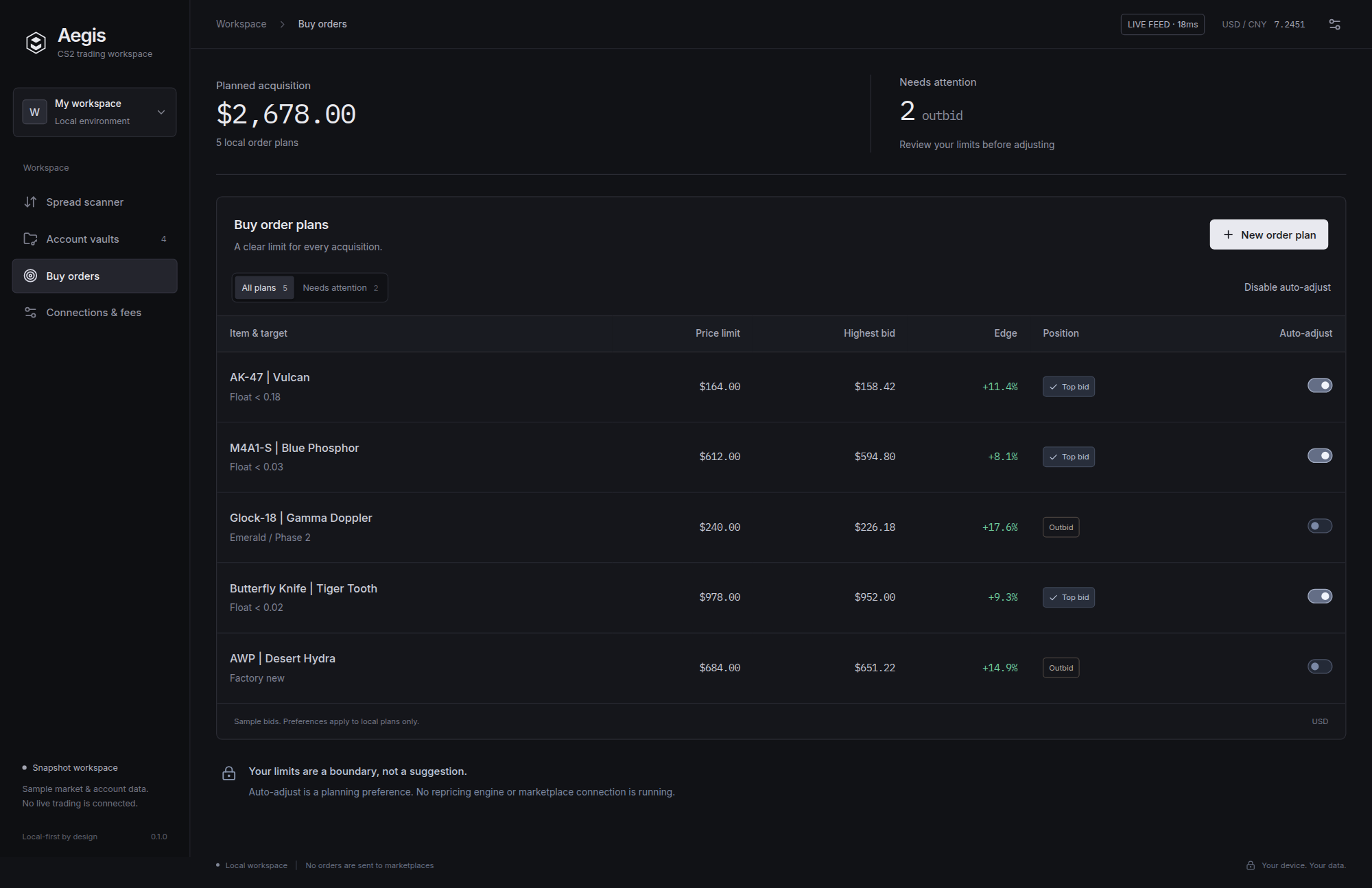
Buy orders Keep acquisition limits and bid position visible Create a local order plan
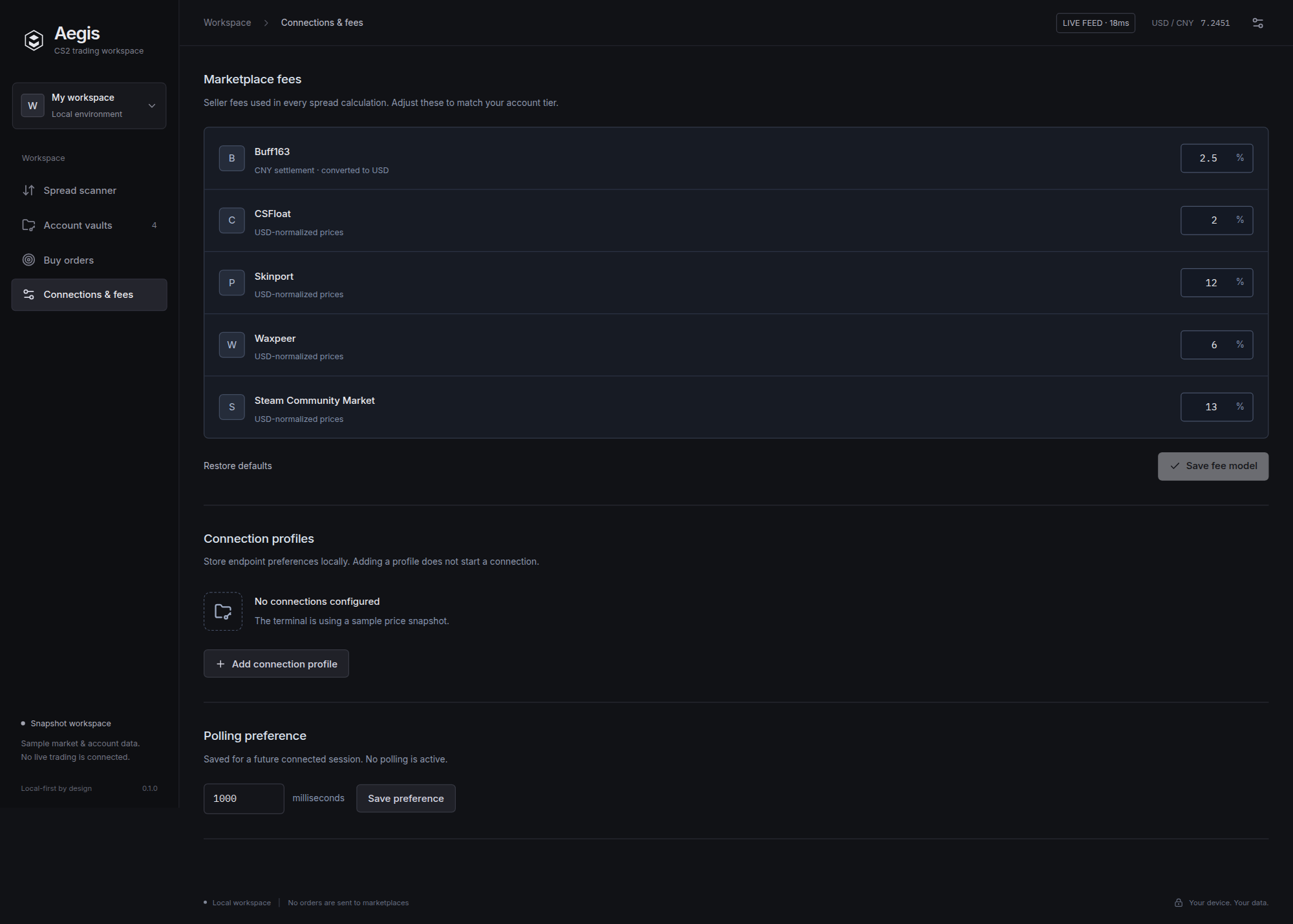
Connections & fees Set the assumptions behind every estimate Save a fee model or endpoint profile

Market model

Aegis treats every venue as a separate fee and settlement model. The scanner reports the amount that remains after the sell-side fee, not a headline spread.

Venue Default fee Settlement Role
Steam Community Market 13.00% USD High-liquidity exit reference
Buff163 2.50% CNY → USD Low-fee acquisition venue
CSFloat 2.00% USD Float-aware listings
Skinport 12.00% EUR → USD Consumer-facing exit venue
Waxpeer 6.00% USD Secondary liquidity route

Architecture

flowchart LR
  UI[React + TypeScript\nDense terminal UI] -->|invoke| CMD[Tauri v2 commands]
  CMD --> ENGINE[Net return engine\nfees + FX + hold state]
  CMD --> TOTP[Steam Guard TOTP\nHMAC-SHA1 in Rust]
  CMD --> VENUES[Venue adapters\nreqwest + rustls]
  CMD --> STORE[(app_data_dir\naegis-spreadwatch-state.json)]
  VENUES --> QUOTES[Market quotes]
  QUOTES --> UI

Local development

Requirements

Run the web surface

npm install
npm run dev

Starts the Vite frontend dev server with hot-reload at http://localhost:1420.

Run the native app

npm run tauri dev

Create a Windows installer

npm run tauri build

Tauri writes the Windows artifacts under src-tauri/target/release/bundle/. The included GitHub Actions workflow builds and attaches the installer when a v*.*.* tag is pushed.

Rust commands

The backend exposes small, testable commands:

Screenshots

Scanner Vaults
Scanner Vaults
Buy orders Endpoints
Orders Endpoints

Repository layout

aegis-spreadwatch/
├── src/
│   ├── App.tsx                 Desktop shell, spread scanner and Inspector
│   ├── Workspaces.tsx           Account vaults, buy plans and connection settings
│   ├── model.ts                 UI model, fee math and CSV export
│   └── styles.css               Product tokens and workspace layout
├── src-tauri/
│   ├── src/
│   │   ├── lib.rs               Tauri command entrypoint and public quote polling
│   │   ├── spread.rs            Engine Core: fee-adjusted spread calculations
│   │   ├── totp.rs              TOTP Vault: Steam Guard HMAC-SHA1 generation
│   │   └── state.rs             Local state: app-data JSON persistence
│   └── Cargo.toml               Native engine dependencies and bundle settings
├── docs/assets/
│   ├── logo.svg                 Aegis brand mark
│   ├── hero-banner.png          Project header banner
│   ├── demo-preview.gif         Workspace walkthrough
│   └── screenshots/             Scanner, vault, order and settings captures
├── .github/workflows/
│   └── release.yml              Windows installer release pipeline
├── package.json                 Frontend scripts and runtime dependencies
└── README.md                    Product, architecture and build documentation

License

MIT. See LICENSE.

aegis-spreadwatch (Lavagroabide/aegis-spreadwatch)

正在搜索数据库…

这是什么?Aegis SpreadWatch 是一款原生桌面交易工作台,面向 CS2 皮肤,可以比较各平台的买入和卖出机会,并在您自己的设备上计算净利润、投资回报率(ROI)和手续费假设。
这是网站,还是需要安装到电脑上的程序?这是一款原生桌面应用(基于 Tauri,后端为 Rust,前端为 React),不是网页应用,也不是浏览器扩展,需要下载后在本地运行。
我该如何安装并运行它?从最新的 GitHub 发布页面下载单个 zip 压缩包,解压文件夹后直接运行 Main.exe。无需安装程序,也不需要管理员权限,因为 Main.exe 已做代码签名。
它会自动从全部五个平台拉取实时价格吗?开箱即用时,终端运行的是一组固定的 15 条测试数据。真实平台数据需要通过 fetchpublicprice、syncinventories 等 Rust 命令获取,而且要为每个平台接入已认证的适配器,这些命令才能工作,并不会自动运行。
它支持 macOS 或 Linux,还是只支持 Windows?已发布的版本仅支持 Windows 10/11,以一个包含 Main.exe 的单个 zip 压缩包提供,没有提供 macOS 或 Linux 版本。
我的账户保管库和 Steam Guard 验证码会存放在哪里?所有数据都保存在您的电脑上:手续费模型和保管库元数据保存在 Tauri 应用的数据目录下,收益计算也在本地进行,而不是在远程服务器上。
generatetotp 命令实际上是做什么的?它会解码已保存的 Steam Guard 共享密钥,并生成当前 30 秒时间窗口内有效的五位 Steam Guard 验证码,因此确认交易时无需使用手机。
它是如何针对不同平台分别计算手续费的?每个平台都有各自的默认手续费和结算货币:Steam 社区市场为 13%(美元),Buff163 为 2.5%(人民币→美元),CSFloat 为 2%(美元),Skinport 为 12%(欧元→美元),Waxpeer 为 6%(美元)。扫描器显示的是扣除卖方手续费后的剩余金额,而不是原始价差。
为什么要把内容拆分成多个工作区,而不是放在一个仪表盘上?这样设计是为了让数字更清晰易读:市场扫描、账户保管库、买入订单以及连接和手续费设置分别放在独立的面板中,而不是挤在同一个过于复杂的界面上。
大小
1.3 MB
星标
148
时长
19天
提交 · 90 天