:sauropod: Grounding DINO




IDEA-CVR, IDEA-Research
Shilong Liu, Zhaoyang Zeng, Tianhe Ren, Feng Li, Hao Zhang, Jie Yang, Chunyuan Li, Jianwei Yang, Hang Su, Jun Zhu, Lei Zhang:email:.
[Paper] [Demo] [BibTex]
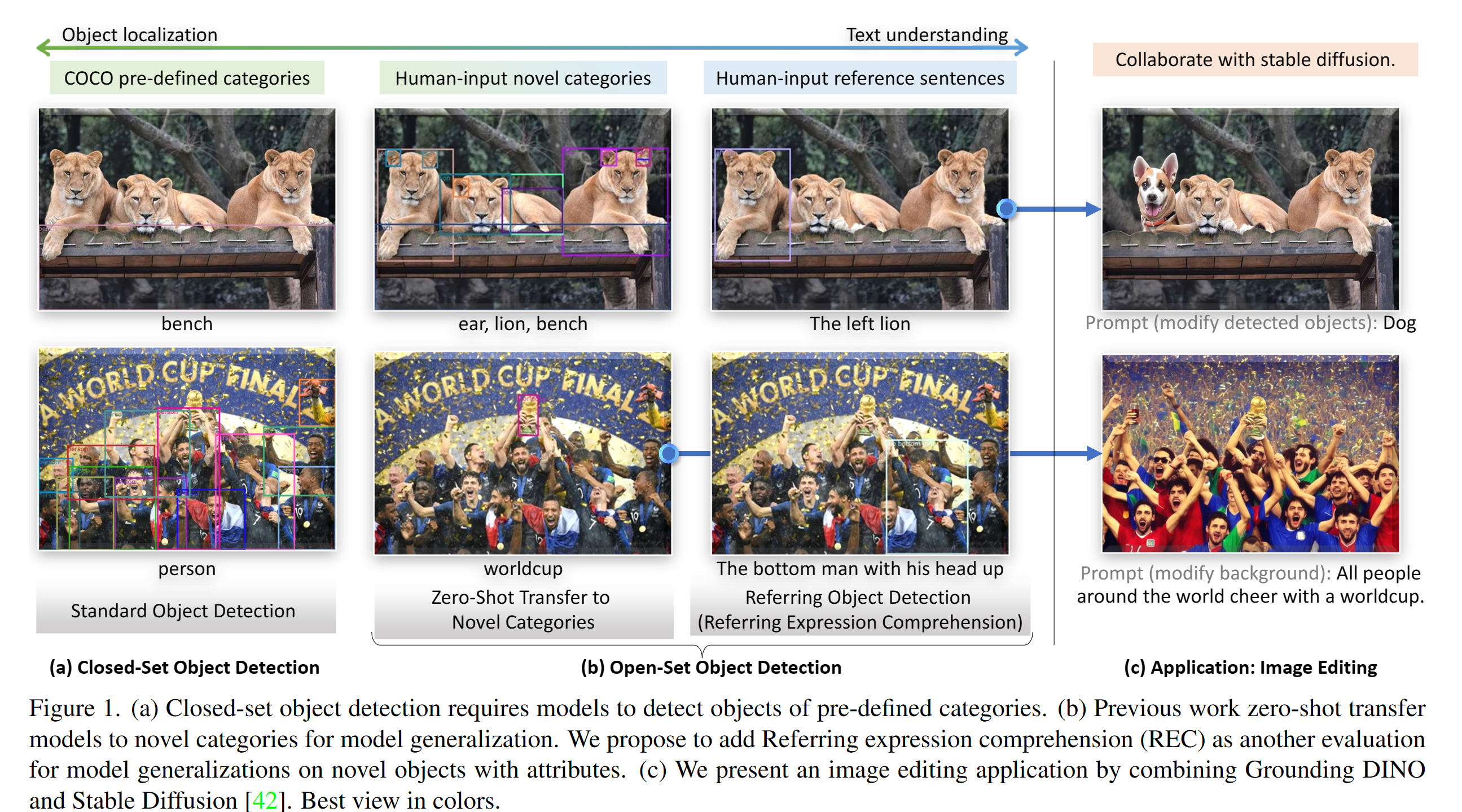
PyTorch implementation and pretrained models for Grounding DINO. For details, see the paper Grounding DINO: Marrying DINO with Grounded Pre-Training for Open-Set Object Detection.
:sun_with_face: Helpful Tutorial
:sparkles: Highlight Projects
:bulb: Highlight
- Open-Set Detection. Detect everything with language!
- High Performance. COCO zero-shot 52.5 AP (training without COCO data!). COCO fine-tune 63.0 AP.
- Flexible. Collaboration with Stable Diffusion for Image Editting.
:fire: News
2023/07/18: We release Semantic-SAM, a universal image segmentation model to enable segment and recognize anything at any desired granularity. Code and checkpoint are available!2023/06/17: We provide an example to evaluate Grounding DINO on COCO zero-shot performance.2023/04/15: Refer to CV in the Wild Readings for those who are interested in open-set recognition!2023/04/08: We release demos to combine Grounding DINO with GLIGEN for more controllable image editings.2023/04/08: We release demos to combine Grounding DINO with Stable Diffusion for image editings.2023/04/06: We build a new demo by marrying GroundingDINO with Segment-Anything named Grounded-Segment-Anything aims to support segmentation in GroundingDINO.2023/03/28: A YouTube video about Grounding DINO and basic object detection prompt engineering. [SkalskiP]2023/03/28: Add a demo on Hugging Face Space!2023/03/27: Support CPU-only mode. Now the model can run on machines without GPUs.2023/03/25: A demo for Grounding DINO is available at Colab. [SkalskiP]2023/03/22: Code is available Now!
Description
Paper introduction.
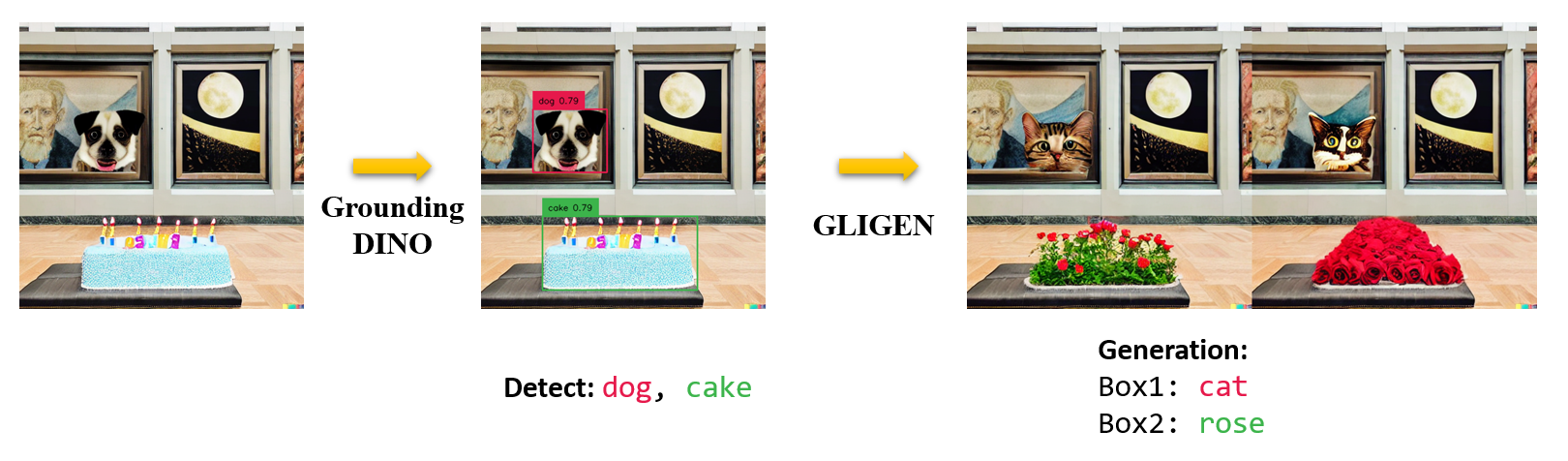
 Marrying Grounding DINO and GLIGEN
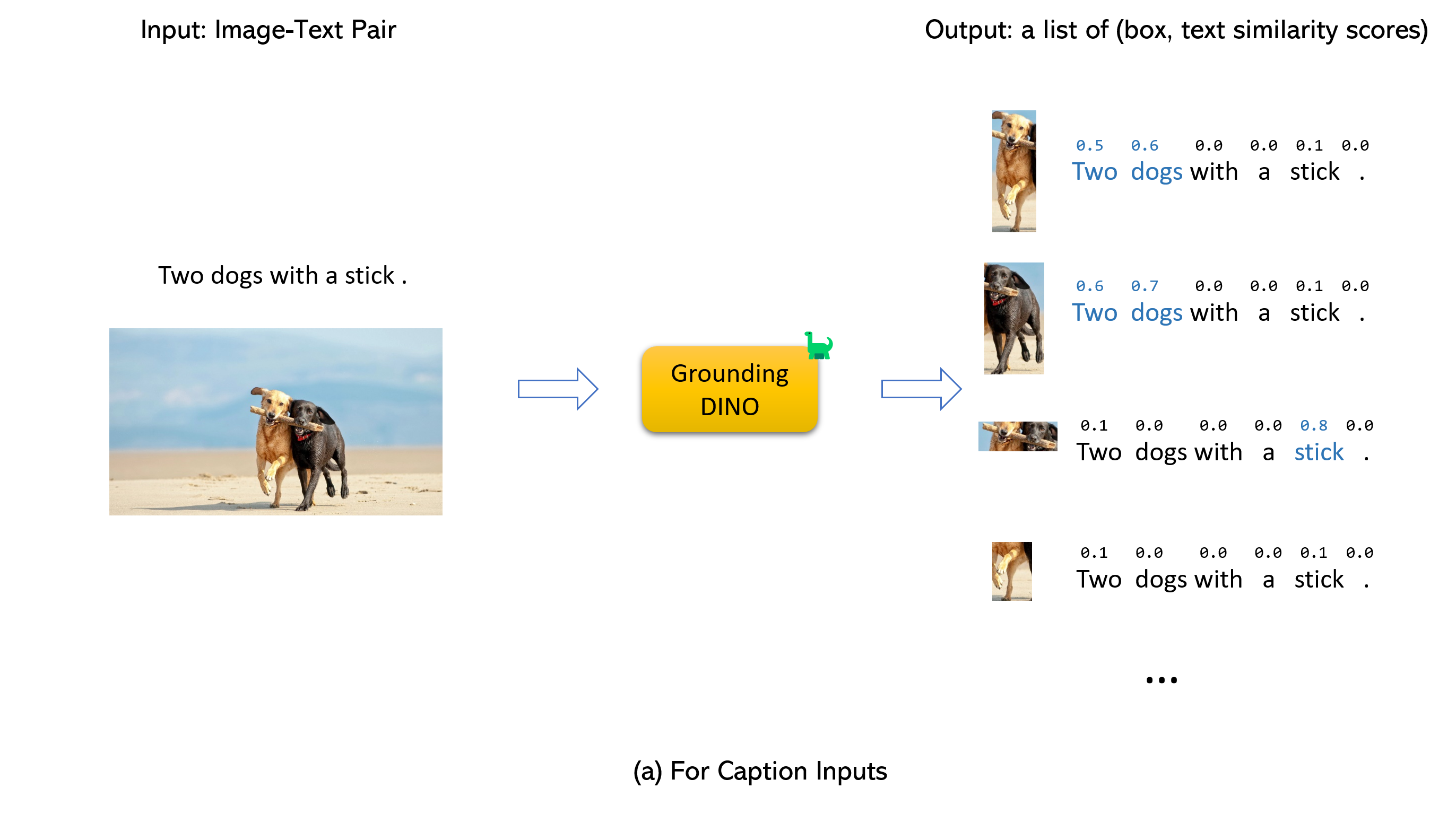
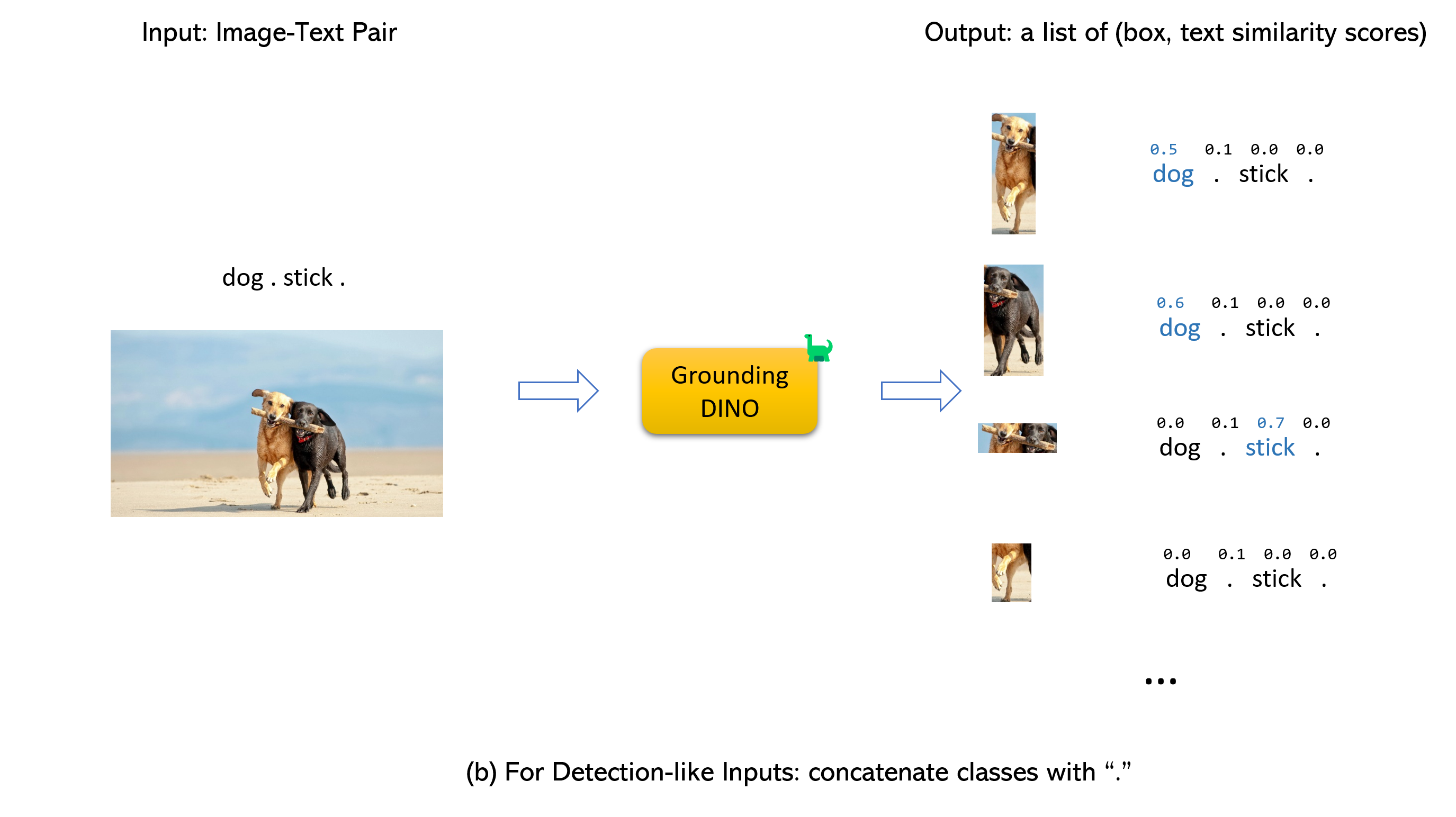
- Grounding DINO accepts an
(image, text) pair as inputs.
- It outputs
900 (by default) object boxes. Each box has similarity scores across all input words. (as shown in Figures below.)
- We defaultly choose the boxes whose highest similarities are higher than a
box_threshold.
- We extract the words whose similarities are higher than the
text_threshold as predicted labels.
- If you want to obtain objects of specific phrases, like the
dogs in the sentence two dogs with a stick., you can select the boxes with highest text similarities with dogs as final outputs.
- Note that each word can be split to more than one tokens with different tokenlizers. The number of words in a sentence may not equal to the number of text tokens.
- We suggest separating different category names with
. for Grounding DINO.
:label: TODO
- Release inference code and demo.
- Release checkpoints.
- Grounding DINO with Stable Diffusion and GLIGEN demos.
- Release training codes.
:hammer_and_wrench: Install
Note:
- If you have a CUDA environment, please make sure the environment variable
CUDA_HOME is set. It will be compiled under CPU-only mode if no CUDA available.
Please make sure following the installation steps strictly, otherwise the program may produce:
NameError: name '_C' is not defined
If this happened, please reinstalled the groundingDINO by reclone the git and do all the installation steps again.
how to check cuda:
echo $CUDA_HOME
If it print nothing, then it means you haven't set up the path/
Run this so the environment variable will be set under current shell.
export CUDA_HOME=/path/to/cuda-11.3
Notice the version of cuda should be aligned with your CUDA runtime, for there might exists multiple cuda at the same time.
If you want to set the CUDA_HOME permanently, store it using:
echo 'export CUDA_HOME=/path/to/cuda' >> ~/.bashrc
after that, source the bashrc file and check CUDA_HOME:
source ~/.bashrc
echo $CUDA_HOME
In this example, /path/to/cuda-11.3 should be replaced with the path where your CUDA toolkit is installed. You can find this by typing which nvcc in your terminal:
For instance,
if the output is /usr/local/cuda/bin/nvcc, then:
export CUDA_HOME=/usr/local/cuda
Installation:
1.Clone the GroundingDINO repository from GitHub.
git clone https://github.com/IDEA-Research/GroundingDINO.git
- Change the current directory to the GroundingDINO folder.
cd GroundingDINO/
- Install the required dependencies in the current directory.
pip install -e .
- Download pre-trained model weights.
mkdir weights
cd weights
wget -q https://github.com/IDEA-Research/GroundingDINO/releases/download/v0.1.0-alpha/groundingdino_swint_ogc.pth
cd ..
:arrow_forward: Demo
Check your GPU ID (only if you're using a GPU)
nvidia-smi
Replace {GPU ID}, image_you_want_to_detect.jpg, and "dir you want to save the output" with appropriate values in the following command
CUDA_VISIBLE_DEVICES={GPU ID} python demo/inference_on_a_image.py \
-c groundingdino/config/GroundingDINO_SwinT_OGC.py \
-p weights/groundingdino_swint_ogc.pth \
-i image_you_want_to_detect.jpg \
-o "dir you want to save the output" \
-t "chair"
 [--cpu-only] # open it for cpu mode
If you would like to specify the phrases to detect, here is a demo:
CUDA_VISIBLE_DEVICES={GPU ID} python demo/inference_on_a_image.py \
-c groundingdino/config/GroundingDINO_SwinT_OGC.py \
-p ./groundingdino_swint_ogc.pth \
-i .asset/cat_dog.jpeg \
-o logs/1111 \
-t "There is a cat and a dog in the image ." \
--token_spans "[[[9, 10], [11, 14]], [[19, 20], [21, 24]]]"
 [--cpu-only] # open it for cpu mode
The token_spans specify the start and end positions of a phrases. For example, the first phrase is [[9, 10], [11, 14]]. "There is a cat and a dog in the image ."[9:10] = 'a', "There is a cat and a dog in the image ."[11:14] = 'cat'. Hence it refers to the phrase a cat . Similarly, the [[19, 20], [21, 24]] refers to the phrase a dog.
See the demo/inference_on_a_image.py for more details.
Running with Python:
from groundingdino.util.inference import load_model, load_image, predict, annotate
import cv2

model = load_model("groundingdino/config/GroundingDINO_SwinT_OGC.py", "weights/groundingdino_swint_ogc.pth")
IMAGE_PATH = "weights/dog-3.jpeg"
TEXT_PROMPT = "chair . person . dog ."
BOX_TRESHOLD = 0.35
TEXT_TRESHOLD = 0.25

image_source, image = load_image(IMAGE_PATH)

boxes, logits, phrases = predict(
    model=model,
    image=image,
    caption=TEXT_PROMPT,
    box_threshold=BOX_TRESHOLD,
    text_threshold=TEXT_TRESHOLD
)

annotated_frame = annotate(image_source=image_source, boxes=boxes, logits=logits, phrases=phrases)
cv2.imwrite("annotated_image.jpg", annotated_frame)
Web UI
We also provide a demo code to integrate Grounding DINO with Gradio Web UI. See the file demo/gradio_app.py for more details.
Notebooks
COCO Zero-shot Evaluations
We provide an example to evaluate Grounding DINO zero-shot performance on COCO. The results should be 48.5.
CUDA_VISIBLE_DEVICES=0 \
python demo/test_ap_on_coco.py \
 -c groundingdino/config/GroundingDINO_SwinT_OGC.py \
 -p weights/groundingdino_swint_ogc.pth \
 --anno_path /path/to/annoataions/ie/instances_val2017.json \
 --image_dir /path/to/imagedir/ie/val2017
:luggage: Checkpoints
|
name |
backbone |
Data |
box AP on COCO |
Checkpoint |
Config |
| 1 |
GroundingDINO-T |
Swin-T |
O365,GoldG,Cap4M |
48.4 (zero-shot) / 57.2 (fine-tune) |
GitHub link | HF link |
link |
| 2 |
GroundingDINO-B |
Swin-B |
COCO,O365,GoldG,Cap4M,OpenImage,ODinW-35,RefCOCO |
56.7 |
GitHub link | HF link
| link |
:medal_military: Results
COCO Object Detection Results
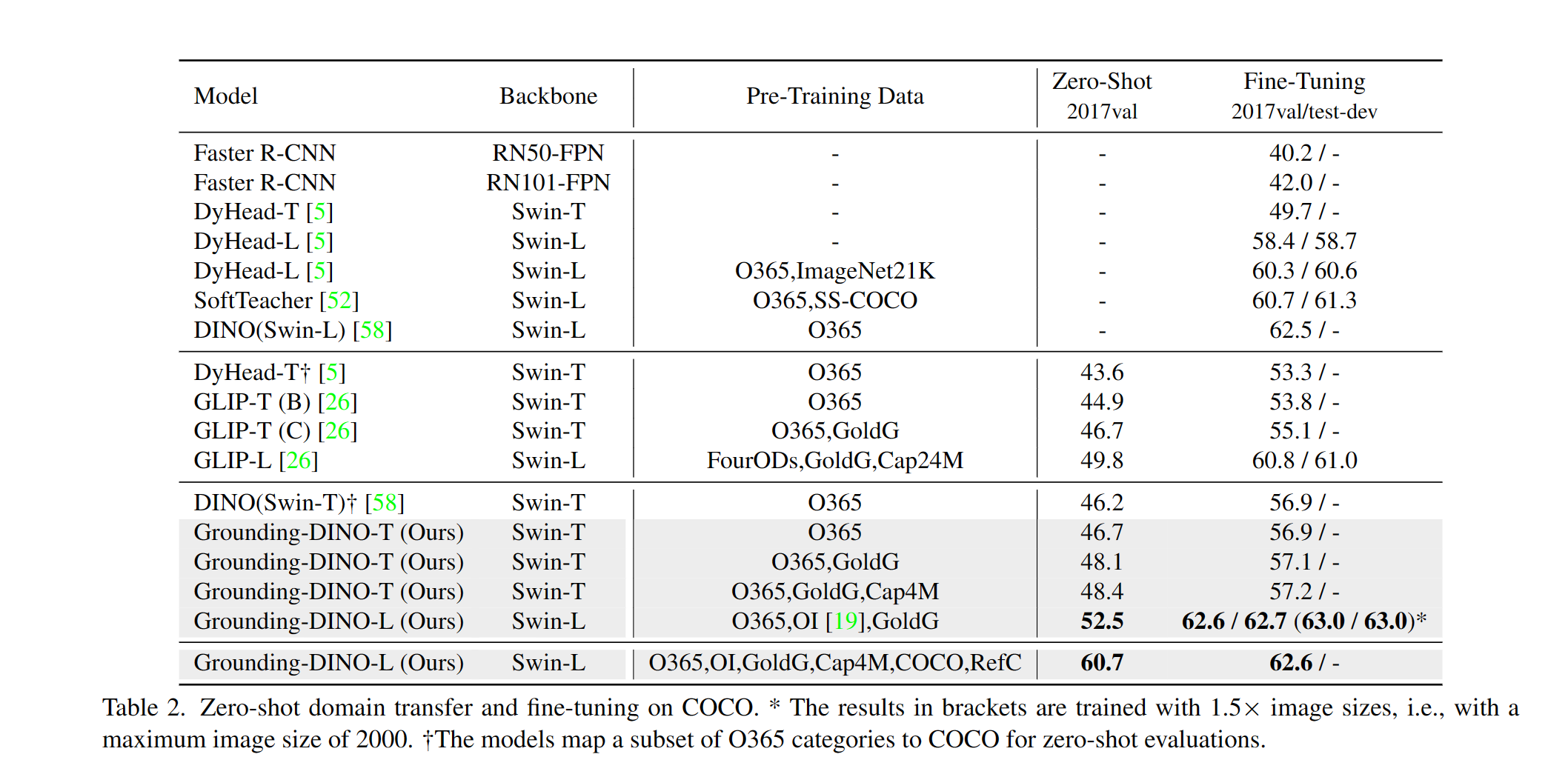
ODinW Object Detection Results
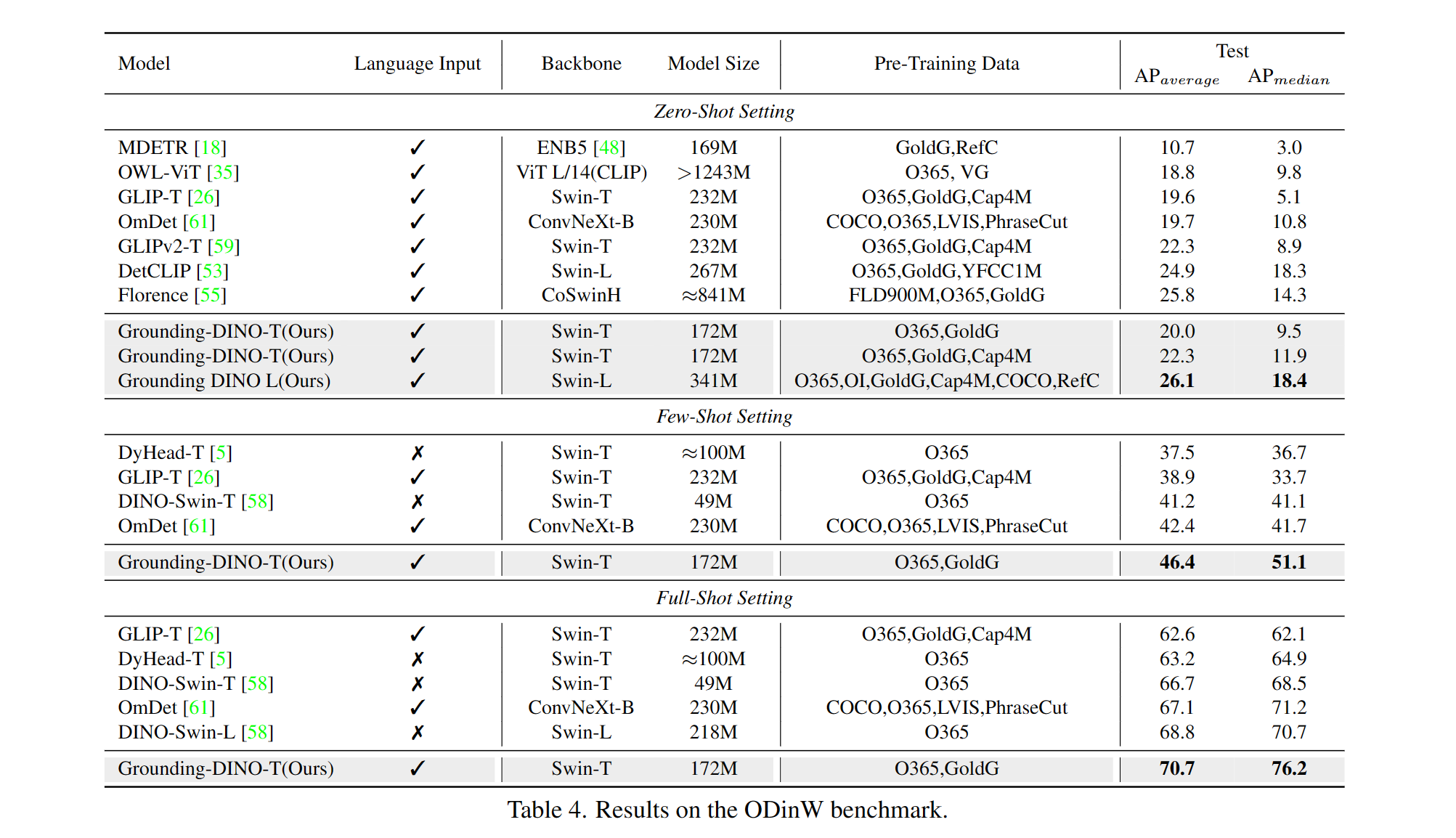
Marrying Grounding DINO with Stable Diffusion for Image Editing
See our example notebook for more details.
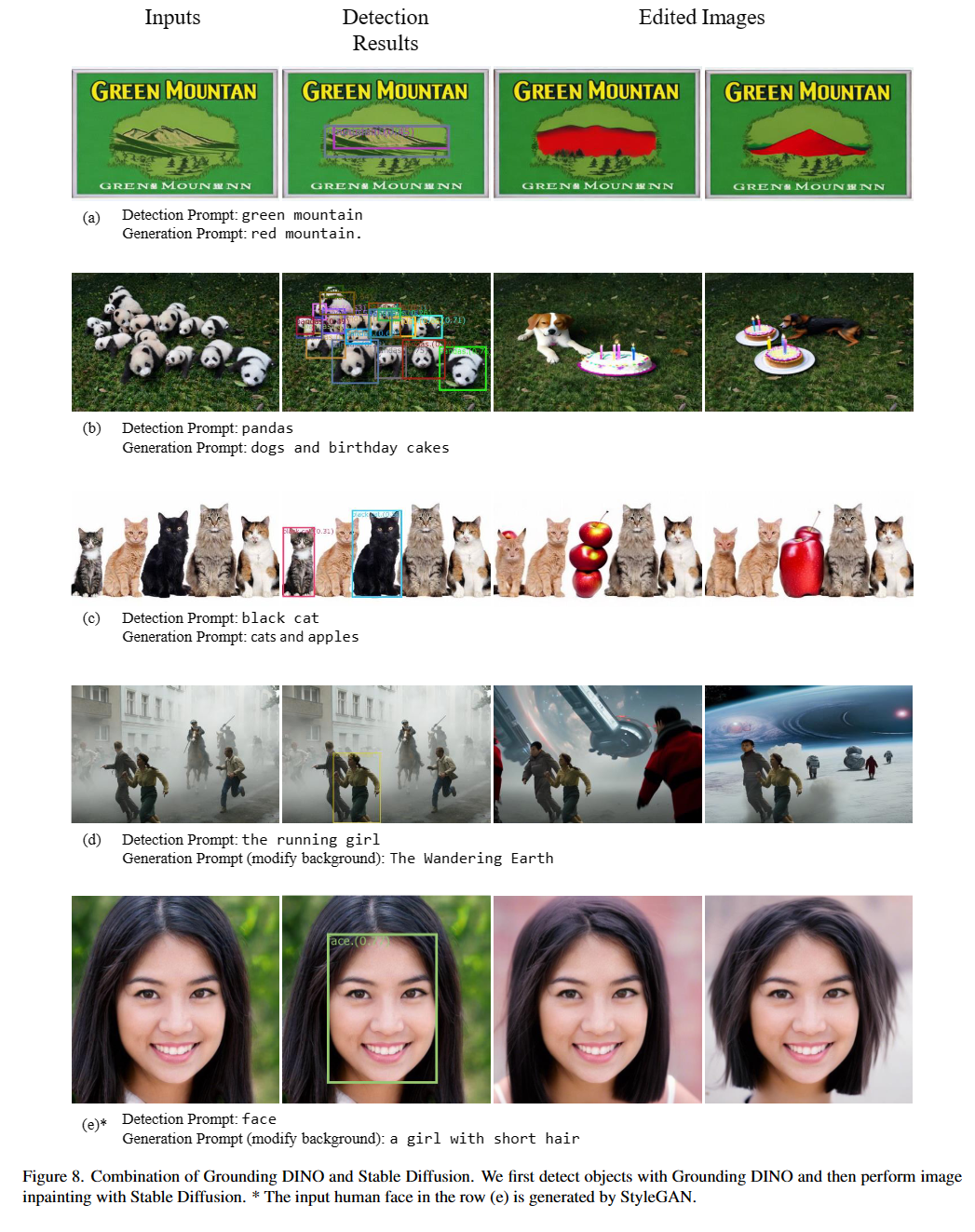
Marrying Grounding DINO with GLIGEN for more Detailed Image Editing.
See our example notebook for more details.
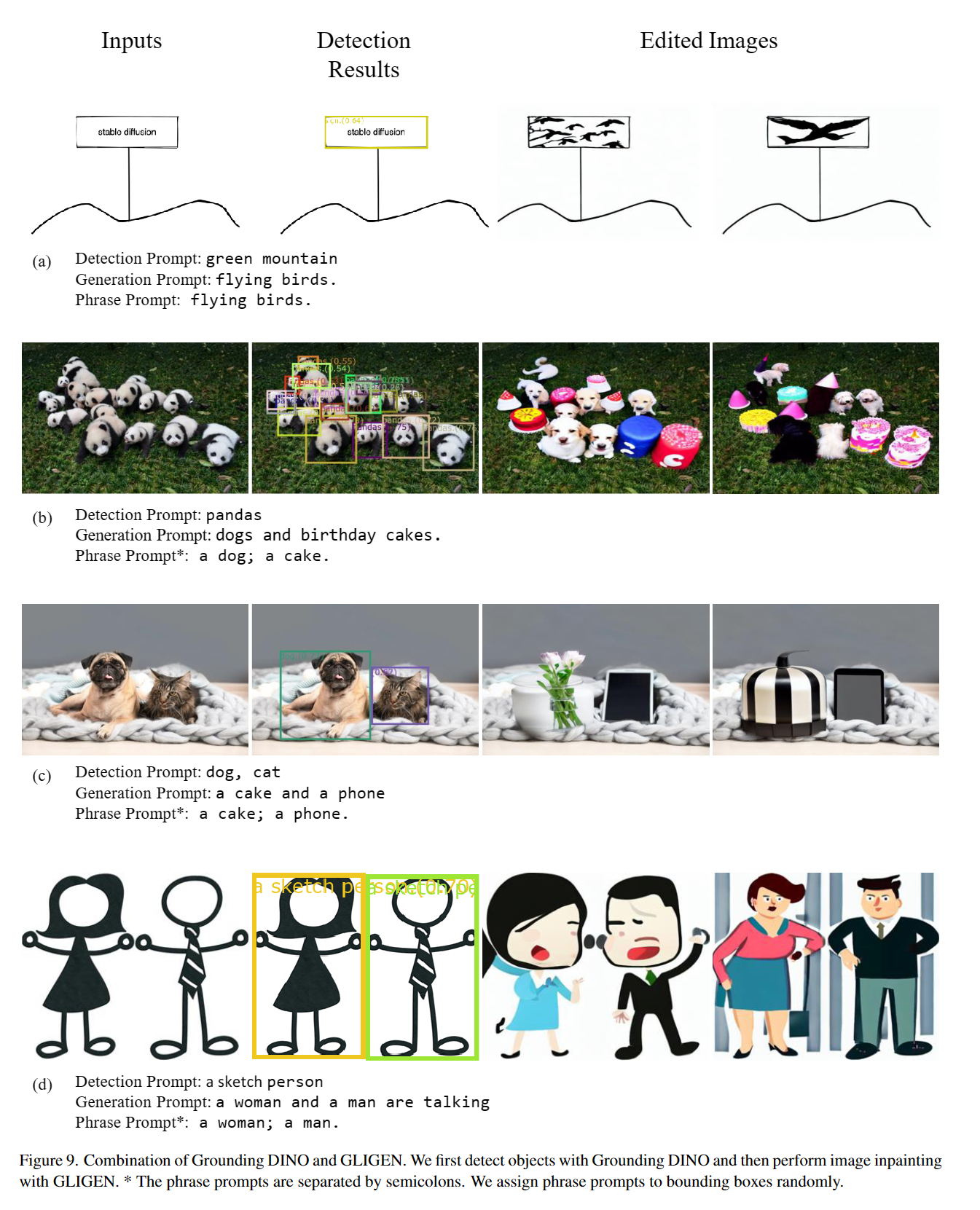
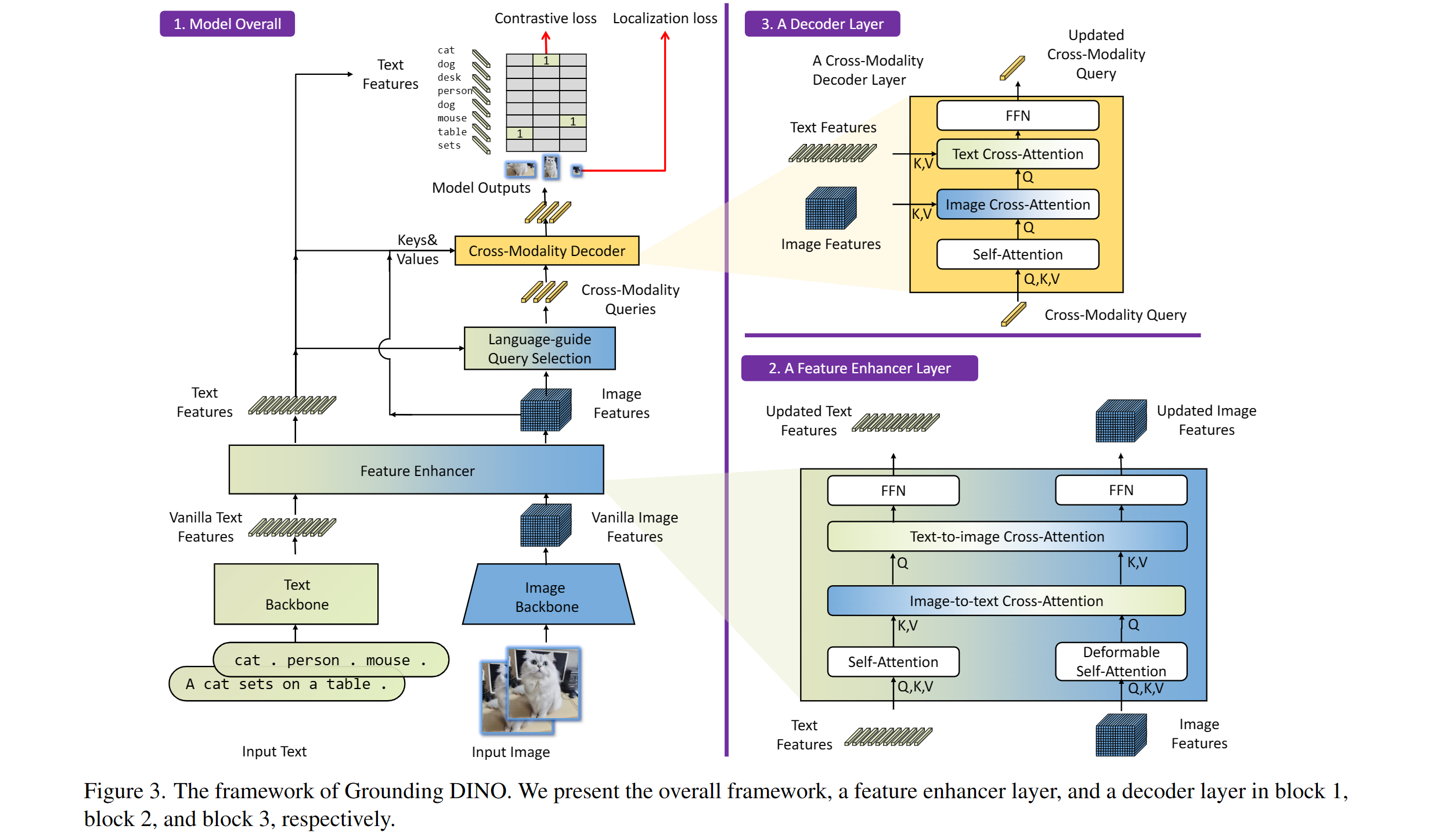
:sauropod: Model: Grounding DINO
Includes: a text backbone, an image backbone, a feature enhancer, a language-guided query selection, and a cross-modality decoder.
:hearts: Acknowledgement
Our model is related to DINO and GLIP. Thanks for their great work!
We also thank great previous work including DETR, Deformable DETR, SMCA, Conditional DETR, Anchor DETR, Dynamic DETR, DAB-DETR, DN-DETR, etc. More related work are available at Awesome Detection Transformer. A new toolbox detrex is available as well.
Thanks Stable Diffusion and GLIGEN for their awesome models.
:black_nib: Citation
If you find our work helpful for your research, please consider citing the following BibTeX entry.
@article{liu2023grounding,
  title={Grounding dino: Marrying dino with grounded pre-training for open-set object detection},
  author={Liu, Shilong and Zeng, Zhaoyang and Ren, Tianhe and Li, Feng and Zhang, Hao and Yang, Jie and Li, Chunyuan and Yang, Jianwei and Su, Hang and Zhu, Jun and others},
  journal={arXiv preprint arXiv:2303.05499},
  year={2023}
}


 IDEA-Research 推出的开放集目标检测模型(发表于 ECCV 2024):给它一张图片加一段文字描述,它就能找出你的文字所描述的物体。这个仓库是官方的 PyTorch 实现,附带预训练模型。