kimi-k3-in-c
A 2.78-trillion-parameter model. One CPU. 8 GB of RAM.
Kimi K3 inference in portable C99.
No BLAS. No framework. No GPU.





2.78T
parameters |
1.56 TB
checkpoint on disk |
8.24 GB
peak RSS, measured |
176 KB
the whole engine |
0
GPUs |
The same 2.78-trillion-parameter model, the same answer, on whatever machine you own.
More memory only buys speed:
| the machine you have |
RAM |
time per token |
what is going on |
| an ordinary laptop |
8 GB |
26.5 s |
the whole model streams off the disk on every step |
| a high-end laptop |
32 GB |
24.2 s |
some of the model now sits in memory |
| a desktop |
64 GB |
19.8 s |
more of it sits in memory |
| a heavy workstation |
128 GB+ |
5.6 s |
the model fits entirely in memory, the disk wait is gone |
Same short prompt at every size, and the output is byte-identical from the smallest machine to the largest; only the clock changes. One machine, 124 cores, fast NVMe drive: the first three rows still read the model from disk each step, so a slower drive is slower there, while the 128 GB+ row keeps everything in memory and no longer waits on the disk. On that same machine v1.0.0 made the math per token about 8× lighter, a follow-up question in a chat 3.9× faster, and long prompts about half as costly. (A token is roughly a short word-piece; the two runnable demos below are the original captures on a slower drive, so their clock reads a little higher.) Full data in docs/data/.
 I am open to AI research roles and PhD positions. CV.
$ ./bin/k3 ~/k3model --trunk ~/k3trunk --preset laptop \
           --tok ~/k3model --prompt "The capital of France is" --gen 8 --incremental

--- generated text ---
 Paris.",
+            "The Eiffel
----------------------
8 tokens in 261.5 s, 32.69 s/token average
PEAK RSS for the whole run: 8.24 GB
Slow, and answering correctly, in 8.24 GB, from a checkpoint of 1.56 TB. This is a base
model, so what follows " Paris." is a continuation rather than a reply; there is no chat
template. Give it more memory and the answer does not change, only the clock:
$ ./bin/k3 ~/k3model --trunk ~/k3trunk --preset server \
           --tok ~/k3model --prompt "def fibonacci(n):" --gen 28 --incremental

--- generated text ---
    if n <= 1:
        return n
    else:
        return fibonacci(n-1) + fibonacci
----------------------
28 tokens in 299.3 s, 10.69 s/token average
PEAK RSS for the whole run: 127.92 GB
Every figure in this document comes from the measurement output in
docs/data/.
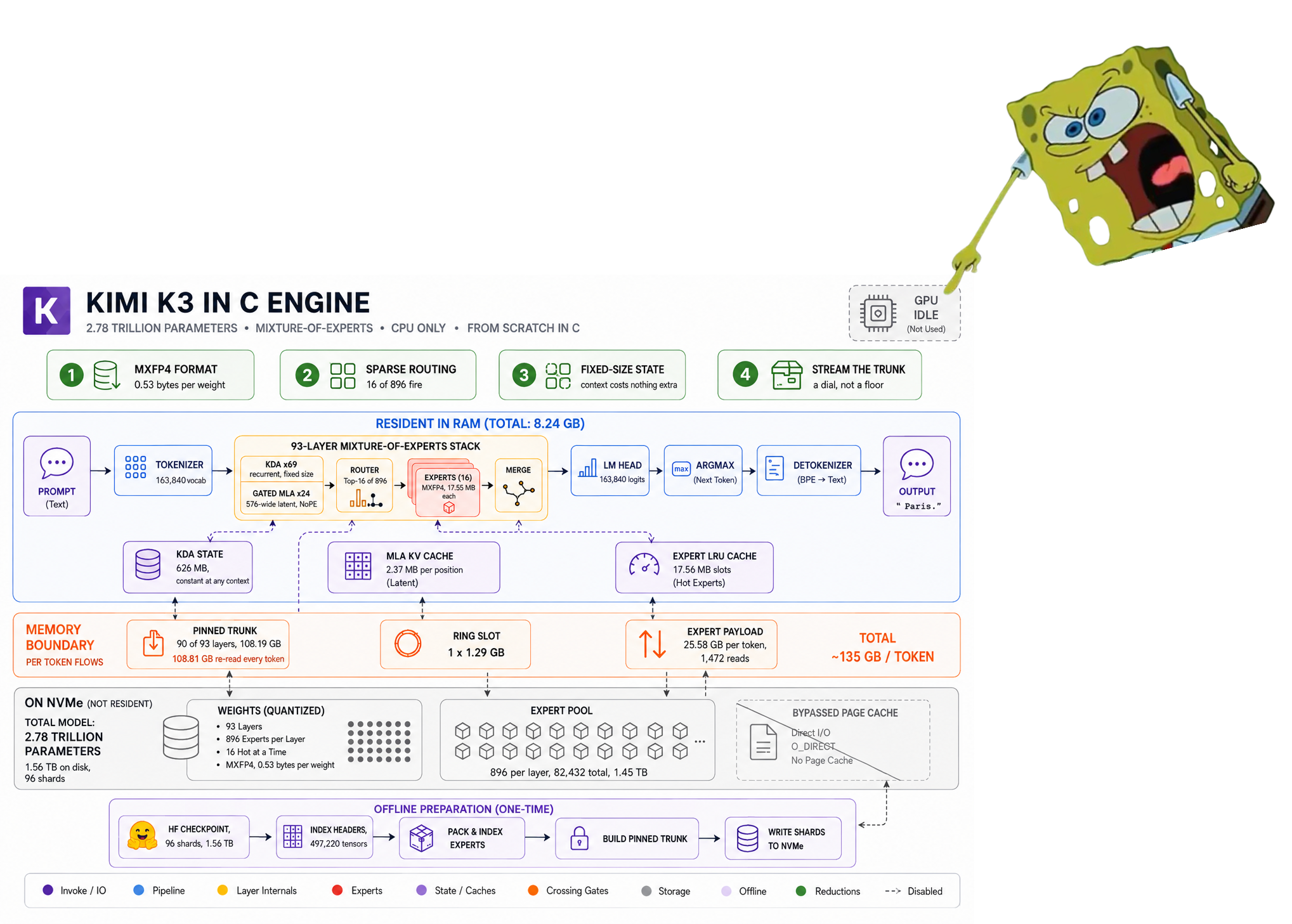
The dense trunk stays in memory to whatever depth you choose and streams the rest; the
1.45 TB of routed experts are never resident, and are multiplied straight out of their
packed 4-bit form. The consequence is that the same model runs in 8 GB and in 224 GB and
produces byte-identical output at every budget between.
Four decisions about where bytes live take it from a cluster to a laptop, and the answer
at the bottom is the same as the answer at the top:
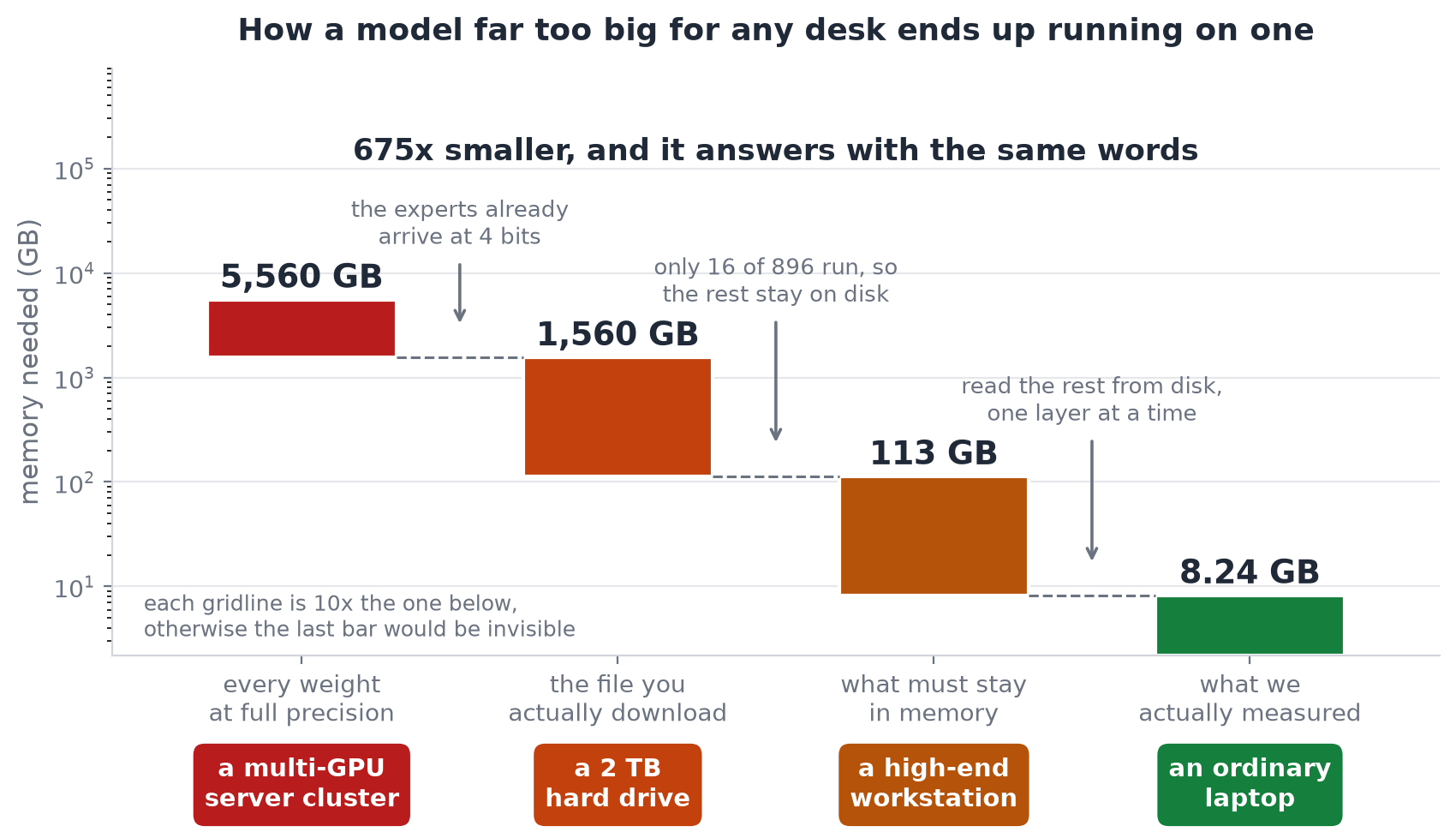
Part II builds every box in both diagrams from scratch, one
component at a time.
Contents
Part I: Getting started
Part II: How it works
Part III: Validation
Part IV: Measurements
Part V: Reference
Part I: Getting started
Requirements
The gate is storage: the checkpoint is 1.56 TB. Everything else is ordinary.
|
|
|
| OS |
Linux, x86-64 (reference); macOS/arm64 and Windows/x86-64 also build and pass every gate |
uses O_DIRECT, posix_memalign, getrusage -- ported for Windows via MSYS2's MinGW-w64 (see src/io/k3_portable_io.h) |
| CPU |
AVX2 + FMA |
AVX-512 unnecessary. make portable targets generic AVX2 |
| RAM |
8 GB and up |
every preset works; more memory is faster, never different |
| Storage |
~1.7 TB free |
1.56 TB checkpoint + 109 GB packed trunk, ideally on fast local disk |
| Toolchain |
GCC ≥ 9 or Clang ≥ 10 |
GNU make, or CMake |
| Python |
3.9+ |
for the download, pack and analysis tools; not for make test |
The tokenizer and config reader are portable C99 and build anywhere. Without a checkpoint
you can still do everything in Quick start.
Quick start
Clone, build and run the entire test suite. No checkpoint, no network, no Python. The
whole thing takes about a minute.
git clone https://github.com/FareedKhan-dev/kimi-k3-in-c.git
cd kimi-k3-in-c

make -j            # seconds. Seven C files, a compiler and OpenMP
make test          # under a minute
It ends like this, or it failed:
GATE 1  teacher forcing : 32/32 positions match tf_pred
        generated span  : 20/20  <- must be exact
GATE 2  greedy decode   : 20/20 generated tokens match full_ids
GATE 3  incremental    : 20/20 generated tokens match full_ids  <- KV cache + carried KDA state

VERDICT: ENGINE MATCHES THE REFERENCE EXACTLY

ALL WEIGHTLESS TESTS PASSED
That is the whole engine: every kernel, the streaming cache, the safetensors reader, the
config reader, the tokenizer, and an end-to-end oracle over a 13-layer model built with the
same tensor graph as the released one, checked against a PyTorch reference from fixtures
committed to the repository.
One published measurement also replays on the spot, from a trace recorded during a full
93-layer run (this one needs Python 3.9+ and numpy):
python3 tools/sim_cache.py tests/fixtures/expert_trace.bin
100,096 expert requests, reprinting the capacity table in
expert-cache-capacity.txt.
Full setup
Six steps from an empty directory to generated text. Only step 4 is slow.
./scripts/k3-doctor.sh can be run at any point. It checks the toolchain, sizes your RAM
to a preset, measures your storage, and prints the exact command to run next.
Step 0. clone
git clone https://github.com/FareedKhan-dev/kimi-k3-in-c.git
cd kimi-k3-in-c
About 45 MB, most of it the diagrams and the test fixtures.
Step 1. check the machine
./scripts/k3-doctor.sh
Takes about a minute, because it measures your disk the way the engine reads it. It exits
non-zero if the machine cannot run the model at all.
Step 2. build
make -j
Seconds. The only dependencies are a C99 compiler, libm and OpenMP. CMake works too:
cmake -B build && cmake --build build -j && ctest --test-dir build
Step 3. verify before downloading anything
make test
This is worth doing before committing to a 1.56 TB download: it proves the engine matches
its reference on a model with the same tensor graph, and it needs nothing but the
repository.
Step 4. fetch the checkpoint
1.56 TB, so hours rather than minutes. Get a token from
huggingface.co/settings/tokens:
export HF_TOKEN=hf_your_token_here          # read from the environment, never echoed
./scripts/download-model.sh ~/k3model       # resumable, re-run to continue
The script finishes by verifying the shard count, the exact byte total, and then every
individual per-shard size against the published figures:
verifying…
  shards : 96 (expect 96)
  bytes  : 1560936091448 (expect 1560936091448)
  shards : all 96 match their published sizes individually
  RESULT : byte-exact match
A partial download does not fail loudly; it produces wrong tokens. Treat a FAIL here as
a stop. Checking per shard also turns "re-download 1.56 terabytes" into "re-download this
one 17 gigabyte file", and it catches the one case a total cannot: two shards wrong in
opposite directions by the same amount.
Step 5. pack the trunk
./scripts/pack-trunk.sh ~/k3model ~/k3trunk
About four minutes, once. It rewrites the 93 dense layers into one 109 GB file where layer
L lives at a known offset and can be read in a single call. This is what turns the
memory requirement into a dial. Put the output on the fastest disk you have.
Step 6. run
./bin/k3 ~/k3model --trunk ~/k3trunk --preset workstation \
         --tok ~/k3model --prompt "The capital of France is" --gen 8 --incremental
The tokenizer ships with the checkpoint, which is why --tok points at the model
directory.
Where everything ends up
kimi-k3-in-c/    ~45 MB   source, docs, images, and bin/k3
~/k3model/      1.56 TB   96 shards · config.json · tiktoken.model · tokenizer_config.json
~/k3trunk/       109 GB   trunk.bin · trunk.json, on the fastest disk you have
The first token of any run loads every pinned layer from disk, about 108 GB at the
server preset, so it takes far longer than the steady rate. That cost is paid once per
run, not once per token.
Usage
Synopsis
k3 <model_dir> [prompt] [memory] [generation] [diagnostics]
<model_dir> is the directory holding the .safetensors shards. It is required for any
run, but --help, --version and --list-presets work without it:
./bin/k3 --help
./bin/k3 --version
./bin/k3 --list-presets
Prompt options
Exactly one of these is required. Passing none, or more than one, is a usage error
(exit 2).
| flag |
argument |
|
--prompt |
TEXT |
tokenize TEXT and run it. Requires --tok. |
--prompt-file |
PATH |
tokenize the file's bytes. Requires --tok. Preferred for anything non-ASCII: the shell re-encodes argv, whereas a file is read verbatim |
--ids |
1,2,3 |
token ids directly. No tokenizer is loaded at all, so this works on a machine with no tokenizer files. The reproducible channel the tests use |
# text in
./bin/k3 ~/k3model --tok ~/k3model --prompt "The capital of France is" ...

# text in, from a file. Use this for CJK, emoji, accents
printf 'La capitale de la France est' > /tmp/p.txt
./bin/k3 ~/k3model --tok ~/k3model --prompt-file /tmp/p.txt ...

# ids in, ids out, no tokenizer needed
./bin/k3 ~/k3model --ids 1008,10484,318,15383,387 ...
Memory options
| flag |
argument |
default |
|
--preset |
NAME |
none |
laptop · desktop · workstation · server · max. Sets both budgets below |
--trunk |
DIR |
off |
the packed trunk directory from step 5. This is what enables streaming. Without it the trunk loads fully resident, around 113.5 GB |
--trunk-gb |
X |
16 |
budget for pinned layers plus the streaming ring |
--cache-gb |
X |
64 |
budget for the routed-expert LRU cache |
--ultra-low-memory |
none |
off |
stream exact embedding rows and lm_head chunks; full recompute also reuses one recurrent-state slot. Requires --trunk |
The ultra preset selects --ultra-low-memory with a 2.5 GB trunk ring and a
0.31 GB expert cache. It is a proof-of-life path for 8 GB-class machines, not an
interactive-speed preset; model precision, Top-K routing and all 93 layers are unchanged.
--preset and the two -gb flags set the same two numbers, so a preset is just a
shorthand. Order matters if you mix them: a later flag wins, so
--preset server --cache-gb 40 gives you the server trunk budget with a 40 GB cache.
--preset without --trunk does nothing useful. Every preset assumes the trunk is
streamed. Omit --trunk and the engine loads all 113.5 GB resident regardless of the
budget you asked for.
Generation options
| flag |
argument |
default |
|
--gen |
N |
8 |
tokens to generate. Ceiling 4096; prompts may be up to 32768 tokens |
--incremental |
none |
off |
carry the KV cache and the recurrent state between tokens instead of re-running the whole prefix |
--tok |
DIR |
none |
directory holding tiktoken.model and tokenizer_config.json |
Pass --incremental for any generation of length. Without it every step re-runs the
entire prefix, which is O(T²); with it, step 0 pays for the prompt and every later step
costs the same fixed amount. Both paths are gated on producing identical tokens, so this
is a pure speed choice.
Diagnostic options
| flag |
argument |
|
--config |
PATH |
model config; defaults to <model_dir>/config.json |
--layers |
N |
bind only the first N layers, for partial shard sets |
--out |
FILE |
JSON results (default k3_run.json) |
--dump-logits |
PATH |
float32 logits for the first step, for elementwise comparison |
--dump-cache-trace |
DIR |
writes expert_hist.json and expert_trace.bin, which tools/sim_cache.py replays |
Exit codes
Scripts can rely on these.
|
|
0 |
success |
1 |
a tensor failed to bind, or a forward pass failed |
2 |
usage error, or a config that could not be read with confidence; the engine declines to guess |
4 |
the run finished, but at least one routed expert failed to load, so the emitted ids are unsound. Distinct from 1 because the process otherwise succeeded, and it is the code that catches silent numerical corruption |
Environment variables
| variable |
used by |
|
HF_TOKEN |
download-model.sh |
HuggingFace token, read from the environment and never echoed |
OMP_NUM_THREADS |
the engine |
thread count, defaulting to all cores |
K3_TOK_FILES |
tokenizer tools and CI |
directory holding tiktoken.model, when it is not in a default location |
K3_MODEL_DIR |
tools/budget.py |
checkpoint directory, when not given as an argument |
Worked examples
# Full-model, one-token proof of life on an 8 GB-class ARM64 machine.
./bin/k3 ~/k3model --trunk ~/k3trunk --preset ultra \
         --tok ~/k3model --prompt "The capital of France is" --gen 1

# Smallest possible run, the 8 GB floor.
./bin/k3 ~/k3model --trunk ~/k3trunk --preset laptop \
         --tok ~/k3model --prompt "Hello! My name is" --gen 16 --incremental

# Fastest per gigabyte. Pins 90 of 93 trunk layers.
./bin/k3 ~/k3model --trunk ~/k3trunk --preset server \
         --tok ~/k3model --prompt "def fibonacci(n):" --gen 28 --incremental

# Hand-tuned split instead of a preset: everything to the trunk.
./bin/k3 ~/k3model --trunk ~/k3trunk --trunk-gb 110 --cache-gb 13 \
         --tok ~/k3model --prompt-file prompt.txt --gen 32 --incremental

# Reproducible: ids in, ids out, no tokenizer, JSON results.
./bin/k3 ~/k3model --trunk ~/k3trunk --preset desktop \
         --ids 1008,10484,318,15383,387 --gen 8 --incremental --out run.json

# Capture a cache trace, then replay it offline at any capacity.
./bin/k3 ~/k3model --trunk ~/k3trunk --preset workstation \
         --ids 1008,10484,318,15383,387 --gen 8 --incremental \
         --dump-cache-trace /tmp/trace
python3 tools/sim_cache.py /tmp/trace/expert_trace.bin

# Elementwise logit

 An inference engine for the 2.78-trillion-parameter Kimi K3 model, written in portable C99. It runs on a plain CPU in as little as 8 GB of RAM — no GPU, no BLAS, no framework — streaming the 1.56 TB checkpoint straight off disk.