





BlackHole README

The project's README from github.com/ExistentialAudio/BlackHole. As one markdown file: README.md.

BlackHole: Audio Loopback Driver

BlackHole: Audio Loopback Driver

Platform: macOS Release License Twitter Facebook

BlackHole is a modern macOS virtual audio loopback driver that allows applications to pass audio to other applications with zero additional latency.

Download Installer

Join the Discord Server

Sponsors

Recall.ai - API for desktop recording

If you’re looking for a desktop recording API, consider checking out Recall.ai, an API that records video, audio, and transcripts from Zoom, Google Meet, Microsoft Teams, in-person meetings, and more.

To sponsor this project visit https://github.com/sponsors/ExistentialAudio

Table of Contents

Features

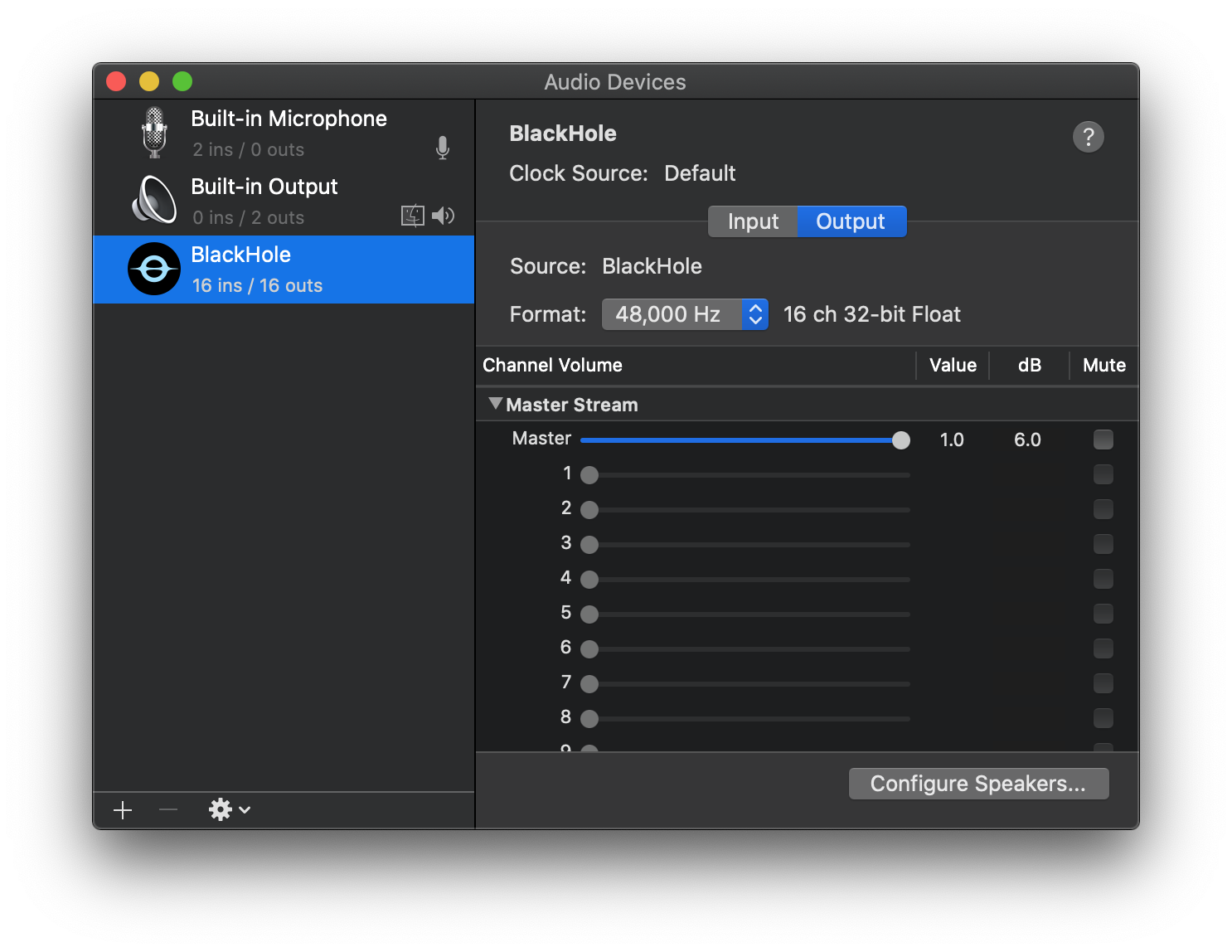
Audio MIDI Setup

Installation Instructions

Option 1: Download Installer

  1. Download the latest installer
  2. Close all running audio applications
  3. Open and install package
  4. Restart your system when prompted

Option 2: Install via Homebrew

Uninstallation Instructions

Option 1: Use Uninstaller

Option 2: Manually Uninstall

  1. Delete the BlackHole driver with the terminal command:

    rm -R /Library/Audio/Plug-Ins/HAL/BlackHoleXch.driver

    Be sure to replace X with either 2, 16, or 64.

    Note that the directory is the root /Library not /Users/user/Library.

  2. Restart CoreAudio with the terminal command:

    sudo killall -9 coreaudiod

For more specific details visit the Wiki.

User Guides

Logic Pro X

GarageBand

Audacity

Reaper

Record System Audio

  1. Setup Multi-Output Device
  2. In Audio MIDI Setup → Audio Devices right-click on the newly created Multi-Output and select "Use This Device For Sound Output"
  3. Open digital audio workstation (DAW) such as GarageBand and set input device to "BlackHole"
  4. Set track to input from channel 1-2
  5. Play audio from another application and monitor or record in your DAW

Route Audio Between Applications

  1. Set output driver to "BlackHole" in sending application
  2. Output audio to any channel
  3. Open receiving application and set input device to "BlackHole"
  4. Input audio from the corresponding output channels

Developer Guides

A license is required for all non-GPLv3 projects

Please support our hard work and continued development. To request a license contact Existential Audio.

Build & Install

After building, to install BlackHole:

  1. Copy or move the built BlackHoleXch.driver bundle to /Library/Audio/Plug-Ins/HAL
  2. Restart CoreAudio using sudo killall -9 coreaudiod

Customizing BlackHole

The following pre-compiler constants may be used to easily customize a build of BlackHole.

kDriver_Name
kPlugIn_BundleID
kPlugIn_Icon

kDevice_Name
kDevice_IsHidden
kDevice_HasInput
kDevice_HasOutput

kDevice2_Name
kDevice2_IsHidden
kDevice2_HasInput
kDevice2_HasOutput

kLatency_Frame_Size
kNumber_Of_Channels
kSampleRates

They can be specified at build time with xcodebuild using GCC_PREPROCESSOR_DEFINITIONS.

Example:

xcodebuild \
  -project BlackHole.xcodeproj \
  GCC_PREPROCESSOR_DEFINITIONS='$GCC_PREPROCESSOR_DEFINITIONS kSomeConstant=value'

Be sure to escape any quotation marks when using strings.

Renaming BlackHole

To customize BlackHole it is required to change the following constants.

These can specified as pre-compiler constants using xcodebuild.

driverName="BlackHole"
bundleID="audio.existential.BlackHole"
icon="BlackHole.icns"

xcodebuild \
  -project BlackHole.xcodeproj \
  -configuration Release \
  PRODUCT_BUNDLE_IDENTIFIER=$bundleID \
  GCC_PREPROCESSOR_DEFINITIONS='$GCC_PREPROCESSOR_DEFINITIONS
  kDriver_Name=\"'$driverName'\"
  kPlugIn_BundleID=\"'$bundleID'\"
  kPlugIn_Icon=\"'$icon'\"'

Customizing Channels, Latency, and Sample Rates

kNumber_Of_Channels is used to set the number of channels. Be careful when specifying high channel counts. Although BlackHole is designed to be extremely efficient at higher channel counts it's possible that your computer might not be able to keep up. Sample rates play a role as well. Don't use high sample rates with a high number of channels. Some applications don't know how to handle high channel counts. Proceed with caution.

kLatency_Frame_Size is how much time in frames that the driver has to process incoming and outgoing audio. It can be used to delay the audio inside of BlackHole up to a maximum of 65536 frames. This may be helpful if using BlackHole with a high channel count.

kSampleRates set the sample rate or sample rates of the audio device. If using multiple sample rates separate each with a comma (,). For example: kSampleRates='44100,48000'.

Mirror Device

By default BlackHole has a hidden mirrored audio device. The devices may be customized using the following constants.

// Original Device
kDevice_IsHidden
kDevice_HasInput
kDevice_HasOutput

// Mirrored Device
kDevice2_IsHidden
kDevice2_HasInput
kDevice2_HasOutput

When all are set to true a 2nd BlackHole will show up that works exactly the same. The inputs and outputs are mirrored so the outputs from both devices go to the inputs of both devices.

This is useful if you need a separate device for input and output.

Example

// Original Device
kDevice_IsHidden=false
kDevice_HasInput=true
kDevice_HasOutput=false

// Mirrored Device
kDevice2_IsHidden=false
kDevice2_HasInput=false
kDevice2_HasOutput=true

In this situation we have two BlackHole devices. One will have inputs only and the other will have outputs only.

One way to use this in projects is to hide the mirrored device and use it behind the scenes. That way the user will see an input only device while routing audio through to the output behind them scenes.

Hidden audio devices can be accessed using kAudioHardwarePropertyTranslateUIDToDevice.

Continuous Integration / Continuous Deployment

BlackHole can be integrated into your CI/CD. Take a look at the create_installer.sh shell script to see how the installer is built, signed and notarized.

Feature Requests

If you are interested in any of the following features please leave a comment in the linked issue. To request a features not listed please create a new issue.

FAQ

Why isn't BlackHole showing up in the Applications folder?

BlackHole is a virtual audio loopback driver. It only shows up in Audio MIDI Setup, Sound Preferences, or other audio applications.

How can I listen to the audio and use BlackHole at the same time?

See Setup a Multi-Output Device.

What bit depth does BlackHole use, and can I change it?

BlackHole uses 32-bit float bit depth since macOS Core Audio natively uses 32-bit at the system level. This provides the broadest compatibility and greatest audio headroom.

This format is lossless for up to 24-bit integer. All applications should be able to playback and record audio, and do not require adjusting bit depth at the BlackHole driver level.

How can I change the volume of a Multi-Output device?

Unfortunately macOS does not support changing the volume of a Multi-Output device but you can set the volume of individual devices in Audio MIDI Setup.

Why is nothing playing through BlackHole?

Why is audio glitching after X minutes when using a multi-output or an aggregate?

Why is the Installer failing?

What Apps Don't Work with Multi-Outputs?

Unfortunately multi-outputs can be buggy and some apps won't work with them at all. Here is a list of known ones. If additional incompatible applications are found, please report them by opening an issue.

AirPods with an Aggregate/Multi-Output is not working.

The microphone from AirPods runs at a lower sample rate which means it should not be used as the primary/clock device in an Aggregate or Multi-Output device. The solution is to use your built-in speakers (and just mute them) or BlackHole 2ch as the primary/clock device. BlackHole 16ch will not work as the primary since the primary needs to have 2ch.

Read this discussion for more details.

Can I integrate BlackHole into my app?

BlackHole is licensed under GPL-3.0. You can use BlackHole as long as your app is also licensed as GPL-3.0. For all other applications please contact Existential Audio directly.

MultiSoundChanger

A small tool for changing sound volume even for aggregate devices cause native sound volume controller can't change volume of aggregate devices

BackgroundMusic

Background Music, a macOS audio utility: automatically pause your music, set individual apps' volumes and record system audio.

BlackHole (ExistentialAudio/BlackHole)

Searching Database…

19.9K ·GitHub
Что это такое?Виртуальный аудиодрайвер loopback для macOS: он создаёт звуковое устройство, через которое одно приложение может передавать свой звук другому приложению без какой-либо дополнительной задержки.
Это приложение, которое я запускаю, или что-то другое?Это системный драйвер, а не приложение — в папке «Программы» вы его не найдёте. Он появляется в Audio MIDI Setup, в настройках звука, а также как устройство ввода/вывода внутри аудиоприложений.
Нужно ли менять настройки безопасности системы, чтобы всё заработало?Нет. BlackHole встраивается в Core Audio macOS как обычный драйвер, поэтому ему не нужны kernel extensions и какие-либо изменения системной безопасности.
Есть ли подводные камни с маршрутизацией и мультиустройствами вывода?Чтобы слышать звук одновременно с его маршрутизацией, нужен Multi-Output Device, громкость которого macOS не даст вам менять, а некоторые приложения (Apple Podcasts, Apple Messages, HDHomeRun) с мультиустройствами вывода вообще не работают.
Он будет работать на моём Mac?На любом Mac с macOS 10.10 Yosemite или новее, причём есть отдельные сборки для процессоров Intel и Apple Silicon.
Могу ли я использовать его в своём приложении бесплатно?Лицензия GPL-3.0: бесплатно, пока ваше приложение тоже под GPLv3. Любое другое приложение, встраивающее BlackHole, требует лицензии от Existential Audio.
Для чего его реально используют?Чаще всего для записи системного звука в DAW — например GarageBand, Audacity, Logic Pro или Reaper — и для маршрутизации звука между приложениями, скажем из Logic Pro в Zoom, Google Meet, Skype или FaceTime. В README есть пошаговые инструкции для каждого из этих сценариев.
Сколько каналов и какие частоты дискретизации он поддерживает?Готовые сборки идут на 2, 16, 64, 128 или 256 каналов, а частоты дискретизации поддерживаются от 8 кГц до 768 кГц (включая 44,1, 48 и 96 кГц). Звук обрабатывается в формате 32-bit float, что гарантирует отсутствие потерь для источников до 24-bit integer.
Я всё настроил, но звука нет — что делать?Проверьте, что у вашей DAW есть доступ к микрофону в System Preferences → Security & Privacy → Privacy, увеличьте громкость входа и выхода BlackHole в Audio MIDI Setup, а в мультиустройстве вывода оставьте Built-in Output включённым и первым в списке устройств.
Можно ли собрать свою версию, например переименовать её или изменить задержку?Да. С помощью констант препроцессора kDriverName, kNumberOfChannels, kLatencyFrameSize (до 65536 фреймов) и kSampleRates можно собрать кастомную версию через xcodebuild; затем скопируйте бандл .driver в /Library/Audio/Plug-Ins/HAL и перезапустите CoreAudio командой sudo killall -9 coreaudiod.
Как его удалить?Запустите официальный деинсталлятор для вашей версии с нужным числом каналов или удалите /Library/Audio/Plug-Ins/HAL/BlackHoleXch.driver (это корневая папка Library, X = 2, 16 или 64) и перезапустите CoreAudio командой sudo killall -9 coreaudiod.
Size
5.4 MB
Stars
19.9K
Age
7y
Commits · 90 Days