XRAG: eXamining the Core - Benchmarking Foundational Component Modules in Advanced Retrieval-Augmented Generation







📑 Table of Contents
:mega: Updates
- 2026-02.24: Paper accepted by ICDE 2026. 🎉🎉🎉🎉🎉
- 2025-11.18: Add orchestrators: SIM-rag.
- 2025-11.05: Add orchestrators: self-rag, adaptive-rag.
- 2025-07.18: Add Text Splitters, including SemanticSplitterNodeParser, SentenceSplitterNodeParser, and SentenceWindowNodeParser.
- 2025-06.23: Update configuration file,parameters appear clearer.
- 2025-01.09: Add API support. Now you can use XRAG as a backend service.
- 2025-01.06: Add ollama LLM support.
- 2025-01.05: Add generate command. Now you can generate your own QA pairs from a folder which contains your documents.
- 2024-12.23: XRAG Documentation is released🌈.
- 2024-12.20: XRAG is released🎉.
XRAG Roadmap
Welcome developers, researchers, and enthusiasts to join the XRAG open-source project!
📊 Novel Novel Evaluation Metrics
- Semantic Perplexity (SePer)
- Entropy & Semantic Entropy
- Auto-J
- Prometheus
🤖 LLM Experiments (Various Parameter Sizes)
- PGE/GTE/M3E embeddings
- 30B/more-parameter models via OpenAI API or Ollama
🧠 Ever-Evolving Agent Workflows
- Adaptive Retrieval
- Multi-step Approach
- Self-RAG
- FLARE
- Adaptive-RAG
📊 Other Novel RAG modules
🙌 Your contributions—code, data, ideas, or feedback—are the heartbeat of XRAG!
Repository: https://github.com/DocAILab/XRAG
📖 Introduction
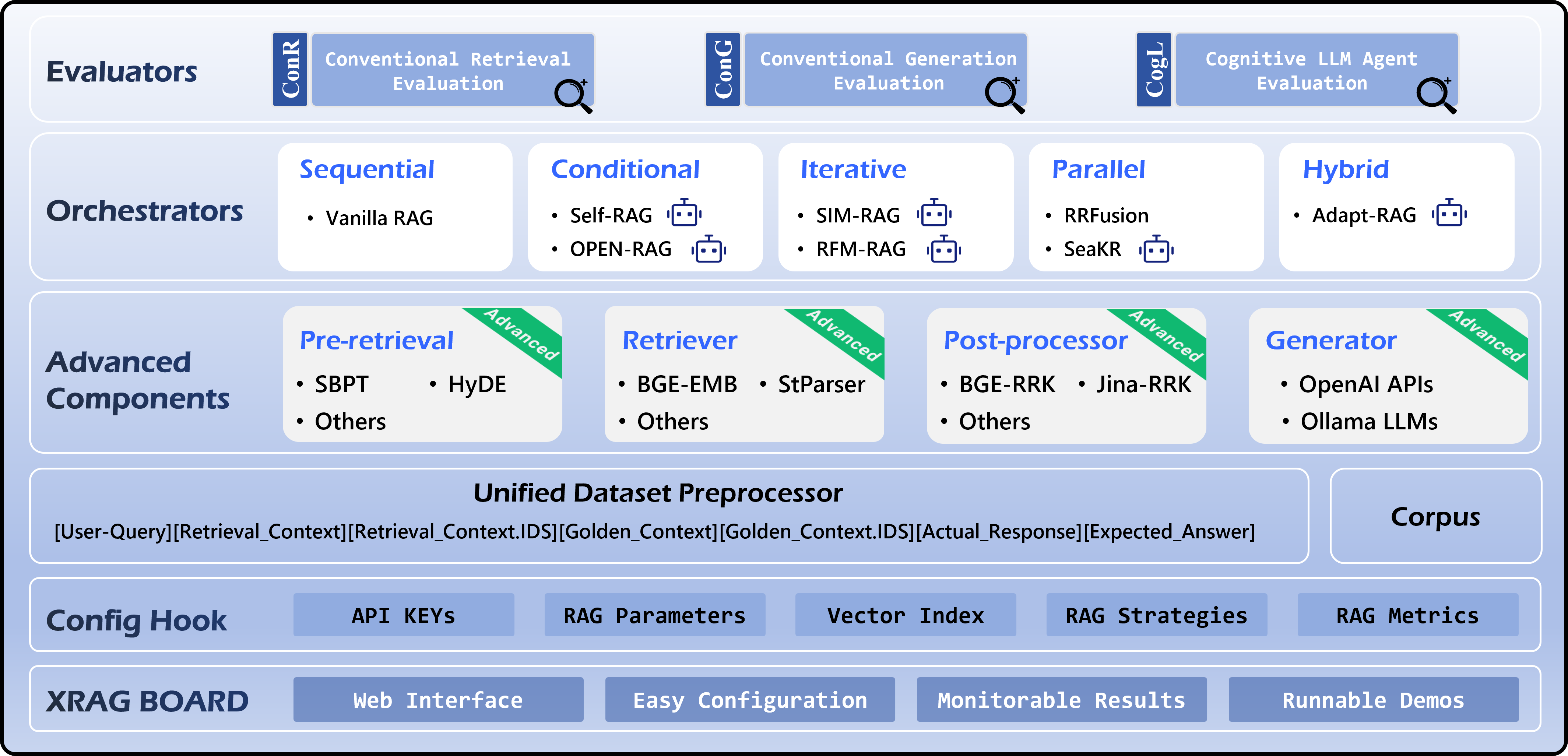
XRAG is a benchmarking framework designed to evaluate the foundational components of advanced Retrieval-Augmented Generation (RAG) systems. By dissecting and analyzing each core module, XRAG provides insights into how different configurations and components impact the overall performance of RAG systems.
✨ Features
🔍 Comprehensive Evaluation Framework:
- Multiple evaluation dimensions: LLM-based evaluation, Deep evaluation, and traditional metrics
- Support for evaluating retrieval quality, response faithfulness, and answer correctness
- Built-in evaluation models including LlamaIndex, DeepEval, and custom metrics
⚙️ Flexible Architecture:
- Modular design with pluggable components for retrievers, embeddings, and LLMs
- Support for various retrieval methods: Vector, BM25, Hybrid, and Tree-based
- Easy integration with custom retrieval and evaluation strategies
🤖 Multiple LLM Support:
- Seamless integration with OpenAI models
- Support for local models (Qwen, LLaMA, etc.)
- Configurable model parameters and API settings
📊 Rich Evaluation Metrics:
- Traditional metrics: F1, EM, MRR, Hit@K, MAP, NDCG
- LLM-based metrics: Faithfulness, Relevancy, Correctness
- Deep evaluation metrics: Contextual Precision/Recall, Hallucination, Bias
🎯 Advanced Retrieval Methods:
- BM25-based retrieval
- Vector-based semantic search
- Tree-structured retrieval
- Keyword-based retrieval
- Document summary retrieval
- Custom retrieval strategies
💻 User-Friendly Interface:
- Command-line interface with rich options
- Web UI for interactive evaluation
- Detailed evaluation reports and visualizations
🧠 Agentic RAG
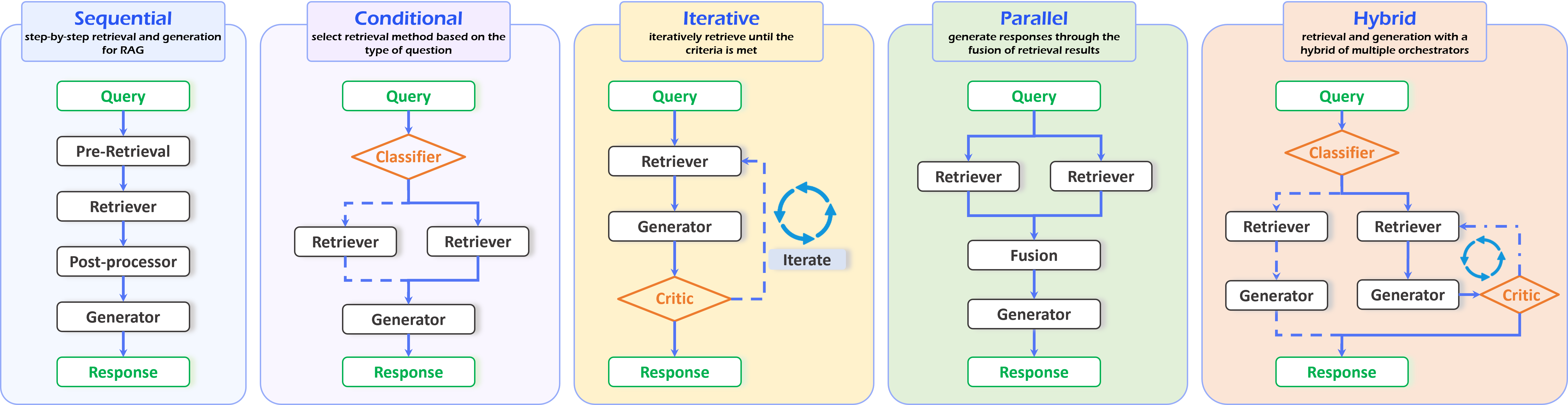
Orchestrators are used to organize and manage the execution logic and workflow of RAG components, thereby achieving agentic RAG methods in XRAG. As illustrated in figure, the XRAG framework includes five types of orchestrators: sequential, conditional, iterative, parallel, and hybrid.
🌐 WebUI Demo
XRAG provides an intuitive web interface for interactive evaluation and visualization. Launch it with:
xrag-cli webui
The WebUI guides you through the following workflow:
1. Dataset Upload and Configuration
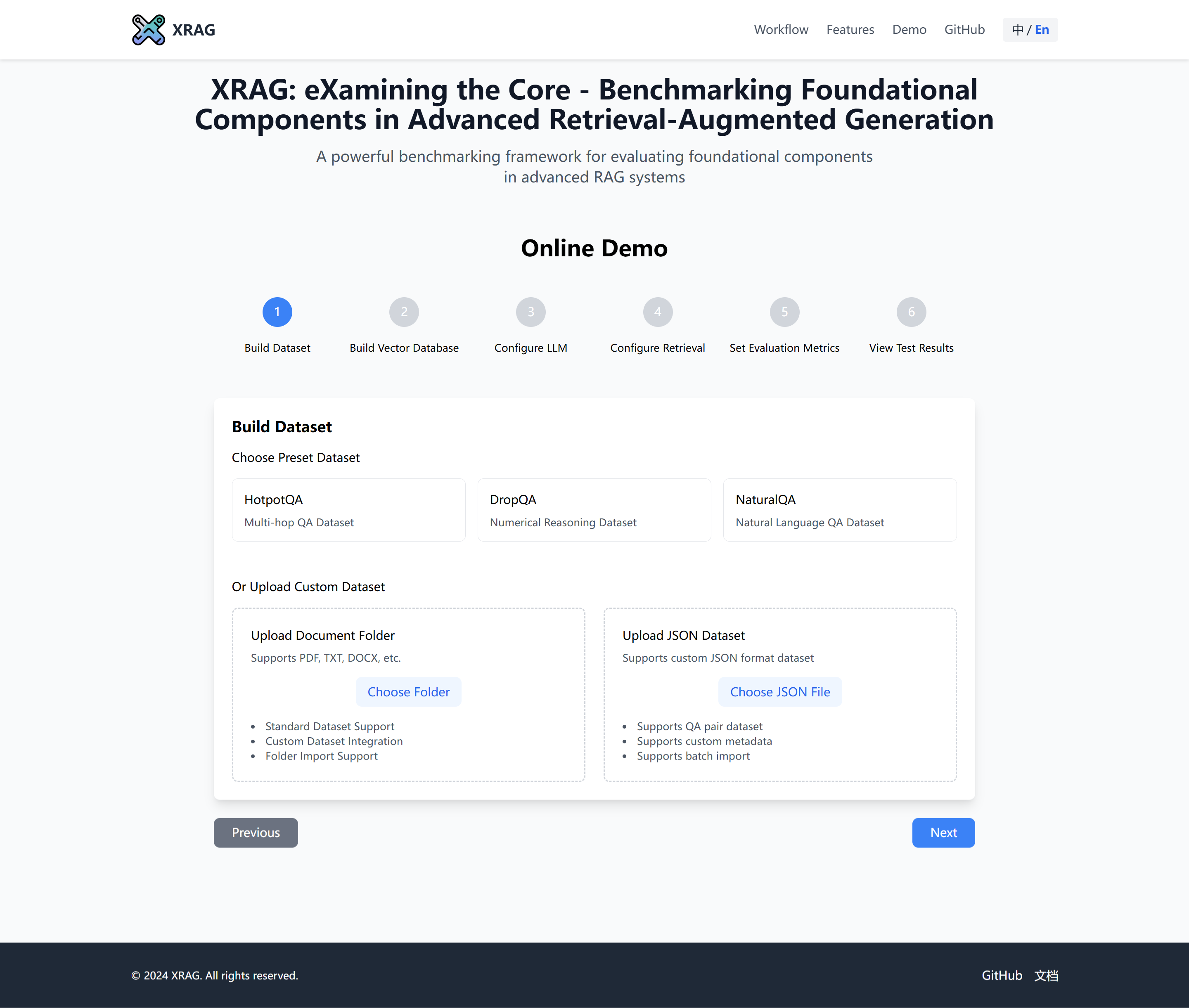
Upload and configure your datasets:
- Support for benchmark datasets (HotpotQA, DropQA, NaturalQA)
- Custom dataset integration
- Automatic format conversion and preprocessing
2. Index Building and Configuration
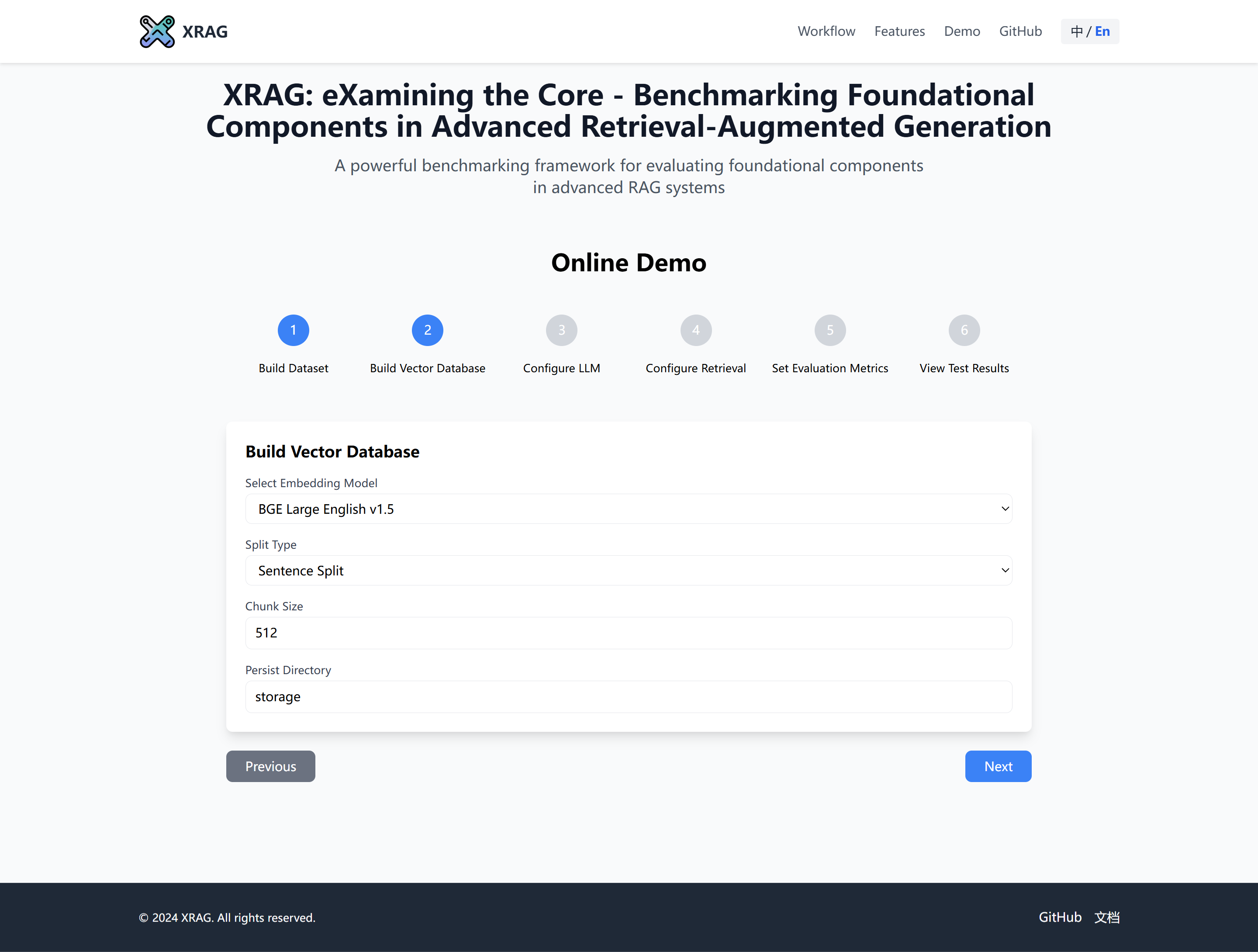
Configure system parameters and build indices:
- API key configuration
- Parameter settings
- Vector database index construction
- Chunk size optimization
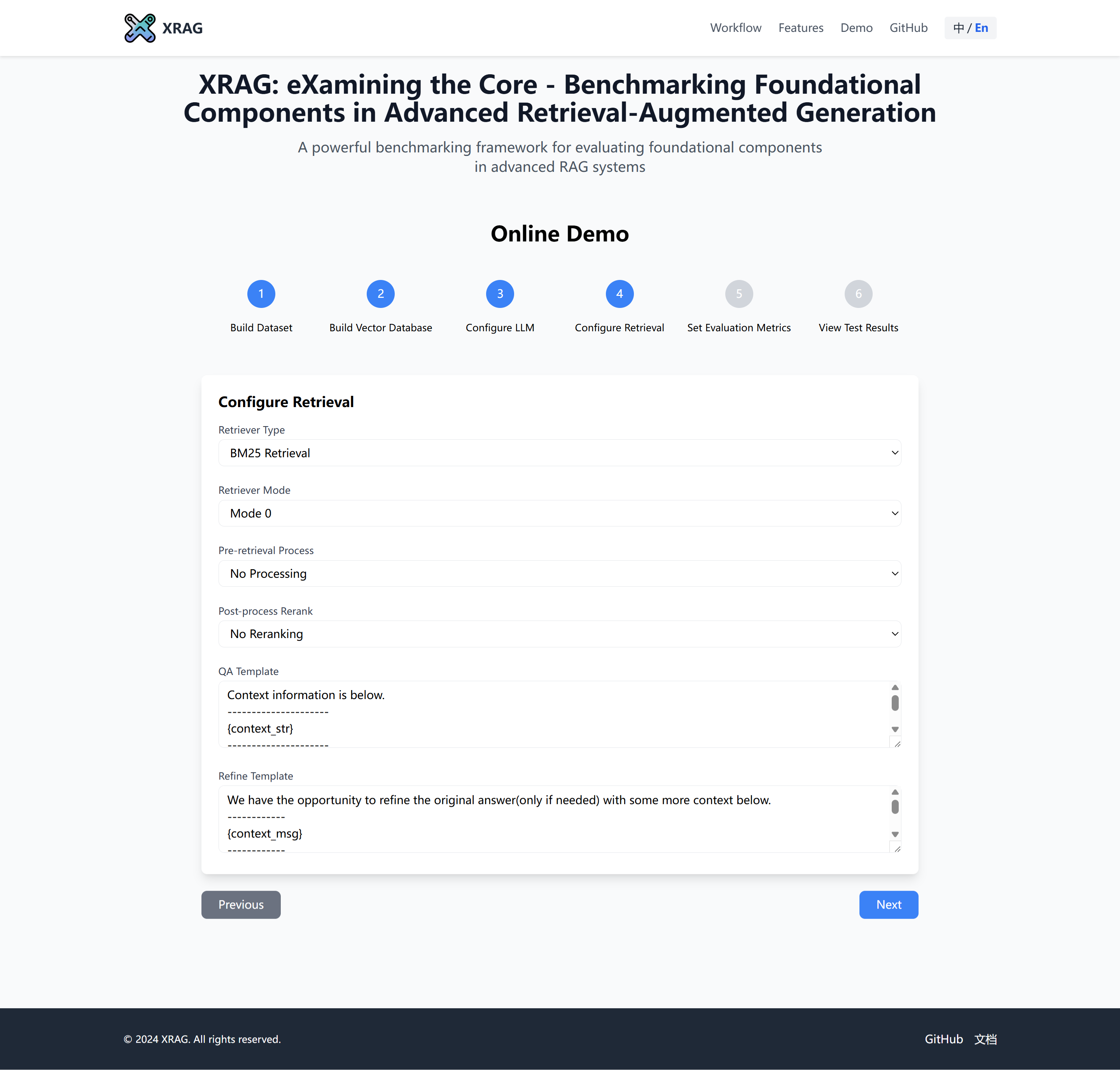
3. RAG Strategy Configuration
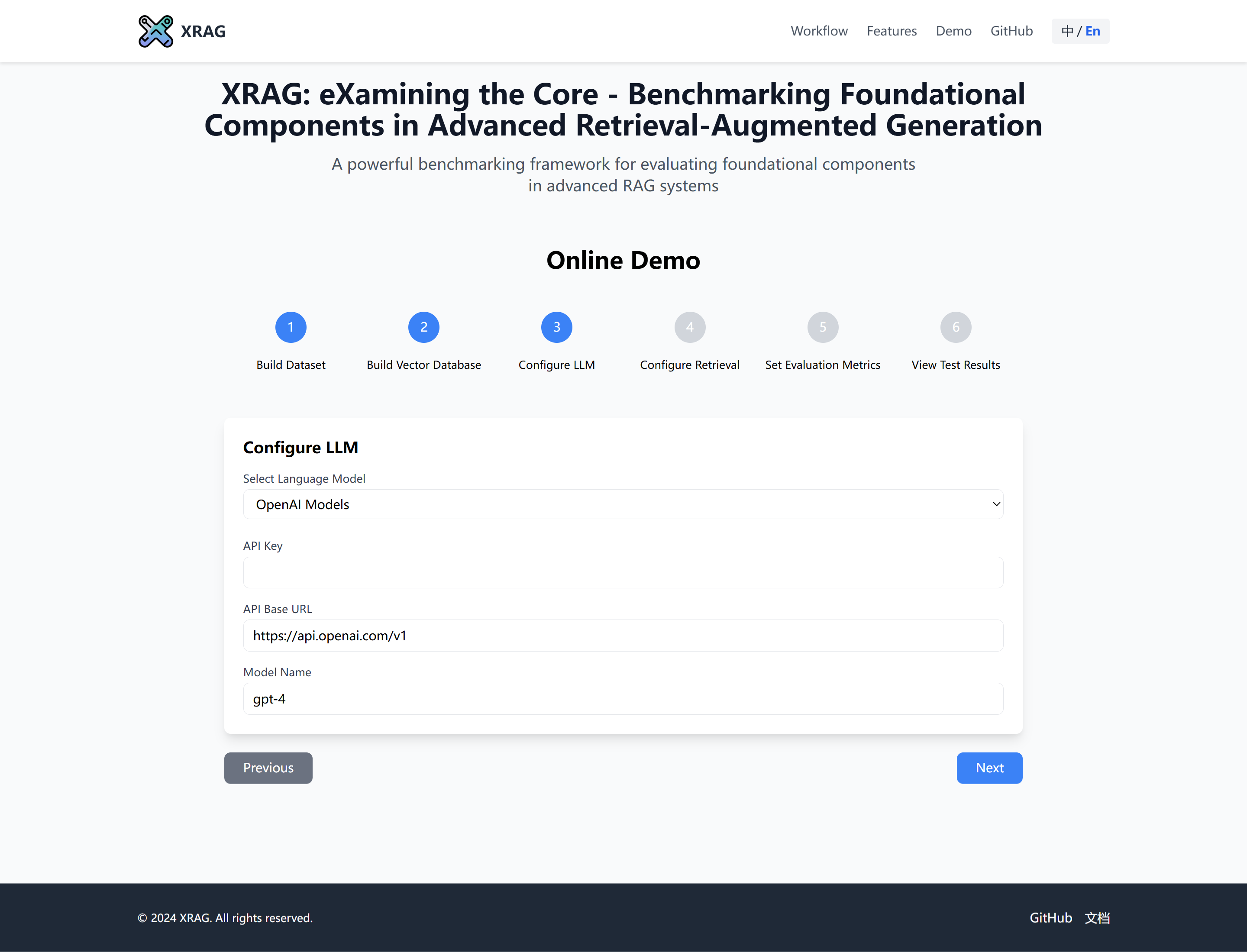
Define your RAG pipeline components:
- Pre-retrieval methods
- Retriever selection
- Post-processor configuration
- Custom prompt template creation
4. Interactive Testing
Test your RAG system interactively:
- Real-time query testing
- Retrieval result inspection
- Response generation review
- Performance analysis
5. Comprehensive Evaluation
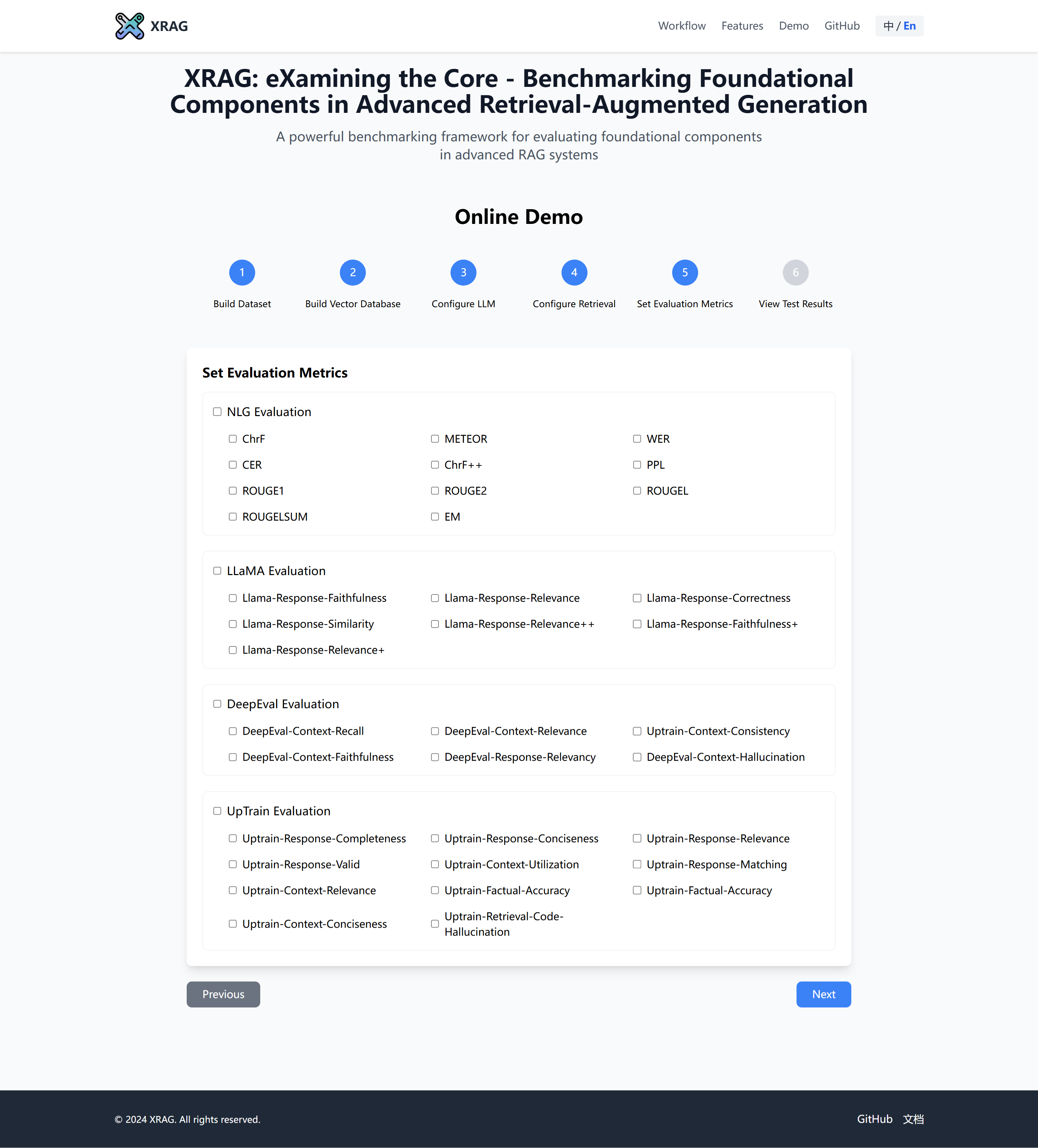
🛠️ Installation
Before installing XRAG, ensure that you have Python 3.11 or later installed.
Create a Virtual Environment via conda(Recommended)
# Create a new conda environment
conda create -n xrag python=3.11

# Activate the environment
conda activate xrag
Install via pip
You can install XRAG directly using pip:
# Install XRAG
pip install examinationrag

# Install 'jury' without dependencies to avoid conflicts
pip install jury --no-deps

# Adjust some package versions
pip install requests==2.27.1
pip install urllib3==1.25.11
pip install jiwer<4.0.0
🚀 Quick Start
Here's how you can get started with XRAG:
1. Prepare Configuration:
Modify the config.toml file to set up your desired configurations.
2. Using xrag-cli
After installing XRAG, the xrag-cli command becomes available in your environment. This command provides a convenient way to interact with XRAG without needing to call Python scripts directly.
Command Structure
xrag-cli [command] [options]
Commands and Options
run: Runs the benchmarking process.
xrag-cli run [--override key=value ...]
webui: Launches the web-based user interface.
xrag-cli webui
ver: Displays the current version of XRAG.
xrag-cli version
help: Displays help information.
xrag-cli help
generate: Generate QA pairs from a folder.
xrag-cli generate -i <input_file> -o <output_file> -n <num_questions> -s <sentence_length>
api: Launch the API server for XRAG services.
xrag-cli api [--host <host>] [--port <port>] [--json_path <json_path>] [--dataset_folder <dataset_folder>]
Options:
--host: API server host address (default: 0.0.0.0)--port: API server port number (default: 8000)--json_path: Path to the JSON configuration file--dataset_folder: Path to the dataset folder
Using the API Service
Once the API server is running, you can interact with it using HTTP requests. Here are the available endpoints:
1. Query Endpoint
Send a POST request to /query to get answers based on your documents:
curl -X POST "http://localhost:8000/query" \
     -H "Content-Type: application/json" \
     -d '{
           "query": "your question here",
           "top_k": 3
         }'
Response format:
{
    "answer": "Generated answer to your question",
    "sources": [
        {
            "content": "Source document content",
            "id": "document_id",
            "score": 0.85
        }
    ]
}
2. Health Check
Check the API server status with a GET request to /health:
curl "http://localhost:8000/health"
Response format:
{
    "status": "healthy",
    "engine_status": "initialized"
}
The API service supports both custom JSON datasets and folder-based documents:
- Use
--json_path for JSON format QA datasets
- Use
--dataset_folder for document folders
- Do not set
--json_path and --dataset_folder at the same time.
Overriding Configuration Parameters
Use the --override flag followed by key-value pairs to override configuration settings:
xrag-cli run --override embeddings="new-embedding-model"
Generate QA pairs from a folder
xrag-cli generate -i <input_file> -o <output_file> -n <num_questions> -s <sentence_length>
Automatically generate QA pairs from a folder.
⚙️ Configuration
XRAG uses a config.toml file for configuration management. Here's a detailed explanation of the configuration options:
[api_keys]
api_key = "sk-xxxx"          # Your API key for LLM service
api_base = "https://xxx"     # API base URL
api_name = "gpt-4o"     # Model name
auth_token = "hf_xxx"        # Hugging Face auth token

[settings]
llm = "openai" # openai, huggingface, ollama
ollama_model = "llama2:7b" # ollama model name
huggingface_model = "llama" # huggingface model name
embeddings = "BAAI/bge-large-en-v1.5"
split_type = "sentence"
chunk_size = 128
dataset = "hotpot_qa"
persist_dir = "storage"
# ... additional settings ...
❗ Troubleshooting
Dependency Conflicts: If you encounter dependency issues, ensure that you have the correct versions specified in requirements.txt and consider using a virtual environment.
Invalid Configuration Keys: Ensure that the keys you override match exactly with those in the config.toml file.
Data Type Mismatches: When overriding configurations, make sure the values are of the correct data type (e.g., integers, booleans).
📝 Changelog
Version 0.1.3
- Add API support. Now you can use XRAG as a backend service.
Version 0.1.2
Version 0.1.1
- Add generate command. Now you can generate your own QA pairs from a folder which contains your documents.
Version 0.1.0
- Initial release with core benchmarking functionality.
- Support for HotpotQA dataset.
- Command-line configuration overrides.
- Introduction of the
xrag-cli command-line tool.
💬 Feedback and Support
We value feedback from our users. If you have suggestions, feature requests, or encounter issues:
- Open an Issue: Submit an issue on our GitHub repository.
- Email Us: Reach out at [email protected].
- Join the Discussion: Participate in discussions and share your insights.
:round_pushpin: Acknowledgement
Organizers: Qianren Mao, Yangyifei Luo (罗杨一飞), Qili Zhang (张启立), Yashuo Luo (罗亚硕), Zhilong Cao(曹之龙), Jinlong Zhang (张金龙), Hanwen Hao (郝瀚文), Zhenting Huang (黄振庭), Feng Yan(闫丰), Weifeng Jiang (蒋为峰).
This project is inspired by RAGLAB, FlashRAG, FastRAG, AutoRAG, LocalRAG.
We are deeply grateful for the following external libraries, which have been pivotal to the development and functionality of our project: LlamaIndex, Hugging Face Transformers.
📚 Citation
If you find this work helpful, please cite our paper:
@INPROCEEDINGS{11629265,
  author={Zhang, Qili and Mao, Qianren and Luo, Yangyifei and Luo, Yashuo and Hao, Hanwen and Cao, Zhilong and Jiang, Weifeng and Chen, Zhijun and Liu, Junnan and Yan, Feng and Wang, Xiaolong and Zhang, Jinlong and Huang, Zhenting and Tan, Zhixing and Sun, Jie and Li, Bo and Li, Jianxin and Yu, Philip S.},
  booktitle={2026 IEEE 42nd International Conference on Data Engineering (ICDE)},
  title={XRAG: Examining the Core - Benchmarking Foundational Components in Advanced Retrieval-Augmented Generation},
  year={2026},
  pages={2697-2710},
  keywords={Modeling;Retrieval augmented generation;Context;Measurement;Large language models;Printing;Indexes;Indexing;Generative Pre-trained transformer;Modules (abstract algebra);Database;Retrieval-Augmented Generation;Evaluation;Benchmark;Data Management},
  doi={10.1109/ICDE65706.2026.00201}}
Or access via arXiv.
🙏 Thank You
Thank you for using XRAG! We hope it proves valuable in your research and development efforts in the field of Retrieval-Augmented Generation.

 XRAG is a benchmarking framework that dissects and evaluates the foundational components of Retrieval-Augmented Generation (RAG) systems, such as retrievers, embeddings, and LLMs, to show how different configurations affect overall RAG performance.