




Drift README

The project's README from github.com/CutWire-Studios/Drift. As one markdown file: README.md.

Drift icon

Drift

The free desktop editor that makes your videos look finished — not “good enough.”

Latest release License: GPL-3.0 Platform: Linux | Windows | macOS | Android

GitHub · Download · Issues · License

Drift is a desktop video editor from CutWire Studios. Drop in clips, add effects, captions, stickers, and music, then export a polished video — with no subscription, no watermark, and no account.

It is built for the edits people actually make: Reels and Shorts, game clips, school projects, tutorials, product demos, memes, and anything you want to look sharp without living in a browser or paying a monthly fee.

What you see in the preview is what you export. One compositor, one look, no surprises.

Download

Get it on Flathub Get it from Microsoft Get it on Google Play (closed testing)

Google Play is closed testing — how to join.

Linux — install from Flathub:

flatpak install flathub org.cutwire.Drift
flatpak run org.cutwire.Drift

macOS — install via Homebrew:

brew install --cask cutwire-studios/tap/drift

First launch on macOS: Drift is signed ad-hoc. If Gatekeeper blocks opening it, run:

xattr -dr com.apple.quarantine /Applications/Drift.app

Or grab a build for your platform from the latest release:

Platform Package
Linux Flathub · AppImage
Windows Microsoft Store · Installer (.exe) · Portable zip
macOS Homebrew Tap · Disk image (.dmg, Apple Silicon)
Android Google Play (closed testing) · APK (arm64-v8a) · APK (armeabi-v7a) · APK (x86_64)

On a phone, join closed testing on Google Play, or grab Drift-*-arm64-v8a.apk from the latest release and install it (or adb install Drift-*-arm64-v8a.apk). Use x86_64 for emulators.

See all releases for previous versions and full changelogs.

Screenshot

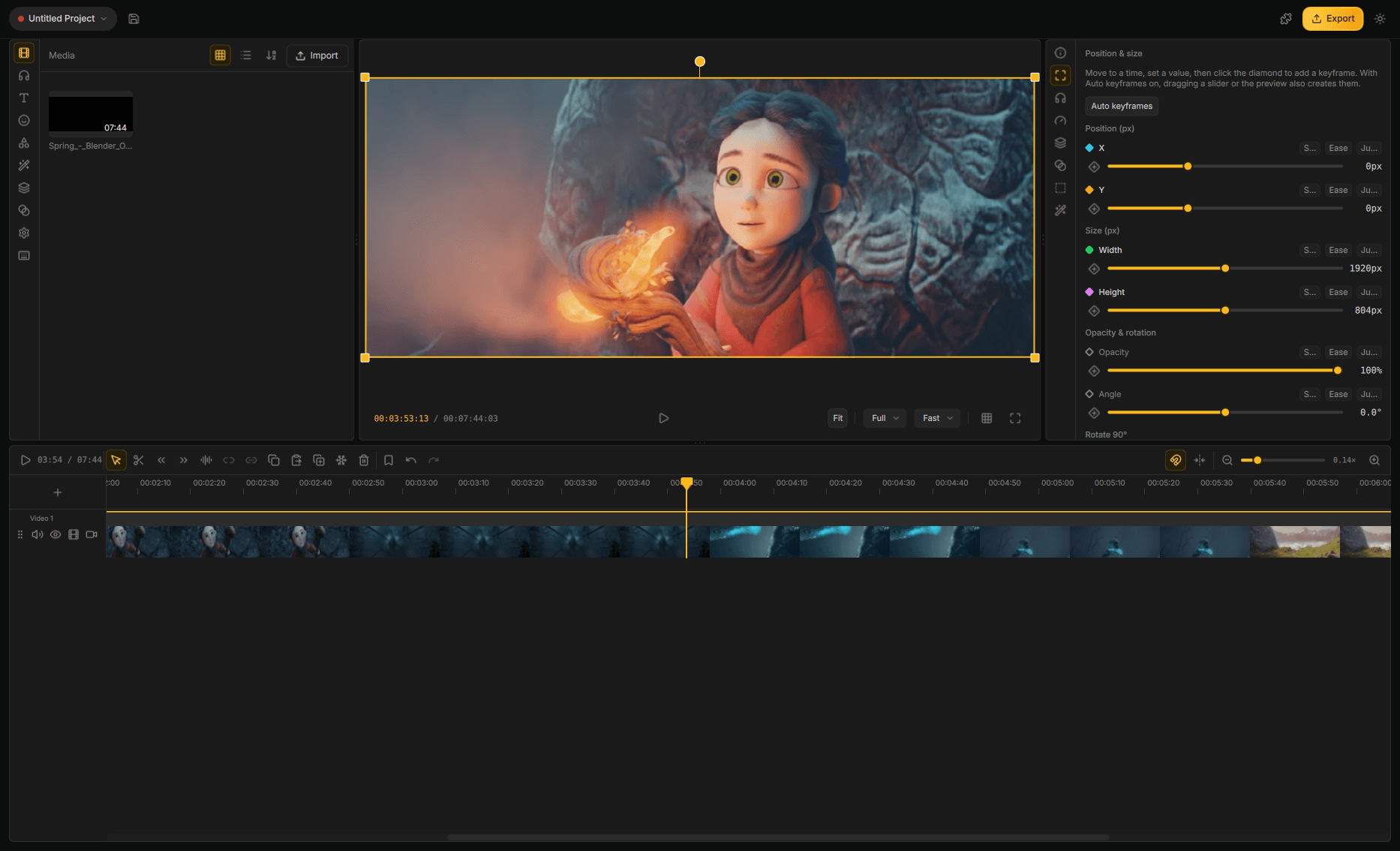
The Drift editor: media bin on the left, 3D camera in the preview, text inspector on the right, multi-track timeline below

Features

An agent can edit the open project. Import, cut, grade, and export in the project you have open. The same editor can run with no window.

3D on the timeline. Tilt clips in space, light them, and park a title behind the subject. Drop in a 3D model and it plays in the same cut.

Lottie animations. Motion graphics and vector art stay sharp at any size. Recolour or reword them in place.

Advanced keyframing. Animate position, scale, rotation, opacity, and effect parameters over time. Draw the curve yourself.

150+ transitions and 40+ effects. Every look previews on your footage. One click can drop a whole stack — Beat Drop, Glitch Cut, Neon Cutout. Trails of earlier frames, and grades that stick to one clip.

On this machine. Click a subject and lift it off the shot. Add depth of field and lights that belong to the clip. Automatic captions, video upscale, and live face retouch — all on your computer.

Edit the words. Speech becomes text on the clip. Cut phrases, drop fillers, strip silence, pick the best takes, label speakers, and build captions from those times.

Titles with a real look. Thirty-three packs — karaoke, Hormozi-style, neon, chrome, holographic, handwritten. Copy one style onto every subtitle on the track.

Move a whole stack at once. One layer can drag, scale, rotate, tilt, and fade everything under it. Nest layers, or open a composite when the stack needs its own timeline.

Cut to the music. The timeline snaps to the beat. Clips split and land on the bar. Music ducks under speech and comes back to its own level. Reframe a landscape take into a vertical video that follows the face.

A timeline that behaves. Multi-track filmstrips, ripple, snap, masks, freeze frame, bookmarks, a mixer. Split a clip and the grade stays. A crash leaves the last save intact.

Audio that sounds finished. Clean up speech, meter loudness, EQ and compress, keep pitch when you change speed, record a voiceover.

Find shots. Switch cameras. Search footage for what’s on screen. Watch every angle at once and punch the cut.

Stabilise, export, take the project with you. Smooth shaky clips, upscale, play heavy files smoothly. MP4, GIF, audio-only, or just a range. Pack the media with the edit so paths stay whole.

Android is the same editor. Timeline, effects, and export on the phone. Share straight from the app.

Stock, voices, and a small install. Search stock into the bin. Generate voiceover and sound effects. Fonts, stickers, and extra models download when you use them. UI in Arabic, Spanish (Spain and Colombia), French (Canada), Italian, Japanese, Portuguese (Brazil and Portugal), Russian, Sinhala, Tagalog, Vietnamese, and Simplified Chinese.

Why people pick Drift

Most “free” editors want an account, a watermark, or a subscription the moment the video starts looking good. Drift is the opposite: yours, on your computer, GPLv3, no login wall.

It is fast enough for a 30-second social cut and deep enough for a real project — an agent on the timeline, 3D and Lottie, captions, effects, audio, cutouts, and multicam.

Help us translate Drift

Translation status

For developers

Build, packaging, architecture, and agent protocol live in docs/:

Help and feedback

Found a bug or have an idea? Open an issue on GitHub.

License

GPLv3 — see LICENSE.

Star History

Star History Chart

Drift (CutWire-Studios/Drift)

Searching Database…

这是什么?Drift 是 CutWire Studios 出品的免费开源桌面视频编辑器,基于 Qt 6 和 FFmpeg 构建,用来剪辑片段、添加特效、字幕、贴纸和音乐,然后导出——无需订阅、无水印、无需账号。
Drift 是简单的裁剪工具,还是完整的编辑器?它是一个完整的非线性编辑器,具备多轨时间线、高级关键帧、调色、3D 合成、Lottie 动态图形、多机位切换和音频混音——不只是基础裁剪。
怎么安装 Drift?Linux 上从 Flathub 安装或使用 AppImage;macOS 上通过 Homebrew 或已签名的 .dmg;Windows 上通过 Microsoft Store 或 .exe/便携版 zip;Android 上则从最新的 GitHub release 获取对应的 APK。
使用它需要账号或订阅吗?不需要——Drift 无需订阅、没有水印、不用账号;它做的一切都在你自己的电脑上本地完成。
Android 版本可以正式使用了吗?Android 版仍在 Google Play 上进行封闭测试;在此期间你可以加入测试,或者直接从最新的 GitHub release 安装 APK(arm64-v8a、armeabi-v7a,模拟器用 x86_64)。
像抠像或字幕这类特效会把我的素材上传到别处吗?不会——自动字幕、视频超分和实时面部修饰等功能都在你自己的机器上本地运行,而不是在云端。
AI 智能体能直接控制 Drift 吗?可以——Drift 暴露了基于 MCP 的智能体协议,智能体因此可以编辑打开的项目(导入、剪辑、调色、导出),同一个编辑器还能以无窗口的无头模式运行。
界面翻译成了哪些语言?除英语外,界面还提供阿拉伯语、西班牙语、法语、意大利语、日语、葡萄牙语、俄语、僧伽罗语、他加禄语、越南语和简体中文。
它包含多少特效和转场?Drift 自带 150 多种转场和 40 多种特效,包括 Beat Drop、Glitch Cut、Neon Cutout 等一键预设组合。
Drift 与其他免费编辑器有什么不同?许多“免费”编辑器用账号、水印或订阅来限制画质,Drift 与之不同:它采用 GPLv3,没有任何这类门槛,并且完全在你自己的电脑上运行。
Size
55.1 MB
Stars
2K
Age
3mo
Commits · 90 Days