





Что это?
 Drift — бесплатный десктопный видеоредактор с открытым исходным кодом от CutWire Studios, построенный на Qt 6 и FFmpeg: обрезка клипов, добавление эффектов, субтитров, стикеров и музыки с последующим экспортом — без подписок, водяных знаков и аккаунтов.
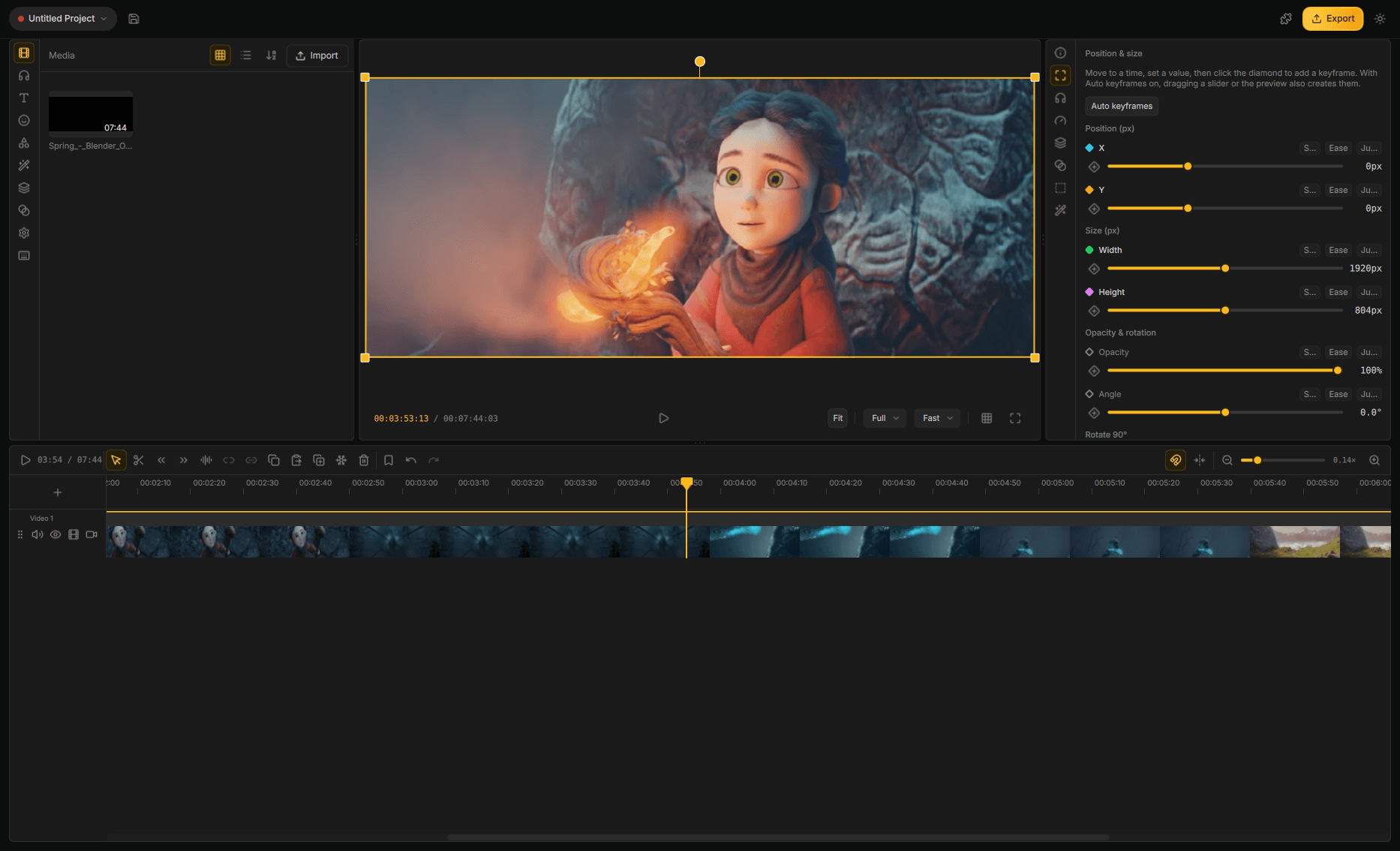
Drift — бесплатный десктопный видеоредактор с открытым исходным кодом от CutWire Studios, построенный на Qt 6 и FFmpeg: обрезка клипов, добавление эффектов, субтитров, стикеров и музыки с последующим экспортом — без подписок, водяных знаков и аккаунтов.Drift — это простой триммер или полноценный редактор?Это полноценный нелинейный редактор с многодорожечными таймлайнами, продвинутой работой с ключевыми кадрами, цветокоррекцией, 3D-композитингом, motion-графикой Lottie, мультикамерным монтажом и микшированием аудио — а не просто базовая обрезка.
Это полноценный нелинейный редактор с многодорожечными таймлайнами, продвинутой работой с ключевыми кадрами, цветокоррекцией, 3D-композитингом, motion-графикой Lottie, мультикамерным монтажом и микшированием аудио — а не просто базовая обрезка.Как установить Drift?Установите из Flathub или через AppImage на Linux, через Homebrew или подписанный .dmg на macOS, из Microsoft Store или через .exe/портативный zip на Windows, либо возьмите подходящий APK из последнего релиза на GitHub для Android.
Установите из Flathub или через AppImage на Linux, через Homebrew или подписанный .dmg на macOS, из Microsoft Store или через .exe/портативный zip на Windows, либо возьмите подходящий APK из последнего релиза на GitHub для Android.Нужны ли аккаунт или подписка, чтобы им пользоваться?Нет — Drift работает без подписки, без водяных знаков и без аккаунта; всё, что он делает, происходит локально на вашем компьютере.
Нет — Drift работает без подписки, без водяных знаков и без аккаунта; всё, что он делает, происходит локально на вашем компьютере.Готова ли Android-версия к использованию?Android всё ещё в закрытом тестировании на Google Play; пока можно присоединиться к тесту или установить APK (arm64-v8a, armeabi-v7a или x86_64 для эмуляторов) прямо из последнего релиза на GitHub.
Android всё ещё в закрытом тестировании на Google Play; пока можно присоединиться к тесту или установить APK (arm64-v8a, armeabi-v7a или x86_64 для эмуляторов) прямо из последнего релиза на GitHub.Мои видеоматериалы куда-то загружаются для эффектов вроде вырезок или субтитров?Нет — такие функции, как автоматические субтитры, апскейл видео и ретушь лиц в реальном времени, работают локально на вашей машине, а не в облаке.
Нет — такие функции, как автоматические субтитры, апскейл видео и ретушь лиц в реальном времени, работают локально на вашей машине, а не в облаке.Может ли ИИ-агент управлять Drift напрямую?Да — Drift открывает агентный протокол на базе MCP, чтобы агент мог редактировать открытый проект (импорт, нарезку, цветокоррекцию, экспорт), а сам редактор может работать и без окна, в headless-режиме.
Да — Drift открывает агентный протокол на базе MCP, чтобы агент мог редактировать открытый проект (импорт, нарезку, цветокоррекцию, экспорт), а сам редактор может работать и без окна, в headless-режиме.На какие языки переведён интерфейс?Интерфейс поставляется на арабском, испанском, французском, итальянском, японском, португальском, русском, сингальском, тагальском, вьетнамском и упрощённом китайском языках, помимо английского.
Интерфейс поставляется на арабском, испанском, французском, итальянском, японском, португальском, русском, сингальском, тагальском, вьетнамском и упрощённом китайском языках, помимо английского.Сколько в нём эффектов и переходов?В Drift более 150 переходов и более 40 эффектов, включая пресетные стеки в один клик вроде Beat Drop, Glitch Cut и Neon Cutout.
В Drift более 150 переходов и более 40 эффектов, включая пресетные стеки в один клик вроде Beat Drop, Glitch Cut и Neon Cutout.Чем Drift отличается от других бесплатных редакторов?В отличие от многих «бесплатных» редакторов, прячущих качество за аккаунтом, водяным знаком или подпиской, Drift — GPLv3, у него нет ни одного из этих барьеров, и он работает целиком на вашем компьютере.
В отличие от многих «бесплатных» редакторов, прячущих качество за аккаунтом, водяным знаком или подпиской, Drift — GPLv3, у него нет ни одного из этих барьеров, и он работает целиком на вашем компьютере.What are similar projects?Concat, autoclip, ffmpeg-skill, filmcraft, herk-edit-kit, open-edit, openscreen, video-use
Concat, autoclip, ffmpeg-skill, filmcraft, herk-edit-kit, open-edit, openscreen, video-useWhich topics is it in?qt6, motion-design, video-production, upscaling, audio-generation, subtitles, video-editing, speech-to-text, content-creation, video-processing, android-app, gpu-acceleration
qt6, motion-design, video-production, upscaling, audio-generation, subtitles, video-editing, speech-to-text, content-creation, video-processing, android-app, gpu-acceleration