





What is this?
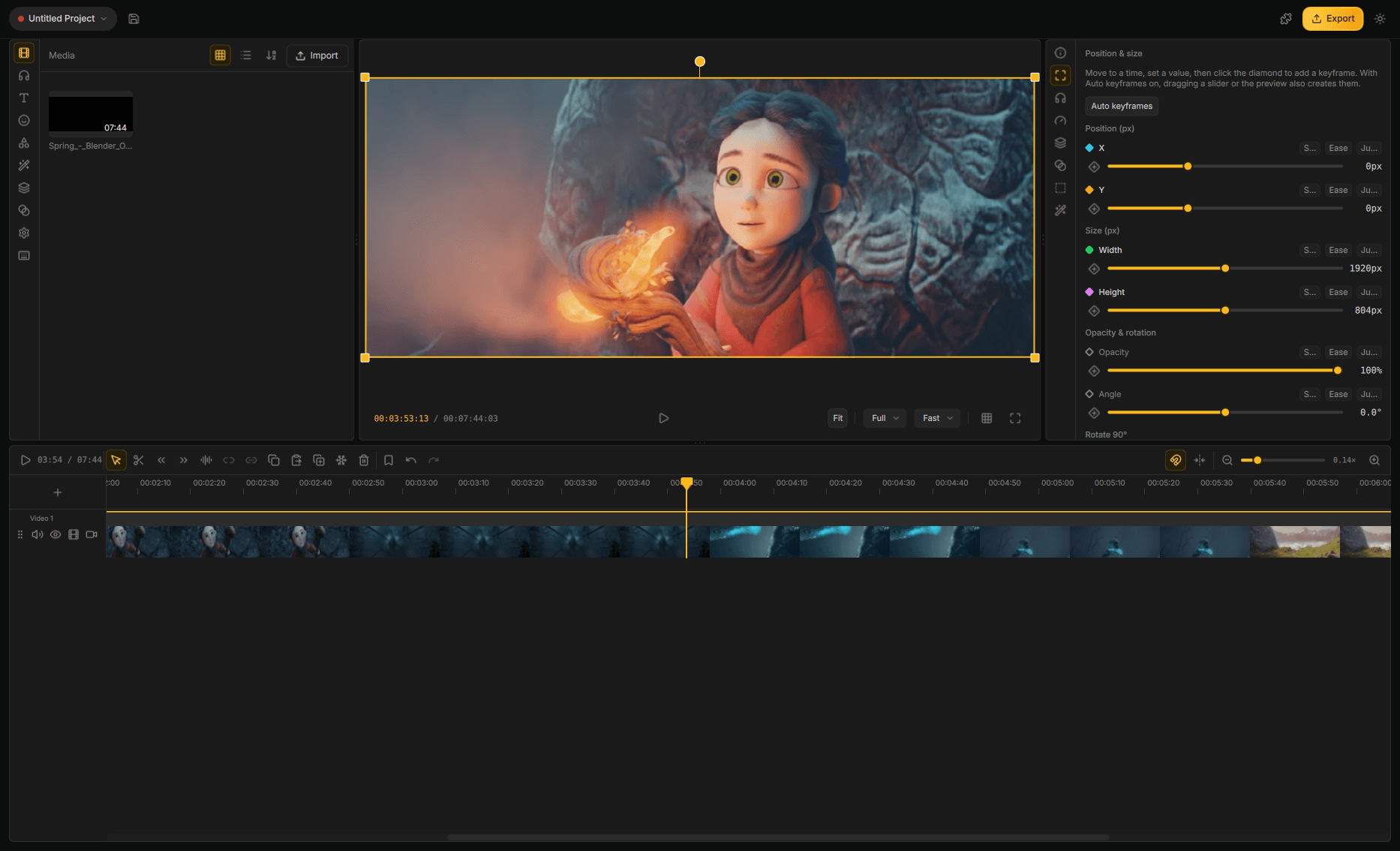
 Drift is a free, open-source desktop video editor from CutWire Studios, built with Qt 6 and FFmpeg, for cutting clips, adding effects, captions, stickers and music, then exporting without subscriptions, watermarks, or accounts.
Drift is a free, open-source desktop video editor from CutWire Studios, built with Qt 6 and FFmpeg, for cutting clips, adding effects, captions, stickers and music, then exporting without subscriptions, watermarks, or accounts.Is Drift a simple trimmer or a full editor?It is a full nonlinear editor with multi-track timelines, advanced keyframing, color grading, 3D compositing, Lottie motion graphics, multicam switching, and audio mixing — not just basic trimming.
It is a full nonlinear editor with multi-track timelines, advanced keyframing, color grading, 3D compositing, Lottie motion graphics, multicam switching, and audio mixing — not just basic trimming.How do I install Drift?Install from Flathub or AppImage on Linux, via Homebrew or a signed .dmg on macOS, from the Microsoft Store or an .exe/portable zip on Windows, or grab the matching APK from the latest GitHub release on Android.
Install from Flathub or AppImage on Linux, via Homebrew or a signed .dmg on macOS, from the Microsoft Store or an .exe/portable zip on Windows, or grab the matching APK from the latest GitHub release on Android.Do I need an account or subscription to use it?No — Drift runs with no subscription, no watermark, and no account; everything it does happens locally on your own computer.
No — Drift runs with no subscription, no watermark, and no account; everything it does happens locally on your own computer.Is the Android version ready to use?Android is still in closed testing on Google Play; in the meantime you can join the test or install the APK (arm64-v8a, armeabi-v7a, or x86_64 for emulators) straight from the latest GitHub release.
Android is still in closed testing on Google Play; in the meantime you can join the test or install the APK (arm64-v8a, armeabi-v7a, or x86_64 for emulators) straight from the latest GitHub release.Does my footage get uploaded anywhere for effects like cutouts or captions?No — features like automatic captions, video upscale, and live face retouch all run locally on your own machine rather than in the cloud.
No — features like automatic captions, video upscale, and live face retouch all run locally on your own machine rather than in the cloud.Can an AI agent control Drift directly?Yes — Drift exposes an MCP-based agent protocol so an agent can edit the open project (import, cut, grade, export), and the same editor can also run headless with no window.
Yes — Drift exposes an MCP-based agent protocol so an agent can edit the open project (import, cut, grade, export), and the same editor can also run headless with no window.What languages is the UI translated into?The interface ships in Arabic, Spanish, French, Italian, Japanese, Portuguese, Russian, Sinhala, Tagalog, Vietnamese, and Simplified Chinese, alongside English.
The interface ships in Arabic, Spanish, French, Italian, Japanese, Portuguese, Russian, Sinhala, Tagalog, Vietnamese, and Simplified Chinese, alongside English.How many effects and transitions does it include?Drift ships with 150+ transitions and 40+ effects, including one-click preset stacks like Beat Drop, Glitch Cut, and Neon Cutout.
Drift ships with 150+ transitions and 40+ effects, including one-click preset stacks like Beat Drop, Glitch Cut, and Neon Cutout.What makes Drift different from other free editors?Unlike many 'free' editors that gate quality behind an account, watermark, or subscription, Drift is GPLv3, has none of those gates, and runs entirely on your own computer.
Unlike many 'free' editors that gate quality behind an account, watermark, or subscription, Drift is GPLv3, has none of those gates, and runs entirely on your own computer.What are similar projects?Concat, autoclip, ffmpeg-skill, filmcraft, herk-edit-kit, open-edit, openscreen, video-use
Concat, autoclip, ffmpeg-skill, filmcraft, herk-edit-kit, open-edit, openscreen, video-useWhich topics is it in?qt6, motion-design, video-production, upscaling, audio-generation, subtitles, video-editing, speech-to-text, content-creation, video-processing, android-app, gpu-acceleration
qt6, motion-design, video-production, upscaling, audio-generation, subtitles, video-editing, speech-to-text, content-creation, video-processing, android-app, gpu-acceleration