


21.9K ·GitHub
这是做什么用的?
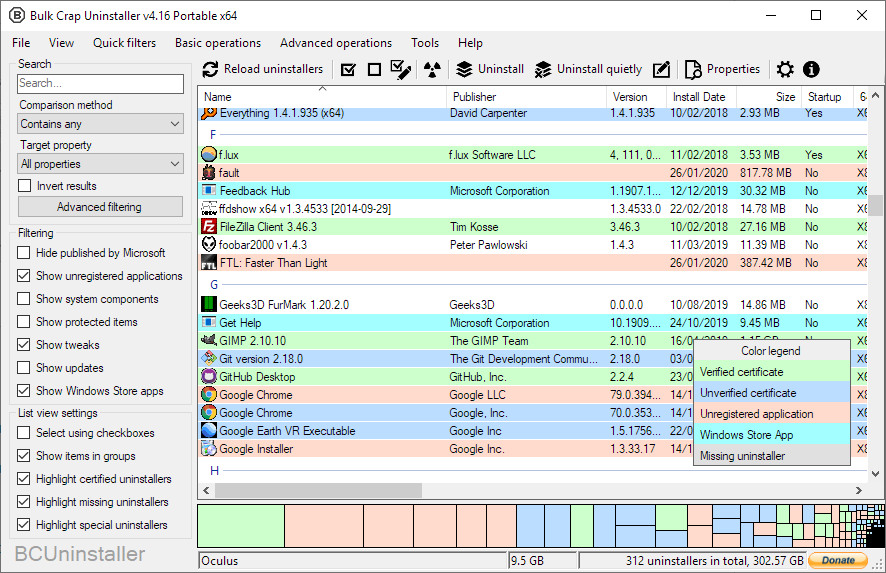
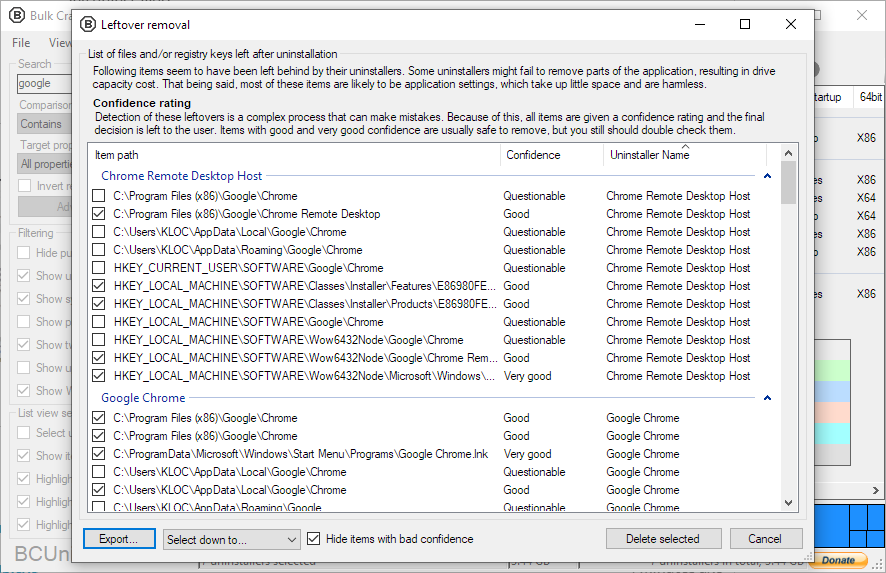
 Bulk Crap Uninstaller(BCU)是一款免费开源的 Windows 卸载工具,专门用于以最少的操作批量卸载大量应用程序。它还能清理残留文件并检测已被孤立的程序。
Bulk Crap Uninstaller(BCU)是一款免费开源的 Windows 卸载工具,专门用于以最少的操作批量卸载大量应用程序。它还能清理残留文件并检测已被孤立的程序。它是带图形界面的普通 Windows 程序,还是命令行工具?它是一个带图形界面的 Windows 桌面应用(基于 Windows Forms 开发),不是命令行工具,也不是网络服务。
它是一个带图形界面的 Windows 桌面应用(基于 Windows Forms 开发),不是命令行工具,也不是网络服务。我需要先安装别的东西吗,比如 .NET?版本 6 需要 .NET 8 桌面运行时,不过你不用手动安装:安装程序会自动装上,完整的 Portable 便携版也自带它(所以体积才那么大)。
版本 6 需要 .NET 8 桌面运行时,不过你不用手动安装:安装程序会自动装上,完整的 Portable 便携版也自带它(所以体积才那么大)。它在旧版 Windows 上能用吗?v6 面向 Windows 10 及更高版本,只提供 64 位版本;Windows 7 SP1 请使用 5.x 版本,更早的 v1-v4 版本甚至能在 Windows XP 上运行。
v6 面向 Windows 10 及更高版本,只提供 64 位版本;Windows 7 SP1 请使用 5.x 版本,更早的 v1-v4 版本甚至能在 Windows XP 上运行。它是给 IT 专业人士用的,还是普通用户也能用?都可以——它设计时考虑了 IT 专业人士的需求,但只要对 Windows 里软件的安装和卸载有基本了解,任何人都能使用。
都可以——它设计时考虑了 IT 专业人士的需求,但只要对 Windows 里软件的安装和卸载有基本了解,任何人都能使用。我能在工作中使用它吗,还是仅限个人使用?它采用 Apache 2.0 许可证——个人和商业使用都免费,没有任何附加义务,只要遵守许可证条款即可。
它采用 Apache 2.0 许可证——个人和商业使用都免费,没有任何附加义务,只要遵守许可证条款即可。除了普通桌面程序,它还能卸载什么?它完整支持 Windows Store 应用、Steam 游戏和 Windows 功能,并对 NSIS、InnoSetup、Msiexec 等多种卸载体系提供了专门支持。
它完整支持 Windows Store 应用、Steam 游戏和 Windows 功能,并对 NSIS、InnoSetup、Msiexec 等多种卸载体系提供了专门支持。我可以自动批量卸载,而不用一个一个点过去吗?可以——这正是它的核心功能:BCU 能按照预先准备好的列表运行卸载程序,以最少的操作批量删除大量应用程序,还支持无人值守卸载。
可以——这正是它的核心功能:BCU 能按照预先准备好的列表运行卸载程序,以最少的操作批量删除大量应用程序,还支持无人值守卸载。这个项目还在积极维护吗?README 开头就写着'寻找维护者'的告示,但包含最新功能和修复的 nightly 构建仍然会发布在 actions 页面上。
README 开头就写着'寻找维护者'的告示,但包含最新功能和修复的 nightly 构建仍然会发布在 actions 页面上。What are similar projects?Winhance, Windows10Debloater, FluentCleaner, DriverStoreExplorer, Playnite, BibaYanji, FluentTweaker, winutil
Winhance, Windows10Debloater, FluentCleaner, DriverStoreExplorer, Playnite, BibaYanji, FluentTweaker, winutilWhich topics is it in?bloatware, disk-space, cleaner, debloat, windows-10, foss, dotnet, c#, app, sysadmin, windows-app, utility
bloatware, disk-space, cleaner, debloat, windows-10, foss, dotnet, c#, app, sysadmin, windows-app, utility