


21.9K ·GitHub
Что это такое?
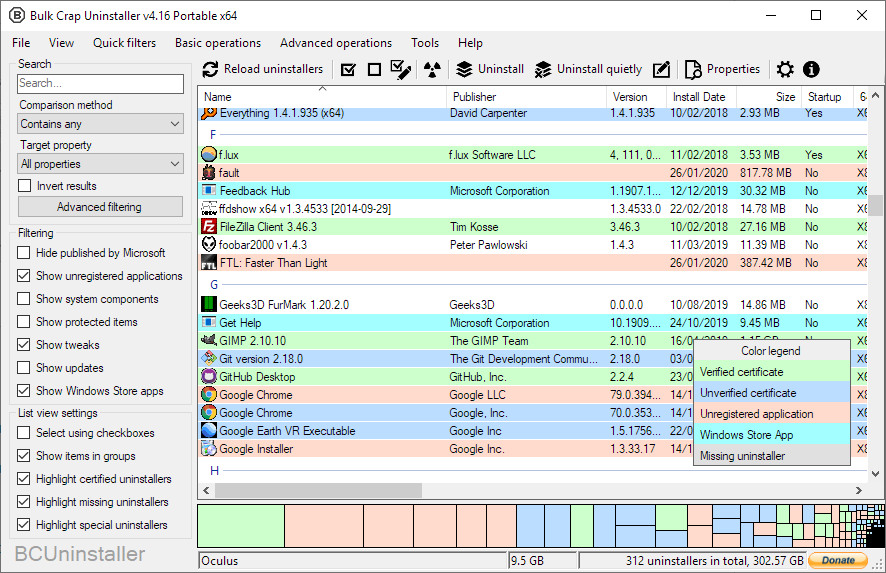
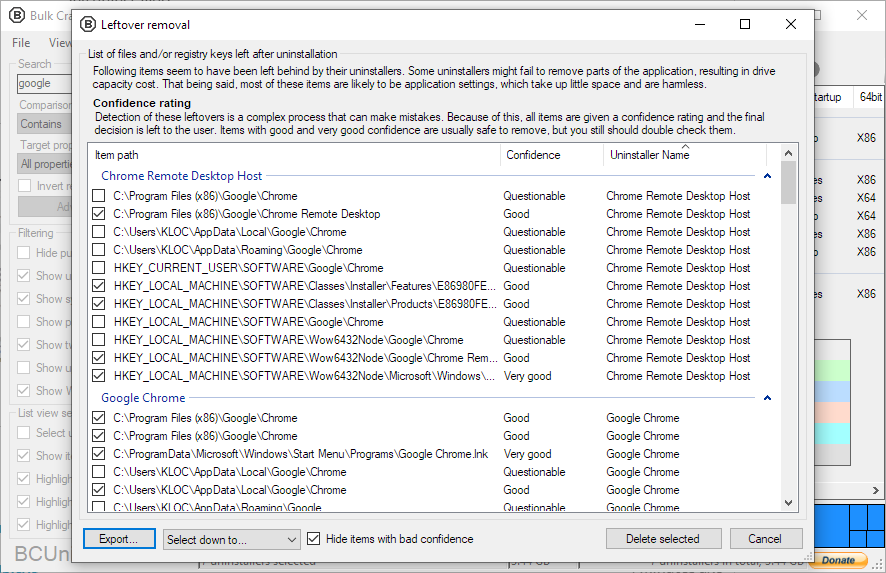
 Bulk Crap Uninstaller (BCU) — это бесплатный деинсталлятор для Windows с открытым исходным кодом, созданный для удаления большого количества приложений с минимумом действий от пользователя. Он также чистит остатки программ и находит «осиротевшие» приложения.
Bulk Crap Uninstaller (BCU) — это бесплатный деинсталлятор для Windows с открытым исходным кодом, созданный для удаления большого количества приложений с минимумом действий от пользователя. Он также чистит остатки программ и находит «осиротевшие» приложения.Это обычная программа для Windows с графическим интерфейсом или утилита командной строки?Это настольное приложение для Windows с графическим интерфейсом (построено на Windows Forms), а не утилита командной строки и не веб-сервис.
Это настольное приложение для Windows с графическим интерфейсом (построено на Windows Forms), а не утилита командной строки и не веб-сервис.Нужно ли сначала что-то установить, например .NET?Версии 6 нужен .NET 8 desktop runtime, но можно обойтись без ручной настройки: установщик добавит его автоматически, а полная Portable-сборка поставляется вместе с ним (поэтому она такая большая).
Версии 6 нужен .NET 8 desktop runtime, но можно обойтись без ручной настройки: установщик добавит его автоматически, а полная Portable-сборка поставляется вместе с ним (поэтому она такая большая).Будет ли работать на старых версиях Windows?v6 ориентирована на Windows 10 и новее и выпускается только в 64-битных сборках; для Windows 7 SP1 используйте релиз 5.x, а старые версии v1-v4 работали даже на Windows XP.
v6 ориентирована на Windows 10 и новее и выпускается только в 64-битных сборках; для Windows 7 SP1 используйте релиз 5.x, а старые версии v1-v4 работали даже на Windows XP.Она для IT-специалистов или для обычных пользователей?Для тех и других — она создавалась с прицелом на IT-специалистов, но воспользоваться ею сможет любой, кто в общих чертов понимает, как программы устанавливаются и удаляются в Windows.
Для тех и других — она создавалась с прицелом на IT-специалистов, но воспользоваться ею сможет любой, кто в общих чертов понимает, как программы устанавливаются и удаляются в Windows.Можно ли использовать её на работе или только для себя?Лицензия — Apache 2.0: бесплатно и для личного, и для коммерческого использования без каких-либо обязательств, если соблюдаются условия лицензии.
Лицензия — Apache 2.0: бесплатно и для личного, и для коммерческого использования без каких-либо обязательств, если соблюдаются условия лицензии.Что ещё она умеет удалять, кроме обычных настольных программ?Полностью поддерживаются приложения Windows Store, игры Steam и компоненты Windows, а также есть специальная поддержка многих систем деинсталляции, таких как NSIS, InnoSetup и Msiexec.
Полностью поддерживаются приложения Windows Store, игры Steam и компоненты Windows, а также есть специальная поддержка многих систем деинсталляции, таких как NSIS, InnoSetup и Msiexec.Можно ли автоматизировать удаление, а не кликать по программам по одной?Да — ради этого она и сделана: BCU может запускать деинсталляторы по готовым спискам, так что целые партии приложений удаляются с минимальным участием пользователя, включая полностью автоматическое удаление без вопросов.
Да — ради этого она и сделана: BCU может запускать деинсталляторы по готовым спискам, так что целые партии приложений удаляются с минимальным участием пользователя, включая полностью автоматическое удаление без вопросов.Проект ещё активно развивается?README начинается с предупреждения «Looking for maintainers», но nightly-сборки со свежими функциями и исправлениями по-прежнему публикуются на странице actions.
README начинается с предупреждения «Looking for maintainers», но nightly-сборки со свежими функциями и исправлениями по-прежнему публикуются на странице actions.What are similar projects?Winhance, Windows10Debloater, FluentCleaner, DriverStoreExplorer, Playnite, BibaYanji, FluentTweaker, winutil
Winhance, Windows10Debloater, FluentCleaner, DriverStoreExplorer, Playnite, BibaYanji, FluentTweaker, winutilWhich topics is it in?bloatware, disk-space, cleaner, debloat, windows-10, foss, dotnet, c#, app, windows-app, sysadmin, utility
bloatware, disk-space, cleaner, debloat, windows-10, foss, dotnet, c#, app, windows-app, sysadmin, utility