Every creature is compiled from one JSON spec. No mesh files, no downloaded art
packs, no photogrammetry. The worked example that ships with this repo,
example/wolf.json, is 2,211 vertices and 31 joints written
out by the engine from plain text.
Quick start
bash setup.sh                              # deps + red/green ruler calibration
node engine/cli.js example/wolf.json out/wolf.glb
setup.sh must print calibrate OK before you trust anything else: it builds one
spec that has to pass and two that have to be blocked, so you know the rulers separate
good from bad on your machine.
To run the full text-to-creature session, give your agent (Claude Code,
Cursor, a VM agent — anything that runs shell commands) EXACTLY this:
Read MANUAL.md in this folder and follow it exactly — the cards in cards/
are the pipeline, do not improvise around them. First run bash setup.sh
and confirm it prints "calibrate OK". Then make me: <describe your
creature>. Real-world height: <e.g. 1.8 m>.
Ask me exactly one question — card 01's — and nothing else. Not cost, not
token budget, not how long, not whether to publish. Decide the rest and
tell me what you chose when you deliver.
Three things that make or break the result:
- Don't invent your own workflow prompt. "Use this workspace to generate a
character" skips every quality gate in the pipeline; twenty iterations of
that will not equal one pass through the cards.
- Let the agent run
setup.sh itself, in its own environment. Don't
pre-bundle node_modules into a zip — dependencies are per-machine.
- Image reference? The pipeline is text-first. Tell the agent: "extract a
one-paragraph creature brief from this image — masses, signature parts,
proportions, real-world size — then proceed with the cards." The image
becomes the brief; the pipeline does the rest.
Driving it harder
| Knob |
Where |
What it changes |
smooth_angle |
spec root, or per volume/part |
Crease threshold in degrees, default 50. Higher = smoother body, lower = more facets. |
shading |
spec root |
Whole-body vertical colour ramp and grain — {gradient:{top,bottom}, noise:{size,amount}}. |
build: "rigid" |
spec root |
The only way to get a fully faceted body past the checker. For robots and crystals, not for animals. |
ao |
spec root |
Per-vertex ambient occlusion; false to skip the bake. |
embed_spec |
spec root |
Every GLB embeds its own authored spec (asset.extras.source_spec) + a parts manifest — any agent can extract, edit, recompile, or graft parts between creatures (harness/graft.py). false opts out. |
harness/claims.json |
QC |
The one claims sheet — signature presence, 6:3:1 hierarchy, focal contrast, saturated area, rig/animations, triangle budget. Everything is judged at boss standard; adjust tri_budget for cheap creatures. |
What is actually in here
| Folder |
What it holds |
engine/ |
The ACS engine. One JSON spec in, one skinned GLB out. Zero runtime dependencies — node engine/cli.js spec.json out.glb is the whole interface. |
cards/ |
The five stage cards the executing session reads, plus the spec syntax on one page. |
harness/ |
Measuring tools (silhouettes, mask metrics, claims judge), the delivery packer and the publisher. |
example/ |
A bred, approved light quadruped to read and copy from. |
calibration/ |
One sample that must build and two that must be blocked — proof the rulers separate good from bad. |
How it works
flowchart LR
    A[Order<br/>one sentence] --> B[Interview<br/>≤ 2 questions] --> C[Silhouette<br/>brief] --> D[LOW<br/>design free]
    D --> E{Gate 1<br/>RECOGNISED}
    E -->|fail| D
    E -->|pass| F{Gate 2<br/>PUNCHIER}
    F -->|reverted| D
    F -->|pass| G[MID<br/>all parts] --> H[HIGH<br/>colour + anims] --> I[SHIP<br/>stamp · deliver]
The two gates
Neither gate is self-graded. The session that designed the creature is the worst
possible judge of whether it reads, because it already knows what it drew. So the
silhouettes go to a context-free reader agent that has never seen the order, and
the only question is "what is this?"
Gate 1 is RECOGNISED: all four views have to land. Gate 2 is PUNCHIER: a new
round may only make the silhouette bolder than the last one — a round that tames the
shape is reverted, even if it is "more correct". LOW's deliverable is an exaggerated
silhouette, not an accurate one.
The engine floors
The compiler talks in three registers, and they mean different things:
| Prefix |
Meaning |
BLOCK: |
The build stops. A hard floor was crossed — faceted body, part floating off its host, a mirrored twin distorted past 30%, an attack that never reaches. |
warn: |
It built, but something is probably wrong. Read it. |
info: |
A number you asked for, or an assumption the compiler made on your behalf — like which way an anchored fin ended up facing. |
Floors are not style opinions. They are the failures that survive review and ship
broken: a body that renders in hard facets, a horn that hovers a centimetre off the
skull, a right thigh collapsed to 40% depth by mirrored skinning.
What gets measured
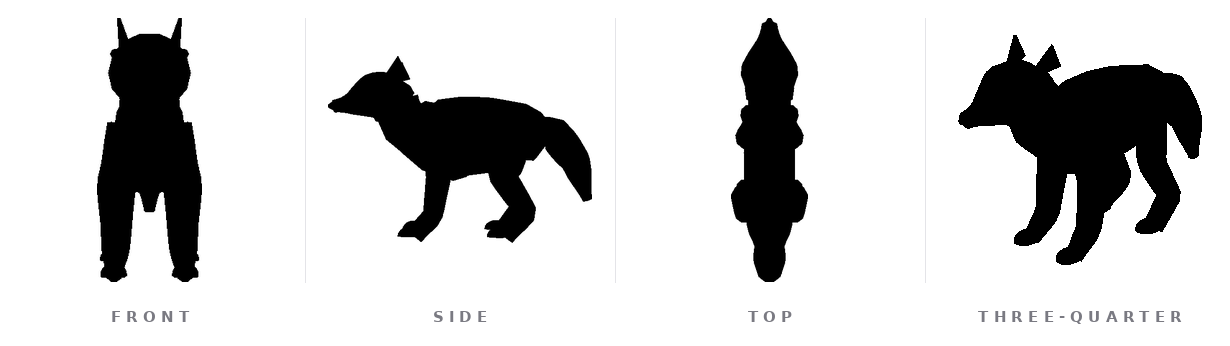
Every round renders these four views, reduces them to masks, and computes the numbers
the design card declared a target for — width over height, mass thirds, torso depth
contrast, leg fraction, silhouette turn count, zigzag alignment, and IoU against the
previous round as a regression guard. The 24px thumbnail is what the blind reader
actually sees; if it does not read at 24px, it does not read.
The doctrine in one paragraph
Head-to-head experiments showed the model designs BOLDLY when left free, and
every attempt to teach it design upfront made the output tamer — so this harness
ships a clean painter and a strict inspector. The creation side gets only the
order, the engine syntax, and a short pit-map of engine-local traps; ALL quality
control lives in gates read by context-free reader agents, never self-graded.
Form beats obedience, everywhere.
Honesty about limits
- Isolated-part blind reads misfire on dome-plus-hanging-tube heads. Elephants and
birds get read as something else when the head is shown alone; put the same head back
on the body and it reads fine. Trust the whole-body read when the two disagree.
- Cost scales with the creature. Treat the triangle budget in
harness/claims.json as an estimate rather than data.
- Splitting the modelling across subagents costs more, not less. One agent
start-to-finish beats a chain of short-lived agents (skeleton → parts → anims →
verify) on tokens, wall clock and turns alike. Onboarding is not the cause —
every fresh agent reads the same ground truth. The cause is re-derivation: work
the previous agent had already done and could not hand over. Iron law 9 in card
00 states the rule.
part_attachment and mirror_distortion are new in 1.2.0. Specs authored against
an older version may now be blocked. That is usually the checker being right, but it
is a breaking change, not a silent improvement.- The example wolf ships two animations, not three. Card 03 asks for idle, move and
attack;
example/wolf.json has idle and move. It is a SYNTAX reference, never a starting skeleton — the engine
refuses a build whose joints are the example's with the numbers barely moved
(example_copy), because a thin order is not permission to ship a recoloured
wolf. Read it for syntax, not for
animation coverage.
- The engine has zero dependencies; the tooling does not. Every render and measure
tool drives headless Chromium through playwright. If playwright will not install, you
can still compile creatures — you just cannot measure them, and the gates are the
point.
Scripts
| Script |
Role |
engine/cli.js |
Spec → GLB. The whole engine interface. |
harness/silmetrics.mjs |
Renders the four silhouettes and the 24px thumbnail; emits the layout metrics. |
harness/maskmetrics.py |
Per-view mask measures and dullness flags (sq_fill, mirror_sym, straight_max). |
harness/judge.mjs |
Claims judge — part shares, focal contrast, saturated area, rig/anim/triangle budgets. |
harness/hero.mjs |
hero.png (1024² transparent, 45°) and hero.jpg over studio grey. |
harness/deliver.py |
Stamps identity into the GLB, writes the offline showroom viewer, builds the upload pack. |
harness/publish.mjs |
Gobkit publisher. Only runs after an explicit yes, and always tries the upload before offering the manual page. |
harness/calibrate.py |
The red/green self-check setup.sh runs. |
Requirements
Node 18+ and Python 3.9+. Windows: run setup.ps1 in PowerShell (or setup.sh in Git Bash/WSL). setup.sh installs three, playwright, numpy, pillow
and scipy, then runs the calibration self-check. The engine alone needs nothing but
Node; the dependencies are for the measuring and render tools.
Output contract
Every GLB this harness writes satisfies docs/OUTPUT_CONTRACT.md
— two chunks, no trailing bytes, no external URIs, no textures (colour is baked
into vertex colours), semantic material names, convention bone names. Verify any
file with node harness/glbcheck.mjs <file.glb>; the same module runs as a
dependency-free import inside a server or Worker.
Security
Short-lived local servers used by the render tools bind to 127.0.0.1 only, and
Chromium runs with its OS sandbox enabled. The Gobkit submission key in
harness/gobkit.json is public by design — it authorises posting to the community
wall and nothing else. Details and reporting: SECURITY.md.
Licence
MIT — see LICENSE. One third-party component is bundled
(harness/assets/three-bundle.js, three.js, MIT); attributions for it and for
everything setup.sh installs are in
THIRD-PARTY-NOTICES.md.
About
Gobkit: AI-native 3D infrastructure for agents and vibe coders. Stream
game-ready 3D assets straight into your workflows via API. Agent-friendly.
Studio-quality. Built by a team of artists and engineers.
Author: Ariescar | Alsomindtech
👹 gobkit.com · 📖 Devlog





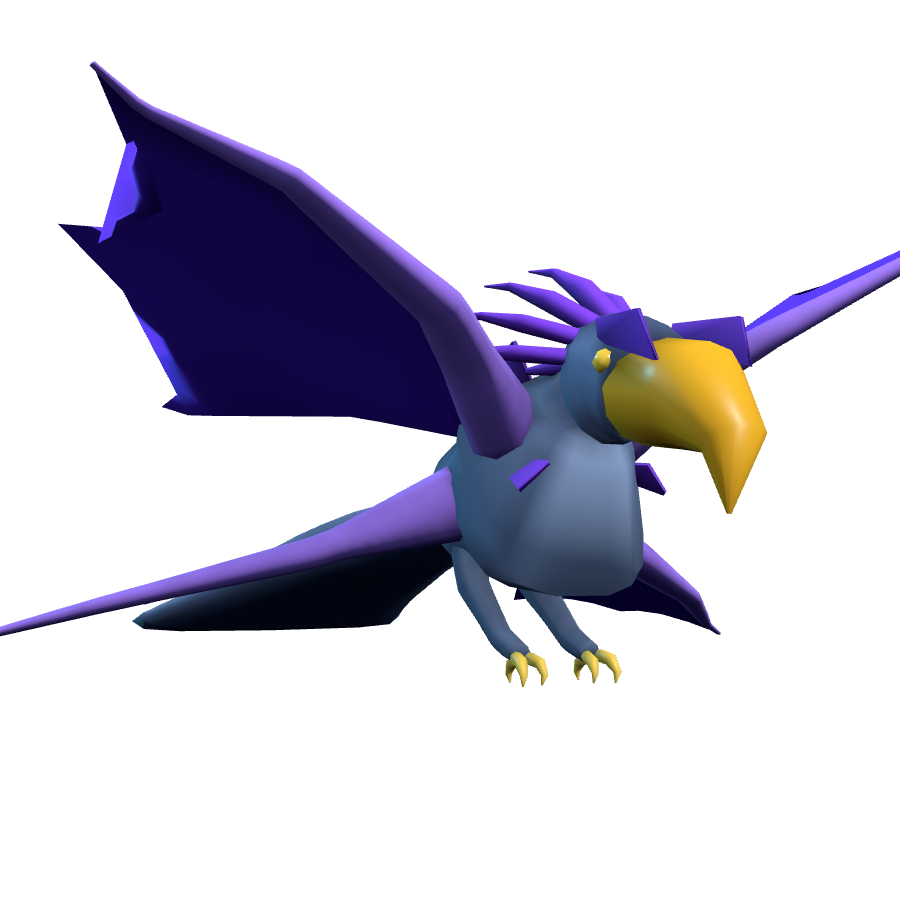

 anyCreature 把诸如「一只凶猛的山地巨人」这样的自然语言描述变成可直接用于游戏的 3D 生物——一个带蒙皮、动画和顶点色的 GLB 文件,外加一个离线查看器——全部在一次 AI 智能体会话中完成。