🤗 HuggingFace |
 ModelScope | 💬 WeChat(微信) | 📰 Blog | 📑 Paper

👏 Welcome to try Tongyi DeepResearch via our Modelscope online demo or 🤗 Huggingface online demo or  bailian service!
[!NOTE]
This demo is for quick exploration only. Response times may vary or fail intermittently due to model latency and tool QPS limits. For a stable experience we recommend local deployment; for a production-ready service, visit bailian and follow the guided setup.
Introduction
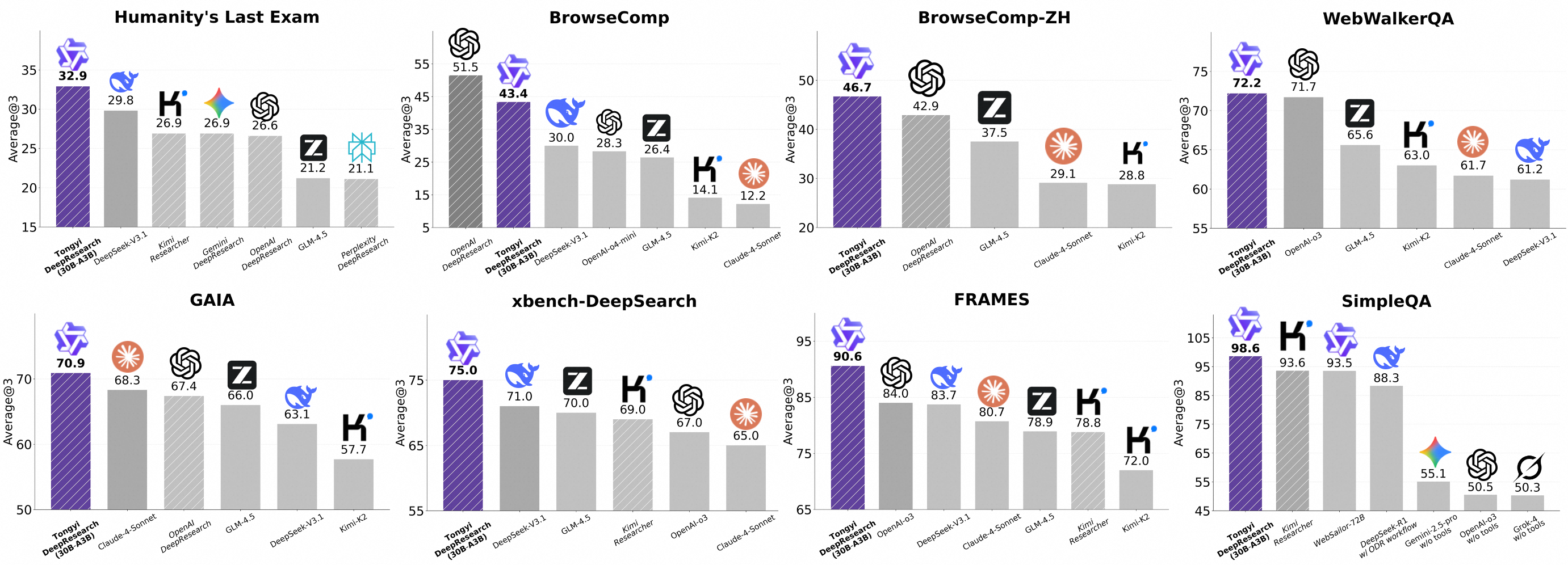
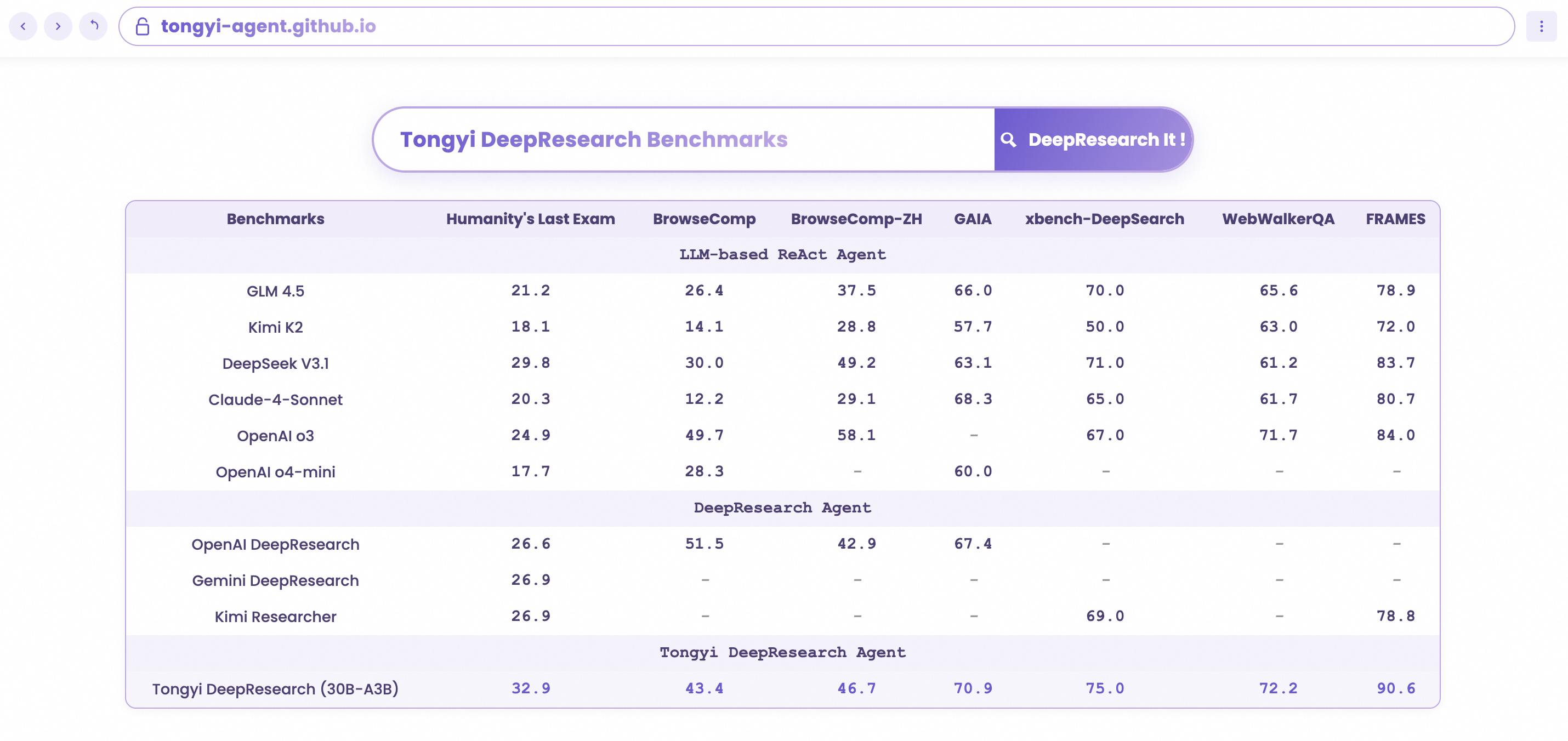
We present Tongyi DeepResearch, an agentic large language model featuring 30.5 billion total parameters, with only 3.3 billion activated per token. Developed by Tongyi Lab, the model is specifically designed for long-horizon, deep information-seeking tasks. Tongyi DeepResearch demonstrates state-of-the-art performance across a range of agentic search benchmarks, including Humanity's Last Exam, BrowseComp, BrowseComp-ZH, WebWalkerQA,xbench-DeepSearch, FRAMES and SimpleQA.
Tongyi DeepResearch builds upon our previous work on the WebAgent project.
More details can be found in our 📰 Tech Blog.
Features
- ⚙️ Fully automated synthetic data generation pipeline: We design a highly scalable data synthesis pipeline, which is fully automatic and empowers agentic pre-training, supervised fine-tuning, and reinforcement learning.
- 🔄 Large-scale continual pre-training on agentic data: Leveraging diverse, high-quality agentic interaction data to extend model capabilities, maintain freshness, and strengthen reasoning performance.
- 🔁 End-to-end reinforcement learning: We employ a strictly on-policy RL approach based on a customized Group Relative Policy Optimization framework, with token-level policy gradients, leave-one-out advantage estimation, and selective filtering of negative samples to stabilize training in a non‑stationary environment.
- 🤖 Agent Inference Paradigm Compatibility: At inference, Tongyi DeepResearch is compatible with two inference paradigms: ReAct, for rigorously evaluating the model's core intrinsic abilities, and an IterResearch-based 'Heavy' mode, which uses a test-time scaling strategy to unlock the model's maximum performance ceiling.
Model Download
You can directly download the model by following the links below.
News
[2025/09/20]🚀 Tongyi-DeepResearch-30B-A3B is now on OpenRouter! Follow the Quick-start guide.
[2025/09/17]🔥 We have released Tongyi-DeepResearch-30B-A3B.
Deep Research Benchmark Results
Quick Start
This guide provides instructions for setting up the environment and running inference scripts located in the inference folder.
1. Environment Setup
- Recommended Python version: 3.10.0 (using other versions may cause dependency issues).
- It is strongly advised to create an isolated environment using
conda or virtualenv.
# Example with Conda
conda create -n react_infer_env python=3.10.0
conda activate react_infer_env
2. Installation
Install the required dependencies:
pip install -r requirements.txt
3. Environment Configuration and Prepare Evaluation Data
Environment Configuration
Configure your API keys and settings by copying the example environment file:
# Copy the example environment file
cp .env.example .env
Edit the .env file and provide your actual API keys and configuration values:
- SERPER_KEY_ID: Get your key from Serper.dev for web search and Google Scholar
- JINA_API_KEYS: Get your key from Jina.ai for web page reading
- API_KEY/API_BASE: OpenAI-compatible API for page summarization from OpenAI
- DASHSCOPE_API_KEY: Get your key from Dashscope for file parsing
- SANDBOX_FUSION_ENDPOINT: Python interpreter sandbox endpoints (see SandboxFusion)
- MODEL_PATH: Path to your model weights
- DATASET: Name of your evaluation dataset
- OUTPUT_PATH: Directory for saving results
Note: The .env file is gitignored, so your secrets will not be committed to the repository.
Prepare Evaluation Data
The system supports two input file formats: JSON and JSONL.
Option 1: JSONL Format (recommended)
Option 2: JSON Format
- Create your data file with
.json extension (e.g., my_questions.json)
- File must contain a JSON array of objects, each with
question and answer keys:[
{ "question": "What is the capital of France?", "answer": "Paris" },
{ "question": "Explain quantum computing", "answer": "" }
]
Important Note: The answer field contains the ground truth/reference answer used for evaluation. The system generates its own responses to the questions, and these reference answers are used to automatically judge the quality of the generated responses during benchmark evaluation.
File References for Document Processing:
- If using the file parser tool, prepend the filename to the
question field
- Place referenced files in
eval_data/file_corpus/ directory
- Example:
{"question": "(Uploaded 1 file: ['report.pdf'])\n\nWhat are the key findings?", "answer": "..."}
File Organization:
project_root/
├── eval_data/
│   ├── my_questions.jsonl          # Your evaluation data
│   └── file_corpus/                # Referenced documents
│       ├── report.pdf
│       └── data.xlsx
- Open
run_react_infer.sh and modify the following variables as instructed in the comments:
MODEL_PATH - path to the local or remote model weights.DATASET - full path to your evaluation file, e.g. eval_data/my_questions.jsonl or /path/to/my_questions.json.OUTPUT_PATH - path for saving the prediction results, e.g. ./outputs.
- Depending on the tools you enable (retrieval, calculator, web search, etc.), provide the required
API_KEY, BASE_URL, or other credentials. Each key is explained inline in the bash script.
5. Run the Inference Script
bash run_react_infer.sh
With these steps, you can fully prepare the environment, configure the dataset, and run the model. For more details, consult the inline comments in each script or open an issue.
6. You can use OpenRouter's API to call our model
Tongyi-DeepResearch-30B-A3B is now available at OpenRouter. You can run the inference without any GPUs.
You need to modify the following in the file inference/react_agent.py:
- In the call_server function: Set the API key and URL to your OpenRouter account’s API and URL.
- Change the model name to alibaba/tongyi-deepresearch-30b-a3b.
- Adjust the content concatenation way as described in the comments on lines 88–90.
Benchmark Evaluation
We provide benchmark evaluation scripts for various datasets. Please refer to the evaluation scripts directory for more details.
FAQ
Please refer to the FAQ for more details.
Deep Research Agent Family
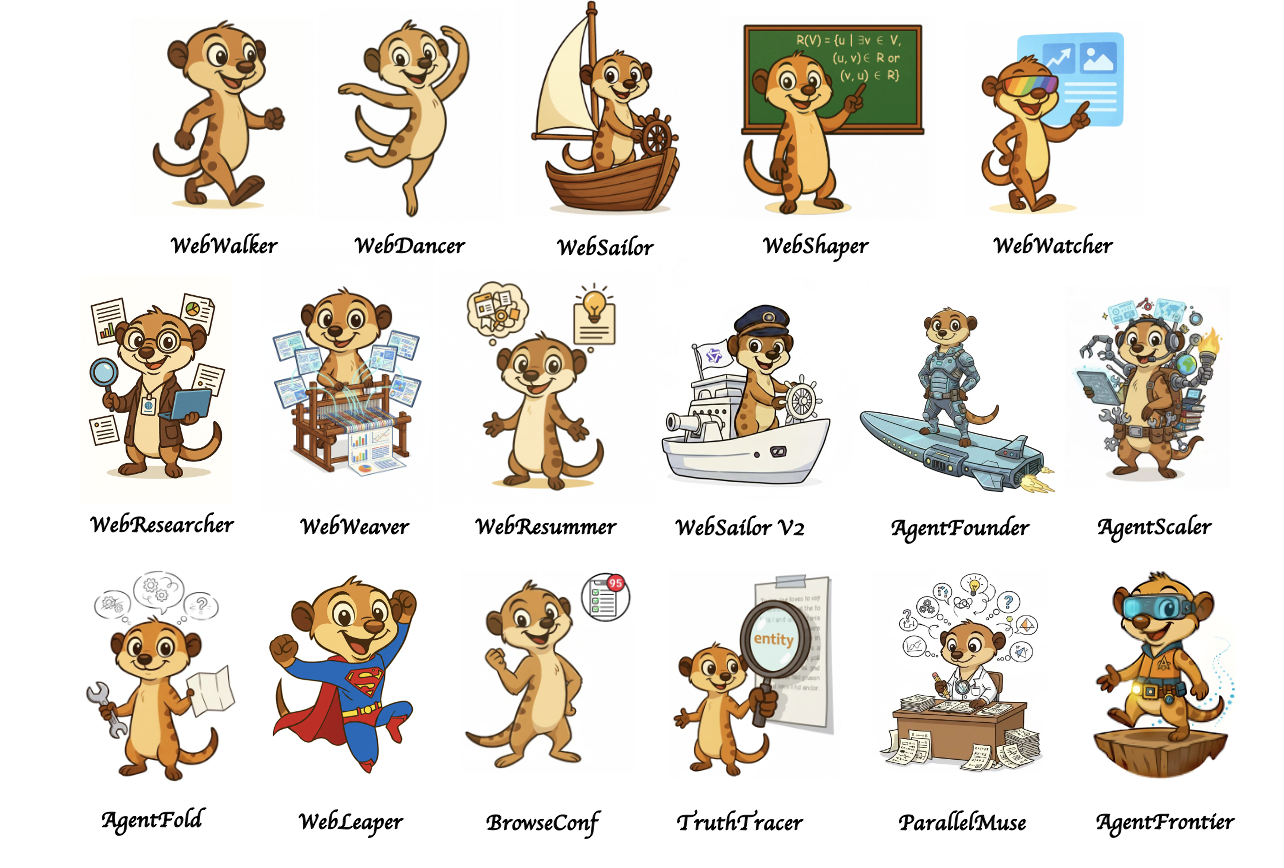
Tongyi DeepResearch also has an extensive deep research agent family. You can find more information in the following paper:
[1] WebWalker: Benchmarking LLMs in Web Traversal (ACL 2025)
[2] WebDancer: Towards Autonomous Information Seeking Agency (NeurIPS 2025)
[3] WebSailor: Navigating Super-human Reasoning for Web Agent
[4] WebShaper: Agentically Data Synthesizing via Information-Seeking Formalization
[5] WebWatcher: Breaking New Frontier of Vision-Language Deep Research Agent
[6] WebResearcher: Unleashing unbounded reasoning capability in Long-Horizon Agents
[7] ReSum: Unlocking Long-Horizon Search Intelligence via Context Summarization
[8] WebWeaver: Structuring Web-Scale Evidence with Dynamic Outlines for Open-Ended Deep Research
[9] WebSailor-V2: Bridging the Chasm to Proprietary Agents via Synthetic Data and Scalable Reinforcement Learning
[10] Scaling Agents via Continual Pre-training
[11] Towards General Agentic Intelligence via Environment Scaling
[12] AgentFold: Long-Horizon Web Agents with Proactive Context Management
[13] WebLeaper: Empowering Efficient, Info-Rich Seeking for Web Agents
[14] BrowseConf: Confidence-Guided Test-Time Scaling for Web Agents
[15] Repurposing Synthetic Data for Fine-grained Search Agent Supervision
[16] ParallelMuse: Agentic Parallel Thinking for Deep Information Seeking
[17] AgentFrontier: Expanding the Capability Frontier of LLM Agents with ZPD-Guided Data Synthesis
[18] Nested Browser-Use Learning for Agentic Information Seeking
🌟 Misc
🚩 Talent Recruitment
🔥🔥🔥 We are hiring! Research intern positions are open (based in Hangzhou、Beijing、Shanghai)
📚 Research Area:Web Agent, Search Agent, Agent RL, MultiAgent RL, Agentic RAG
☎️ Contact:[email protected]
For communications, please contact Yong Jiang ([email protected]).
Citation
@article{tongyidr,
  title={Tongyi DeepResearch Technical Report},
  author={Team, Tongyi DeepResearch and Li, Baixuan and Zhang, Bo and Zhang, Dingchu and Huang, Fei and Li, Guangyu and Chen, Guoxin and Yin, Huifeng and Wu, Jialong and Zhou, Jingren and others},
  journal={arXiv preprint arXiv:2510.24701},
  year={2025}
}



 Tongyi DeepResearch 是阿里巴巴通义实验室开源的智能体大模型,专为在网页上进行长程、深度的信息检索而打造。这个仓库提供模型权重,以及 Python 推理脚本和基准评测脚本。