!!! Check out our new paper and framework improved for articulated objects
First Order Motion Model for Image Animation
This repository contains the source code for the paper First Order Motion Model for Image Animation by Aliaksandr Siarohin, Stéphane Lathuilière, Sergey Tulyakov, Elisa Ricci and Nicu Sebe.
Hugging Face Spaces
Example animations
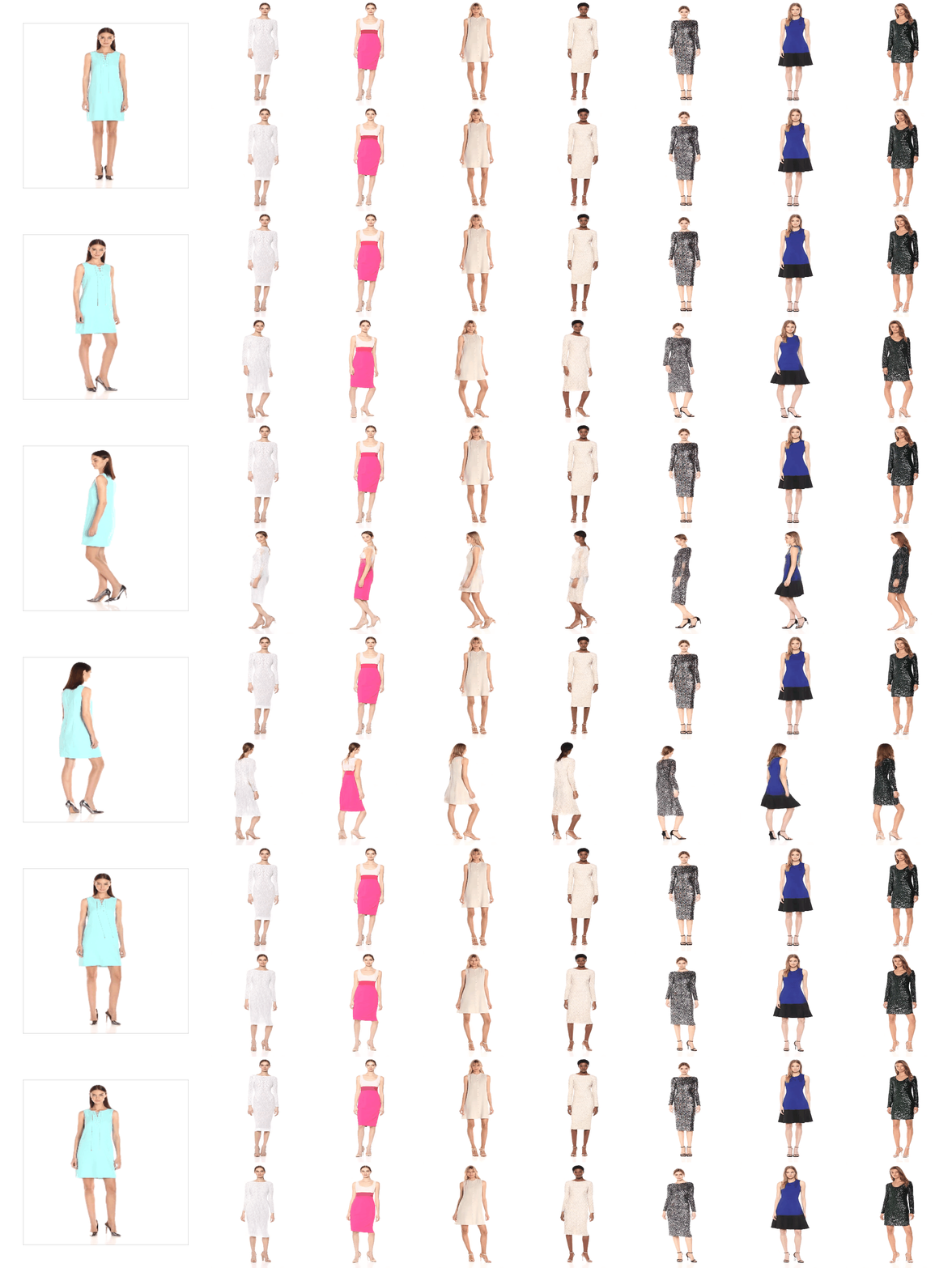
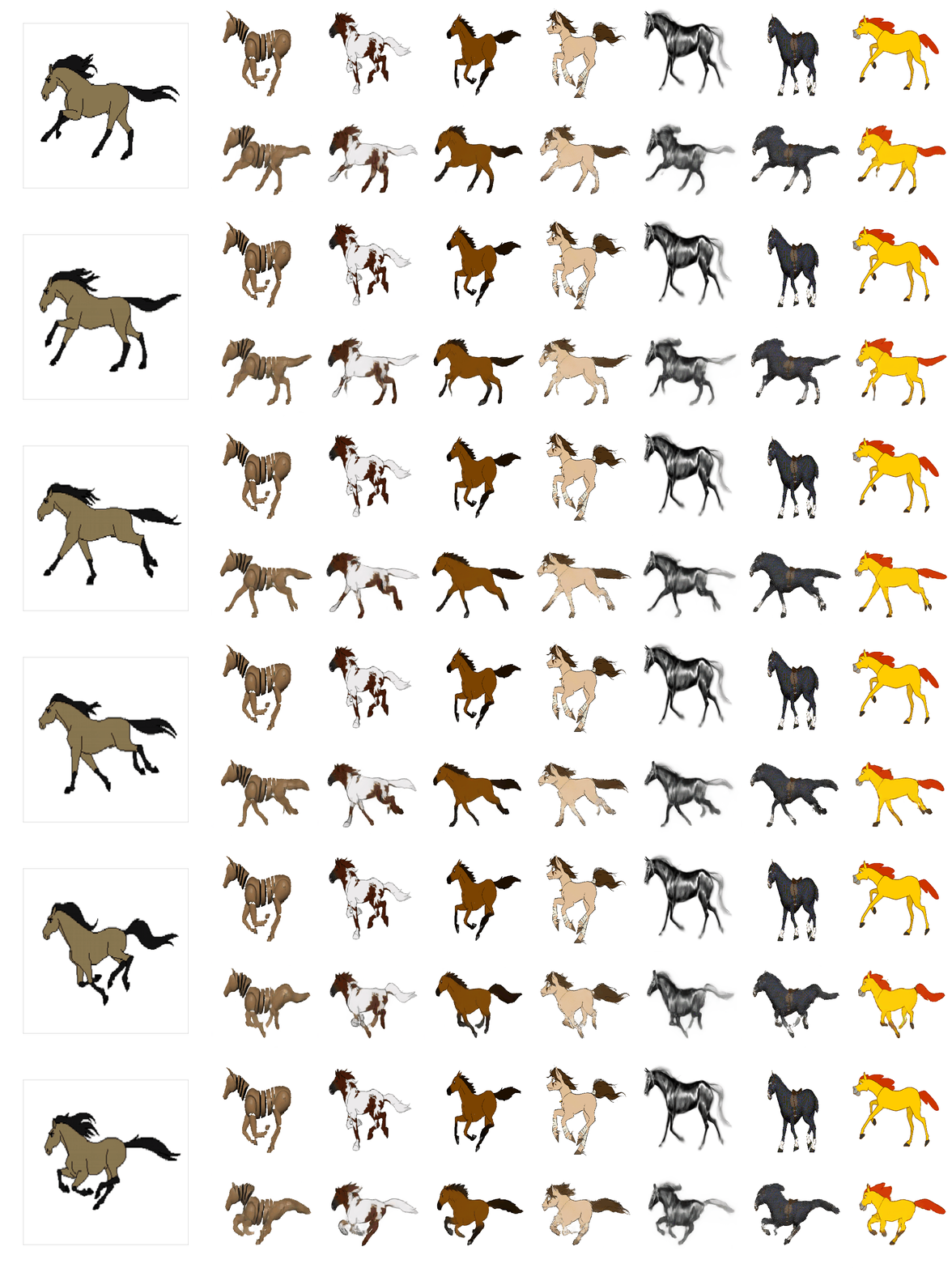
The videos on the left show the driving videos. The first row on the right for each dataset shows the source videos. The bottom row contains the animated sequences with motion transferred from the driving video and object taken from the source image. We trained a separate network for each task.
VoxCeleb Dataset
Fashion Dataset
MGIF Dataset
Installation
We support python3. To install the dependencies run:
pip install -r requirements.txt
YAML configs
There are several configuration (config/dataset_name.yaml) files one for each dataset. See config/taichi-256.yaml to get description of each parameter.
Pre-trained checkpoint
Checkpoints can be found under following link: google-drive or yandex-disk.
Animation Demo
To run a demo, download checkpoint and run the following command:
python demo.py --config config/dataset_name.yaml --driving_video path/to/driving --source_image path/to/source --checkpoint path/to/checkpoint --relative --adapt_scale
The result will be stored in result.mp4.
The driving videos and source images should be cropped before it can be used in our method. To obtain some semi-automatic crop suggestions you can use python crop-video.py --inp some_youtube_video.mp4. It will generate commands for crops using ffmpeg. In order to use the script, face-alligment library is needed:
git clone https://github.com/1adrianb/face-alignment
cd face-alignment
pip install -r requirements.txt
python setup.py install
Animation demo with Docker
If you are having trouble getting the demo to work because of library compatibility issues,
and you're running Linux, you might try running it inside a Docker container, which would
give you better control over the execution environment.
Requirements: Docker 19.03+ and nvidia-docker
installed and able to successfully run the nvidia-docker usage tests.
We'll first build the container.
docker build -t first-order-model .
And now that we have the container available locally, we can use it to run the demo.
docker run -it --rm --gpus all \
       -v $HOME/first-order-model:/app first-order-model \
       python3 demo.py --config config/vox-256.yaml \
           --driving_video driving.mp4 \
           --source_image source.png  \
           --checkpoint vox-cpk.pth.tar \
           --result_video result.mp4 \
           --relative --adapt_scale
Colab Demo


@graphemecluster prepared a GUI demo for the Google Colab. It also works in Kaggle. For the source code, see demo.ipynb.
For the old demo, see old_demo.ipynb.
Face-swap
It is possible to modify the method to perform face-swap using supervised segmentation masks.
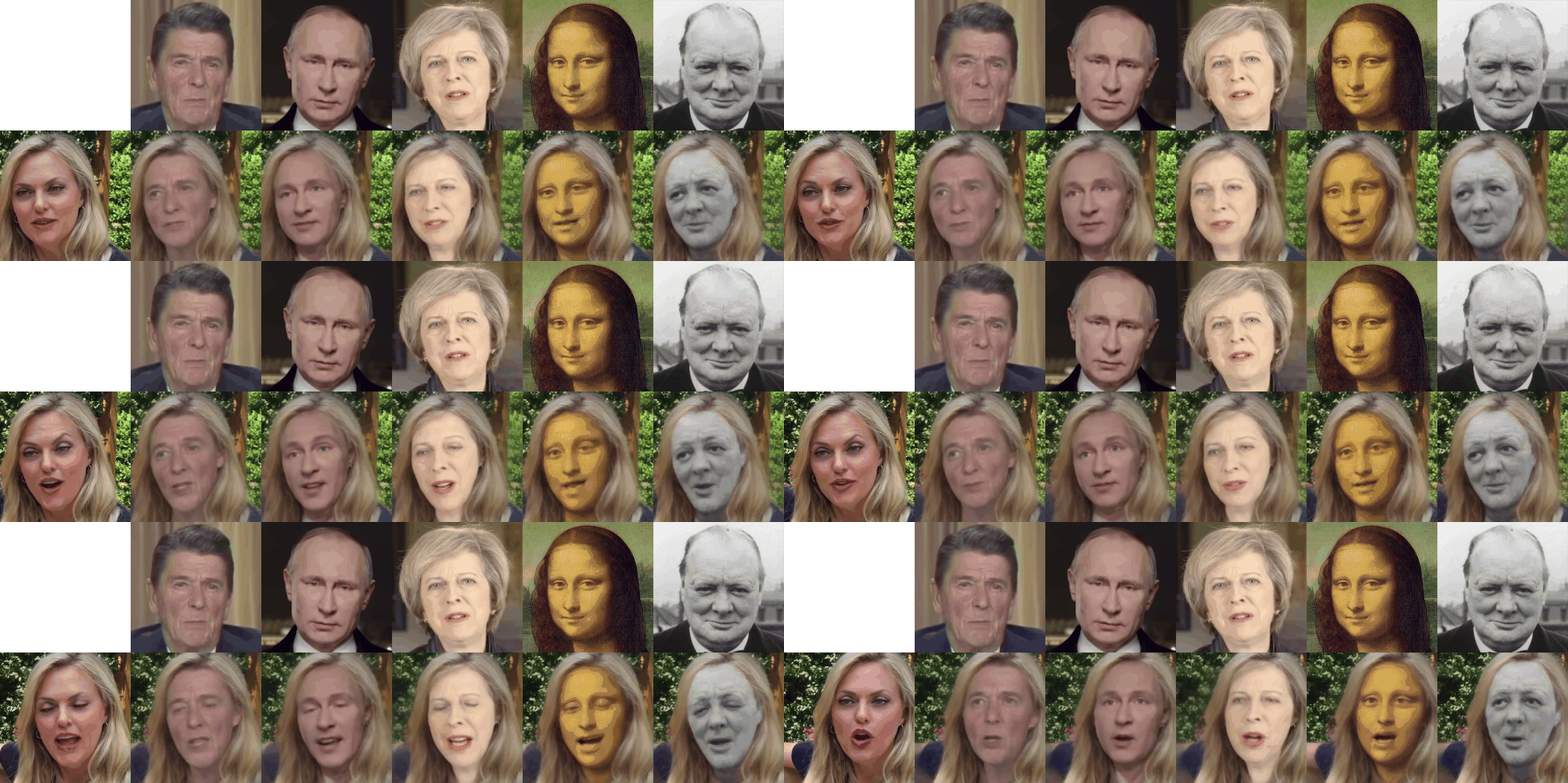 For both unsupervised and supervised video editing, such as face-swap, please refer to Motion Co-Segmentation.
Training
To train a model on specific dataset run:
CUDA_VISIBLE_DEVICES=0,1,2,3 python run.py --config config/dataset_name.yaml --device_ids 0,1,2,3
The code will create a folder in the log directory (each run will create a time-stamped new directory).
Checkpoints will be saved to this folder.
To check the loss values during training see log.txt.
You can also check training data reconstructions in the train-vis subfolder.
By default the batch size is tuned to run on 2 or 4 Titan-X gpu (apart from speed it does not make much difference). You can change the batch size in the train_params in corresponding .yaml file.
Evaluation on video reconstruction
To evaluate the reconstruction performance run:
CUDA_VISIBLE_DEVICES=0 python run.py --config config/dataset_name.yaml --mode reconstruction --checkpoint path/to/checkpoint
You will need to specify the path to the checkpoint,
the reconstruction subfolder will be created in the checkpoint folder.
The generated video will be stored to this folder, also generated videos will be stored in png subfolder in loss-less '.png' format for evaluation.
Instructions for computing metrics from the paper can be found: https://github.com/AliaksandrSiarohin/pose-evaluation.
Image animation
In order to animate videos run:
CUDA_VISIBLE_DEVICES=0 python run.py --config config/dataset_name.yaml --mode animate --checkpoint path/to/checkpoint
You will need to specify the path to the checkpoint,
the animation subfolder will be created in the same folder as the checkpoint.
You can find the generated video there and its loss-less version in the png subfolder.
By default video from test set will be randomly paired, but you can specify the "source,driving" pairs in the corresponding .csv files. The path to this file should be specified in corresponding .yaml file in pairs_list setting.
There are 2 different ways of performing animation:
by using absolute keypoint locations or by using relative keypoint locations.
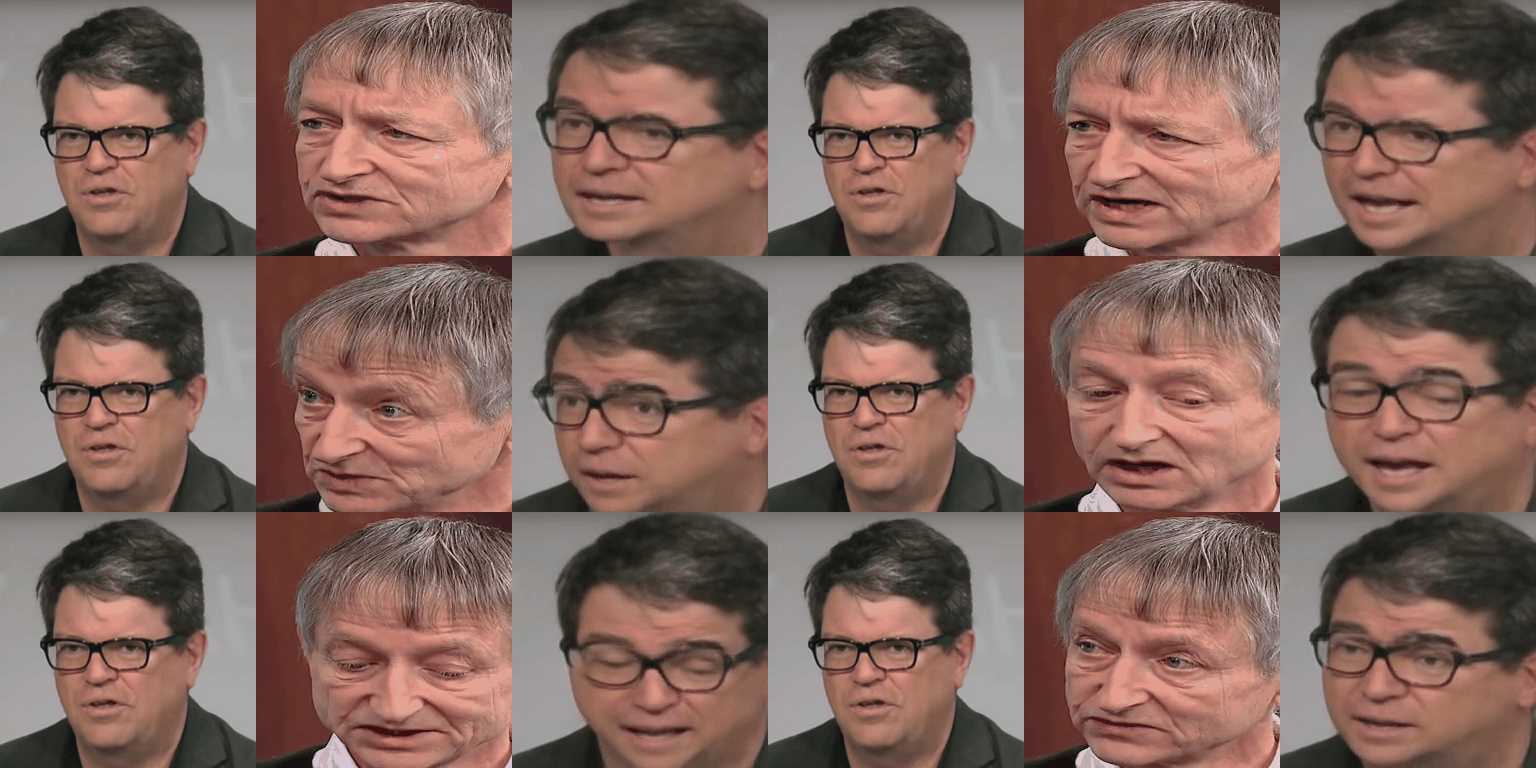
- Animation using absolute coordinates: the animation is performed using the absolute positions of the driving video and appearance of the source image.
In this way there are no specific requirements for the driving video and source appearance that is used.
However this usually leads to poor performance since irrelevant details such as shape is transferred.
Check animate parameters in
taichi-256.yaml to enable this mode.
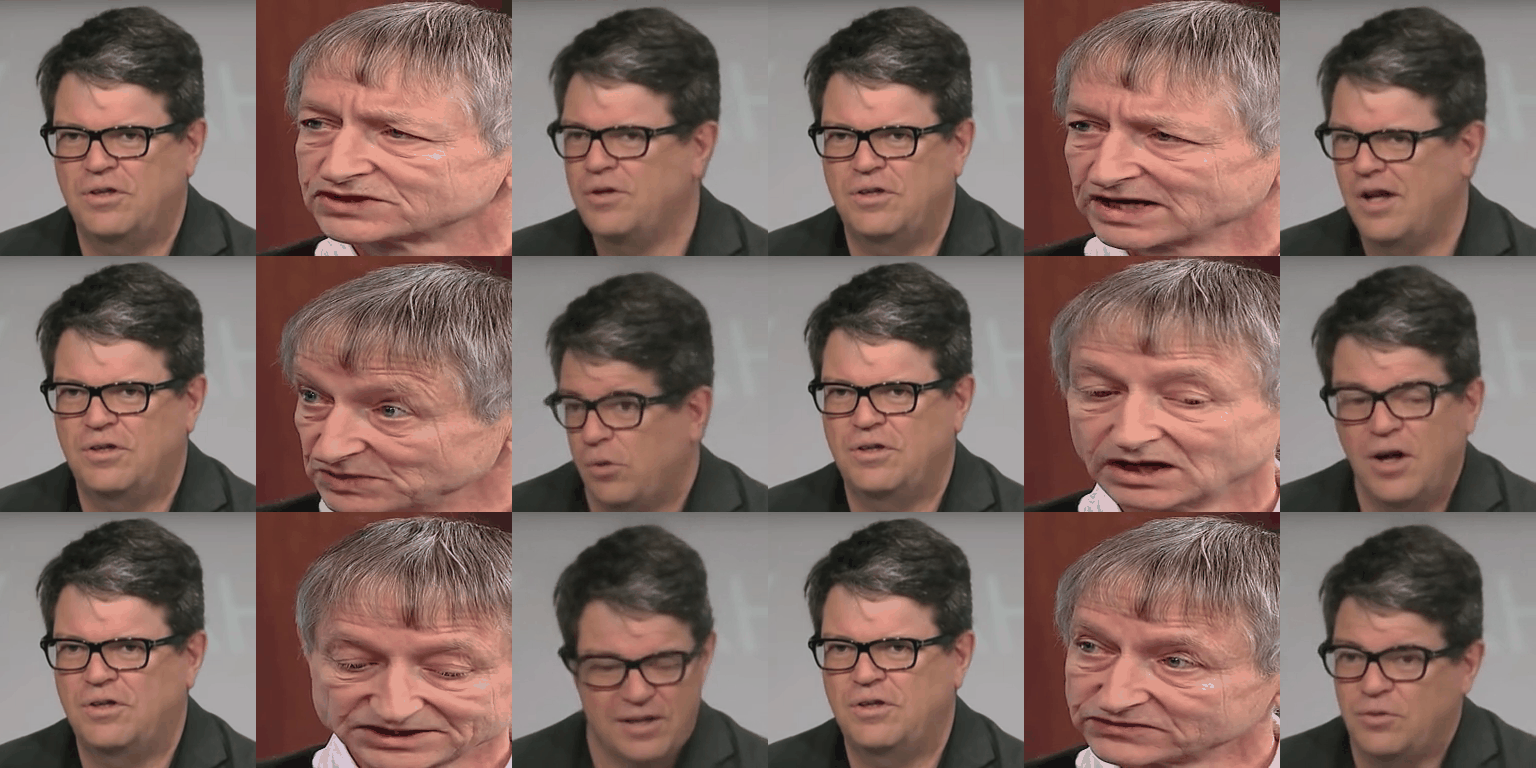
- Animation using relative coordinates: from the driving video we first estimate the relative movement of each keypoint,
then we add this movement to the absolute position of keypoints in the source image.
This keypoint along with source image is used for animation. This usually leads to better performance, however this requires
that the object in the first frame of the video and in the source image have the same pose
Datasets
Bair. This dataset can be directly downloaded.
Mgif. This dataset can be directly downloaded.
Fashion. Follow the instruction on dataset downloading from.
Taichi. Follow the instructions in data/taichi-loading or instructions from https://github.com/AliaksandrSiarohin/video-preprocessing.
Nemo. Please follow the instructions on how to download the dataset. Then the dataset should be preprocessed using scripts from https://github.com/AliaksandrSiarohin/video-preprocessing.
VoxCeleb. Please follow the instruction from https://github.com/AliaksandrSiarohin/video-preprocessing.
Training on your own dataset
Resize all the videos to the same size e.g 256x256, the videos can be in '.gif', '.mp4' or folder with images.
We recommend the later, for each video make a separate folder with all the frames in '.png' format. This format is loss-less, and it has better i/o performance.
Create a folder data/dataset_name with 2 subfolders train and test, put training videos in the train and testing in the test.
Create a config config/dataset_name.yaml, in dataset_params specify the root dir the root_dir: data/dataset_name. Also adjust the number of epoch in train_params.
Additional notes
Citation:
@InProceedings{Siarohin_2019_NeurIPS,
  author={Siarohin, Aliaksandr and Lathuilière, Stéphane and Tulyakov, Sergey and Ricci, Elisa and Sebe, Nicu},
  title={First Order Motion Model for Image Animation},
  booktitle = {Conference on Neural Information Processing Systems (NeurIPS)},
  month = {December},
  year = {2019}
}

 这是论文《First Order Motion Model for Image Animation》的官方源代码。它通过从驱动视频中迁移运动,让一张静态的源图像动起来,并且使用自学习的关键点,而不需要手工标注。