这是什么?
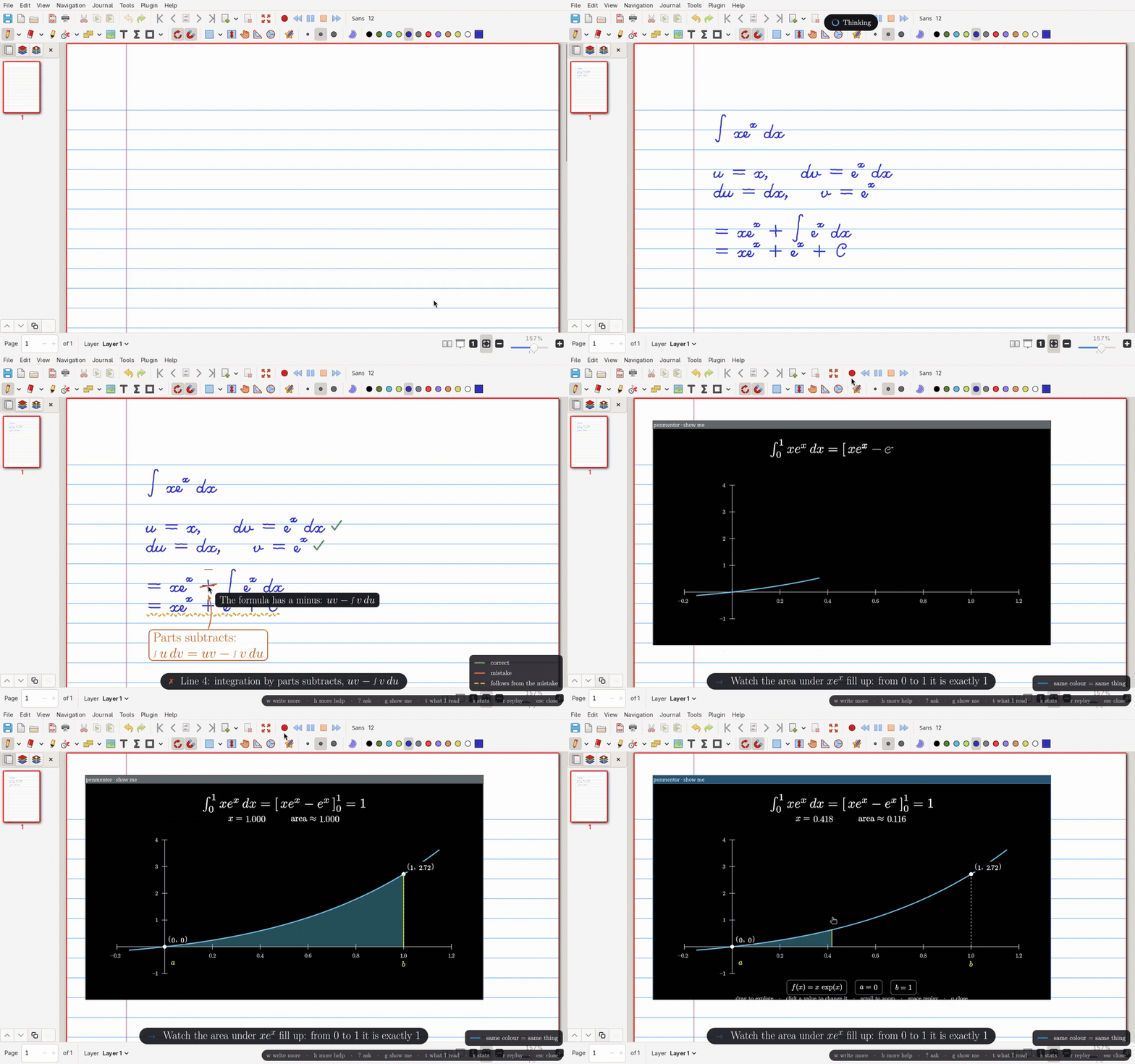
 这是一个数学批改导师:它会监看你在 xournal++ 里手写的微积分作业,你按下按键后,AI 智能体(Claude、Gemini 或 GPT)会像老师一样直接在屏幕上批改:圈出错误、勾出正确的步骤,并给出提示而不是答案。
这是独立应用,还是要接入别的软件?这是一个小型 Linux 工具加一个 xournal++ 插件:你在 xournal++ 里用数位板书写,按下快捷键,penmentor 就会调用你已安装的任一编程智能体 CLI,在页面上做标注并生成 manim 动画。
这是一个小型 Linux 工具加一个 xournal++ 插件:你在 xournal++ 里用数位板书写,按下快捷键,penmentor 就会调用你已安装的任一编程智能体 CLI,在页面上做标注并生成 manim 动画。我怎么把它跑起来?在 Linux(X11)上使用 xournal++ 时,把 bin/penmentor 脚本绑定到一个键盘快捷键(推荐 i3);项目指南涵盖了安装配置、快捷键绑定,以及每个智能体的接入方式。
在 Linux(X11)上使用 xournal++ 时,把 bin/penmentor 脚本绑定到一个键盘快捷键(推荐 i3);项目指南涵盖了安装配置、快捷键绑定,以及每个智能体的接入方式。用之前我需要先装什么?你需要安装 rofi、slop、xdotool 和 PyQt6,还需要装好 xournal++,并且已安装并登录 Claude Code、Codex 或 Antigravity CLI 中的一个智能体,因为 penmentor 使用的是你现有的该智能体订阅。
你需要安装 rofi、slop、xdotool 和 PyQt6,还需要装好 xournal++,并且已安装并登录 Claude Code、Codex 或 Antigravity CLI 中的一个智能体,因为 penmentor 使用的是你现有的该智能体订阅。我的 Linux 环境都能用吗?不能。它是为 X11 构建的,在 i3 窗口管理器下效果最好;没有提及对 Wayland 或非 Linux 系统的支持。
不能。它是为 X11 构建的,在 i3 窗口管理器下效果最好;没有提及对 Wayland 或非 Linux 系统的支持。我可以选哪些 AI 模型?你在设置中通过前缀选择模型:claude: 用于 Claude Code(opus、sonnet、haiku),codex: 用于 Codex(例如 gpt-5.6-terra),agy: 用于 Antigravity CLI(例如 gemini-4-argon-medium)。
你在设置中通过前缀选择模型:claude: 用于 Claude Code(opus、sonnet、haiku),codex: 用于 Codex(例如 gpt-5.6-terra),agy: 用于 Antigravity CLI(例如 gemini-4-argon-medium)。为什么只给提示,不直接给答案?作者的设计初衷是让你自己保持思考:它提供循序渐进的提示阶梯,从轻轻点拨,到点明所用的技巧,再到下一行的淡淡虚影,而不是直接把解答交给你。
作者的设计初衷是让你自己保持思考:它提供循序渐进的提示阶梯,从轻轻点拨,到点明所用的技巧,再到下一行的淡淡虚影,而不是直接把解答交给你。manim 动画会展示什么?如果你框选了作业的某一部分,penmentor 会生成一个可交互的、3Blue1Brown 风格的 manim 动画,你可以操作它,比如拖动积分上下限,或重新输入一个数值,观察黎曼和如何收敛。
如果你框选了作业的某一部分,penmentor 会生成一个可交互的、3Blue1Brown 风格的 manim 动画,你可以操作它,比如拖动积分上下限,或重新输入一个数值,观察黎曼和如何收敛。它只能看到屏幕可见的区域吗?不是。一个小型 xournal++ 插件会共享你正在处理的整页内容,而不只是当前屏幕能显示的部分,因此智能体能完整掌握你的作业内容。
不是。一个小型 xournal++ 插件会共享你正在处理的整页内容,而不只是当前屏幕能显示的部分,因此智能体能完整掌握你的作业内容。有哪些类似的项目?Auto-claude-code-research-in-sleep, Gnos, webcodex, brag, ordewell, ai-guide, oh-my-hermes, awesome-chatgpt-zh
Auto-claude-code-research-in-sleep, Gnos, webcodex, brag, ordewell, ai-guide, oh-my-hermes, awesome-chatgpt-zh它属于哪些主题?i3, math, x11, mathematics, antigravity, gpt, animation, learning, gemini, openai, education, command-line-tool
i3, math, x11, mathematics, antigravity, gpt, animation, learning, gemini, openai, education, command-line-tool