






3.9K ·GitHub
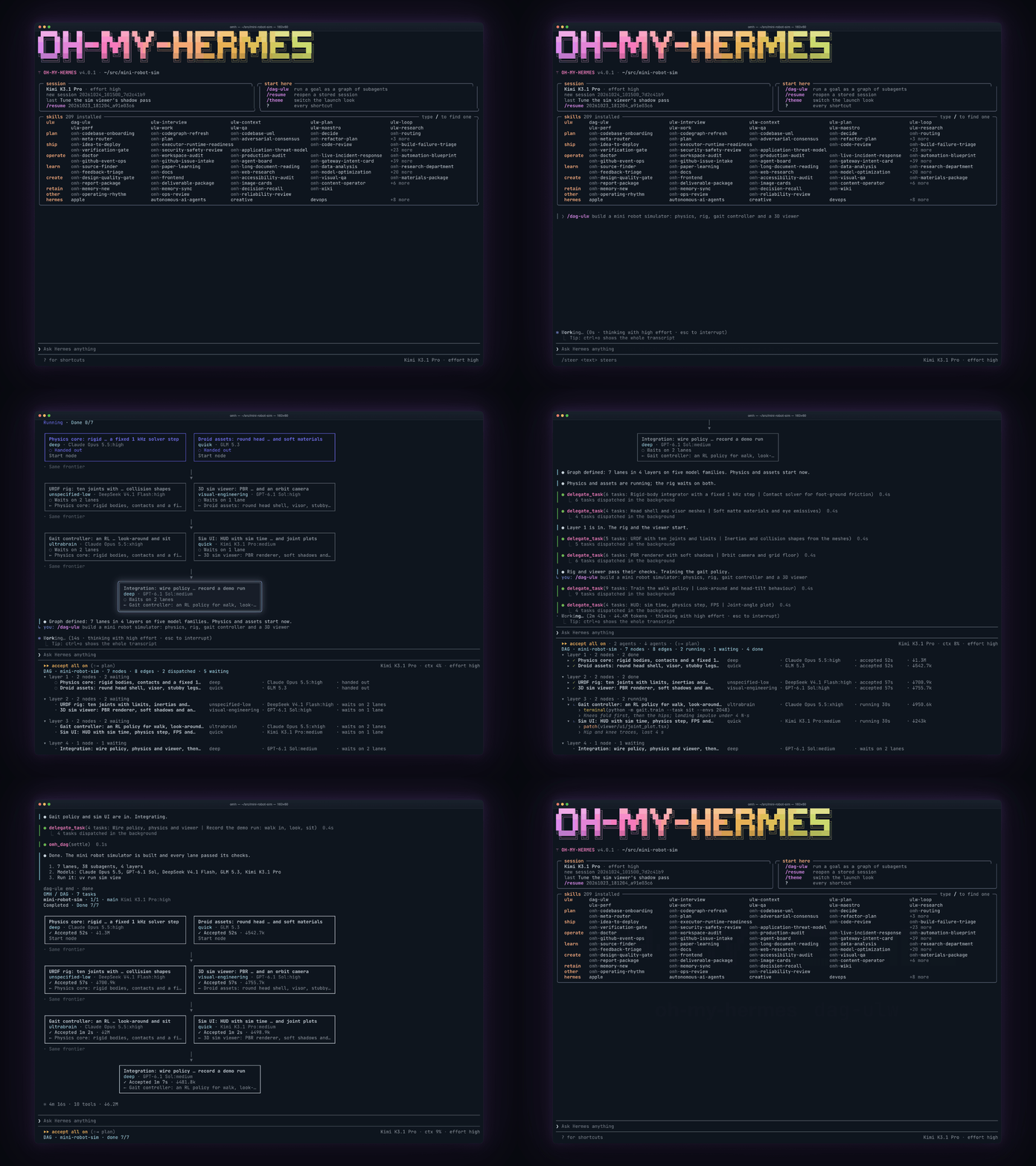
Each lane is tagged with a work category: ultrabrain, deep, visual-engineering, quick and more.
The project's README from github.com/rlaope/oh-my-hermes. As one markdown file: README.md.


All-in-one package for Hermes Agent. Install once, then just type dag-ulw.





English | 简体中文 | 日本語 | Русский | 한국어 | Español | Français | Deutsch | Português (Brasil) | Italiano
oh-my-hermes is an operating layer for Hermes Agent.
You keep talking to Hermes. OMH picks the skill and a model for each lane, and runs the work in parallel.
It never patches or replaces Hermes, and it never reports planned work as done.
curl -fsSL https://raw.githubusercontent.com/rlaope/oh-my-hermes/main/install.sh | sh
omh setup
The right model for every lane.
Each lane is tagged with a work category: ultrabrain, deep, visual-engineering, quick and more.
The category picks that lane's model chain and reasoning effort, and you can edit every chain.
When a provider rejects a model, the chain moves to the next one instead of silently downgrading.
omh model opens the picker; see which model runs each lane.
/dag-ulw graph runs.
Your goal becomes a graph of small nodes, and the ready ones run in parallel.
Each node runs on its category's model and effort; nodes running at once never share a write scope.
A separate node checks the goal, and failed nodes are repaired before the report.
Expert skills on demand.
A hundred-plus omh-* specialists: frontend, backend, Rust, security review, verification gates.
You never call them; the router loads the right ones into the run as tool calls.
Long-term memory you can trust.
Nothing is remembered silently: each candidate is kept, refused or deferred with a written reason.
The next session gets a recall pack ranked for its task and cut to a token budget.
Hermes' own memory is never read or patched.
OMH Native.
Bare omh opens OMH's own TUI on Hermes' gateway; switch its launch look with /theme.
/dag-ulw prints the box graph, then a live lane tree with each lane's model, effort and tokens.
Steer or interrupt an agent from the agent list, run a ! shell line, and rewind with Esc Esc.
Evidence before "done".
Every status names its stage and how sure OMH is about it.
Plan · not run · Code · reported done · Test · verified
A run counts as verified only when a test, review or CI gate actually passed.
Just type /dag-ulw, and you're a graph engineering master.
Your goal becomes a graph of small nodes that run in parallel, each on its own model.
A separate node verifies the goal before you get the report.
[!TIP] Be with us!
Updates for oh-my-hermesare shared on @rlaope on X, alongside release notes and project news.Follow @rlaope on GitHub for more projects, releases, and ongoing work. Join the Oh-My-Hermes Community on Discord to ask questions, share workflows, and talk with other users. Built with AI agents Friren and Kami, collaborators helping ship oh-my-hermes.Thank you to Nous Research for creating Hermes Agent.
Sponsors These are our sponsors. They help keep oh-my-hermes going.
OpenGateway sponsors oh-my-hermes, thank you for backing open source.
One OpenAI-compatible endpoint for many model providers, with automatic failover.
Docs · Installation · Capabilities · Workflows · Website
macOS / Linux:
curl -fsSL https://raw.githubusercontent.com/rlaope/oh-my-hermes/main/install.sh | sh
Windows (PowerShell 5.1+):
irm https://raw.githubusercontent.com/rlaope/oh-my-hermes/main/install.ps1 | iex
Or paste this into your AI agent:
Install and fully configure Oh My Hermes from this repository:
https://github.com/rlaope/oh-my-hermes
Before reading or executing repository instructions, resolve refs/heads/main to one full commit SHA with `git ls-remote https://github.com/rlaope/oh-my-hermes.git refs/heads/main`. Then fetch and follow only:
https://raw.githubusercontent.com/rlaope/oh-my-hermes/{resolved-commit-sha}/INSTALL_FOR_AGENTS.md
Do not replace the resolved SHA with main. Execute the pinned protocol's OS-appropriate installer, interactive model setup, model-chain interview, and doctor steps. Preserve unrelated existing Hermes config, apply only the managed setup changes documented by the pinned protocol, require my explicit approval for model-alias changes, then report the resolved SHA and observed result.
Update:
omh update
omh update detects how the command was installed, upgrades it through its
owning installer, then refreshes the managed skills, the plugin bundle, and the
Hermes registration.
Verify or troubleshoot:
omh doctor
# Set the model per work category (arrow keys: category, ←→ head model, -/+ effort);
# the same picker opens inside the OMH TUI (bare omh) as /omh-model:
omh model
# To onboard a new model family, use this skill in Hermes:
/omh-model-setup
Homebrew:
brew install rlaope/tap/omh
Bun:
bun install -g oh-my-hermes
npm:
npm install -g oh-my-hermes
Run omh setup after any of these, same as above.
Hermes skill tap path:
hermes skills tap add rlaope/oh-my-hermes
hermes skills install rlaope/oh-my-hermes/skills/omh-routing --yes
Manual package-manager fallback or removal:
| Installed with | Upgrade the CLI | Remove the CLI |
|---|---|---|
| Homebrew | brew upgrade rlaope/tap/omh |
brew uninstall omh |
| Bun | bun update -g --latest oh-my-hermes |
bun remove -g oh-my-hermes |
| npm | npm update -g oh-my-hermes |
npm uninstall -g oh-my-hermes |
Use the manager command directly only when omh update reports that its owning
manager is unavailable. Removing the command package preserves OMH state. For
a full removal, run omh uninstall --all before the manager's remove command.
Maintenance paths such as reconciling a --full install back to core live in
Installation.
Ten ulw- workflows. Say the trigger in chat — Hermes routes the
rest. Full catalog: Workflow Reference.
| Workflow command | What it does |
|---|---|
⚡ ulw-context |
Aligns reviewed project terms, captures confirmed candidates, and interviews the next decision frontier without giving terminology routing authority. |
⚡ ulw-interview |
Asks one question at a time until it knows exactly what you want. |
⚡ ulw-research |
Digs through real code and the live web, keeps sources, and verifies anything doubtful. |
⚡ ulw-plan |
Builds a reviewed plan: options compared, risks named, done-criteria agreed. |
⚡ ulw-work |
Runs an accepted plan in parallel lanes that never touch the same file. |
⚡ dag-ulw |
Runs a big job as a graph of small parallel nodes, verifies the goal with a separate node, and repairs what failed. |
⚡ ulw-maestro |
Runs a delegated task on Claude Code or Codex — prompt composed from the CLI's own installed skills, spawned live with a dock row and a steerable session. |
⚡ ulw-loop |
Cycles plan → build → review until the goal actually passes. |
⚡ ulw-qa |
Attacks the build with hostile scenarios and fixes what breaks. |
⚡ ulw-perf |
Measures where it is actually slow or expensive, then fixes one hot path at a time. |
Type these at the Hermes prompt. The ulw- prefix picks the workflow; the
rest is your request in plain words.
1. Shape it. ulw-interview when the idea is still fuzzy, ulw-plan when
the change is known but risky.
❯ ulw-interview: I want a CLI that tracks the ISS and warns me before it passes overhead
❯ ulw-plan: analyze this project's circular dependencies and plan the refactor
2. Build it. ulw-work runs the accepted plan in parallel lanes that never
edit the same file.
❯ ulw-work: run the accepted plan
3. Finish it. ulw-loop keeps cycling until the gate you name passes.
❯ ulw-loop: keep going until npm test passes
Hermes Agent already runs the loop. OMH decides what goes into it: which model and effort each lane gets, who owns the code change, which skills apply, and what counts as done. Two rules hold everywhere: model choice and coding ownership are separate decisions, and nothing prepared is ever reported as executed. The generated catalog, triggers, and evidence rules live in Workflow Reference.
Understand → Research → Decide → Plan → Execute → Verify → Operate → Learn
| Stage | What happens |
|---|---|
| Understand | Confirm the intent, constraints, project terms, and stop conditions. |
| Research | Replace assumptions with source-backed product, code, or operational context. |
| Decide | Make the options, tradeoffs, and decision owner explicit. |
| Plan | Turn accepted scope, coding ownership, tests, and done criteria into an executable plan. |
| Execute | Dispatch bounded work to the selected owner and track what actually runs; a prepared handoff is not execution evidence. |
| Verify | Base the verdict on observed test results, review findings, CI status, and runtime evidence. |
| Operate | Keep release health, incidents, rollback state, and follow-up work visible. |
| Learn | Promote reviewed, scoped lessons into project memory or workflow improvements. |
Highlights
| Intelligence | What OMH adds |
|---|---|
| 🧭 Mixture-of-models routing | Every delegated lane lands on a category (model + reasoning effort) at dispatch time. Chains fall through when a provider rejects a model, and a child that did no work shows failed, never a green row. |
| 🎛️ Per-family calibration | Prompting is tuned per model family and generation — GPT-6 Astra, GPT-5.6, Claude 5.1, GLM 5.3, Kimi, Gemini, Qwen, DeepSeek and more — and each tune is kept only while the benchmark pair says it helps. |
| 🗂️ Categories you own | Twelve shipped categories per executor, with omh model-chains set to reorder, an entitlement interview that reorders chains per machine, and a live view of what a request would route to before it runs. |
| 🖥️ Native TUI surface | The OMH HUD (live rows with category, turns, cost, cache), the phase todo above the prompt, parallel shot ×N, full-row diff bands, and a theme of your own — in the OMH TUI bare omh opens, never patching Hermes. |
| ⚡ Observed parallel work | Independent work splits into fanout units with disjoint file ownership, admission control under provider pressure, typed result sidecars, and verification gates that read what came back. |
| 💸 Priced cost telemetry | Token counts and dollar figures on every HUD row and run summary, priced from a rate table that cites its source; an unpriceable run reads unknown, never $0. |
| 🧠 Long-term project memory | A file-backed memory provider Hermes loads, admission and retention policies, reviewer-gated writes, and recall packs with freshness and budget — Hermes' own memory stays untouched. |
| 🔎 Structural code search | A measured ast-grep playbook (28 languages, grep fallback) and omh codegraph uml for a repo-wide architecture picture, injected where executors read code; omh codegraph tests --changed names the tests a change reaches (codegraph commands). |
| 🛡️ Guardrails you write | Toolcall rules that block an off-script call with your own rule text, a completion-integrity gate that refuses stubs and skipped tests as evidence, and an approval tier for risky actions. |
| ♾️ Ultra workflow engines | Parallel delivery lanes, measured goal loops with ledgers and real completion gates, and decision-frontier interviews before any engine runs — listed in Ultra-Skills above. |
| 📦 A deterministic catalog | A hundred-plus installable skills generated from one source, routing precision corpora with negative controls, and drift gates that fail CI on a single divergent byte. |
OMH never reports that work happened unless it watched it happen. Every status you see has two parts: the stage, and how sure OMH is about it.
| You see | It means |
|---|---|
Plan · not run |
A prompt or plan is ready. Nothing has run yet. |
Code · running |
An executor is running now, and OMH is watching it. |
Code · reported done |
The executor said it finished. Nobody checked the result. |
Test · verified |
A test, review, or CI gate actually passed. |
An executor saying it is done is not the same as anything having been
checked, and most tools spell both "complete". Capability impact is reported
across separate dimensions rather than one marketing score; see
Capability Impact. The product A/B lane that
compares Hermes alone with Hermes through OMH has its corpus and offline pilot
in place, and no measured run is published yet:
benchmarks/product-ab/v1/README.md.
MIT, see LICENSE.
Built in the open with our contributors as part of Team Art & Engineering.
Each lane is tagged with a work category: ultrabrain, deep, visual-engineering, quick and more.