




What is this?
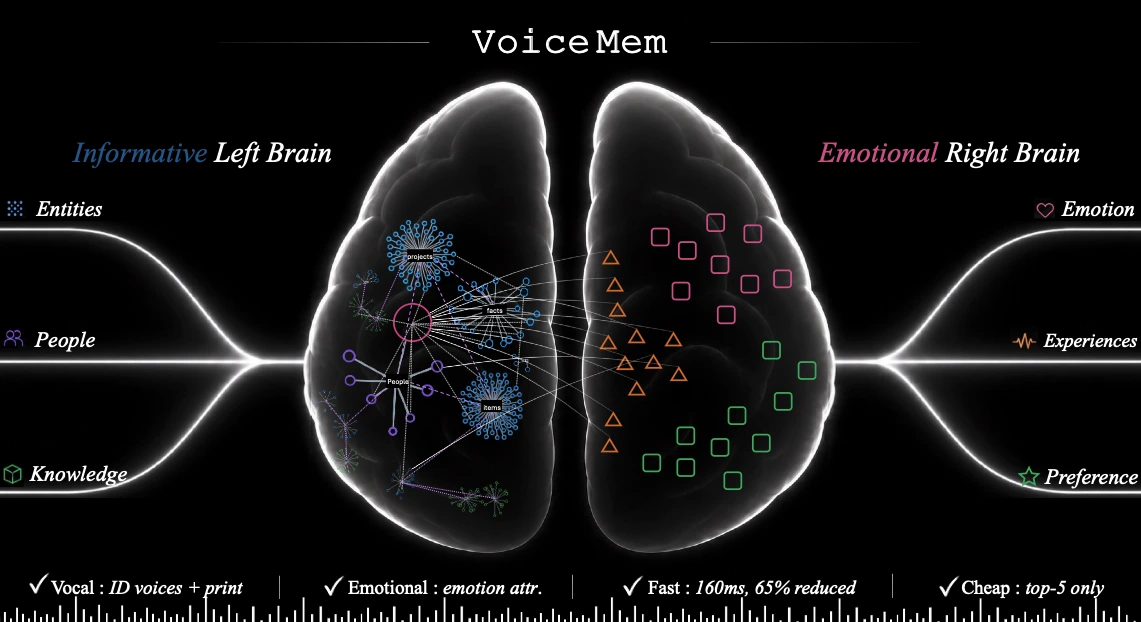
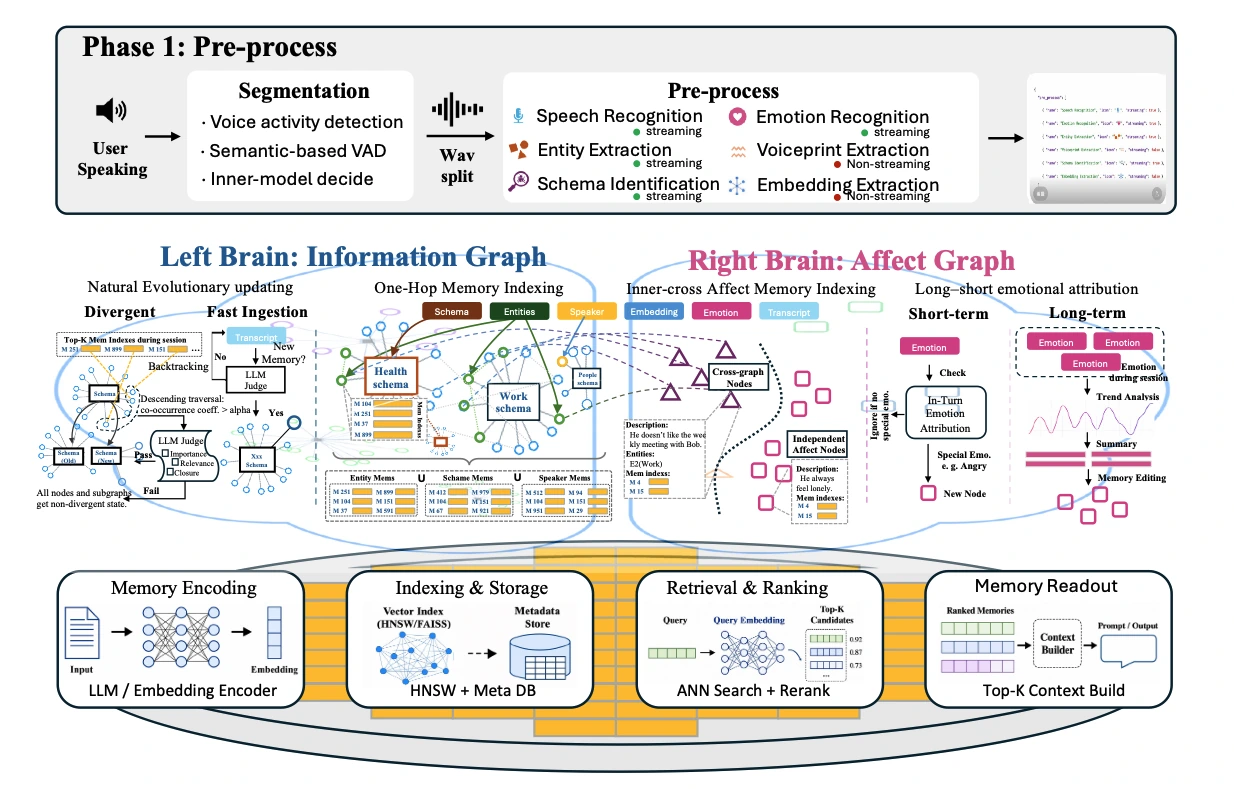
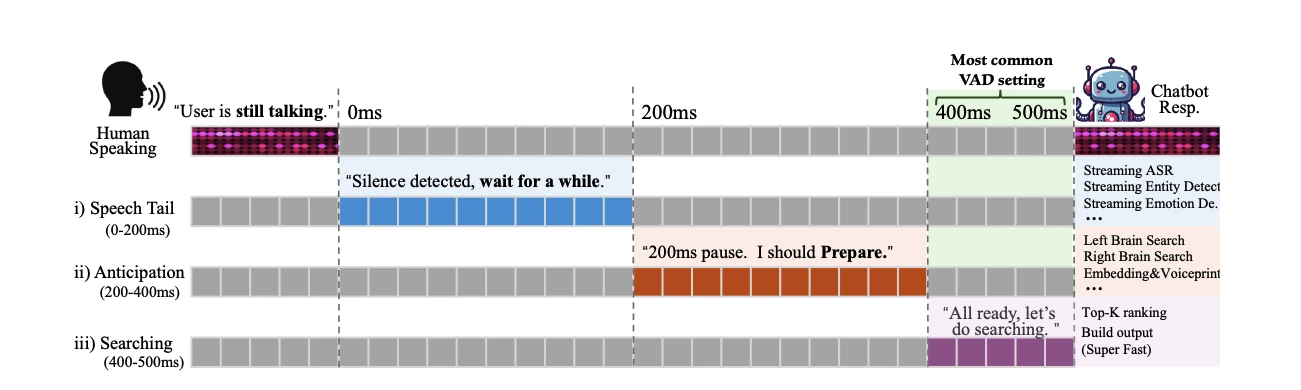
 VoiceMem is an open-source memory infrastructure for real-time voice agents, giving them long-term memory through a dual-brain architecture: a 'left brain' that stores factual information and a 'right brain' that tracks emotions and personality, built on a fully streaming pipeline to keep latency low.
VoiceMem is an open-source memory infrastructure for real-time voice agents, giving them long-term memory through a dual-brain architecture: a 'left brain' that stores factual information and a 'right brain' that tracks emotions and personality, built on a fully streaming pipeline to keep latency low.Is VoiceMem a standalone app or something I plug into my own voice agent?It's a pip-installable Python memory layer you wire into your own pipeline: the flow is microphone to VoiceMem (which listens and pre-retrieves relevant memories) to your own model (which reads those memories and generates the reply) — you only swap out the generation step.
It's a pip-installable Python memory layer you wire into your own pipeline: the flow is microphone to VoiceMem (which listens and pre-retrieves relevant memories) to your own model (which reads those memories and generates the reply) — you only swap out the generation step.How do I get it running?You install the Python package, download the required local models, then run VoiceMem either as an offline memory engine or in streaming mode; the repo also ships an interactive demo (with WebSocket/Uvicorn server) once you clone it.
You install the Python package, download the required local models, then run VoiceMem either as an offline memory engine or in streaming mode; the repo also ships an interactive demo (with WebSocket/Uvicorn server) once you clone it.Do I need an OpenAI API key?Yes for the full agent loop — VoiceMem uses the OpenAI API for Chat, TTS, and Realtime features — but the memory engine itself ships local models (FunASR-based streaming ASR, Silero VAD, multilingual-e5 embeddings) so retrieval can work without it.
Yes for the full agent loop — VoiceMem uses the OpenAI API for Chat, TTS, and Realtime features — but the memory engine itself ships local models (FunASR-based streaming ASR, Silero VAD, multilingual-e5 embeddings) so retrieval can work without it.Are the benchmark numbers based on the full conversation history or just retrieved memories?Only on retrieved memories — the answering model in evaluations never sees the raw transcript, because feeding it the full conversation would turn the benchmark into a reading-comprehension test instead of a memory test.
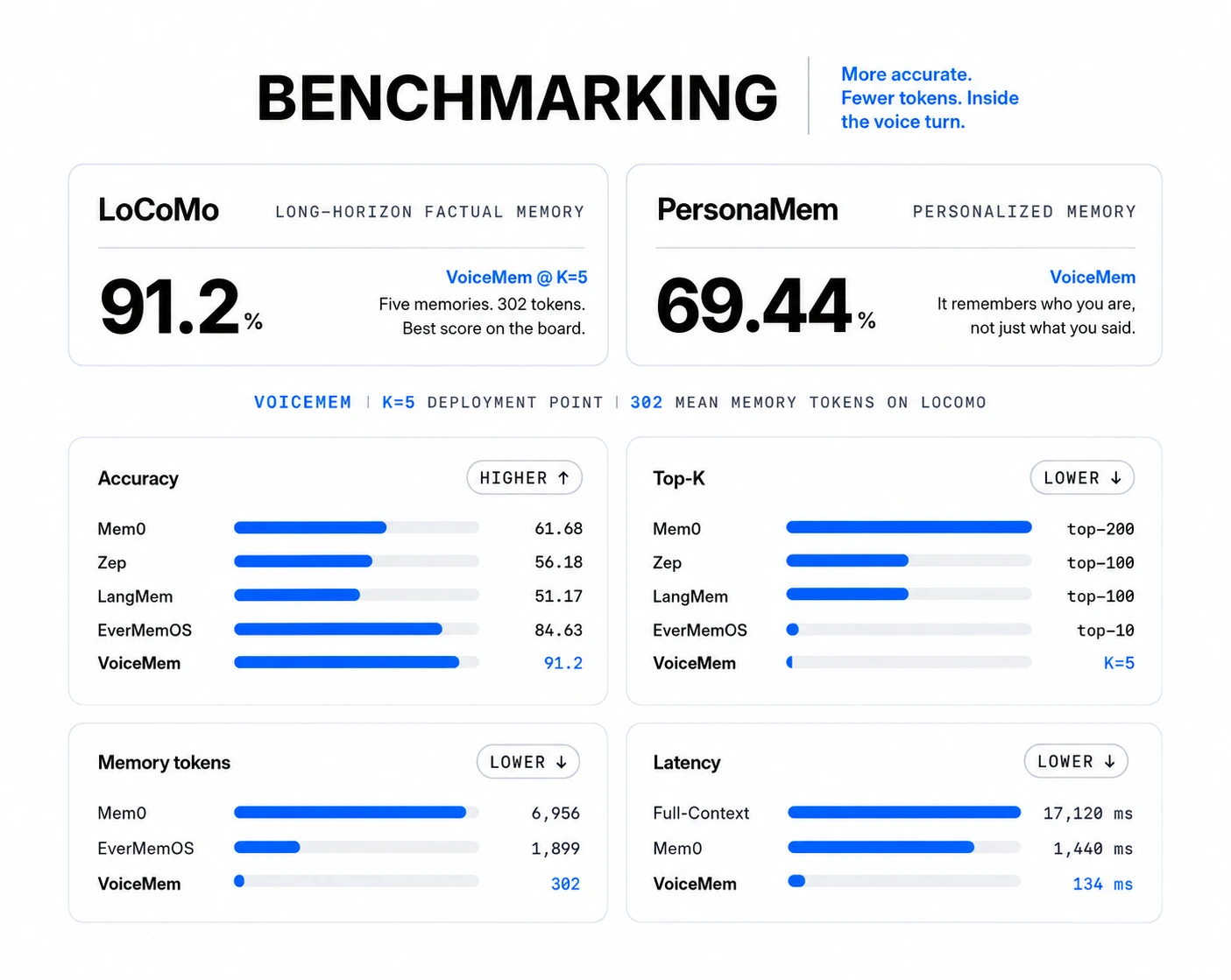
Only on retrieved memories — the answering model in evaluations never sees the raw transcript, because feeding it the full conversation would turn the benchmark into a reading-comprehension test instead of a memory test.How accurate is VoiceMem's memory retrieval compared to Mem0?On the LoCoMo benchmark VoiceMem reaches 91.2% accuracy versus Mem0's 61.68% while using only its top-5 retrieved memories, and it responds in about 134ms compared to Mem0's 1,440ms.
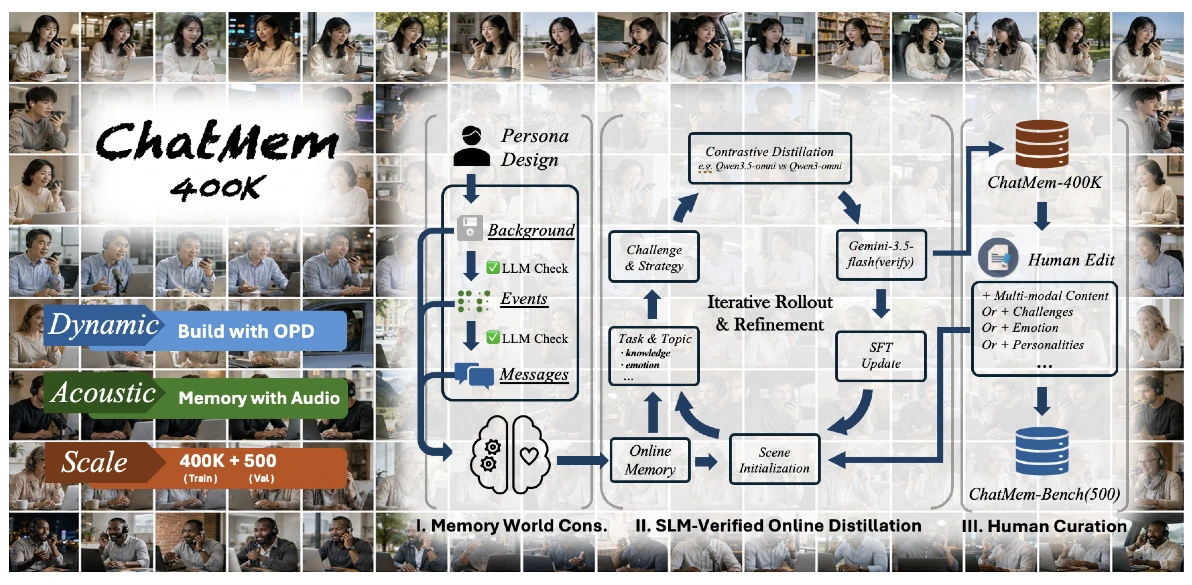
On the LoCoMo benchmark VoiceMem reaches 91.2% accuracy versus Mem0's 61.68% while using only its top-5 retrieved memories, and it responds in about 134ms compared to Mem0's 1,440ms.What is ChatMem-400K?It's an open-sourced 400K-example dataset built through a three-stage pipeline (memory-world construction, SLM-validated on-policy distillation, and human refinement), used to train the VoiceMem model family and build the ChatMem-Bench evaluation set.
It's an open-sourced 400K-example dataset built through a three-stage pipeline (memory-world construction, SLM-validated on-policy distillation, and human refinement), used to train the VoiceMem model family and build the ChatMem-Bench evaluation set.Which models already understand VoiceMem's memories?The open-sourced VoiceMem model family includes adapters for Qwen2.5-Omni, Qwen3-Omni, and Step-Audio2-Mini, which can directly read and use the memories VoiceMem provides.
The open-sourced VoiceMem model family includes adapters for Qwen2.5-Omni, Qwen3-Omni, and Step-Audio2-Mini, which can directly read and use the memories VoiceMem provides.Why split memory into a left brain and right brain instead of one store?The left brain organizes facts via schemas and entities for precise retrieval, while the right brain separately tracks personality, emotions, and relationships through cross-entity nodes — keeping emotional context from diluting factual-lookup accuracy.
The left brain organizes facts via schemas and entities for precise retrieval, while the right brain separately tracks personality, emotions, and relationships through cross-entity nodes — keeping emotional context from diluting factual-lookup accuracy.What are similar projects?mem0, memoket-kite, jargo, EverOS, Qwen3-Omni, Omni-Interaction-Agent, Memslides, SimpleMem
mem0, memoket-kite, jargo, EverOS, Qwen3-Omni, Omni-Interaction-Agent, Memslides, SimpleMemWhich topics is it in?memory-engine, voice-agent, application, audio-streaming, memory-system, genai, conversational-ai, memory-management, long-term-memory, voice-assistant, speech-recognition, ai-tools
memory-engine, voice-agent, application, audio-streaming, memory-system, genai, conversational-ai, memory-management, long-term-memory, voice-assistant, speech-recognition, ai-tools