
🔥 AnimeVideo-v3 model (动漫视频小模型). Please see [anime video models] and [comparisons]
🔥 RealESRGAN_x4plus_anime_6B for anime images (动漫插图模型). Please see [anime_model]
- :boom: Update online Replicate demo:

- Online Colab demo for Real-ESRGAN:
 | Online Colab demo for for Real-ESRGAN (anime videos):
- Portable Windows / Linux / MacOS executable files for Intel/AMD/Nvidia GPU. You can find more information here. The ncnn implementation is in Real-ESRGAN-ncnn-vulkan
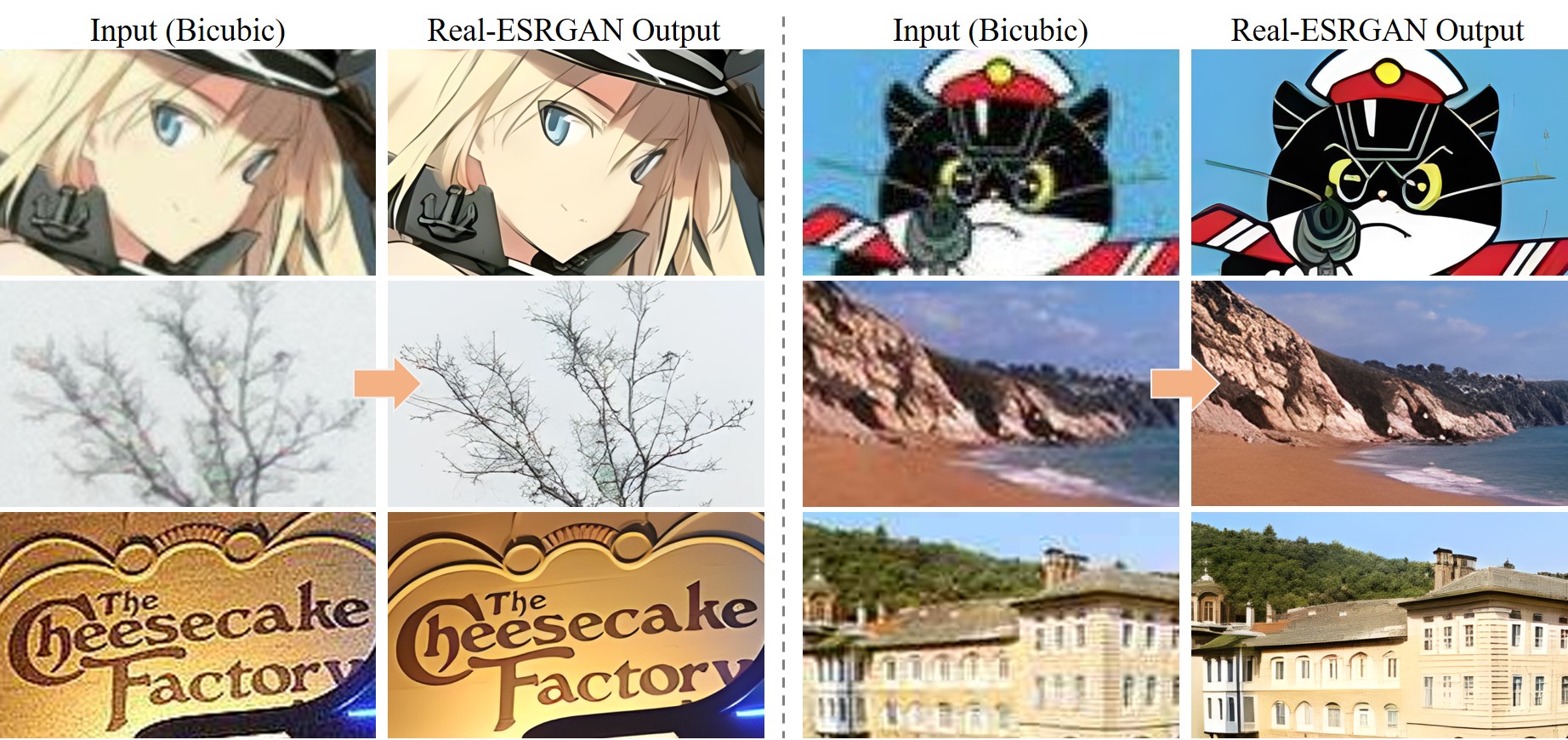
Real-ESRGAN aims at developing Practical Algorithms for General Image/Video Restoration.
We extend the powerful ESRGAN to a practical restoration application (namely, Real-ESRGAN), which is trained with pure synthetic data.
🌌 Thanks for your valuable feedbacks/suggestions. All the feedbacks are updated in feedback.md.
If Real-ESRGAN is helpful, please help to ⭐ this repo or recommend it to your friends 😊
Other recommended projects:
▶️ GFPGAN: A practical algorithm for real-world face restoration
▶️ BasicSR: An open-source image and video restoration toolbox
▶️ facexlib: A collection that provides useful face-relation functions.
▶️ HandyView: A PyQt5-based image viewer that is handy for view and comparison
▶️ HandyFigure: Open source of paper figures
📖 Real-ESRGAN: Training Real-World Blind Super-Resolution with Pure Synthetic Data
[Paper] [YouTube Video] [B站讲解] [Poster] [PPT slides]
Xintao Wang, Liangbin Xie, Chao Dong, Ying Shan
Tencent ARC Lab; Shenzhen Institutes of Advanced Technology, Chinese Academy of Sciences
🚩 Updates
- ✅ Add the realesr-general-x4v3 model - a tiny small model for general scenes. It also supports the -dn option to balance the noise (avoiding over-smooth results). -dn is short for denoising strength.
- ✅ Update the RealESRGAN AnimeVideo-v3 model. Please see anime video models and comparisons for more details.
- ✅ Add small models for anime videos. More details are in anime video models.
- ✅ Add the ncnn implementation Real-ESRGAN-ncnn-vulkan.
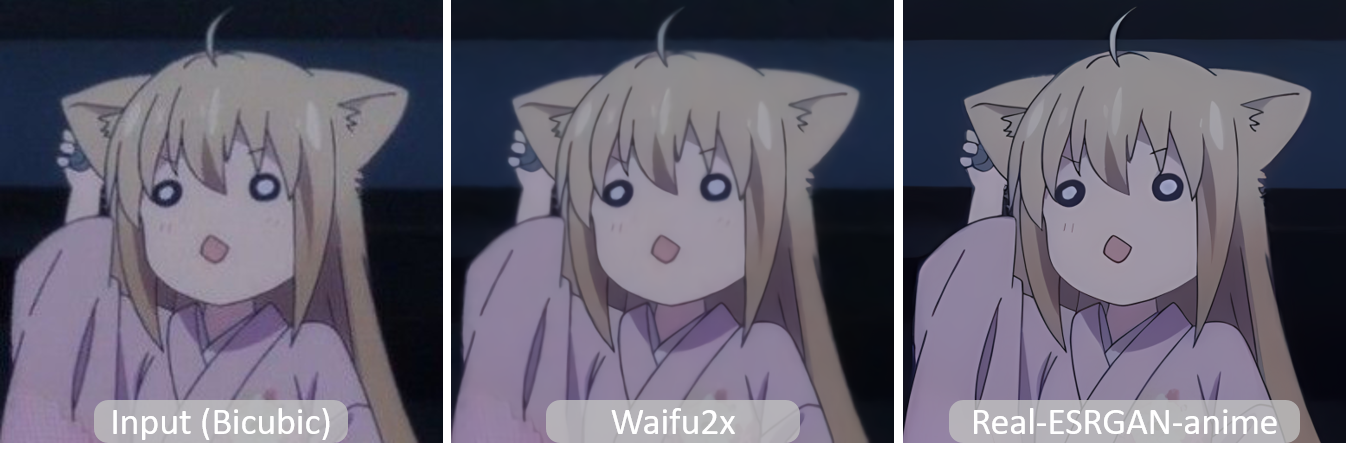
- ✅ Add RealESRGAN_x4plus_anime_6B.pth, which is optimized for anime images with much smaller model size. More details and comparisons with waifu2x are in anime_model.md
- ✅ Support finetuning on your own data or paired data (i.e., finetuning ESRGAN). See here
- ✅ Integrate GFPGAN to support face enhancement.
- ✅ Integrated to Huggingface Spaces with Gradio. See Gradio Web Demo. Thanks @AK391
- ✅ Support arbitrary scale with
--outscale (It actually further resizes outputs with LANCZOS4). Add RealESRGAN_x2plus.pth model.
- ✅ The inference code supports: 1) tile options; 2) images with alpha channel; 3) gray images; 4) 16-bit images.
- ✅ The training codes have been released. A detailed guide can be found in Training.md.
👀 Demos Videos
Bilibili
YouTube
🔧 Dependencies and Installation
Installation
Clone repo
git clone https://github.com/xinntao/Real-ESRGAN.git
cd Real-ESRGAN
Install dependent packages
# Install basicsr - https://github.com/xinntao/BasicSR
# We use BasicSR for both training and inference
pip install basicsr
# facexlib and gfpgan are for face enhancement
pip install facexlib
pip install gfpgan
pip install -r requirements.txt
python setup.py develop
⚡ Quick Inference
There are usually three ways to inference Real-ESRGAN.
- Online inference
- Portable executable files (NCNN)
- Python script
Online inference
- You can try in our website: ARC Demo (now only support RealESRGAN_x4plus_anime_6B)
- Colab Demo for Real-ESRGAN | Colab Demo for Real-ESRGAN (anime videos).
Portable executable files (NCNN)
You can download Windows / Linux / MacOS executable files for Intel/AMD/Nvidia GPU.
This executable file is portable and includes all the binaries and models required. No CUDA or PyTorch environment is needed.
You can simply run the following command (the Windows example, more information is in the README.md of each executable files):
./realesrgan-ncnn-vulkan.exe -i input.jpg -o output.png -n model_name
We have provided five models:
- realesrgan-x4plus (default)
- realesrnet-x4plus
- realesrgan-x4plus-anime (optimized for anime images, small model size)
- realesr-animevideov3 (animation video)
You can use the -n argument for other models, for example, ./realesrgan-ncnn-vulkan.exe -i input.jpg -o output.png -n realesrnet-x4plus
Usage of portable executable files
- Please refer to Real-ESRGAN-ncnn-vulkan for more details.
- Note that it does not support all the functions (such as
outscale) as the python script inference_realesrgan.py.
Usage: realesrgan-ncnn-vulkan.exe -i infile -o outfile [options]...

  -h                   show this help
  -i input-path        input image path (jpg/png/webp) or directory
  -o output-path       output image path (jpg/png/webp) or directory
  -s scale             upscale ratio (can be 2, 3, 4. default=4)
  -t tile-size         tile size (>=32/0=auto, default=0) can be 0,0,0 for multi-gpu
  -m model-path        folder path to the pre-trained models. default=models
  -n model-name        model name (default=realesr-animevideov3, can be realesr-animevideov3 | realesrgan-x4plus | realesrgan-x4plus-anime | realesrnet-x4plus)
  -g gpu-id            gpu device to use (default=auto) can be 0,1,2 for multi-gpu
  -j load:proc:save    thread count for load/proc/save (default=1:2:2) can be 1:2,2,2:2 for multi-gpu
  -x                   enable tta mode"
  -f format            output image format (jpg/png/webp, default=ext/png)
  -v                   verbose output
Note that it may introduce block inconsistency (and also generate slightly different results from the PyTorch implementation), because this executable file first crops the input image into several tiles, and then processes them separately, finally stitches together.
Python script
Usage of python script
- You can use X4 model for arbitrary output size with the argument
outscale. The program will further perform cheap resize operation after the Real-ESRGAN output.
Usage: python inference_realesrgan.py -n RealESRGAN_x4plus -i infile -o outfile [options]...

A common command: python inference_realesrgan.py -n RealESRGAN_x4plus -i infile --outscale 3.5 --face_enhance

  -h                   show this help
  -i --input           Input image or folder. Default: inputs
  -o --output          Output folder. Default: results
  -n --model_name      Model name. Default: RealESRGAN_x4plus
  -s, --outscale       The final upsampling scale of the image. Default: 4
  --suffix             Suffix of the restored image. Default: out
  -t, --tile           Tile size, 0 for no tile during testing. Default: 0
  --face_enhance       Whether to use GFPGAN to enhance face. Default: False
  --fp32               Use fp32 precision during inference. Default: fp16 (half precision).
  --ext                Image extension. Options: auto | jpg | png, auto means using the same extension as inputs. Default: auto
Inference general images
Download pre-trained models: RealESRGAN_x4plus.pth
wget https://github.com/xinntao/Real-ESRGAN/releases/download/v0.1.0/RealESRGAN_x4plus.pth -P weights
Inference!
python inference_realesrgan.py -n RealESRGAN_x4plus -i inputs --face_enhance
Results are in the results folder
Inference anime images
Pre-trained models: RealESRGAN_x4plus_anime_6B
More details and comparisons with waifu2x are in anime_model.md
# download model
wget https://github.com/xinntao/Real-ESRGAN/releases/download/v0.2.2.4/RealESRGAN_x4plus_anime_6B.pth -P weights
# inference
python inference_realesrgan.py -n RealESRGAN_x4plus_anime_6B -i inputs
Results are in the results folder
BibTeX
@InProceedings{wang2021realesrgan,
    author    = {Xintao Wang and Liangbin Xie and Chao Dong and Ying Shan},
    title     = {Real-ESRGAN: Training Real-World Blind Super-Resolution with Pure Synthetic Data},
    booktitle = {International Conference on Computer Vision Workshops (ICCVW)},
    date      = {2021}
}
If you have any question, please email [email protected] or [email protected].
🧩 Projects that use Real-ESRGAN
If you develop/use Real-ESRGAN in your projects, welcome to let me know.
GUI
🤗 Acknowledgement
Thanks for all the contributors.








 Real-ESRGAN 是一种实用的通用图像与视频修复(超分辨率)算法,它在 ESRGAN 的基础上扩展而来,完全使用合成数据训练,因此不仅能处理干净的双三次下采样,也能应对真实世界中的各种画质退化。