Primitive Operation Painter
Primitive Operation Painter explores image generation as an explicit,
human-readable drawing process. Instead of emitting pixels or latent variables
directly, the model builds an image one primitive operation at a time.
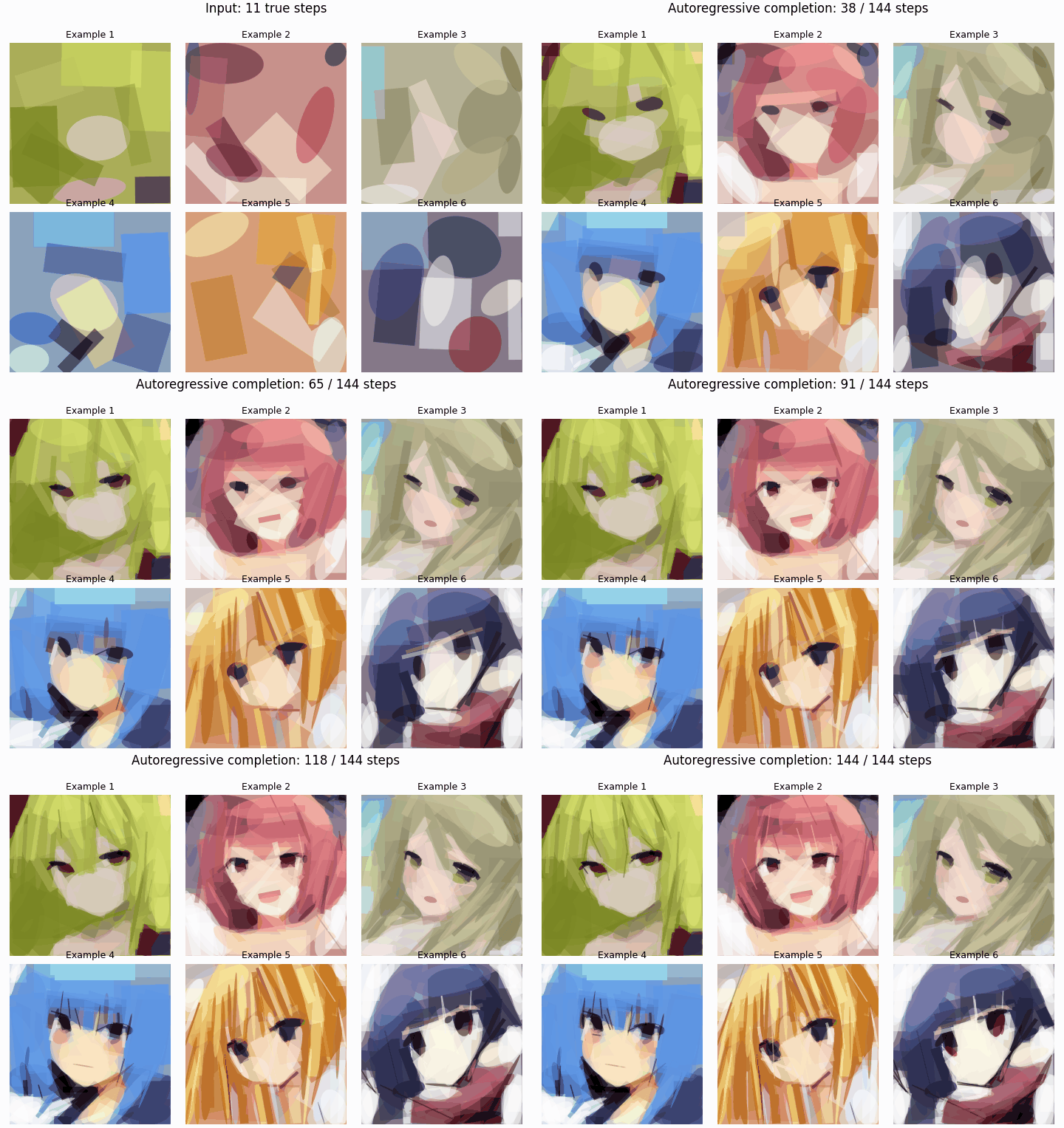
Six bundled 11-step inputs are shown in a 3-column × 2-row grid for three
seconds, then the model adds one primitive at a time until every sample reaches
144 steps. The animation is a rendering of the model's operation history, not
a pixel-space interpolation.
Why primitive operations?
Most image generators expose a prompt and a final image, while the intermediate
process is difficult to inspect, explain, or take over. This project asks a
different question: can an image model draw through a representation that a
person can read and modify while it is working?
Here, a canvas is a sequence of background, ellipse, and rotated-rectangle
operations. Each operation has an explicit centre, angle, width, height, shape
type, and RGB colour. The model predicts these values autoregressively rather
than directly changing pixels. A completed image is therefore also a drawing
history: a concrete list of operations that can be rendered, inspected, or
edited at the operation level.
Human and model co-creation
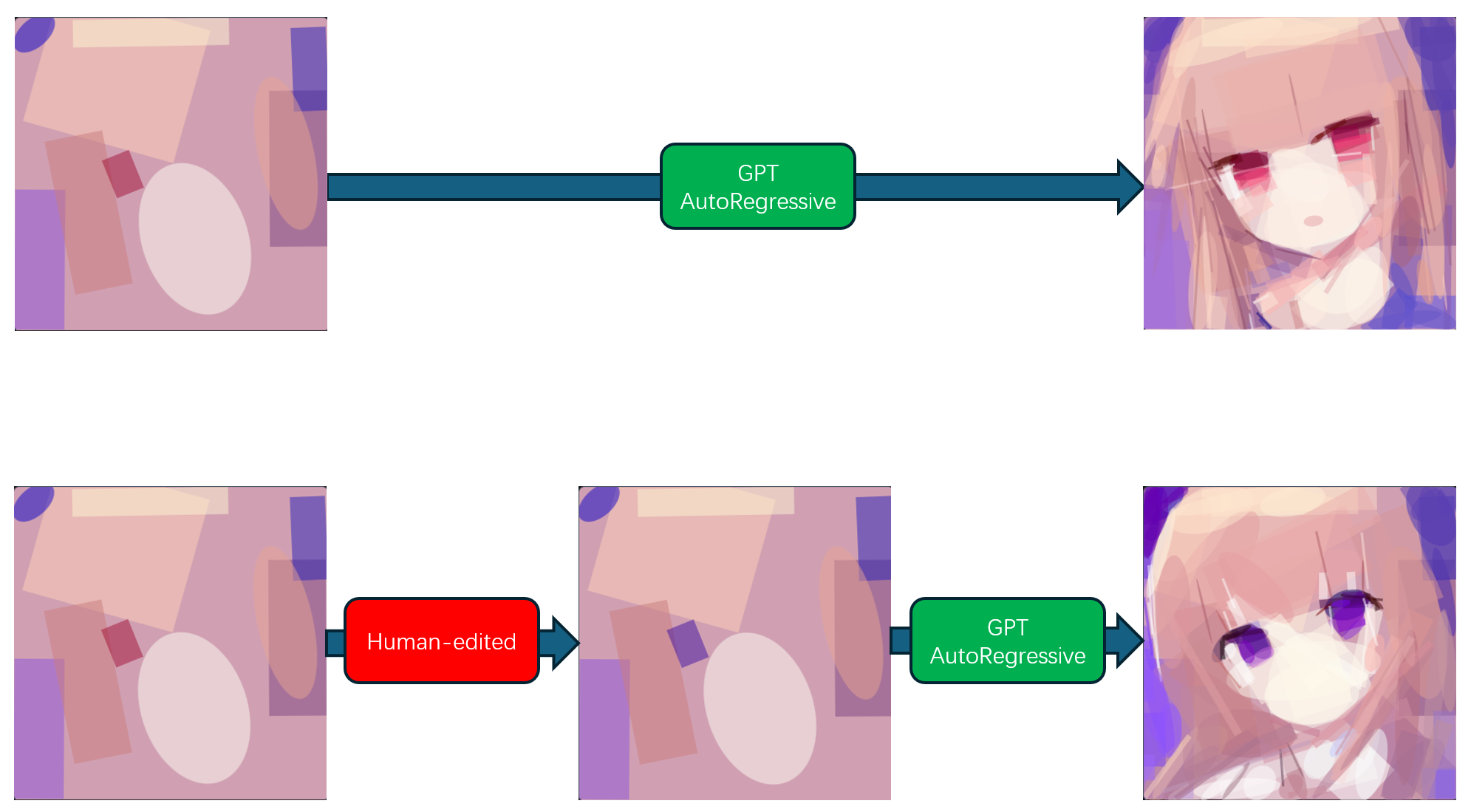
The top path shows the model completing an initial set of primitives on its
own. The bottom path shows the intended collaboration loop: a person changes a
visible operation in the prefix, then the model continues from that modified
history. This makes the intervention part of the model's actual input rather
than a post-hoc pixel edit.
The representation is directly editable; this repository currently provides
the sequence format, inference, rendering, and training code needed to study
that workflow. It does not yet provide a polished graphical editor or a
general guarantee that a particular manual edit will produce a particular
semantic outcome.
How the pipeline works
- Decompose images. The Rust/WGPU
fast_shape_render converter
approximates training images with primitive drawing operations and writes
the CSV format consumed by the Python data loader.
- Encode operations. Every drawing step is represented by nine discrete
tokens: x, y, angle, width, height, shape type, and RGB colour.
- Predict the next operation. The GPT model reads the preceding operation
history and autoregressively predicts the next primitive field by field.
- Render, inspect, and continue. Decoded tokens reproduce a canvas. A
person can provide or alter an operation prefix, and the model can complete
the remaining sequence from that state.
Current scope and limitations
This repository contains the files required to use and continue training the
released 144-step model: the model definition, token layout, full-sequence
data encoder, training entry point, renderer, GPU image-to-sequence converter,
and a six-sequence inference example.
- It is an operation-sequence model, not a prompt-to-image system or a
pixel-level image editor.
- Its output uses a finite sequence of simple primitives. This supports
coarse structure, colour blocks, and an inspectable drawing history, but it
does not replace a high-fidelity texture or detail renderer.
- The bundled example starts with eleven true operations and asks the model to
complete the remaining 133 operations. It demonstrates the protocol; it is
not a training dataset.
- Training data, model weights, resumable checkpoints, historical migration
scripts, and generated local results are intentionally excluded from the
code repository.
License and data boundary
The code and released EMA inference weights are intended to be licensed under
MIT. Training data is not included or redistributed. Anyone using
this project is responsible for confirming they have the necessary rights for
their own input and training data.
Setup
Use Python 3.10 or later and install a PyTorch build suitable for your system,
then install the remaining dependencies:
python -m pip install -r requirements.txt
Set the training-data root with ANIME_PAINTER_DATA_DIR, or generate it with
the bundled fast_shape_render converter. Its default output directory is
data/output_256, which is also the Python programs' default data location.
The data root must contain versioned CSV directories such as v1/*.csv.
$env:ANIME_PAINTER_DATA_DIR = 'D:\datasets\output_256'
python train_gpt_pretrain.py
Convert an image dataset to training sequences
fast_shape_render is a separate Rust/WGPU GPU converter. It resizes each
input image to 256×256, approximates it with primitive drawing operations, and
writes the CSV sequence layout consumed by the Python dataset loader.
Install the Rust toolchain, then set the input directory before running it.
The converter requires a hardware GPU: DirectX 12 on Windows, Vulkan on Linux,
and Metal on macOS. Its default output is data/output_256; no personal path
is embedded in the converter.
$env:SHAPE_RENDERER_INPUT_DIR = 'D:\images\faces_256'

Push-Location fast_shape_render
cargo run --release
Pop-Location
Optional environment variables:
SHAPE_RENDERER_OUTPUT_DIR — use a different CSV output root.SHAPE_RENDERER_NUM_VERSIONS — number of output variants; defaults to 10.SHAPE_RENDERER_MAX_OUTPUT_STEPS — optionally retain a fixed number of
CSV rows per image, including its background row. When set, conversion fails
if an image has too few accepted primitives to fill the requested sequence.SHAPE_RENDERER_IMAGES_PER_GPU_BATCH and
SHAPE_RENDERER_HISTORY_READBACK_IMAGES — reduce these if GPU memory is
limited.
After conversion, either use the default data/output_256 location or point
training and visualization to a custom output root with
ANIME_PAINTER_DATA_DIR or --data-dir.
Six-sequence inference example
The repository includes six compact example sequences under
example/sequences/v1/data_part_1.csv. Each one has eleven
steps: a background operation followed by ten primitives. They are a quick
inference demonstration, not training data: the released trainer requires
complete 144-step sequences.
Download or copy the complete model package into a model folder at the
project root. Keep both package files directly inside that folder:
primitive_operation_painter/
├── example/
│   └── sequences/v1/data_part_1.csv
├── model/
│   ├── config.json
│   └── model.safetensors
└── example.py
The model/ folder is ignored by Git, so the weight is never added to the
code repository. With this layout, run the demonstration without arguments:
python example.py
It renders a two-column, six-row PNG. The left side shows the eleven input
operations; the right side starts from those same eleven operations and
samples the remaining 133 steps to make a complete 144-step sequence. If
model/, config.json, or model.safetensors is missing, example.py
prints the expected location and exits before it tries to load or download a
model.
To use a model package stored elsewhere, override the default explicitly:
python example.py `
  --model-dir path\to\primitive-operation-painter-weight
By default the result is written to
example/example_inference.png. Use --csv-path, --output-path, --seed,
or --device to override the example inputs and inference settings.
Recreate the autoregressive animation
Recreate the tracked README animation with the same local model package and
seed:
python example.py `
  --gif-output example\autoregressive_prediction.gif
Use --gif-fps to change the prediction-frame rate; the input hold is always
three seconds.
Both example.py and visualize.py use the same field-aware sampling
schedule. For each generated token, temperature and top_k are evaluated as
a * step + b from GPT_SAMPLING_CONFIG; step is the one-based drawing
operation index, including the background operation. top_k is rounded down
to an integer and clipped to the current field's valid token range.
Local visualization
visualize.py requires a local model package and a CSV data root. It never
falls back to a personal absolute path or silently selects a checkpoint.
python visualize.py `
  --model-dir path\to\primitive-operation-painter-weight `
  --data-dir D:\datasets\output_256 `
  --num-tests 8
Continue training the released weight
Place or download the model package in a local directory containing
config.json and model.safetensors, then point the trainer at your own CSV
dataset and that directory:
$env:ANIME_PAINTER_DATA_DIR = 'D:\datasets\output_256'
python train_gpt_pretrain.py `
  --initial-model-dir path\to\primitive-operation-painter-weight
The trainer validates that the package is the compatible 144-step model before
loading its EMA weights. New resumable training checkpoints are written to
checkpoints_gpt_fullseq_144ctx_256reso/. On later runs, omit
--initial-model-dir to resume from the newest local training checkpoint.

 一个自回归图像生成器,把图片构建为一系列基础绘图图元(背景、椭圆、旋转矩形)而非像素,因此整个绘画过程可以逐步检查和编辑。