Что это?
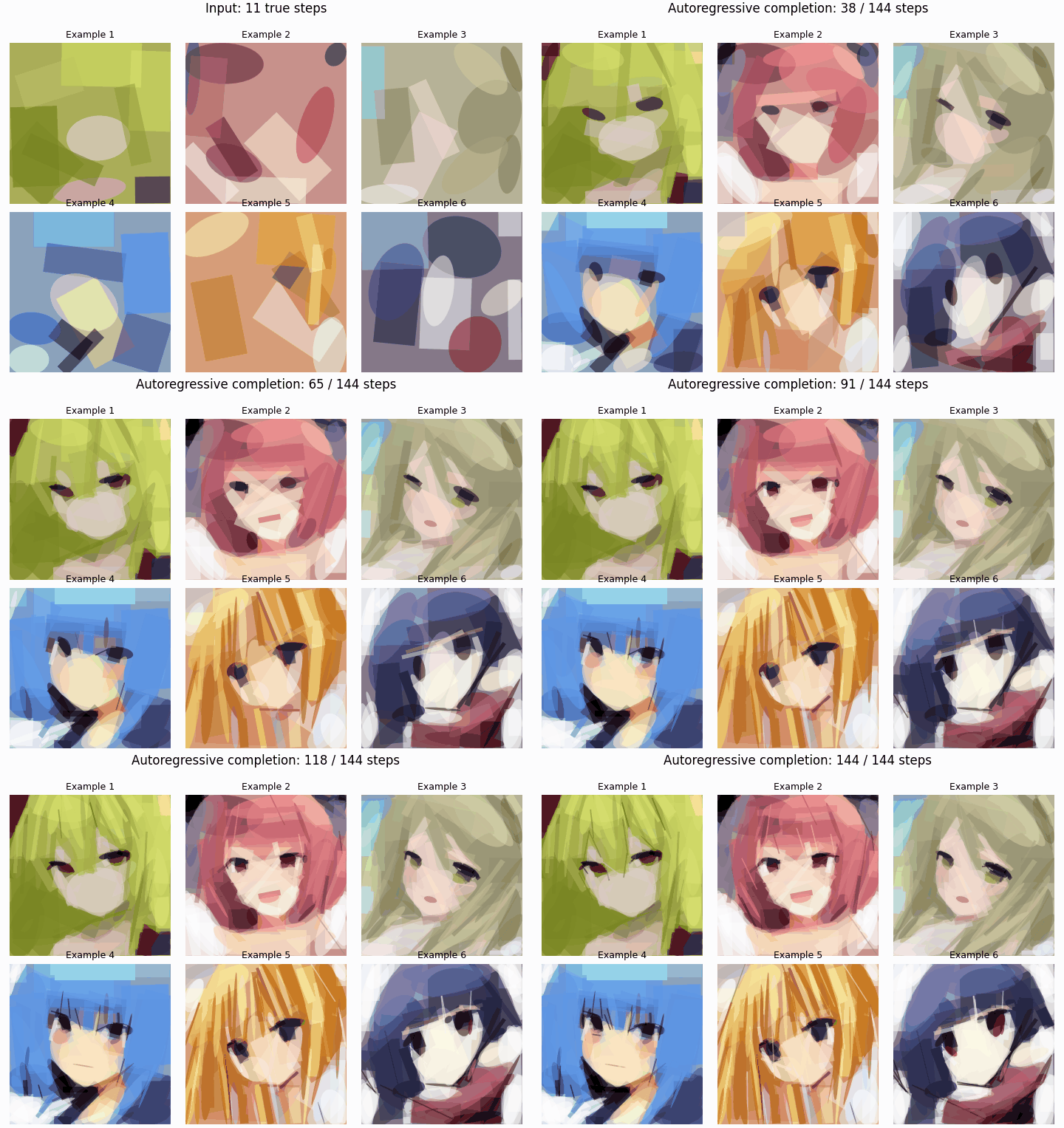
 Авторегрессионный генератор изображений, который строит картинки как последовательность примитивных операций рисования (фон, эллипсы, повёрнутые прямоугольники) вместо пикселей, так что процесс рисования остаётся просматриваемым и редактируемым шаг за шагом.
Авторегрессионный генератор изображений, который строит картинки как последовательность примитивных операций рисования (фон, эллипсы, повёрнутые прямоугольники) вместо пикселей, так что процесс рисования остаётся просматриваемым и редактируемым шаг за шагом.Это готовое приложение или исследовательский код, который я запускаю из командной строки?Это исследовательский код: скрипты Python для инференса, обучения и визуализации плюс отдельный инструмент на Rust/WGPU под названием 'fastshaperender', который конвертирует изображения в обучающие последовательности. Отполированного графического редактора пока нет.
Это исследовательский код: скрипты Python для инференса, обучения и визуализации плюс отдельный инструмент на Rust/WGPU под названием 'fastshaperender', который конвертирует изображения в обучающие последовательности. Отполированного графического редактора пока нет.Как запустить приложенный пример инференса?Скачайте пакет модели (config.json и model.safetensors) в папку model/ в корне проекта, затем запустите example.py без аргументов, чтобы отрисовать входящее демо из шести последовательностей; поведение переопределяется через --csv-path, --output-path, --seed или --device.
Скачайте пакет модели (config.json и model.safetensors) в папку model/ в корне проекта, затем запустите example.py без аргументов, чтобы отрисовать входящее демо из шести последовательностей; поведение переопределяется через --csv-path, --output-path, --seed или --device.Что нужно установить, чтобы его запустить?Python 3.10 или новее со сборкой PyTorch под вашу систему для кода модели, а также инструментарий Rust и аппаратная GPU (DirectX 12, Vulkan или Metal), если хотите сами запускать конвертер 'fastshaperender'.
Python 3.10 или новее со сборкой PyTorch под вашу систему для кода модели, а также инструментарий Rust и аппаратная GPU (DirectX 12, Vulkan или Metal), если хотите сами запускать конвертер 'fastshaperender'.Есть ли в комплекте обучающие данные или веса модели?Нет, обучающие данные, выпущенные веса и чекпоинты для продолжения обучения намеренно исключены из репозитория и должны подаваться или скачиваться отдельно.
Нет, обучающие данные, выпущенные веса и чекпоинты для продолжения обучения намеренно исключены из репозитория и должны подаваться или скачиваться отдельно.Как обстоит дело с лицензированием кода и обучающих данных?Код и выпущенные EMA-веса для инференса предполагается лицензировать под MIT, но обучающие данные не включены и не распространяются, а пользователи должны сами подтверждать свои права на используемые данные.
Код и выпущенные EMA-веса для инференса предполагается лицензировать под MIT, но обучающие данные не включены и не распространяются, а пользователи должны сами подтверждать свои права на используемые данные.Что именно за «примитивные операции», которыми рисует модель?Каждая операция — одна из background, ellipse или rotated-rectangle, определяемая девятью дискретными токенами: x, y, angle, width, height, тип фигуры и RGB-цвет.
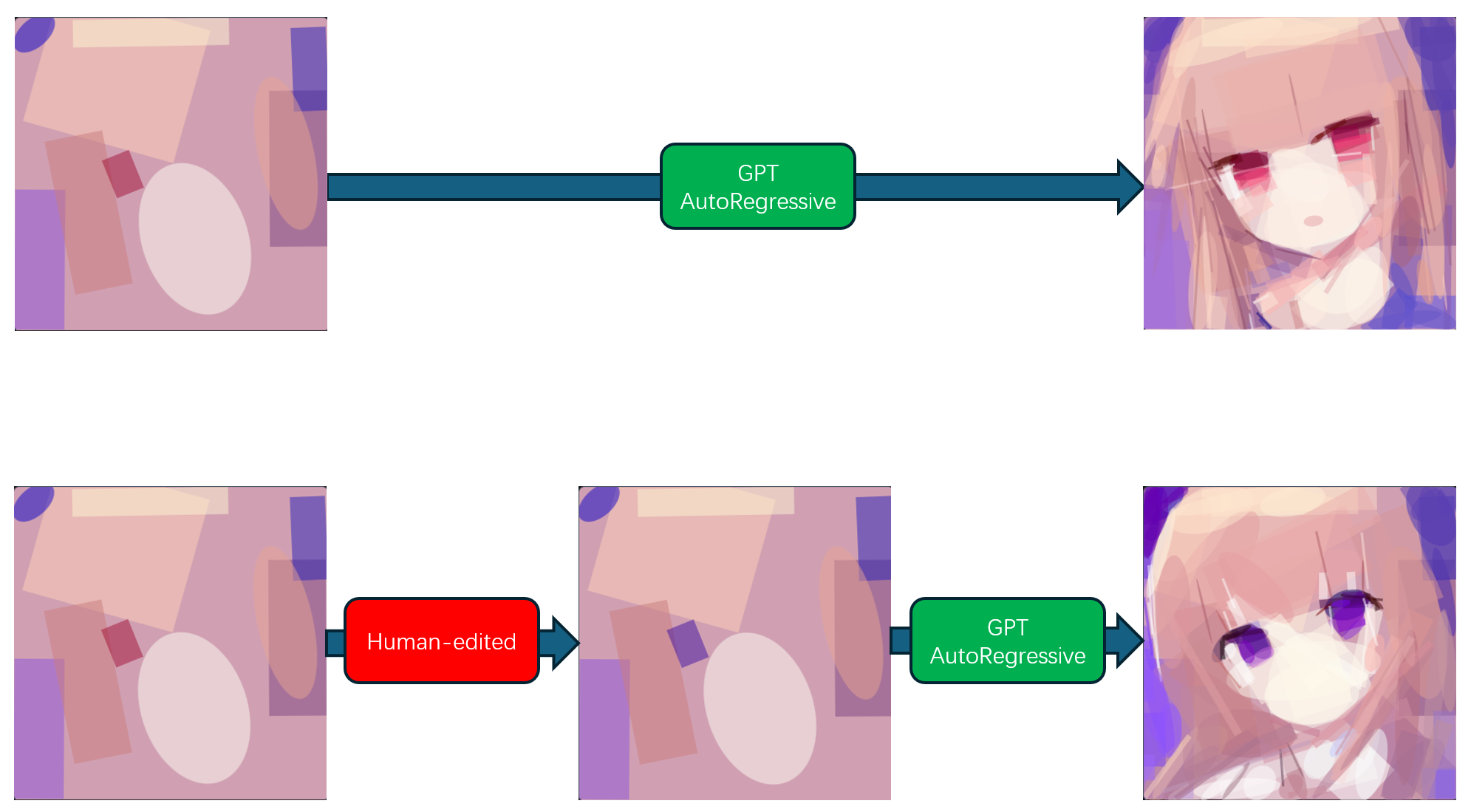
Каждая операция — одна из background, ellipse или rotated-rectangle, определяемая девятью дискретными токенами: x, y, angle, width, height, тип фигуры и RGB-цвет.Можно ли править рисунок, пока модель ещё над ним работает?Да, задуманный процесс позволяет человеку изменить видимую операцию в префиксе последовательности, после чего модель продолжает предсказывать от отредактированной истории, а не от пиксельной подрисовки.
Да, задуманный процесс позволяет человеку изменить видимую операцию в префиксе последовательности, после чего модель продолжает предсказывать от отредактированной истории, а не от пиксельной подрисовки.Зачем строить генератор последовательностей операций вместо обычной пиксельной/промптовой модели изображений?Автор хотел получить процесс создания изображения, который человек реально может прочитать и изменить посреди генерации, — типичные модели prompt-to-image или латентной диффузии скрывают промежуточные шаги.
Автор хотел получить процесс создания изображения, который человек реально может прочитать и изменить посреди генерации, — типичные модели prompt-to-image или латентной диффузии скрывают промежуточные шаги.Что такое fastshaperender?Это отдельный GPU-инструмент на Rust/WGPU, который аппроксимирует обучающие изображения примитивными операциями рисования и записывает их как CSV-последовательности для загрузчика данных Python.
Это отдельный GPU-инструмент на Rust/WGPU, который аппроксимирует обучающие изображения примитивными операциями рисования и записывает их как CSV-последовательности для загрузчика данных Python.What are similar projects?petals, denoising-diffusion-pytorch, nanoGPT, DALL-E, demucs, gpt-2, dalle-mini, stable-diffusion.cpp
petals, denoising-diffusion-pytorch, nanoGPT, DALL-E, demucs, gpt-2, dalle-mini, stable-diffusion.cppWhich topics is it in?generative-model, generative-art, metal, vulkan, gpt, transformer, image-generation, pytorch, rust, command-line-tool, deep-learning, research
generative-model, generative-art, metal, vulkan, gpt, transformer, image-generation, pytorch, rust, command-line-tool, deep-learning, research