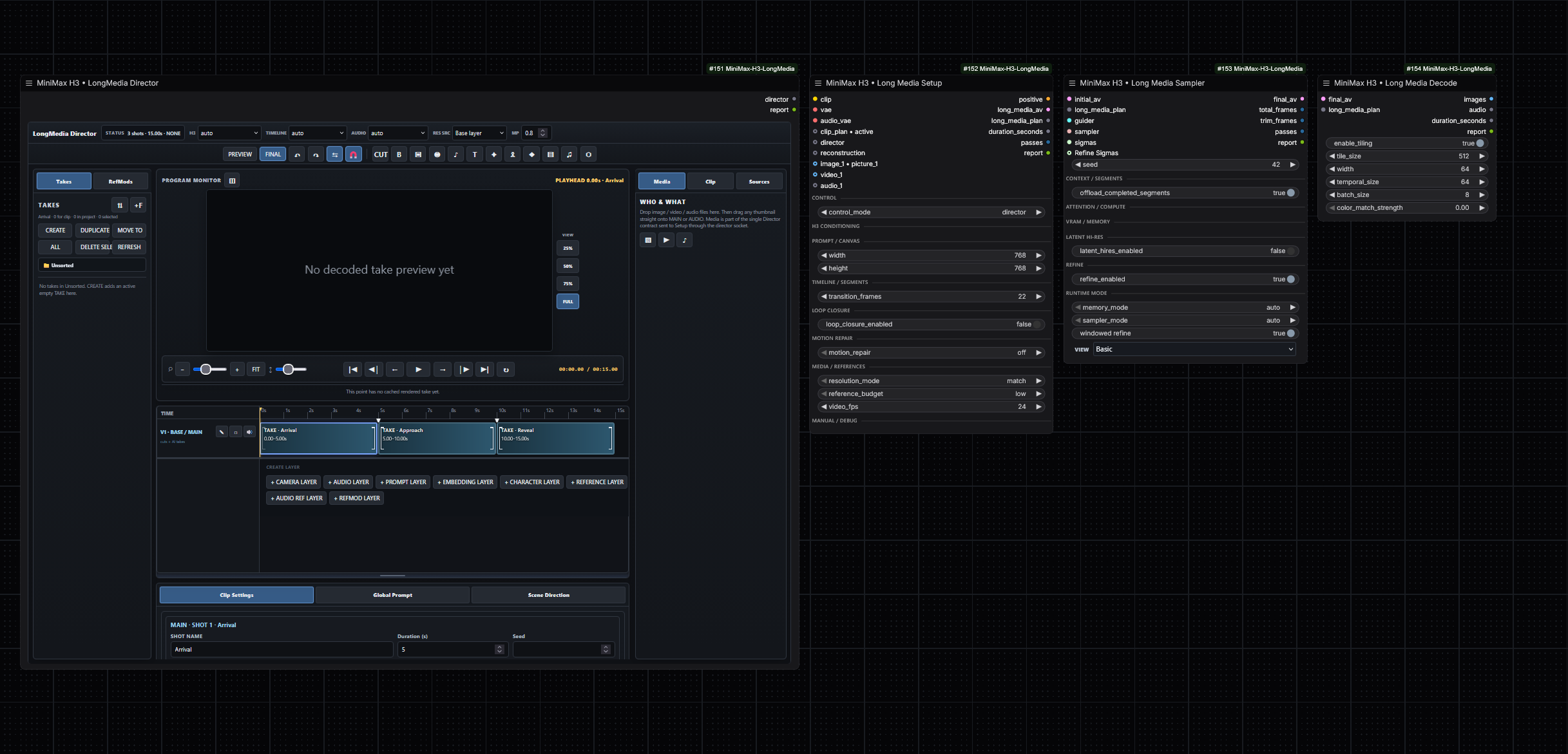
What is this?
 A set of production-oriented custom nodes for ComfyUI that run MiniMax H3 for long-form video and audio generation: reference editing, MultiClip planning, camera direction, fixed segmentation, lip-sync and redubbing, latent hi-res refinement, and low-VRAM-safe execution.
A set of production-oriented custom nodes for ComfyUI that run MiniMax H3 for long-form video and audio generation: reference editing, MultiClip planning, camera direction, fixed segmentation, lip-sync and redubbing, latent hi-res refinement, and low-VRAM-safe execution.Is this a standalone app or something I add to ComfyUI?It is a plugin, not an app: the nodes are installed into an existing ComfyUI setup (custom_nodes folder or as a package from the Comfy Registry) and then appear as nodes in your workflows.
It is a plugin, not an app: the nodes are installed into an existing ComfyUI setup (custom_nodes folder or as a package from the Comfy Registry) and then appear as nodes in your workflows.How do I get it into ComfyUI?Install it into ComfyUI's custom_nodes directory or grab the package from the Comfy Registry, then restart ComfyUI after installing or updating.
Install it into ComfyUI's custom_nodes directory or grab the package from the Comfy Registry, then restart ComfyUI after installing or updating.What do I need besides the plugin itself?A working ComfyUI installation with an H3 checkpoint to sample from; the README treats ComfyUI's Dynamic VRAM option staying enabled as the production starting point.
A working ComfyUI installation with an H3 checkpoint to sample from; the README treats ComfyUI's Dynamic VRAM option staying enabled as the production starting point.Will older 0.4.40 tutorials still apply?Partly: 0.5.x is a consolidation after public 0.4.40, and new workflows use independent semantic controls (Setup, Planner, Cameras, Sampler, Decode nodes), while historical notes may use the old workflowmode terminology.
Partly: 0.5.x is a consolidation after public 0.4.40, and new workflows use independent semantic controls (Setup, Planner, Cameras, Sampler, Decode nodes), while historical notes may use the old workflowmode terminology.Do I need a high-end GPU with lots of VRAM?No — constrained GPUs are an explicit target: query streaming for fused-QKV workloads that cannot fit, repeat-run memory isolation, guarded INT8 VBAR prefetch, and RAM-pressure-aware pinned host memory.
No — constrained GPUs are an explicit target: query streaming for fused-QKV workloads that cannot fit, repeat-run memory isolation, guarded INT8 VBAR prefetch, and RAM-pressure-aware pinned host memory.What can I actually generate with these nodes?Long-form video with its soundtrack: one continuous movie split into fixed-duration internal units for VRAM and stability, or MultiClip sequences where a Planner owns scene prompts, durations, names and seeds while a Cameras node handles framing, lens, movement and transitions. Loop Closure pulls the generated tail back toward the opening macro-state.
Long-form video with its soundtrack: one continuous movie split into fixed-duration internal units for VRAM and stability, or MultiClip sequences where a Planner owns scene prompts, durations, names and seeds while a Cameras node handles framing, lens, movement and transitions. Loop Closure pulls the generated tail back toward the opening macro-state.How does the character-replacement lip-sync mode work?In videorefedit modes Video1 and Audio1 can act as a paired source-performance reference while Audio1 still owns the target timing and output waveform. In lipsync mode Audio1 is deliberately independent of the original facial performance, so completely new dialogue or singing can drive the replacement character.
In videorefedit modes Video1 and Audio1 can act as a paired source-performance reference while Audio1 still owns the target timing and output waveform. In lipsync mode Audio1 is deliberately independent of the original facial performance, so completely new dialogue or singing can drive the replacement character.What does the Latent Hi-Res two-stage sampling do?The Long Media Sampler first denoises a low-resolution Stage-1 x0, learned-upsamples the video latent while preserving the audio latent, rebuilds target-grid conditioning, and can optionally run an independent same-seed fresh-noise high-resolution pass; without it the Refiner stays a zero-noise low-sigma tail.
The Long Media Sampler first denoises a low-resolution Stage-1 x0, learned-upsamples the video latent while preserving the audio latent, rebuilds target-grid conditioning, and can optionally run an independent same-seed fresh-noise high-resolution pass; without it the Refiner stays a zero-noise low-sigma tail.Is there a ready-made workflow to start from?Yes — releases ship example JSON workflows like 'MiniMax-H3-LongMedia-SAFE-1080p-15s.json' (the production starting point) and 'MiniMax-H3-LongMedia-LatentUpscale-Detailer.json', containing neutral media placeholders rather than user media or local preview paths.
Yes — releases ship example JSON workflows like 'MiniMax-H3-LongMedia-SAFE-1080p-15s.json' (the production starting point) and 'MiniMax-H3-LongMedia-LatentUpscale-Detailer.json', containing neutral media placeholders rather than user media or local preview paths.What are similar projects?ComfyUI-MiniMaxH3-TimelineDirector, ComfyUI-ALLinONE-MinimaxH3, ComfyUI_MiniMax_H3_Extender, FreeVideo, Comfyui-MMH3-UltimateUpscale, lanshu-create-ai-presenter-video, DiffSynth-Studio, LTX-2
ComfyUI-MiniMaxH3-TimelineDirector, ComfyUI-ALLinONE-MinimaxH3, ComfyUI_MiniMax_H3_Extender, FreeVideo, Comfyui-MMH3-UltimateUpscale, lanshu-create-ai-presenter-video, DiffSynth-Studio, LTX-2Which topics is it in?lipsync, kv-cache, minimax, memory-management, upscaling, ai-video, diffusion, comfyui, audio-generation, video-editing, text-to-video, content-creation
lipsync, kv-cache, minimax, memory-management, upscaling, ai-video, diffusion, comfyui, audio-generation, video-editing, text-to-video, content-creation