Training and inference usually live in separate worlds. Models are typically trained in Python then
exported to an open format like ONNX or optimized for production engines like vLLM, ONNX Runtime, or
TensorRT. This export step is often brittle and lossy, ruling out complex architectures and advanced
deployment use cases.
Burn unifies the two. By executing multi-platform tensor operations via a single, unified API, the
exact code used for training is the exact code that runs in production. This makes workloads like
on-device personalization and federated learning straightforward, while enabling teams to go from
prototype to deployment in a single codebase.
Burn preserves the intuitive ergonomics of PyTorch, with dynamic shapes and graphs, but JIT-compiles
streams of tensor operations, performing automatic kernel fusion. You get the flexibility of dynamic
graphs without the performance drop.
Rust for Research?
Rust used to be a tough sell for research: long compilation times disrupted the fast
edit-compile-run loop that draws researchers to Python. Burn changes this paradigm. Designed around
incremental compilation, modifying model code recompiles in under 5 seconds, even in release mode.
This delivers a Python-like feedback loop with the speed and safety of Rust.
Ecosystem

Burn is the core of a growing, fully open-source Rust AI ecosystem. You are not adopting a single
library, you are joining a stack that spans GPU compute, model interop and domain toolkits, with
plenty of room to help shape what comes next.
| Category |
Project |
Description |
| Compute |
CubeCL |
GPU compute language and compiler behind Burn's accelerated backends. Write kernels once in Rust, run on CUDA, ROCm, Metal, Vulkan and WebGPU. Usable standalone. |
| Model interop |
burn-onnx |
Import ONNX models into Burn as native Rust code |
|
burn-store |
Save, load and import model weights, including PyTorch and Safetensors |
| Domains |
burn-vision |
Computer vision operators and building blocks |
|
burn-rl |
Reinforcement learning building blocks |
|
burn-dataset |
Dataset loading, transforms and ready-made sources |
| Models |
models |
Curated pre-trained models and examples built with Burn |
| Tooling |
burn-bench |
Benchmark and compare backends, tracking performance over time |
Burn's CubeCL backends (CUDA, ROCm, Metal, Vulkan, WebGPU,
CPU) compose with autodiff, fusion and remote-execution decorators, while external and simpler
backends (LibTorch and pure-Rust CPU/no_std) compose with autodiff only. See
Supported Backends below for the full matrix.
Every project here is open-source and actively developed. Want to help build the Rust AI ecosystem?
The good first issues are a great place to start,
and the Contributing guide will get you set up.
Community crates 🌱
These crates are not maintained by Tracel, but they are part of the same Rust AI story. Anything
that helps you load data, build environments, or ship models belongs here. Built something that
fits? Open a PR to add it!
| Category |
Crate |
Description |
| Data & loading |
polars |
Fast DataFrames for tabular data |
|
arrow-rs |
Apache Arrow columnar memory format |
|
image |
Image decoding, encoding and processing |
|
hf-hub |
Download models and datasets from the Hugging Face Hub |
| Tokenization & NLP |
tokenizers |
Fast, production-ready tokenizers |
|
rust-bert |
Ready-to-use NLP pipelines and transformer models |
| Numerical & linear algebra |
ndarray |
N-dimensional arrays |
|
nalgebra |
Linear algebra |
| Classical ML |
linfa |
Classical ML toolkit, in the spirit of scikit-learn |
|
smartcore |
Classical ML algorithms, no BLAS/LAPACK required |
| Inference & runtimes |
candle |
Minimalist ML framework with a focus on LLM inference |
|
mistral.rs |
Fast, multimodal LLM inference engine |
|
ort |
ONNX Runtime bindings for hardware-accelerated inference |
|
tract |
Pure-Rust inference for ONNX and NNEF models |
|
wonnx |
100% Rust, WebGPU-accelerated ONNX runtime for native and the web |
| LLM apps & RAG |
rig |
Build modular LLM applications and agents |
|
langchain-rust |
LangChain-style chain orchestration |
| Embeddings & vector search |
fastembed |
Generate text embeddings and rerank locally |
|
qdrant |
Vector search engine, written in Rust |
|
lancedb |
Embedded, developer-friendly vector database |
| Computer vision |
kornia-rs |
Low-level 3D computer vision library |
| Simulation & environments |
rapier |
Physics engine for robotics and RL environments |
| Visualization |
rerun |
Multimodal data and CV/robotics visualization |
|
plotters |
Plotting and charting |
Backend

Burn strives to be as fast as possible on as many hardwares as possible, with robust
implementations. We believe this flexibility is crucial for modern needs where you may train your
models in the cloud, then deploy on customer hardwares, which vary from user to user.
Supported Backends
Most backends support all operating systems, so we don't mention them in the tables below.
GPU Backends:
|
CUDA |
ROCm |
Metal |
Vulkan |
WebGPU |
LibTorch |
| Nvidia |
☑️ |
- |
- |
☑️ |
☑️ |
☑️ |
| AMD |
- |
☑️ |
- |
☑️ |
☑️ |
☑️ |
| Apple |
- |
- |
☑️ |
- |
☑️ |
☑️ |
| Intel |
- |
- |
- |
☑️ |
☑️ |
- |
| Qualcom |
- |
- |
- |
☑️ |
☑️ |
- |
| Wasm |
- |
- |
- |
- |
☑️ |
- |
CPU Backends:
|
Cpu (CubeCL) |
Flex |
LibTorch |
| X86 |
☑️ |
☑️ |
☑️ |
| Arm |
☑️ |
☑️ |
☑️ |
| Wasm |
- |
☑️ |
- |
| no-std |
- |
☑️ |
- |
Note: The LibTorch backend is deprecated as of 0.22.0 and will be removed in a future
release. For GPU acceleration, use a CubeCL backend (CUDA,
ROCm, Metal, Vulkan, WebGPU). For CPU execution, use the CubeCL CPU backend or burn-flex.
Compared to other frameworks, Burn has a very different approach to supporting many backends. By
design, most code is generic over the Backend trait, which allows us to build Burn with swappable
backends. This makes composing backend possible, augmenting them with additional functionalities
such as autodifferentiation and automatic kernel fusion.
Autodiff: Backend decorator that brings backpropagation to any backend 🔄
Contrary to the aforementioned backends, Autodiff is actually a backend decorator. This means that
it cannot exist by itself; it must encapsulate another backend.
The simple act of wrapping a base backend with Autodiff transparently equips it with
autodifferentiation support, making it possible to call backward on your model.
use burn::backend::{Autodiff, Wgpu};
use burn::tensor::{Distribution, Tensor};

fn main() {
    type Backend = Autodiff<Wgpu>;

    let device = Default::default();

    let x: Tensor<Backend, 2> = Tensor::random([32, 32], Distribution::Default, &device);
    let y: Tensor<Backend, 2> = Tensor::random([32, 32], Distribution::Default, &device).require_grad();

    let tmp = x.clone() + y.clone();
    let tmp = tmp.matmul(x);
    let tmp = tmp.exp();

    let grads = tmp.backward();
    let y_grad = y.grad(&grads).unwrap();
    println!("{y_grad}");
}
Of note, it is impossible to make the mistake of calling backward on a model that runs on a backend
that does not support autodiff (for inference), as this method is only offered by an Autodiff
backend.
See the Autodiff Backend README for more details.
Fusion: Backend decorator that brings kernel fusion to all first-party backends
This backend decorator enhances a backend with kernel fusion, provided that the inner backend
supports it. Note that you can compose this backend with other backend decorators such as Autodiff.
All first-party accelerated backends (like WGPU and CUDA) use Fusion by default (burn/fusion
feature flag), so you typically don't need to apply it manually.
#[cfg(not(feature = "fusion"))]
pub type Cuda<F = f32, I = i32> = CubeBackend<CudaRuntime, F, I, u8>;

#[cfg(feature = "fusion")]
pub type Cuda<F = f32, I = i32> = burn_fusion::Fusion<CubeBackend<CudaRuntime, F, I, u8>>;
Of note, we plan to implement automatic gradient checkpointing based on compute bound and memory
bound operations, which will work gracefully with the fusion backend to make your code run even
faster during training, see this issue.
See the Fusion Backend README for more details.
Remote (Beta): Backend decorator for remote backend execution, useful for distributed computations
That backend has two parts, one client and one server. The client sends tensor operations over the
network to a remote compute backend. You can use any first-party backend as server in a single line
of code:
fn main_server() {
    // Start a server on port 3000.
    burn::server::start::<burn::backend::Cuda>(Default::default(), 3000);
}

fn main_client() {
    // Create a client that communicate with the server on port 3000.
    use burn::backend::{Autodiff, RemoteBackend};

    type Backend = Autodiff<RemoteDevice>;

    let device = RemoteDevice::new("ws://localhost:3000");
    let tensor_gpu =
        Tensor::<Backend, 2>::random([3, 3], Distribution::Default, &device);
}
Training & Inference

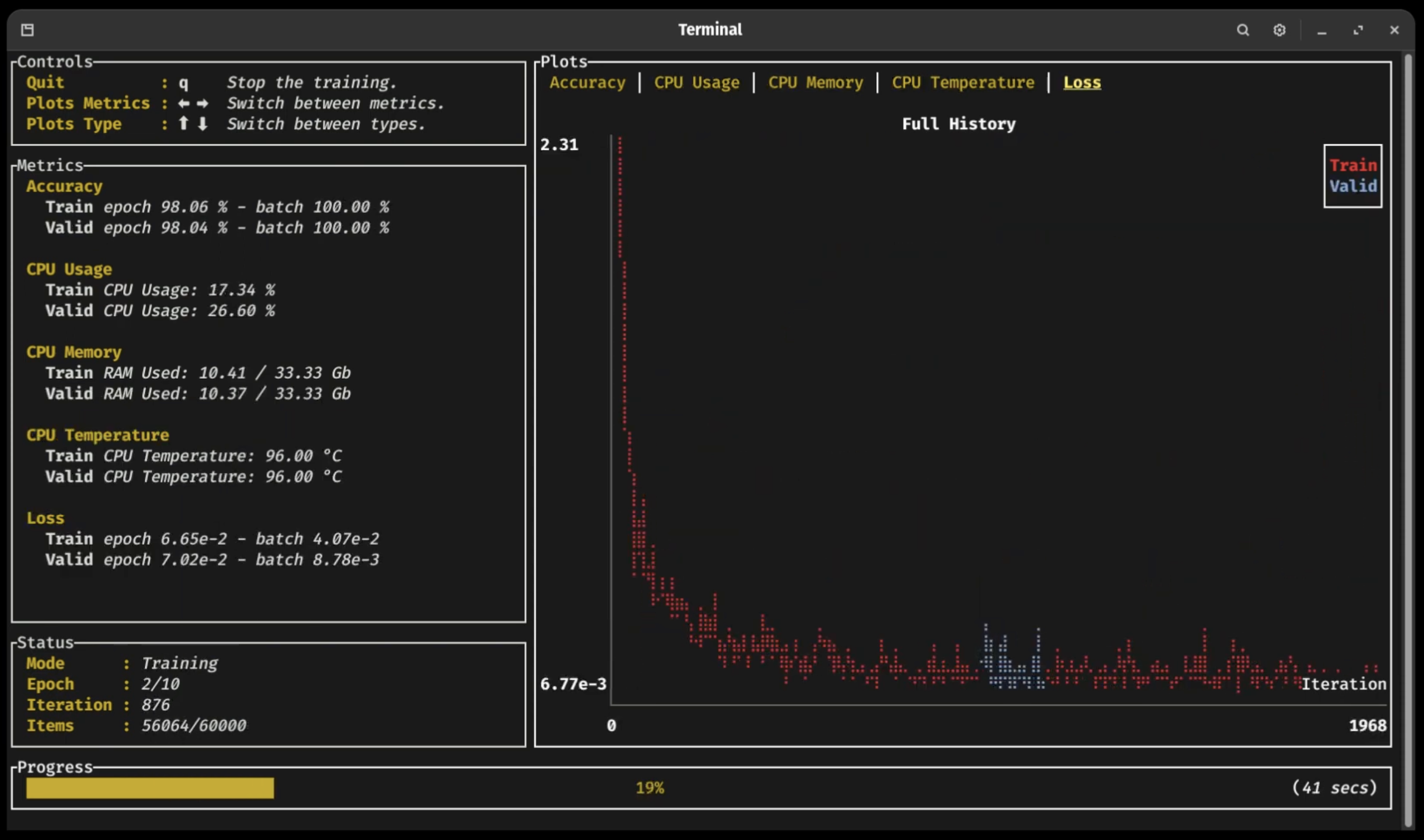
The whole deep learning workflow is made easy with Burn, as you can monitor your training progress
with an ergonomic dashboard, and run inference everywhere from embedded devices to large GPU
clusters.
Burn was built from the ground up with training and inference in mind. It's also worth noting how
Burn, in comparison to frameworks like PyTorch, simplifies the transition from training to
deployment, eliminating the need for code changes.
Click on the following sections to expand 👇
Training Dashboard 📈
As you can see in the previous video (click on the picture!), a new terminal UI dashboard based on
the Ratatui crate allows users to follow their training
with ease without having to connect to any external application.
You can visualize your training and validation metrics updating in real-time and analyze the
lifelong progression or recent history of any registered metrics using only the arrow keys. Break
from the training loop without crashing, allowing potential checkpoints to be fully written or
important pieces of code to complete without interruption 🛡
ONNX Support 🐫
Burn supports importing ONNX (Open Neural Network Exchange) models through the
burn-onnx crate, allowing you to easily port models from
TensorFlow or PyTorch to Burn. The ONNX model is converted into Rust code that uses Burn's native
APIs, enabling the imported model to run on any Burn backend (CPU, GPU, WebAssembly) and benefit
from all of Burn's optimizations like automatic kernel fusion.
Our ONNX support is further described in
this section of the Burn Book 🔥.
Note: This crate is in active development and currently supports a
limited set of ONNX operators.
Importing PyTorch or Safetensors Models 🚚
You can load weights from PyTorch or Safetensors formats directly into your Burn-defined models.
This makes it easy to reuse existing models while benefiting from Burn's performance and deployment
features.
Learn more in the Saving & Loading Models
section of the Burn Book.
Inference in the Browser 🌐
Several of our backends can run in WebAssembly environments: Flex for CPU execution, and WGPU for
GPU acceleration via WebGPU. This means that you can run inference directly within a browser. We
provide several examples of this:
- MNIST where you can draw digits and a small convnet tries to
find which one it is! 2️⃣ 7️⃣ 😰
- Image Classification
where you can upload images and classify them! 🌄
Embedded: no_std support ⚙️
Burn's core components support no_std. This
means it can run in bare metal environment such as embedded devices without an operating system.
As of now, only the Flex backend can be used in a no_std environment.
Benchmarks
To evaluate performance across different backends and track improvements over time, we provide a
dedicated benchmarking suite.
Run and compare benchmarks using burn-bench.
⚠️ Warning When using one of the wgpu backends, you may encounter compilation errors related
to recursive type evaluation. This is due to complex type nesting within the wgpu dependency
chain. To resolve this issue, add the following line at the top








 Burn 是一个 Rust 张量库和深度学习框架,同时支持训练和推理,同一份代码可以让模型从原型一路走到生产环境,从 GPU 集群到浏览器都能运行。