

What is this?
 Koharu is an ML-powered manga translator written in Rust that combines object detection, OCR, inpainting, and LLMs to automate translating manga pages while running everything locally.
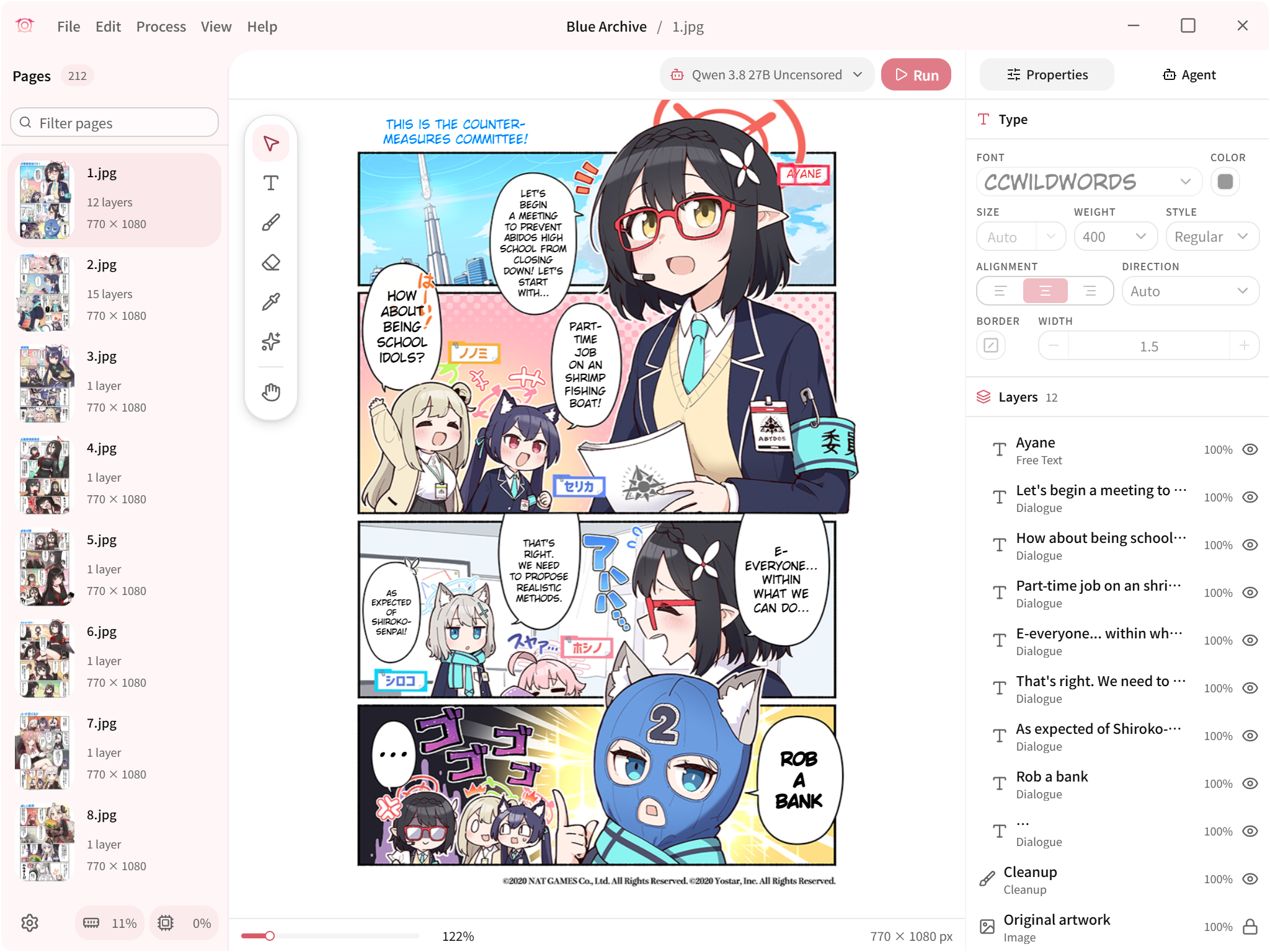
Koharu is an ML-powered manga translator written in Rust that combines object detection, OCR, inpainting, and LLMs to automate translating manga pages while running everything locally.Is this a command-line tool or a full desktop app?It is a desktop GUI application with a WebGPU-based canvas for manual cleanup, text placement, and page composition, not a library or CLI tool.
It is a desktop GUI application with a WebGPU-based canvas for manual cleanup, text placement, and page composition, not a library or CLI tool.How do I get it running?Download a prebuilt release for Windows, macOS, or Linux from the releases page, or install on Windows with WinGet or on macOS with Homebrew.
Download a prebuilt release for Windows, macOS, or Linux from the releases page, or install on Windows with WinGet or on macOS with Homebrew.Any catches with hardware acceleration or performance?CPU inference works but is described as substantially slower, and GPU acceleration depends on exact hardware/driver combinations — CUDA needs a Turing-class or newer NVIDIA GPU, and ROCm support varies by AMD GPU, OS, and driver. The editor canvas also needs a current graphics driver via WebGPU even when inference itself runs on CPU.
CPU inference works but is described as substantially slower, and GPU acceleration depends on exact hardware/driver combinations — CUDA needs a Turing-class or newer NVIDIA GPU, and ROCm support varies by AMD GPU, OS, and driver. The editor canvas also needs a current graphics driver via WebGPU even when inference itself runs on CPU.Does my manga data leave my machine?No, by default vision models and LLMs run locally so your manga pages stay on your machine, though you can optionally opt into cloud LLM or machine-translation providers.
No, by default vision models and LLMs run locally so your manga pages stay on your machine, though you can optionally opt into cloud LLM or machine-translation providers.What file formats can I bring into a project?Koharu supports raster images, archives, and PDFs, with page sequencing for multi-format project management.
Koharu supports raster images, archives, and PDFs, with page sequencing for multi-format project management.What happens to the original Japanese text after translation?Generative inpainting models (like FLUX.2 Klein or LaMa) remove the source text and reconstruct the artwork underneath before the translated text is rendered on top.
Generative inpainting models (like FLUX.2 Klein or LaMa) remove the source text and reconstruct the artwork underneath before the translated text is rendered on top.Can I export the finished translation for further editing?Yes, Koharu offers layered PSD export so you can either flatten the result for delivery or keep editing the layers in another program.
Yes, Koharu offers layered PSD export so you can either flatten the result for delivery or keep editing the layers in another program.What is the agent-based workflow mentioned in the features?It lets an agent inspect, edit, and drive the detection, OCR, translation, and inpainting pipeline across a project automatically instead of you running each step manually.
It lets an agent inspect, edit, and drive the detection, OCR, translation, and inpainting pipeline across a project automatically instead of you running each step manually.What are similar projects?video-subtitle-remover, ds4, Deep-Live-Cam, manga-image-translator, qwen38-mtp, Bud-Decision-Studio, MoE4All, project-maya
video-subtitle-remover, ds4, Deep-Live-Cam, manga-image-translator, qwen38-mtp, Bud-Decision-Studio, MoE4All, project-mayaWhich topics is it in?manga, inpainting, japanese, amd-gpu, rocm, webgpu, gguf, image-editing, metal, object-detection, ocr, translation
manga, inpainting, japanese, amd-gpu, rocm, webgpu, gguf, image-editing, metal, object-detection, ocr, translation