








burn README

The project's README from github.com/tracel-ai/burn. As one markdown file: README.md.

Discord Current Crates.io Version Minimum Supported Rust Version Documentation Test Status license Ask DeepWiki


Burn is both a tensor library and a deep learning framework, optimized for
numerical computing, training and inference.


Training and inference usually live in separate worlds. Models are typically trained in Python then exported to an open format like ONNX or optimized for production engines like vLLM, ONNX Runtime, or TensorRT. This export step is often brittle and lossy, ruling out complex architectures and advanced deployment use cases.

Burn unifies the two. By executing multi-platform tensor operations via a single, unified API, the exact code used for training is the exact code that runs in production. This makes workloads like on-device personalization and federated learning straightforward, while enabling teams to go from prototype to deployment in a single codebase.

Burn preserves the intuitive ergonomics of PyTorch, with dynamic shapes and graphs, but JIT-compiles streams of tensor operations, performing automatic kernel fusion. You get the flexibility of dynamic graphs without the performance drop.

Rust for Research?

Rust used to be a tough sell for research: long compilation times disrupted the fast edit-compile-run loop that draws researchers to Python. Burn changes this paradigm. Designed around incremental compilation, modifying model code recompiles in under 5 seconds, even in release mode. This delivers a Python-like feedback loop with the speed and safety of Rust.

Ecosystem

Burn is the core of a growing, fully open-source Rust AI ecosystem. You are not adopting a single library, you are joining a stack that spans GPU compute, model interop and domain toolkits, with plenty of room to help shape what comes next.

Category Project Description
Compute CubeCL GPU compute language and compiler behind Burn's accelerated backends. Write kernels once in Rust, run on CUDA, ROCm, Metal, Vulkan and WebGPU. Usable standalone.
Model interop burn-onnx Import ONNX models into Burn as native Rust code
burn-store Save, load and import model weights, including PyTorch and Safetensors
Domains burn-vision Computer vision operators and building blocks
burn-rl Reinforcement learning building blocks
burn-dataset Dataset loading, transforms and ready-made sources
Models models Curated pre-trained models and examples built with Burn
Tooling burn-bench Benchmark and compare backends, tracking performance over time

Burn's CubeCL backends (CUDA, ROCm, Metal, Vulkan, WebGPU, CPU) compose with autodiff, fusion and remote-execution decorators, while external and simpler backends (LibTorch and pure-Rust CPU/no_std) compose with autodiff only. See Supported Backends below for the full matrix.

Every project here is open-source and actively developed. Want to help build the Rust AI ecosystem? The good first issues are a great place to start, and the Contributing guide will get you set up.

Community crates 🌱

These crates are not maintained by Tracel, but they are part of the same Rust AI story. Anything that helps you load data, build environments, or ship models belongs here. Built something that fits? Open a PR to add it!

Category Crate Description
Data & loading polars Fast DataFrames for tabular data
arrow-rs Apache Arrow columnar memory format
image Image decoding, encoding and processing
hf-hub Download models and datasets from the Hugging Face Hub
Tokenization & NLP tokenizers Fast, production-ready tokenizers
rust-bert Ready-to-use NLP pipelines and transformer models
Numerical & linear algebra ndarray N-dimensional arrays
nalgebra Linear algebra
Classical ML linfa Classical ML toolkit, in the spirit of scikit-learn
smartcore Classical ML algorithms, no BLAS/LAPACK required
Inference & runtimes candle Minimalist ML framework with a focus on LLM inference
mistral.rs Fast, multimodal LLM inference engine
ort ONNX Runtime bindings for hardware-accelerated inference
tract Pure-Rust inference for ONNX and NNEF models
wonnx 100% Rust, WebGPU-accelerated ONNX runtime for native and the web
LLM apps & RAG rig Build modular LLM applications and agents
langchain-rust LangChain-style chain orchestration
Embeddings & vector search fastembed Generate text embeddings and rerank locally
qdrant Vector search engine, written in Rust
lancedb Embedded, developer-friendly vector database
Computer vision kornia-rs Low-level 3D computer vision library
Simulation & environments rapier Physics engine for robotics and RL environments
Visualization rerun Multimodal data and CV/robotics visualization
plotters Plotting and charting

Backend

Burn strives to be as fast as possible on as many hardwares as possible, with robust implementations. We believe this flexibility is crucial for modern needs where you may train your models in the cloud, then deploy on customer hardwares, which vary from user to user.

Supported Backends

Most backends support all operating systems, so we don't mention them in the tables below.

GPU Backends:

CUDA ROCm Metal Vulkan WebGPU LibTorch
Nvidia ☑️ - - ☑️ ☑️ ☑️
AMD - ☑️ - ☑️ ☑️ ☑️
Apple - - ☑️ - ☑️ ☑️
Intel - - - ☑️ ☑️ -
Qualcom - - - ☑️ ☑️ -
Wasm - - - - ☑️ -

CPU Backends:

Cpu (CubeCL) Flex LibTorch
X86 ☑️ ☑️ ☑️
Arm ☑️ ☑️ ☑️
Wasm - ☑️ -
no-std - ☑️ -

Note: The LibTorch backend is deprecated as of 0.22.0 and will be removed in a future release. For GPU acceleration, use a CubeCL backend (CUDA, ROCm, Metal, Vulkan, WebGPU). For CPU execution, use the CubeCL CPU backend or burn-flex.


Compared to other frameworks, Burn has a very different approach to supporting many backends. By design, most code is generic over the Backend trait, which allows us to build Burn with swappable backends. This makes composing backend possible, augmenting them with additional functionalities such as autodifferentiation and automatic kernel fusion.

Autodiff: Backend decorator that brings backpropagation to any backend 🔄

Contrary to the aforementioned backends, Autodiff is actually a backend decorator. This means that it cannot exist by itself; it must encapsulate another backend.

The simple act of wrapping a base backend with Autodiff transparently equips it with autodifferentiation support, making it possible to call backward on your model.

use burn::backend::{Autodiff, Wgpu};
use burn::tensor::{Distribution, Tensor};

fn main() {
    type Backend = Autodiff<Wgpu>;

    let device = Default::default();

    let x: Tensor<Backend, 2> = Tensor::random([32, 32], Distribution::Default, &device);
    let y: Tensor<Backend, 2> = Tensor::random([32, 32], Distribution::Default, &device).require_grad();

    let tmp = x.clone() + y.clone();
    let tmp = tmp.matmul(x);
    let tmp = tmp.exp();

    let grads = tmp.backward();
    let y_grad = y.grad(&grads).unwrap();
    println!("{y_grad}");
}

Of note, it is impossible to make the mistake of calling backward on a model that runs on a backend that does not support autodiff (for inference), as this method is only offered by an Autodiff backend.

See the Autodiff Backend README for more details.

Fusion: Backend decorator that brings kernel fusion to all first-party backends

This backend decorator enhances a backend with kernel fusion, provided that the inner backend supports it. Note that you can compose this backend with other backend decorators such as Autodiff. All first-party accelerated backends (like WGPU and CUDA) use Fusion by default (burn/fusion feature flag), so you typically don't need to apply it manually.

#[cfg(not(feature = "fusion"))]
pub type Cuda<F = f32, I = i32> = CubeBackend<CudaRuntime, F, I, u8>;

#[cfg(feature = "fusion")]
pub type Cuda<F = f32, I = i32> = burn_fusion::Fusion<CubeBackend<CudaRuntime, F, I, u8>>;

Of note, we plan to implement automatic gradient checkpointing based on compute bound and memory bound operations, which will work gracefully with the fusion backend to make your code run even faster during training, see this issue.

See the Fusion Backend README for more details.

Remote (Beta): Backend decorator for remote backend execution, useful for distributed computations

That backend has two parts, one client and one server. The client sends tensor operations over the network to a remote compute backend. You can use any first-party backend as server in a single line of code:

fn main_server() {
    // Start a server on port 3000.
    burn::server::start::<burn::backend::Cuda>(Default::default(), 3000);
}

fn main_client() {
    // Create a client that communicate with the server on port 3000.
    use burn::backend::{Autodiff, RemoteBackend};

    type Backend = Autodiff<RemoteDevice>;

    let device = RemoteDevice::new("ws://localhost:3000");
    let tensor_gpu =
        Tensor::<Backend, 2>::random([3, 3], Distribution::Default, &device);
}

Training & Inference

The whole deep learning workflow is made easy with Burn, as you can monitor your training progress with an ergonomic dashboard, and run inference everywhere from embedded devices to large GPU clusters.

Burn was built from the ground up with training and inference in mind. It's also worth noting how Burn, in comparison to frameworks like PyTorch, simplifies the transition from training to deployment, eliminating the need for code changes.


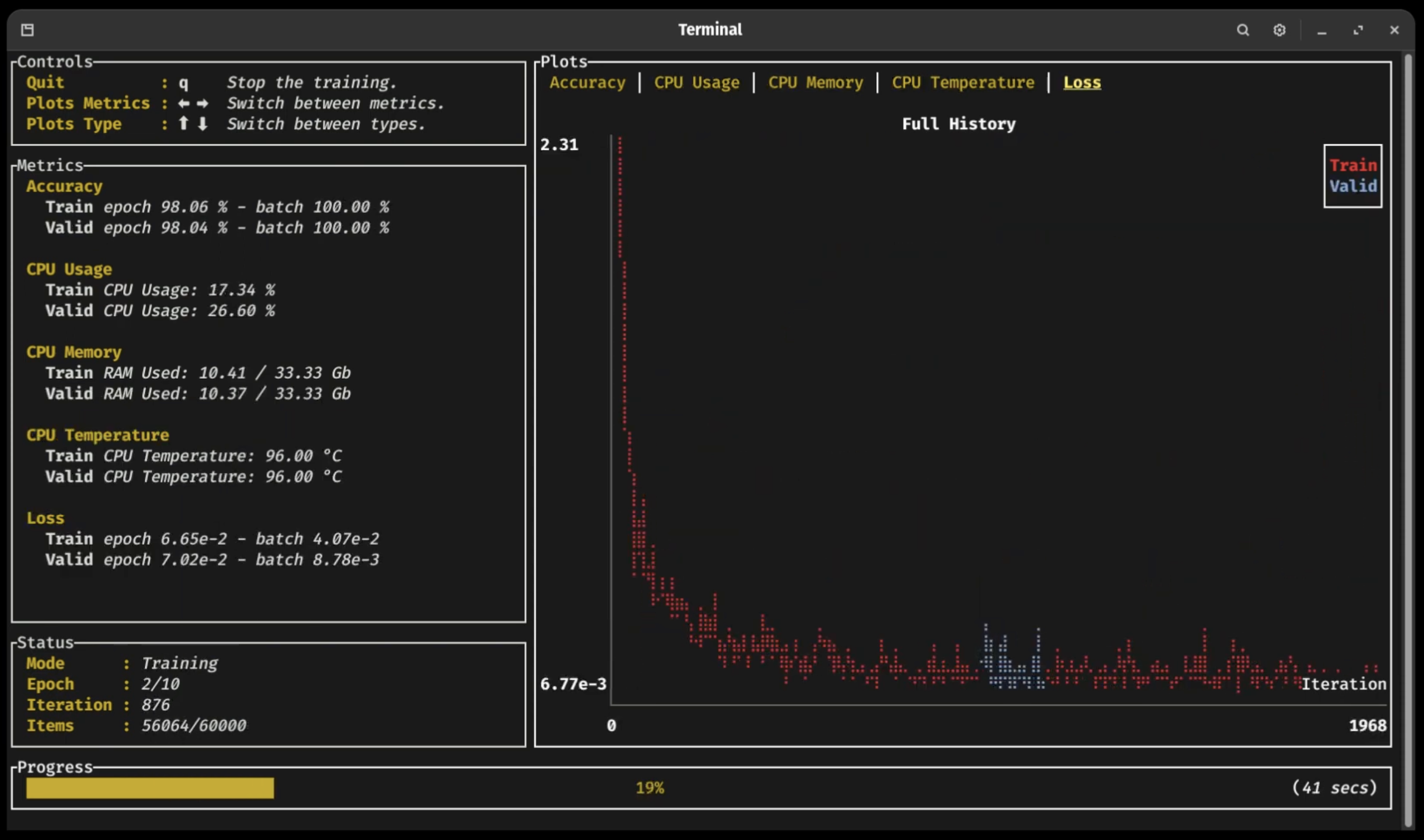
Burn Train TUI

Click on the following sections to expand 👇

Training Dashboard 📈

As you can see in the previous video (click on the picture!), a new terminal UI dashboard based on the Ratatui crate allows users to follow their training with ease without having to connect to any external application.

You can visualize your training and validation metrics updating in real-time and analyze the lifelong progression or recent history of any registered metrics using only the arrow keys. Break from the training loop without crashing, allowing potential checkpoints to be fully written or important pieces of code to complete without interruption 🛡

ONNX Support 🐫

Burn supports importing ONNX (Open Neural Network Exchange) models through the burn-onnx crate, allowing you to easily port models from TensorFlow or PyTorch to Burn. The ONNX model is converted into Rust code that uses Burn's native APIs, enabling the imported model to run on any Burn backend (CPU, GPU, WebAssembly) and benefit from all of Burn's optimizations like automatic kernel fusion.

Our ONNX support is further described in this section of the Burn Book 🔥.

Note: This crate is in active development and currently supports a limited set of ONNX operators.

Importing PyTorch or Safetensors Models 🚚

You can load weights from PyTorch or Safetensors formats directly into your Burn-defined models. This makes it easy to reuse existing models while benefiting from Burn's performance and deployment features.

Learn more in the Saving & Loading Models section of the Burn Book.

Inference in the Browser 🌐

Several of our backends can run in WebAssembly environments: Flex for CPU execution, and WGPU for GPU acceleration via WebGPU. This means that you can run inference directly within a browser. We provide several examples of this:

  • MNIST where you can draw digits and a small convnet tries to find which one it is! 2️⃣ 7️⃣ 😰
  • Image Classification where you can upload images and classify them! 🌄
Embedded: no_std support ⚙️

Burn's core components support no_std. This means it can run in bare metal environment such as embedded devices without an operating system.

As of now, only the Flex backend can be used in a no_std environment.


Benchmarks

To evaluate performance across different backends and track improvements over time, we provide a dedicated benchmarking suite.

Run and compare benchmarks using burn-bench.

⚠️ Warning When using one of the wgpu backends, you may encounter compilation errors related to recursive type evaluation. This is due to complex type nesting within the wgpu dependency chain. To resolve this issue, add the following line at the top

burn (tracel-ai/burn)

Searching Database…

16.1K ·GitHub
Что это такое?Burn — это тензорная библиотека и фреймворк глубокого обучения на Rust для обучения и инференса: один и тот же код доводит модель от прототипа до продакшена где угодно — от GPU-кластеров до браузера.
Чем это отличается от PyTorch?Burn сохраняет привычную эргономику PyTorch — динамические формы и графы, — но JIT-компилирует тензорные операции с автоматическим слиянием ядер (kernel fusion), так что вы получаете гибкость динамического графа без падения производительности. Код для обучения и код для продакшена — буквально один и тот же код, без хрупкого шага экспорта.
Как начать пользоваться этим в Rust-проекте?Добавьте крейт burn в свой Cargo-проект и включите бэкенд через feature-флаги (CUDA, ROCm, Metal, Vulkan, WebGPU или CPU). Burn Book шаг за шагом проведёт вас через первый проект.
Нужен ли мне где-то в рабочем процессе Python, например для экспорта моделей?Нет, всё живёт в Rust. Веса PyTorch или Safetensors можно загрузить прямо в модель, описанную на Burn, а модели ONNX из TensorFlow или PyTorch импортируются через burn-onnx как нативный Rust-код, работающий на любом бэкенде.
Какие есть подводные камни перед первой компиляцией?Бэкенд LibTorch начиная с версии 0.22.0 объявлен устаревшим и будет удалён, поэтому выбирайте бэкенд на CubeCL (CUDA, ROCm, Metal, Vulkan, WebGPU) или CPU. У бэкендов wgpu бывают ошибки компиляции из-за рекурсивных типов, для которых есть известное обходное решение, а burn-onnx покрывает пока лишь ограниченный набор операторов ONNX.
А он правда может работать в браузере или на встраиваемом железе?Да. Бэкенды Flex (CPU) и WGPU (WebGPU) работают под WebAssembly, так что инференс идёт прямо в браузере — есть демо с MNIST и классификацией изображений, — а ключевые компоненты поддерживают nostd для «голого железа» во встраиваемых устройствах, правда, только через Flex.
Мне нужна видеокарта Nvidia или подойдёт другое железо?Подойдёт любой крупный производитель: Nvidia через CUDA, AMD через ROCm, Apple через Metal, плюс Vulkan и WebGPU на картах Nvidia, AMD, Intel и Qualcomm. Чисто процессорные бэкенды работают на x86, Arm и Wasm, когда GPU не задействован.
Что такое CubeCL?CubeCL — это язык и компилятор для GPU-вычислений, на которых строятся ускоренные бэкенды Burn. Ядра (kernels) пишутся один раз на Rust и работают на CUDA, ROCm, Metal, Vulkan и WebGPU, причём CubeCL можно использовать и отдельно, вне Burn.
Как работают бэкенды Autodiff, Fusion и Remote?Это декораторы бэкендов, которые вы надстраиваете над базовым: Autodiff добавляет обратное распространение ошибки к любому бэкенду, Fusion — автоматическое слияние ядер (для «родных» GPU-бэкендов включено по умолчанию), а бета-декоратор Remote пересылает тензорные операции по сети на удалённый вычислительный бэкенд для распределённых запусков.
Что входит в Burn помимо основного крейта?Команда Tracel поддерживает burn-onnx (импорт моделей ONNX), burn-store (сохранение и загрузка весов, включая PyTorch и Safetensors), burn-vision, burn-rl и burn-dataset как строительные блоки для конкретных областей, а также burn-bench для бенчмаркинга бэкендов и отобранный набор предобученных моделей.
Нужны ли мне сторонние инструменты, чтобы следить за обучением?Нет. В Burn встроена терминальная панель на базе Ratatui: она показывает метрики обучения и валидации в реальном времени, позволяет листать историю метрик стрелками и выйти из цикла обучения, не уронив его.
Creator
tracel-ai
Size
83 MB
Stars
16.1K
Age
4y
Commits · 90 Days