









What is this?
 Burn is a Rust tensor library and deep learning framework for both training and inference, so the same code takes a model from prototype to production on everything from GPU clusters to the browser.
Burn is a Rust tensor library and deep learning framework for both training and inference, so the same code takes a model from prototype to production on everything from GPU clusters to the browser.How is it different from PyTorch?It keeps PyTorch-like ergonomics such as dynamic shapes and graphs, but JIT-compiles tensor operations with automatic kernel fusion, so you get dynamic-graph flexibility without the performance drop. Training code and production code are literally the same code — no brittle export step.
It keeps PyTorch-like ergonomics such as dynamic shapes and graphs, but JIT-compiles tensor operations with automatic kernel fusion, so you get dynamic-graph flexibility without the performance drop. Training code and production code are literally the same code — no brittle export step.How do I get started with it in a Rust project?Add the burn crate to your Cargo project and enable a backend through feature flags (CUDA, ROCm, Metal, Vulkan, WebGPU or CPU). The Burn Book walks you through your first project.
Add the burn crate to your Cargo project and enable a backend through feature flags (CUDA, ROCm, Metal, Vulkan, WebGPU or CPU). The Burn Book walks you through your first project.Do I need Python anywhere in the workflow, e.g. to export models?No, everything lives in Rust. You can load PyTorch or Safetensors weights straight into Burn-defined models, and ONNX models from TensorFlow or PyTorch import through burn-onnx as native Rust code that runs on any backend.
No, everything lives in Rust. You can load PyTorch or Safetensors weights straight into Burn-defined models, and ONNX models from TensorFlow or PyTorch import through burn-onnx as native Rust code that runs on any backend.Any pitfalls before I compile it for the first time?The LibTorch backend is deprecated as of 0.22.0 and will be removed, so pick a CubeCL backend (CUDA, ROCm, Metal, Vulkan, WebGPU) or CPU instead. The wgpu backends can also hit recursive-type compilation errors with a known workaround, and burn-onnx still covers only a limited set of ONNX operators.
The LibTorch backend is deprecated as of 0.22.0 and will be removed, so pick a CubeCL backend (CUDA, ROCm, Metal, Vulkan, WebGPU) or CPU instead. The wgpu backends can also hit recursive-type compilation errors with a known workaround, and burn-onnx still covers only a limited set of ONNX operators.Can it really run in a browser or on embedded hardware?Yes. The Flex (CPU) and WGPU (WebGPU) backends run in WebAssembly, so inference works directly in the browser — there are MNIST and image-classification demos — and core components support nostd for bare-metal embedded devices, though only via Flex.
Yes. The Flex (CPU) and WGPU (WebGPU) backends run in WebAssembly, so inference works directly in the browser — there are MNIST and image-classification demos — and core components support nostd for bare-metal embedded devices, though only via Flex.Do I need an Nvidia GPU, or will other hardware work?Any major vendor works: Nvidia via CUDA, AMD via ROCm, Apple via Metal, plus Vulkan and WebGPU across Nvidia, AMD, Intel and Qualcomm. Pure CPU backends cover x86, Arm and Wasm when no GPU is involved.
Any major vendor works: Nvidia via CUDA, AMD via ROCm, Apple via Metal, plus Vulkan and WebGPU across Nvidia, AMD, Intel and Qualcomm. Pure CPU backends cover x86, Arm and Wasm when no GPU is involved.What is CubeCL?CubeCL is the GPU compute language and compiler behind Burn's accelerated backends. You write kernels once in Rust and they run on CUDA, ROCm, Metal, Vulkan and WebGPU — and it is usable standalone, outside Burn.
CubeCL is the GPU compute language and compiler behind Burn's accelerated backends. You write kernels once in Rust and they run on CUDA, ROCm, Metal, Vulkan and WebGPU — and it is usable standalone, outside Burn.How do Autodiff, Fusion and Remote backends work?They are backend decorators you stack on a base backend: Autodiff adds backpropagation to any backend, Fusion adds automatic kernel fusion (on by default for first-party GPU backends), and the beta Remote decorator sends tensor operations over the network to a remote compute backend for distributed runs.
They are backend decorators you stack on a base backend: Autodiff adds backpropagation to any backend, Fusion adds automatic kernel fusion (on by default for first-party GPU backends), and the beta Remote decorator sends tensor operations over the network to a remote compute backend for distributed runs.What comes with Burn besides the core crate?Tracel maintains burn-onnx (import ONNX models), burn-store (save/load weights incl. PyTorch and Safetensors), burn-vision, burn-rl and burn-dataset for domain building blocks, plus burn-bench for benchmarking backends and a curated set of pre-trained models.
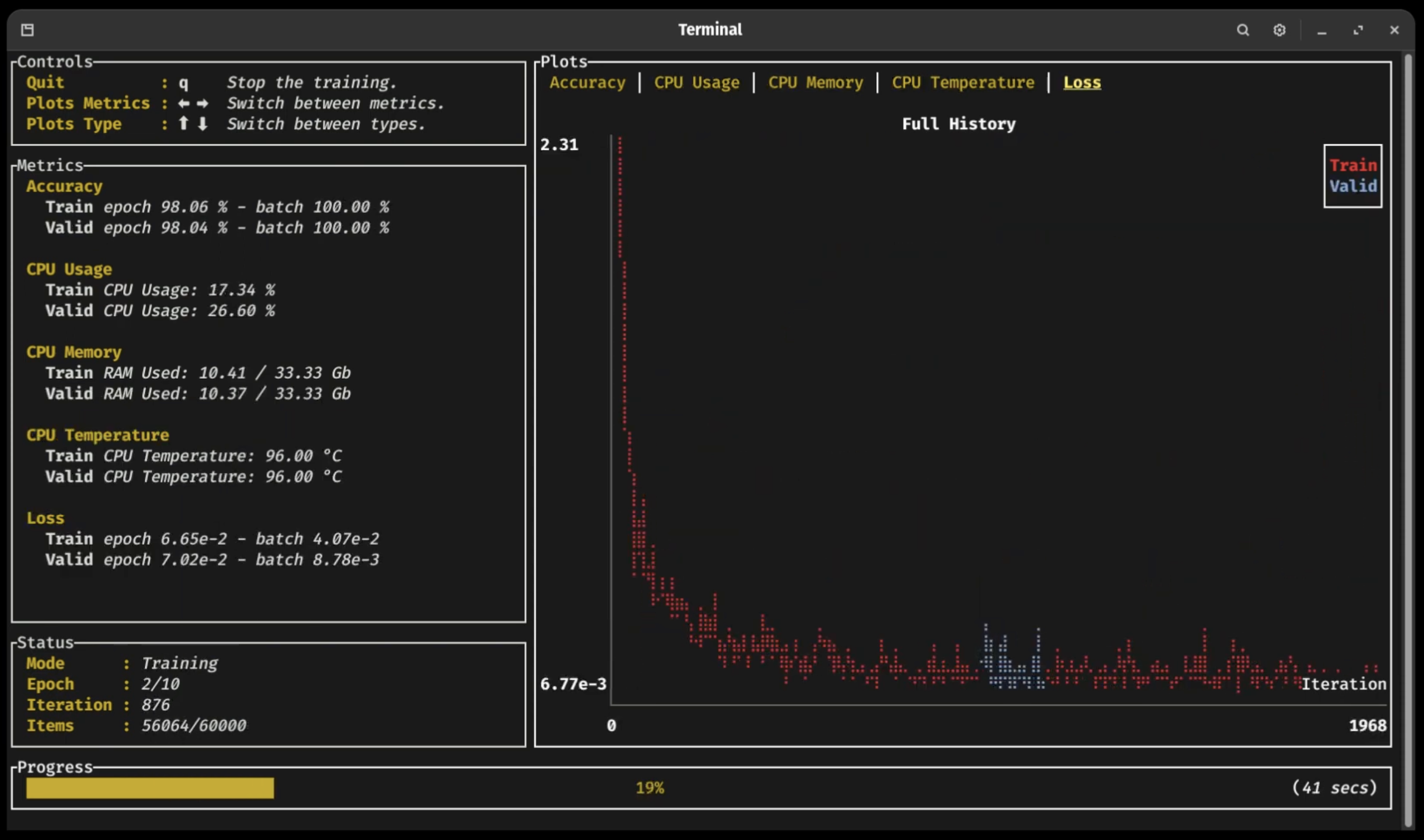
Tracel maintains burn-onnx (import ONNX models), burn-store (save/load weights incl. PyTorch and Safetensors), burn-vision, burn-rl and burn-dataset for domain building blocks, plus burn-bench for benchmarking backends and a curated set of pre-trained models.Do I need external tools to monitor training?No. Burn ships a terminal UI dashboard built on Ratatui that shows training and validation metrics in real time, lets you browse metric history with the arrow keys, and lets you break out of the training loop without crashing it.
No. Burn ships a terminal UI dashboard built on Ratatui that shows training and validation metrics in real time, lets you browse metric history with the arrow keys, and lets you break out of the training loop without crashing it.What are similar projects?tvm, tilelang, cupy, onnxruntime, pytorch, verl, koharu, High-Angle_Robust_Fast_FaceAlignment
tvm, tilelang, cupy, onnxruntime, pytorch, verl, koharu, High-Angle_Robust_Fast_FaceAlignment