
STORM: Synthesis of Topic Outlines through Retrieval and Multi-perspective Question Asking
| Research preview | STORM Paper| Co-STORM Paper | Website |
**Latest News** 🔥
[2025/01] We add litellm integration for language models and embedding models in knowledge-storm v1.1.0.
[2024/09] Co-STORM codebase is now released and integrated into knowledge-storm python package v1.0.0. Run pip install knowledge-storm --upgrade to check it out.
[2024/09] We introduce collaborative STORM (Co-STORM) to support human-AI collaborative knowledge curation! Co-STORM Paper has been accepted to EMNLP 2024 main conference.
[2024/07] You can now install our package with pip install knowledge-storm!
[2024/07] We add VectorRM to support grounding on user-provided documents, complementing existing support of search engines (YouRM, BingSearch). (check out #58)
[2024/07] We release demo light for developers a minimal user interface built with streamlit framework in Python, handy for local development and demo hosting (checkout #54)
[2024/06] We will present STORM at NAACL 2024! Find us at Poster Session 2 on June 17 or check our presentation material.
[2024/05] We add Bing Search support in rm.py. Test STORM with GPT-4o - we now configure the article generation part in our demo using GPT-4o model.
[2024/04] We release refactored version of STORM codebase! We define interface for STORM pipeline and reimplement STORM-wiki (check out src/storm_wiki) to demonstrate how to instantiate the pipeline. We provide API to support customization of different language models and retrieval/search integration.

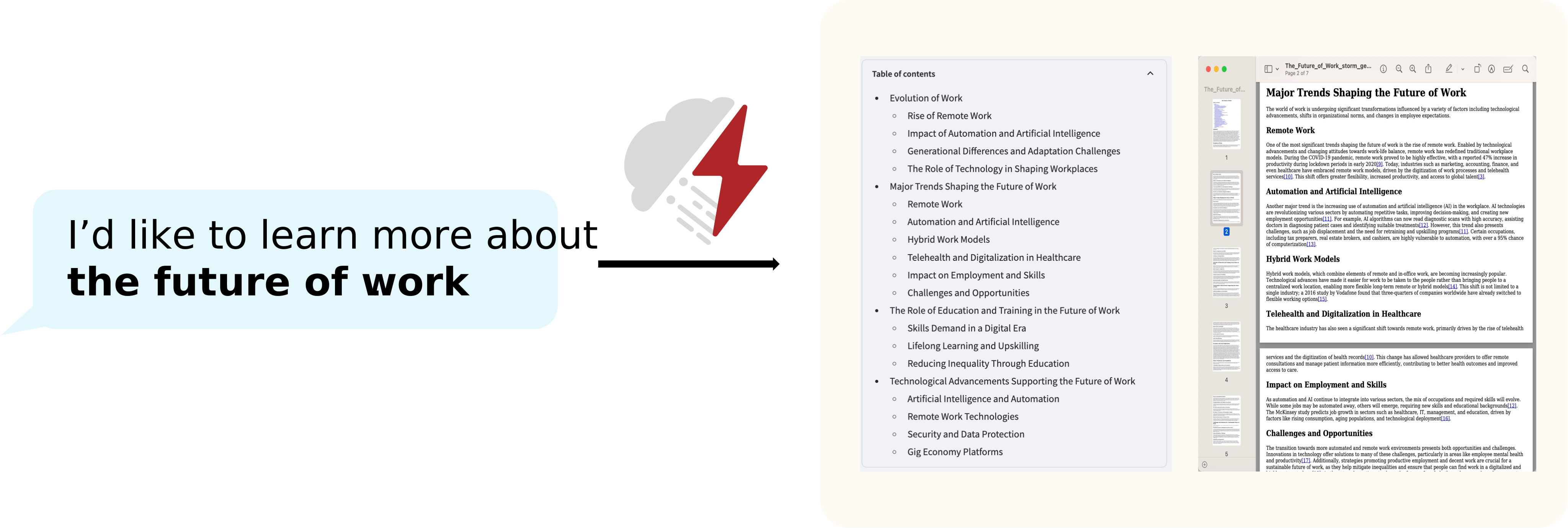
STORM is a LLM system that writes Wikipedia-like articles from scratch based on Internet search. Co-STORM further enhanced its feature by enabling human to collaborative LLM system to support more aligned and preferred information seeking and knowledge curation.
While the system cannot produce publication-ready articles that often require a significant number of edits, experienced Wikipedia editors have found it helpful in their pre-writing stage.
More than 70,000 people have tried our live research preview. Try it out to see how STORM can help your knowledge exploration journey and please provide feedback to help us improve the system 🙏!
How STORM & Co-STORM works
STORM
STORM breaks down generating long articles with citations into two steps:
- Pre-writing stage: The system conducts Internet-based research to collect references and generates an outline.
- Writing stage: The system uses the outline and references to generate the full-length article with citations.
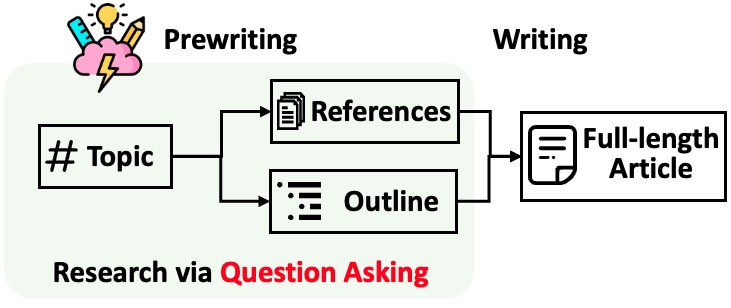
STORM identifies the core of automating the research process as automatically coming up with good questions to ask. Directly prompting the language model to ask questions does not work well. To improve the depth and breadth of the questions, STORM adopts two strategies:
- Perspective-Guided Question Asking: Given the input topic, STORM discovers different perspectives by surveying existing articles from similar topics and uses them to control the question-asking process.
- Simulated Conversation: STORM simulates a conversation between a Wikipedia writer and a topic expert grounded in Internet sources to enable the language model to update its understanding of the topic and ask follow-up questions.
CO-STORM
Co-STORM proposes a collaborative discourse protocol which implements a turn management policy to support smooth collaboration among
- Co-STORM LLM experts: This type of agent generates answers grounded on external knowledge sources and/or raises follow-up questions based on the discourse history.
- Moderator: This agent generates thought-provoking questions inspired by information discovered by the retriever but not directly used in previous turns. Question generation can also be grounded!
- Human user: The human user will take the initiative to either (1) observe the discourse to gain deeper understanding of the topic, or (2) actively engage in the conversation by injecting utterances to steer the discussion focus.
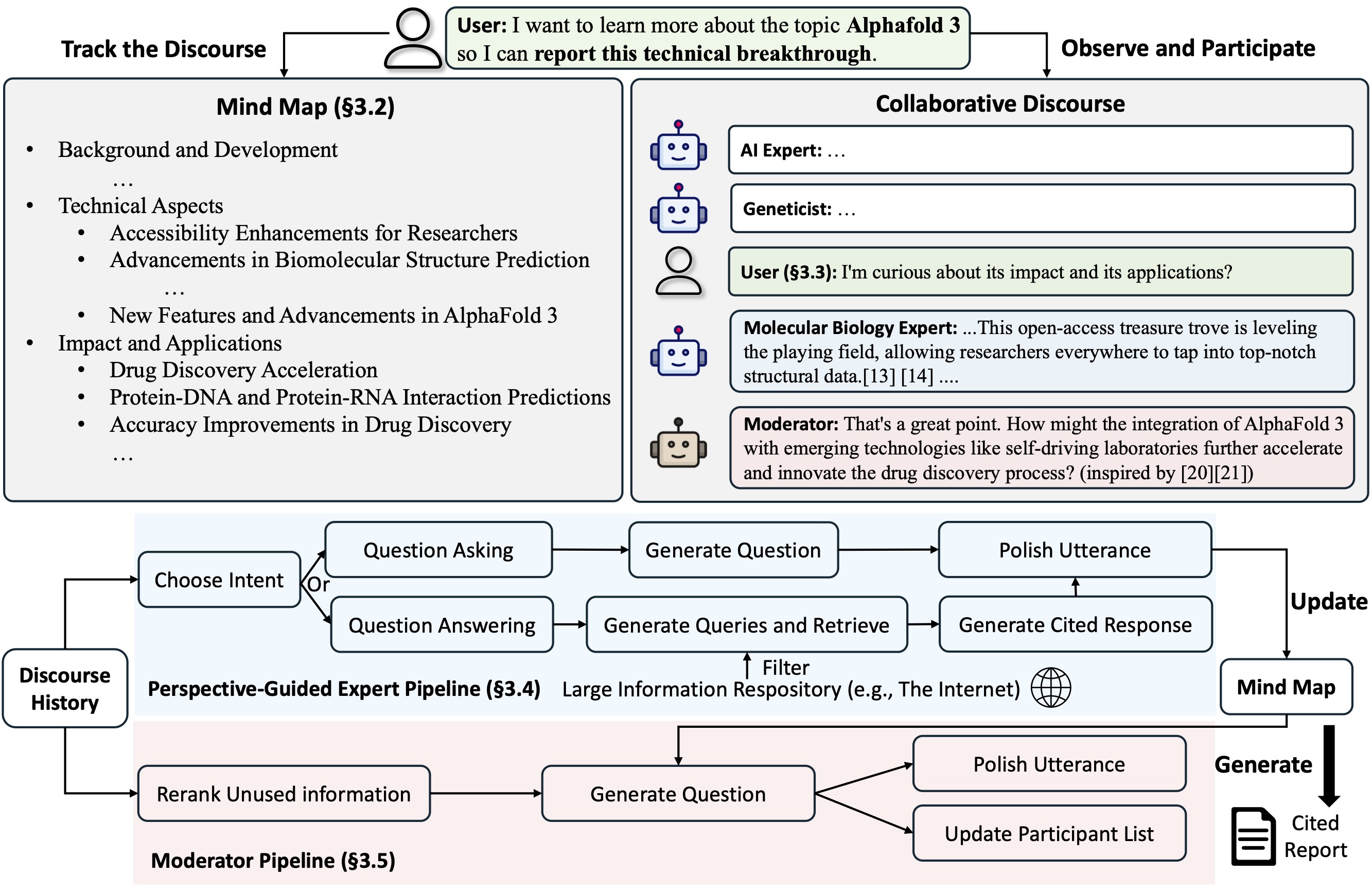
Co-STORM also maintains a dynamic updated mind map, which organize collected information into a hierarchical concept structure, aiming to build a shared conceptual space between the human user and the system. The mind map has been proven to help reduce the mental load when the discourse goes long and in-depth.
Both STORM and Co-STORM are implemented in a highly modular way using dspy.
Installation
To install the knowledge storm library, use pip install knowledge-storm.
You could also install the source code which allows you to modify the behavior of STORM engine directly.
Clone the git repository.
git clone https://github.com/stanford-oval/storm.git
cd storm
Install the required packages.
conda create -n storm python=3.11
conda activate storm
pip install -r requirements.txt
API
Currently, our package support:
- Language model components: All language models supported by litellm as listed here
- Embedding model components: All embedding models supported by litellm as listed here
- retrieval module components:
YouRM, BingSearch, VectorRM, SerperRM, BraveRM, SearXNG, DuckDuckGoSearchRM, TavilySearchRM, GoogleSearch, and AzureAISearch as
:star2: PRs for integrating more search engines/retrievers into knowledge_storm/rm.py are highly appreciated!
Both STORM and Co-STORM are working in the information curation layer, you need to set up the information retrieval module and language model module to create their Runner classes respectively.
STORM
The STORM knowledge curation engine is defined as a simple Python STORMWikiRunner class. Here is an example of using You.com search engine and OpenAI models.
import os
from knowledge_storm import STORMWikiRunnerArguments, STORMWikiRunner, STORMWikiLMConfigs
from knowledge_storm.lm import LitellmModel
from knowledge_storm.rm import YouRM

lm_configs = STORMWikiLMConfigs()
openai_kwargs = {
    'api_key': os.getenv("OPENAI_API_KEY"),
    'temperature': 1.0,
    'top_p': 0.9,
}
# STORM is a LM system so different components can be powered by different models to reach a good balance between cost and quality.
# For a good practice, choose a cheaper/faster model for `conv_simulator_lm` which is used to split queries, synthesize answers in the conversation.
# Choose a more powerful model for `article_gen_lm` to generate verifiable text with citations.
gpt_35 = LitellmModel(model='gpt-3.5-turbo', max_tokens=500, **openai_kwargs)
gpt_4 = LitellmModel(model='gpt-4o', max_tokens=3000, **openai_kwargs)
lm_configs.set_conv_simulator_lm(gpt_35)
lm_configs.set_question_asker_lm(gpt_35)
lm_configs.set_outline_gen_lm(gpt_4)
lm_configs.set_article_gen_lm(gpt_4)
lm_configs.set_article_polish_lm(gpt_4)
# Check out the STORMWikiRunnerArguments class for more configurations.
engine_args = STORMWikiRunnerArguments(...)
rm = YouRM(ydc_api_key=os.getenv('YDC_API_KEY'), k=engine_args.search_top_k)
runner = STORMWikiRunner(engine_args, lm_configs, rm)
The STORMWikiRunner instance can be evoked with the simple run method:
topic = input('Topic: ')
runner.run(
    topic=topic,
    do_research=True,
    do_generate_outline=True,
    do_generate_article=True,
    do_polish_article=True,
)
runner.post_run()
runner.summary()
do_research: if True, simulate conversations with difference perspectives to collect information about the topic; otherwise, load the results.do_generate_outline: if True, generate an outline for the topic; otherwise, load the results.do_generate_article: if True, generate an article for the topic based on the outline and the collected information; otherwise, load the results.do_polish_article: if True, polish the article by adding a summarization section and (optionally) removing duplicate content; otherwise, load the results.
Co-STORM
The Co-STORM knowledge curation engine is defined as a simple Python CoStormRunner class. Here is an example of using Bing search engine and OpenAI models.
from knowledge_storm.collaborative_storm.engine import CollaborativeStormLMConfigs, RunnerArgument, CoStormRunner
from knowledge_storm.lm import LitellmModel
from knowledge_storm.logging_wrapper import LoggingWrapper
from knowledge_storm.rm import BingSearch

# Co-STORM adopts the same multi LM system paradigm as STORM
lm_config: CollaborativeStormLMConfigs = CollaborativeStormLMConfigs()
openai_kwargs = {
    "api_key": os.getenv("OPENAI_API_KEY"),
    "api_provider": "openai",
    "temperature": 1.0,
    "top_p": 0.9,
    "api_base": None,
}
question_answering_lm = LitellmModel(model=gpt_4o_model_name, max_tokens=1000, **openai_kwargs)
discourse_manage_lm = LitellmModel(model=gpt_4o_model_name, max_tokens=500, **openai_kwargs)
utterance_polishing_lm = LitellmModel(model=gpt_4o_model_name, max_tokens=2000, **openai_kwargs)
warmstart_outline_gen_lm = LitellmModel(model=gpt_4o_model_name, max_tokens=500, **openai_kwargs)
question_asking_lm = LitellmModel(model=gpt_4o_model_name, max_tokens=300, **openai_kwargs)
knowledge_base_lm = LitellmModel(model=gpt_4o_model_name, max_tokens=1000, **openai_kwargs)

lm_config.set_question_answering_lm(question_answering_lm)
lm_config.set_discourse_manage_lm(discourse_manage_lm)
lm_config.set_utterance_polishing_lm(utterance_polishing_lm)
lm_config.set_warmstart_outline_gen_lm(warmstart_outline_gen_lm)
lm_config.set_question_asking_lm(question_asking_lm)
lm_config.set_knowledge_base_lm(knowledge_base_lm)

# Check out the Co-STORM's RunnerArguments class for more configurations.
topic = input('Topic: ')
runner_argument = RunnerArgument(topic=topic, ...)
logging_wrapper = LoggingWrapper(lm_config)
bing_rm = BingSearch(bing_search_api_key=os.environ.get("BING_SEARCH_API_KEY"),
                     k=runner_argument.retrieve_top_k)
costorm_runner = CoStormRunner(lm_config=lm_config,
                               runner_argument=runner_argument,
                               logging_wrapper=logging_wrapper,
                               rm=bing_rm)
The CoStormRunner instance can be evoked with the warmstart() and step(...) methods.
# Warm start the system to build shared conceptual space between Co-STORM and users
costorm_runner.warm_start()

# Step through the collaborative discourse
# Run either of the code snippets below in any order, as many times as you'd like
# To observe the conversation:
conv_turn = costorm_runner.step()
# To inject your utterance to actively steer the conversation:
costorm_runner.step(user_utterance="YOUR UTTERANCE HERE")

# Generate report based on the collaborative discourse
costorm_runner.knowledge_base.reorganize()
article = costorm_runner.generate_report()
print(article)
Quick Start with Example Scripts
We provide scripts in our examples folder as a quick start to run STORM and Co-STORM with different configurations.
We suggest using secrets.toml to set up the API keys. Create a file secrets.toml under the root directory and add the following content:
# ============ language model configurations ============
# Set up OpenAI API key.
OPENAI_API_KEY="your_openai_api_key"
# If you are using the API service provided by OpenAI, include the following line:
OPENAI_API_TYPE="openai"
# If you are using the API service provided by Microsoft Azure, include the following lines:
OPENAI_API_TYPE="azure"
AZURE_API_BASE="your_azure_api_base_url"
AZURE_API_VERSION="your_azure_api_version"
# ============ retriever configurations ============
BING_SEARCH_API_KEY="your_bing_search_api_key" # if using bing search
# ============ encoder configurations ============
ENCODER_API_TYPE="openai" # if using openai encoder
STORM examples
To run STORM with gpt family models with default configurations:
Run the following command.
python examples/storm_examples/run_storm_wiki_gpt.py \
    --output-dir $OUTPUT_DIR \
    --retriever bing \
    --do-research \
    --do-generate-outline \
    --do-generate-article \
    --do-polish-article
To run STORM using your favorite language models or grounding on your own corpus: Check out examples/storm_examples/README.md.
Co-STORM examples
To run Co-STORM with gpt family models with default configurations,
- Add
BING_SEARCH_API_KEY="xxx" and ENCODER_API_TYPE="xxx" to secrets.toml
- Run the following command
python examples/costorm_examples/run_costorm_gpt.py \
    --output-dir $OUTPUT_DIR \
    --retriever bing
Customization of the Pipeline
STORM
If you have installed the source code, you can customize STORM based on your own use case. STORM engine consists of 4 modules:
- Knowledge Curation Module: Collects a broad coverage of information about the given topic.
- Outline Generation Module: Organizes the collected information by generating a hierarchical outline for the curated knowledge.
- Article Generation Module: Populates the generated outline with the collected information.
- Article Polishing Module: Refines and enhances the written article for better presentation.
The interface for each module is defined in knowledge_storm/interface.py, while their implementations are instantiated in knowledge_storm/storm_wiki/modules/*. These modules can be customized according to your specific requirements (e.g., generating sections in bullet point format instead of full paragraphs).
Co-STORM
If you have installed the source code, you can customize Co-STORM based on your own use case
- Co-STORM introduces multiple LLM agent types (i.e. Co-STORM experts and Moderator). LLM agent interface is defined in
knowledge_storm/interface.py , while its implementation is instantiated in knowledge_storm/collaborative_storm/modules/co_storm_agents.py. Different LLM agent policies can be customized.
- Co-STORM introduces a collaborative discourse protocol, with its core function centered on turn policy management. We provide an example implementation of turn policy management through
DiscourseManager in knowledge_storm/collaborative_storm/engine.py. It can be customized and further improved.
Datasets
To facilitate the study of automatic knowledge curation and complex information seeking, our project releases the following datasets:
FreshWiki
The FreshWiki Dataset is a collection of 100 high-quality Wikipedia articles focusing on the most-edited pages from February 2022 to September 2023. See Section 2.1 in STORM paper for more details.
You can download the dataset from huggingface directly. To ease the data contamination issue, we archive the source code for the data construction pipeline that can be repeated at future dates.
WildSeek
To study users’ interests in complex information seeking tasks in the wild, we utilized data collected from the web research preview to create the WildSeek dataset. We downsampled the data to ensure the diversity of the topics and the quality of the data. Each data point is a pair comprising a topic and the user’s goal for conducting deep search on the topic. For more details, please refer to Section 2.2 and Appendix A of Co-STORM paper.
The WildSeek dataset is available here.
Replicate STORM & Co-STORM paper result
For STORM paper experiments, please switch to the branch NAACL-2024-code-backup here.
For Co-STORM paper experiments, please switch to the branch EMNLP-2024-code-backup (placeholder for now, will be updated soon).
Roadmap & Contributions
Our team is actively working on:
- Human-in-the-Loop Functionalities: Supporting user participation in the knowledge curation process.
- Information Abstraction: Developing abstractions for curated information to support presentation formats beyond the Wikipedia-style report.
If you have any questions or suggestions, please feel free to open an issue or pull request. We welcome contributions to improve the system and the codebase!
Contact person: Yijia Shao and Yucheng Jiang
Acknowledgement
We would like to thank Wikipedia for its excellent open-source content. The FreshWiki dataset is sourced from Wikipedia, licensed under the Creative Commons Attribution-ShareAlike (CC BY-SA) license.
We are very grateful to Michelle Lam for designing the logo for this project and Dekun Ma for leading the UI development.
Thanks to Vercel for their support of open-source software
Citation
Please cite our paper if you use this code or part of it in your work:
@inproceedings{jiang-etal-2024-unknown,
    title = "Into the Unknown Unknowns: Engaged Human Learning through Participation in Language Model Agent Conversations",
    author = "Jiang, Yucheng  and
      Shao, Yijia  and
      Ma, Dekun  and
      Semnani, Sina  and
      Lam, Monica",
    editor = "Al-Onaizan, Yaser  and
      Bansal, Mohit  and
      Chen, Yun-Nung",
    booktitle = "Proceedings of the 2024 Conference on Empirical Methods in Natural Language Processing",
    month = nov,
    year = "2024",
    address = "Miami, Florida, USA",
    publisher = "Association for Computational Linguistics",
    url = "https://aclanthology.org/2024.emnlp-main.554/",
    doi = "10.18653/v1/2024.emnlp-main.554",
    pages = "9917--9955",
}

@inproceedings{shao-etal-2024-assisting,
    title = "Assisting in Writing {W}ikipedia-like Articles From Scratch with Large Language Models",
    author = "Shao, Yijia  and
      Jiang, Yucheng  and
      Kanell, Theodore  and
      Xu, Peter  and
      Khattab, Omar  and
      Lam, Monica",
    editor = "Duh, Kevin  and
      Gomez, Helena  and
      Bethard, Steven",
    booktitle = "Proceedings of the 2024 Conference of the North American Chapter of the Association for Computational Linguistics: Human Language Technologies (Volume 1: Long Papers)",
    month = jun,
    year = "2024",
    address = "Mexico City, Mexico",
    publisher = "Association for Computational Linguistics",
    url = "https://aclanthology.org/2024.naacl-long.3

 STORM 是一个由大语言模型驱动的系统,它会就某个主题在互联网上做调研,并写出一篇带引用来源的、像维基百科那样的完整报告。Co-STORM 在此基础上增加了人与 AI 协作的知识整理功能。