Что это?
 OpenScreen — бесплатная альтернатива Screen Studio с открытым исходным кодом для создания аккуратных демо и пошаговых обучающих видео с записью экрана, без подписок и водяных знаков.
OpenScreen — бесплатная альтернатива Screen Studio с открытым исходным кодом для создания аккуратных демо и пошаговых обучающих видео с записью экрана, без подписок и водяных знаков.Это десктопное приложение или веб-сервис?Это нативное десктопное приложение на Electron, в котором запись, редактирование, масштабирование, аннотации и экспорт выполняются локально, на вашем компьютере.
Это нативное десктопное приложение на Electron, в котором запись, редактирование, масштабирование, аннотации и экспорт выполняются локально, на вашем компьютере.Нужны ли мне аккаунты или дополнительное ПО, чтобы пользоваться им?Аккаунты, API-ключи и платный тариф не нужны; на Linux для записи системного звука достаточно установить PipeWire.
Аккаунты, API-ключи и платный тариф не нужны; на Linux для записи системного звука достаточно установить PipeWire.Проект всё ещё поддерживается?Нет, проект заархивирован и больше не поддерживается. Он начинался как побочный проект, а в README прямо сказано, что он не готов к промышленной эксплуатации и в нём могут встречаться ошибки.
Нет, проект заархивирован и больше не поддерживается. Он начинался как побочный проект, а в README прямо сказано, что он не готов к промышленной эксплуатации и в нём могут встречаться ошибки.Одинаково ли он работает на macOS, Windows и Linux?Редактор и экспорт одинаковы на всех платформах, но запись отличается: на macOS и Windows используются нативные механизмы захвата с полной поддержкой тем курсора и веб-камеры, а на Linux запись идёт через браузерный механизм и отслеживает только положение курсора, но не его форму и клики.
Редактор и экспорт одинаковы на всех платформах, но запись отличается: на macOS и Windows используются нативные механизмы захвата с полной поддержкой тем курсора и веб-камеры, а на Linux запись идёт через браузерный механизм и отслеживает только положение курсора, но не его форму и клики.Автоматические субтитры отправляются на сервер?Нет, субтитры к озвучке создаются на устройстве, работают полностью офлайн и ничего не загружается в интернет.
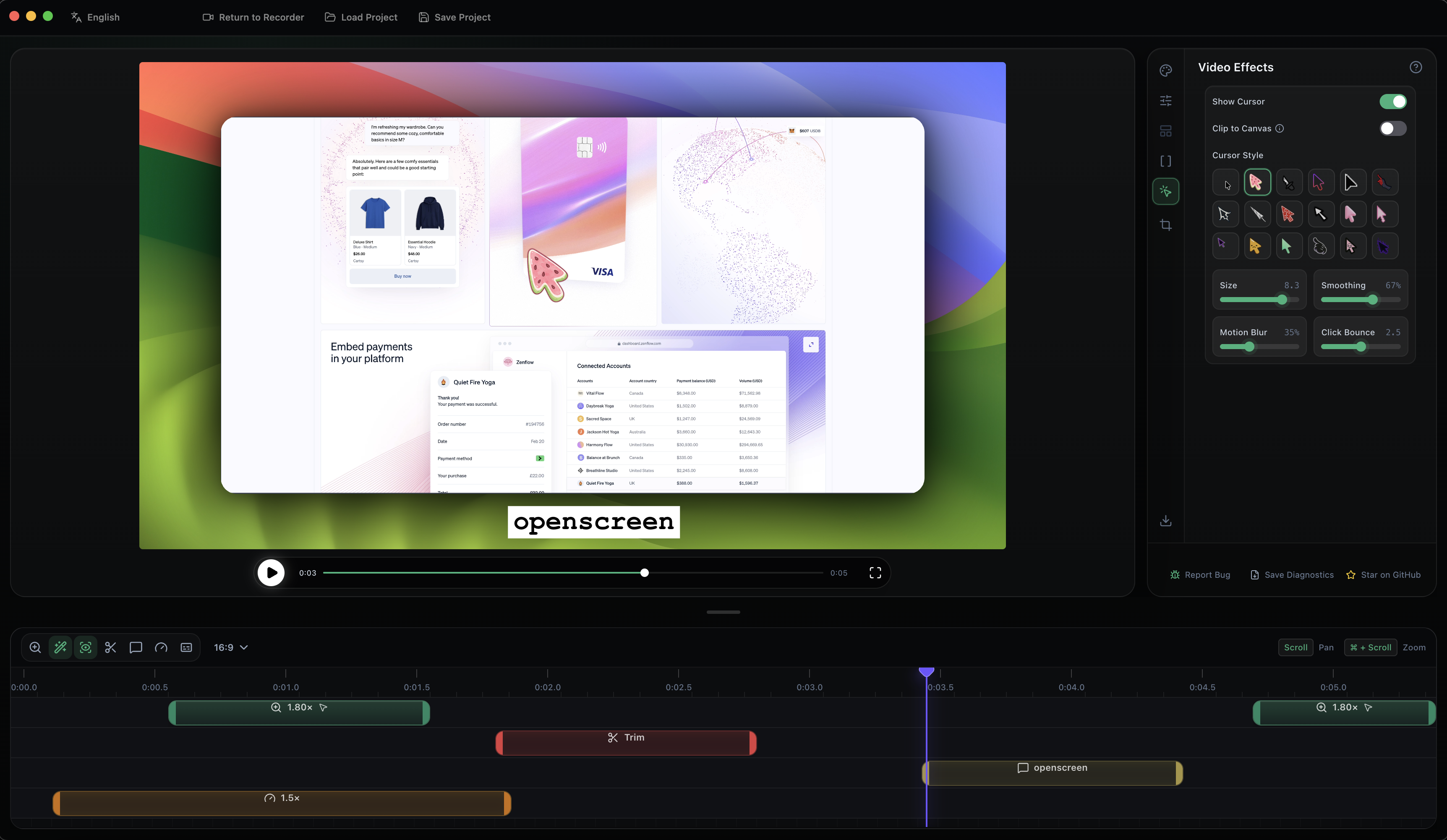
Нет, субтитры к озвучке создаются на устройстве, работают полностью офлайн и ничего не загружается в интернет.Какие функции редактирования есть, кроме записи?Есть кадрирование, обрезка и управление скоростью для каждого сегмента на таймлайне, автоматические или ручные зумы, которые следуют за курсором, размытие в движении, свои обои и фоны, картинка в картинке для веб-камеры, а также аннотации: текст, стрелки и изображения с готовыми пресетами анимации.
Есть кадрирование, обрезка и управление скоростью для каждого сегмента на таймлайне, автоматические или ручные зумы, которые следуют за курсором, размытие в движении, свои обои и фоны, картинка в картинке для веб-камеры, а также аннотации: текст, стрелки и изображения с готовыми пресетами анимации.Какие форматы экспорта и языки поддерживаются?Можно экспортировать в MP4 или GIF с разными соотношениями сторон и разрешениями, а интерфейс и субтитры поддерживают 13 языков, включая арабский, испанский, японский, корейский, а также упрощённый и традиционный китайский.
Можно экспортировать в MP4 или GIF с разными соотношениями сторон и разрешениями, а интерфейс и субтитры поддерживают 13 языков, включая арабский, испанский, японский, корейский, а также упрощённый и традиционный китайский.Что делать, если macOS блокирует запуск через Gatekeeper?Если вы установили .dmg вручную и Gatekeeper его заблокировал, выполните команду обхода в Терминале (предварительно выдав Терминалу полный доступ к диску), а затем включите разрешения «Запись экрана» и «Универсальный доступ» в Настройках системы.
Если вы установили .dmg вручную и Gatekeeper его заблокировал, выполните команду обхода в Терминале (предварительно выдав Терминалу полный доступ к диску), а затем включите разрешения «Запись экрана» и «Универсальный доступ» в Настройках системы.Зачем создали это, а не просто платили за Screen Studio?Автор хотел полностью бесплатный инструмент, который покрывает основной сценарий записи демо, нужный большинству людей, без подписки Screen Studio за $29 в месяц. При этом автор честно признаёт, что это не полный аналог Screen Studio по функциям один к одному.
Автор хотел полностью бесплатный инструмент, который покрывает основной сценарий записи демо, нужный большинству людей, без подписки Screen Studio за $29 в месяц. При этом автор честно признаёт, что это не полный аналог Screen Studio по функциям один к одному.Which topics is it in?pixijs, mp4, screen-recorder, video-production, radix-ui, winget, annotations, webcam, nix, gif, screen-capture, appimage
pixijs, mp4, screen-recorder, video-production, radix-ui, winget, annotations, webcam, nix, gif, screen-capture, appimage