
[Releases][release] | Fonts | Font Patcher | [Wiki Documentation][wiki] | [Stickers][stickers] | [VimDevIcons][vim-devicons]
[![GitHub release][img-version-badge]][repo] [![Gitter][img-gitter-badge]][gitter] [![Code of Conduct][coc-badge]][coc] [![PRs Welcome][prs-badge]][prs] 
Nerd Fonts is a project that patches developer targeted fonts with a high number of glyphs (icons). Specifically to add a high number of extra glyphs from popular 'iconic fonts' such as [Font Awesome][font-awesome], [Devicons][devicons], [Octicons][octicons], and others.
The following flow diagram shows the current glyph sets included:
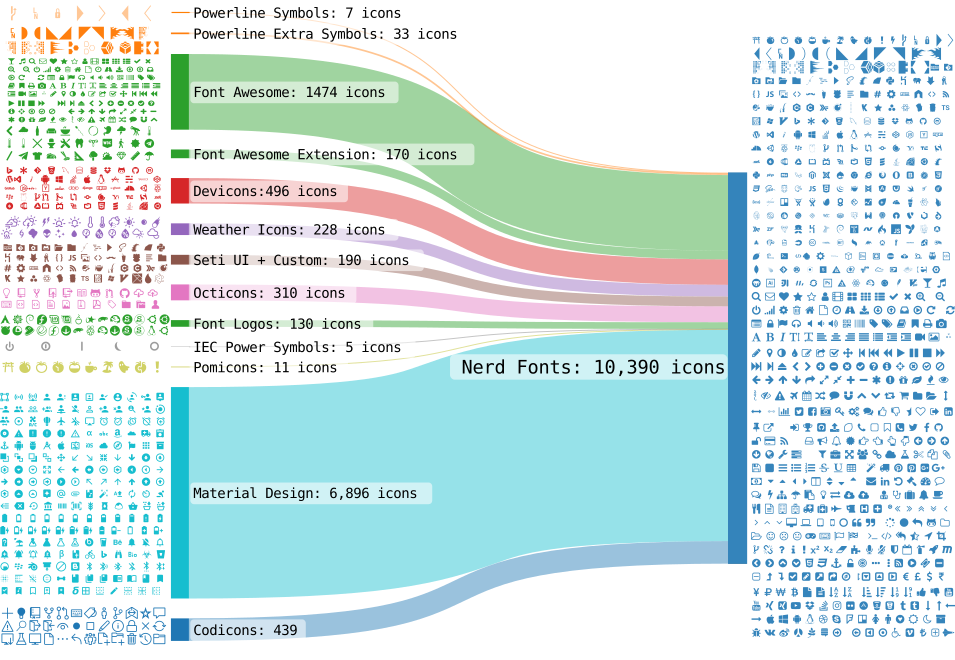
Diagram created using @SankeyMATIC
Important Notices
Table of Contents
TL;DR
Installation Options
Features
Developer / Contributor
Project Motivation
Additional Info
TL;DR
Nerd Fonts takes popular programming fonts and adds a bunch of Glyphs.
There is also a font patcher available if your desired font isn't already patched.
For more high level information see the [wiki][wiki]. If you are looking for the Vim plugin see [VimDevIcons ➶][vim-devicons].
Various Download Options for Fonts
If you...
Features
- A FontForge Python script to patch any font
- Includes an option to create Monospaced (fixed-pitch, fixed-width) or double-width (non-monospaced) glyphs
- For more details see the Font Patcher section
67 already patched font families- Over
10,000 glyphs/icons combined (more details)
- Current glyph sets include: [Powerline with Extra Symbols][ryanoasis-powerline-extra-symbols], [Font Awesome][font-awesome], [Material Design Icons][font-material-design-icons], [Weather][font-weather], [Devicons][devicons], [Octicons][octicons], [Font Logos][font-logos] (Formerly Font Linux), [Pomicons][gabrielelana-pomicons], [Codeicons][codicons]
- Monospaced (fixed-pitch, fixed-width) or double-width (non-monospaced) or proportional glyphs version of each font
- This refers to the Nerd Font glyphs themselves not necessarily the Font as a whole
- A Developer/Contributor provided bash script to re-patch all the fonts
Glyph Sets
The currently used sets are listed in src/glyphs/README.md.
:mag: :mag: You can search for glyphs easily on [NerdFonts.com][Cheat Sheet] via the [Cheat Sheet][]
See [Wiki: Glyph Sets and Codepoints for more details][wiki-glyph-sets-codepoints]
Icon names in shell
See [Wiki: Icon names in shell][wiki-icon-names-in-shell]
Patched Fonts
A preview of all fonts can be found here.
| Font Name |
Original Font Name and Repository |
ver |
*RFN |
| [0xProto Nerd Font][p-0xProto] |
[0xProto][f-0xProto] |
2.502 |
NO |
| [3270 Nerd Font][p-3270] |
[3270][f-3270] |
3.0.1 |
NO |
| [AdwaitaMono Nerd Font][p-adwaita-mono] |
[Adwaita Mono][f-adwaita-mono] |
34.1 |
NO |
| [Agave Nerd Font][p-agave] |
[Agave][f-agave] |
38 |
NO |
| [AnnotationMono Nerd Font][p-annotation] |
[Annotation Mono][f-annotation] |
0.4 |
NO |
| [AnonymicePro Nerd Font][p-anonymous-pro] |
[Anonymous Pro][f-a-pro] |
1.002 |
YES |
| [Arimo Nerd Font][p-arimo] |
[Arimo][f-arimo] |
1.33 |
NO |
| [AtkynsonMono Nerd Font][p-atkinson-mono] |
[Atkinson Hyperlegible Mono][f-atkinson] |
2.001 |
YES |
| [AurulentSansMono Nerd Font][p-aurulent] |
Aurulent Sans Mono (Stephen G. Hartke) |
|
NO |
| [BigBlueTerminal Nerd Font][p-bigblueterm] |
BigBlueTerminal (VileR) |
|
NO |
| [BitstromWera Nerd Font][p-bitstream] |
Vera Sans Mono (Bitstream Inc) |
1.1 |
YES |
| [BlexMono Nerd Font][p-blex] |
[IBM Plex Mono][f-ibm-plex] |
2.004 |
YES |
| [CaskaydiaCove Nerd Font][p-cascadia] |
[Cascadia Code][f-cascadia] |
2407.24 |
YES |
| [CaskaydiaMono Nerd Font][p-cascadia-mono] |
[Cascadia Mono][f-cascadia] |
2407.24 |
YES |
| [CodeNewRoman Nerd Font][p-code-nr] |
Code New Roman (Sam Radian) |
2.0 |
NO |
| [ComicShannsMono Nerd Font][p-comic] |
[Comic Shanns Mono][f-comic] |
1.3.2 |
NO |
| [CommitMono Nerd Font][p-commit] |
[Commit Mono][f-commit] |
1.143 |
NO |
| [Cousine Nerd Font][p-cousine] |
[Cousine][f-cousine] |
1.241 |
NO |
| [D2Koding Nerd Font][p-d2coding] |
[D2Coding][f-d2coding] |
1.3.2 |
YES |
| [DaddyTimeMono Nerd Font][p-daddytimemono] |
[DaddyTimeMono][f-daddytimemono] |
1.2.3 |
NO |
| [DepartureMono Nerd Font][p-departuremono] |
[Departure Mono][f-departuremono] |
1.500 |
NO |
| [DejaVuSansMono Nerd Font][p-dejavu] |
[DejaVu][f-dejavu] |
2.37 |
NO |
| [DroidSansMono Nerd Font][p-droid] |
Droid Sans Mono (Ascender Corp) |
1.00-113 |
NO |
| [EnvyCodeR Nerd Font][p-envy] |
[Envy Code R][f-envy] |
0.79 |
YES |
| [FantasqueSansMono Nerd Font][p-fantasque] |
[Fantasque Sans Mono][f-fant] |
1.8.0 |
NO |
| [FiraCode Nerd Font][p-fira-code] |
[Fira Code][f-fira-code] |
6.2 |
NO |
| [FiraMono Nerd Font][p-fira-mono] |
[Fira Mono][f-fira-mono] |
3.206 |
NO |
| [GeistMono Nerd Font][p-geist-mono] |
[Geist Mono][f-geist-mono] |
1.702 |
NO |
| [GoMono Nerd Font][p-go-mono] |
[Go-Mono][f-go-mono] |
2.010 |
NO |
| [Gohu Nerd Font][p-gohu] |
[Gohu TTF][f-gohu2], [Gohu][f-gohu] |
2.0 |
NO |
| [GoogleSansCode Nerd Font][p-googlesc] |
[Google Sans Code][f-googlesc] |
7.001 |
NO |
| [Hack Nerd Font][p-hack] |
[Hack][f-hack] |
3.003 |
NO |
| [Hasklug Nerd Font][p-hasklig] |
[Hasklig][f-hasklig] |
1.2 |
YES |
| [HeavyDataMono Nerd Font][p-heavy-data] |
HeavyData (Vic Fieger) |
1 |
NO |
| [Hurmit Nerd Font][p-hermit] |
[Hermit][f-hermit] |
2.0 |
YES |
| [iM-Writing Nerd Font][p-im-writing] |
[iA-Writer][f-ia-writer] |
Dec 2018 |
YES |
| [Inconsolata Nerd Font][p-inconsolata] |
[Inconsolata][f-inconsolata] |
3.000 |
NO |
| [InconsolataGo Nerd Font][p-inconsolata-go] |
[InconsolataGo][f-inconsolatago] |
1.013 |
NO |
| [Inconsolata LGC Nerd Font][p-inconsolata-lgc] |
[Inconsolata LGC][f-inconsolatalgc] |
3.201 |
NO |
| [IntoneMono Nerd Font][p-intel-one-mono] |
[Intel One Mono][f-intel-one-mono] |
1.4.0 |
YES |
| [Iosevka Nerd Font][p-iosevka] |
[Iosevka][f-iosevka] |
34.8.0 |
NO |
| [IosevkaTerm Nerd Font][p-iosevka-term] |
[Iosevka Term][f-iosevka] |
34.8.0 |
NO |
| [IosevkaTermSlab Nerd Font][p-iosevka-term-slab] |
[Iosevka Term Slab][f-iosevka] |
34.8.0 |
NO |
| [JetBrainsMono Nerd Font][p-jetbrains-mono] |
[JetBrains Mono][f-jetbrains-mono] |
2.304 |
NO |
| [Lekton Nerd Font][p-lekton] |
[Lekton][f-lekton] |
34 |
NO |
| [Literation Nerd Font][p-liberation] |
[Liberation][f-liberation] |
2.1.5 |
YES |
| [Lilex Nerd Font][p-lilex] |
[Lilex][f-lilex] |
2.700 |
NO |
| [MartianMono Nerd Font][p-martian] |
[MartianMono][f-martian] |
1.1.0 |
NO |
| [Meslo Nerd Font][p-meslo] |
[Meslo][f-meslo] |
1.21 |
NO |
| [Monaspice Nerd Font][p-monaspace] |
[Monaspace][f-monaspace] |
1.400 |
YES |
| [Monofur Nerd Font][p-monofur] |
Monofur (Tobias B Koehler) |
1.0 |
NO |
| [Monoid Nerd Font][p-monoid] |
[Monoid][f-monoid] |
0.61 |
NO |
| [Mononoki Nerd Font][p-mononoki] |
[Mononoki][f-mononoki] |
1.6 |
YES |
| [M+ Nerd Font][p-mplus] |
[MPlus Fonts][f-mplus] |
1.100 |
NO |
| [Noto Nerd Font][p-noto] |
[Noto][f-noto] |
div |
NO |
| [OpenDyslexic Nerd Font][p-opendyslexic] |
[OpenDyslexic][f-opendyslexic] |
2.001 |
NO |
| [Overpass Nerd Font][p-overpass] |
[Overpass][f-overpass] |
3.0.5 |
NO |
| [ProFont Nerd Font][p-profont] |
[ProFont][f-profont] |
2.3, 2.2 |
NO |
| [ProggyClean Nerd Font][p-proggy-clean] |
ProggyClean (Tristan Grimmer) |
2004/04/15 |
NO |
| [RecMono Nerd Font][p-recursive] |
[Recursive Mono][f-recursive] |
1.085 |
NO |
| [RobotoMono Nerd Font][p-roboto] |
[Roboto Mono][f-roboto] |
3.0 |
NO |
| [SauceCodePro Nerd Font][p-source-code-pro] |
[Source Code Pro][f-source] |
2.042 |
YES |
| [ShureTechMono Nerd Font][p-share-tech-mono] |
[Share Tech Mono][f-share] |
1.003 |
YES |
| [SpaceMono Nerd Font][p-space-mono] |
[Space Mono][f-space] |
1.003 |
NO |
| [Terminess Nerd Font][p-terminus] |
[Terminus TTF][f-terminus] |
4.49.3 |
YES |
| [Tinos Nerd Font][p-tinos] |
[Tinos][f-tinos] |
1.23 |
NO |
| [Ubuntu Nerd Font][p-ubuntu] |
[Ubuntu Font][f-ubuntu] |
0.83 |
NO |
| [UbuntuMono Nerd Font][p-ubuntu-mono] |
[Ubuntu Font][f-ubuntu] |
0.80 |
NO |
| [UbuntuSans Nerd Font][p-ubuntu-sans] |
[Ubuntu Sans][f-ubuntu-sans] |
1.006 |
NO |
| [UbuntuSansM Nerd Font][p-ubuntu-sans] |
[Ubuntu Sans Mono][f-ubuntu-sans-m] |
1.100 |
NO |
| [VictorMono Nerd Font][p-victor] |
[Victor Mono][f-victor] |
1.5.6 |
NO |
| [ZedMono Nerd Font][p-zed-mono] |
[Zed Mono][f-zed-mono] |
1.2.0 |
NO |
*RFN = Reserved Font Name
Variations
- no flags given (defaults to only Seti-UI + Custom and [Devicons][devicons])
- double (variable/proportional) or single (fixed/monospaced) or proportional width icon-glyphs
- [Font Awesome][font-awesome]
- [Font Awesome Extension][font-awesome-extension]
- [Material Design Icons][font-material-design-icons]
- [Weather][font-weather]
- [GitHub Octicons][octicons]
- [Font Logos][font-logos] (Formerly Font Linux)
- [Powerline Extra Symbols][ryanoasis-powerline-extra-symbols]
- [IEC Power Symbols][website-iecpower]
- [Pomicons][gabrielelana-pomicons]
- [Codicons][codicons]
Font Installation
Some of the options below just help you to download the font file(s) (i.e. .ttf or .otf) or archives of font files.
These must be installed on your system, depending on your OS. Usually (double) clicking the font files individually does the trick.
Ask your OS' community if installing a font file is a problem.
Option 1: Release Archive Download
Best option if you want an archive or complete font family of variations (Bold, Italic, etc.).
Fonts are available for download as packages in the latest release
A nice overview is on the Nerd Font site (but misses the more compact xv archives).
If you want download the latest release of a given font inside a script you can use (replace "JetBrainsMono" with your font):
curl -OL https://github.com/ryanoasis/nerd-fonts/releases/latest/download/JetBrainsMono.tar.xz
Option 2: Homebrew Fonts
Best option if you want to use Homebrew.
All fonts are available via Homebrew Cask on macOS or Linux
brew install font-hack-nerd-font
On Linux you have to add --cask after install.
Option 3: Install Script
To install fonts from (latest) release
use this script.
Best option if you want to automate installing or for use in scripts.
Only available for Linux / MacOS. It downloads the release artifacts of the latest or any
other release and installs the files.
If you install all patched Fonts: Warning: This is a lot of Fonts adding up to a large size
The script is a standalone tool that you can download individually, use like the following.
No need to clone the complete repository (which does not contain all patched fonts anyhow).
curl -s https://raw.githubusercontent.com/ryanoasis/nerd-fonts/master/install.sh -o install.sh
chmod u+x install.sh
./install.sh --help
Examples:
./install.sh list
./install.sh install <FontName>
./install.sh install Hack
./install.sh install HeavyData
./install.sh install all
./install.sh install # interactive mode
VERBOSE=3 ./install.sh install DaddyTimeMono
GH_RELEASE_TAG=v3.2.1 ./install.sh list
Option 4: Unofficial Chocolatey or Scoop Repositories
Option for Windows and wanting to use Chocolatey or Scoop.
Chocolatey users can download fonts published to the Chocolatey Community Repository (CCR):
choco install nerd-fonts-hack
Scoop users can download fonts using the Scoop bucket for Nerd Fonts:
scoop bucket add nerd-fonts
scoop install Hack-NF
Option for Arch Linux and wanting to use Extra packages.
Most fonts are available via Arch Extra packages.
Some special packages are in AUR.
Option 6: PowerShell Installer
Best option for interactive setup guidance or automating installations through PowerShell scripts.
PSModule NerdFonts
This is a 3rd-party community tool. More information can be found on its GitHub repository here.
To install the module:
Install-PSResource -Name NerdFonts
Import-Module -Name NerdFonts
To install one font:
Install-NerdFont -Name 'FiraCode' # Tab completion works on name
Powershell Web Installer
This is a 3rd-party community tool. More information can be found on its GitHub repository here.
- Requires PowerShell 7+ to be installed on Windows, macOS, or Linux.
- Windows PowerShell 5.1 is also supported.
To run the interactive installer, use the following command:
& ([scriptblock]::Create((iwr 'https://to.loredo.me/Install-NerdFont.ps1')))
To install specific fonts directly, use the following command:
& ([scriptblock]::Create((iwr 'https://to.loredo.me/Install-NerdFont.ps1'))) -Name hack, heavy-data
Option 7: Font Fallback
Most systems have a mechanism to search for an alternative font when the current font does not
have a glyph tha

 Nerd Fonts дорабатывает популярные шрифты для разработчиков (Hack, JetBrains Mono, Fira Code, Source Code Pro и многие другие), добавляя в них тысячи дополнительных значков из наборов Font Awesome, Octicons, Devicons, Material Design Icons и других. Благодаря этому терминалы, редакторы и строки состояния могут показывать иконки.