Powerlevel10k

- THE PROJECT HAS VERY LIMITED SUPPORT
- NO NEW FEATURES ARE IN THE WORKS
- MOST BUGS WILL GO UNFIXED
- HELP REQUESTS WILL BE IGNORED
Powerlevel10k is a theme for Zsh. It emphasizes speed,
flexibility and out-of-the-box experience.
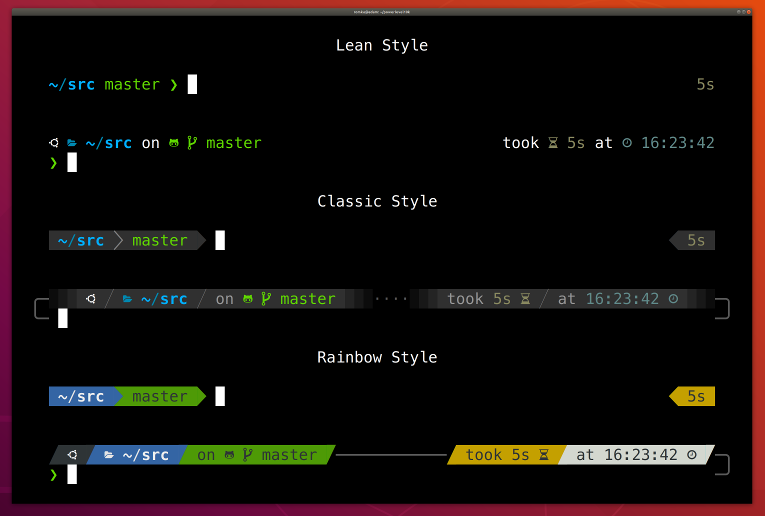
Getting started
- Install the recommended font. Optional but highly
recommended.
- Install Powerlevel10k itself.
- Restart Zsh with
exec zsh.
- Type
p10k configure if the configuration wizard doesn't start automatically.
Features
Configuration wizard
Type p10k configure to access the builtin configuration wizard right from your terminal.
Screen recording
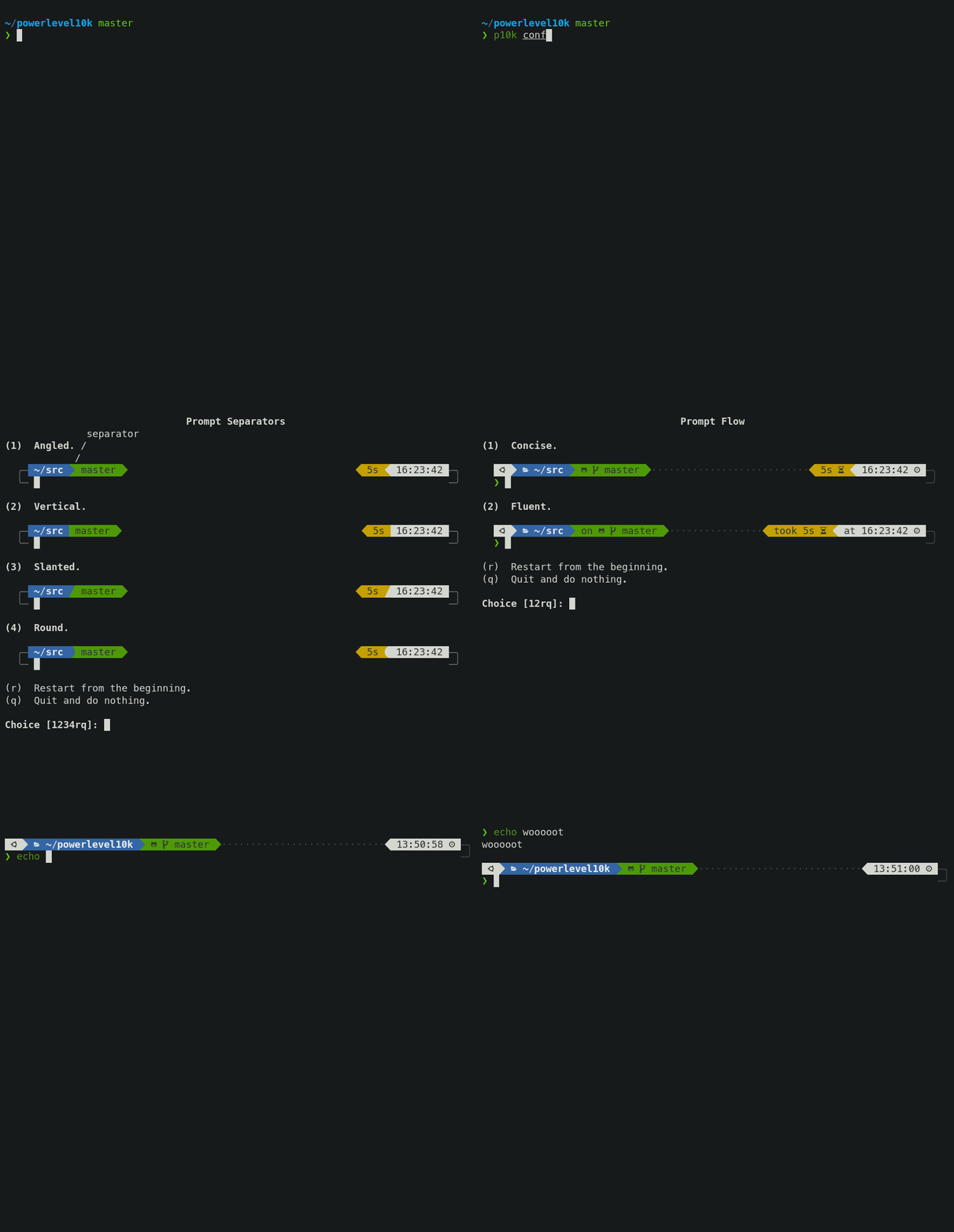
All styles except Pure are functionally equivalent. They display the same
information and differ only in presentation.
Configuration wizard creates ~/.p10k.zsh based on your preferences. Additional prompt
customization can be done by editing this file. It has plenty of comments to help you navigate
through configuration options.
Tip: Install the recommended font before
running p10k configure to unlock all prompt styles.
FAQ:
Troubleshooting:
When you hit ENTER, the next prompt appears instantly. With Powerlevel10k there is no prompt lag.
If you install Cygwin on Raspberry Pi, cd into a Linux Git repository and activate enough prompt
segments to fill four prompt lines on both sides of the screen... wait, that's just crazy and no
one ever does that. Probably impossible, too. The point is, Powerlevel10k prompt is always fast, no
matter what you do!
Screen recording
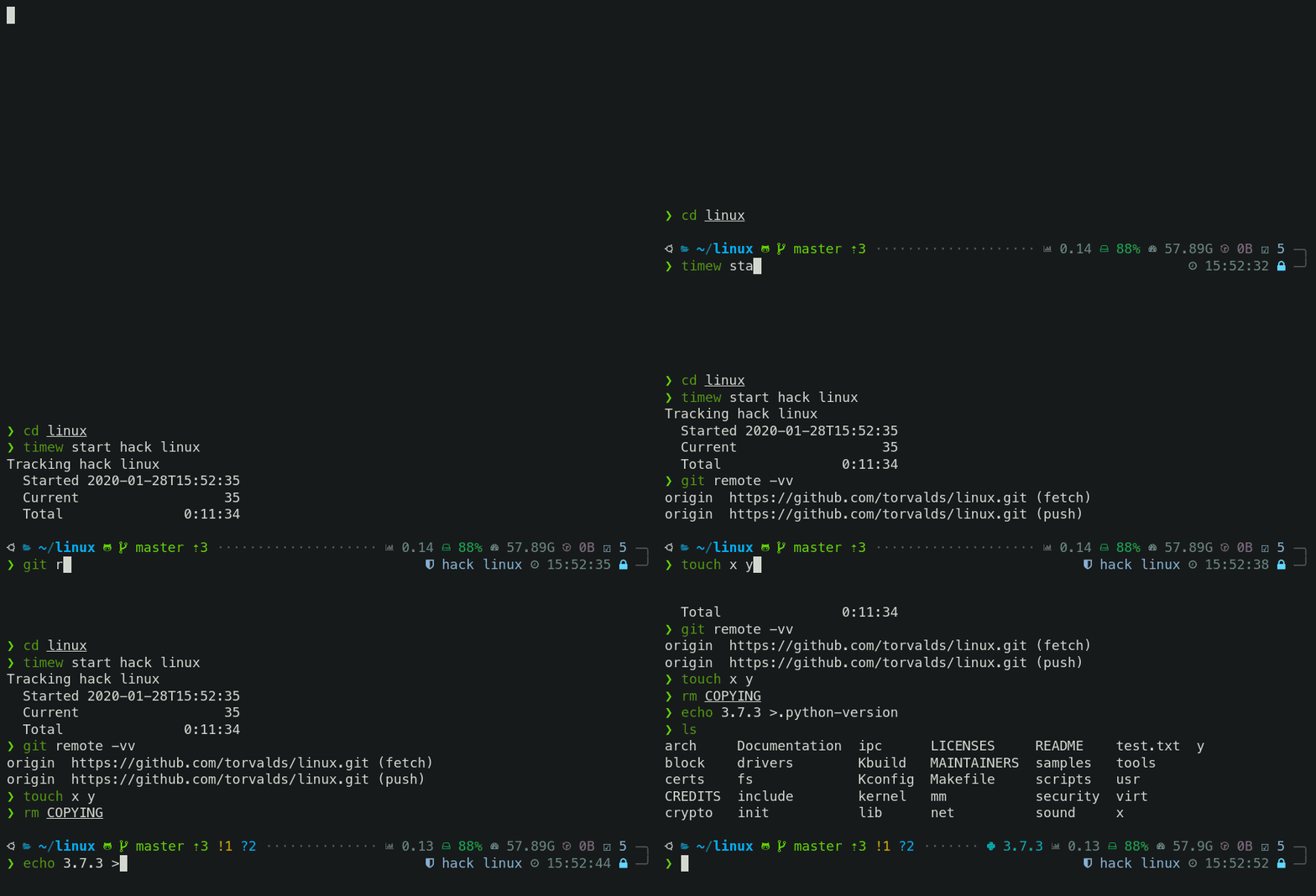
Note how the effect of every command is instantly reflected by the very next prompt.
| Command |
Prompt Indicator |
Meaning |
timew start hack linux |
⌚ hack linux |
time tracking enabled in timewarrior |
touch x y |
?2 |
2 untracked files in the Git repo |
rm COPYING |
!1 |
1 unstaged change in the Git repo |
echo 3.7.3 >.python-version |
🐍 3.7.3 |
the current python version in pyenv |
Other Zsh themes capable of displaying the same information either produce prompt lag or print
prompt that doesn't reflect the current state of the system and then refresh it later. With
Powerlevel10k you get fast prompt and up-to-date information.
FAQ: Is it really fast?
Powerlevel9k compatibility
Powerlevel10k understands all Powerlevel9k
configuration parameters.
Screen recording

Migration from Powerlevel9k to Powerlevel10k is a straightforward process. All
your POWERLEVEL9K configuration parameters will still work. Prompt will look the same as before
(almostig))
but it will be much faster (certainly).
FAQ:
Pure compatibility
Powerlevel10k can produce the same prompt as Pure. Type
p10k configure and select Pure style.
Screen recording
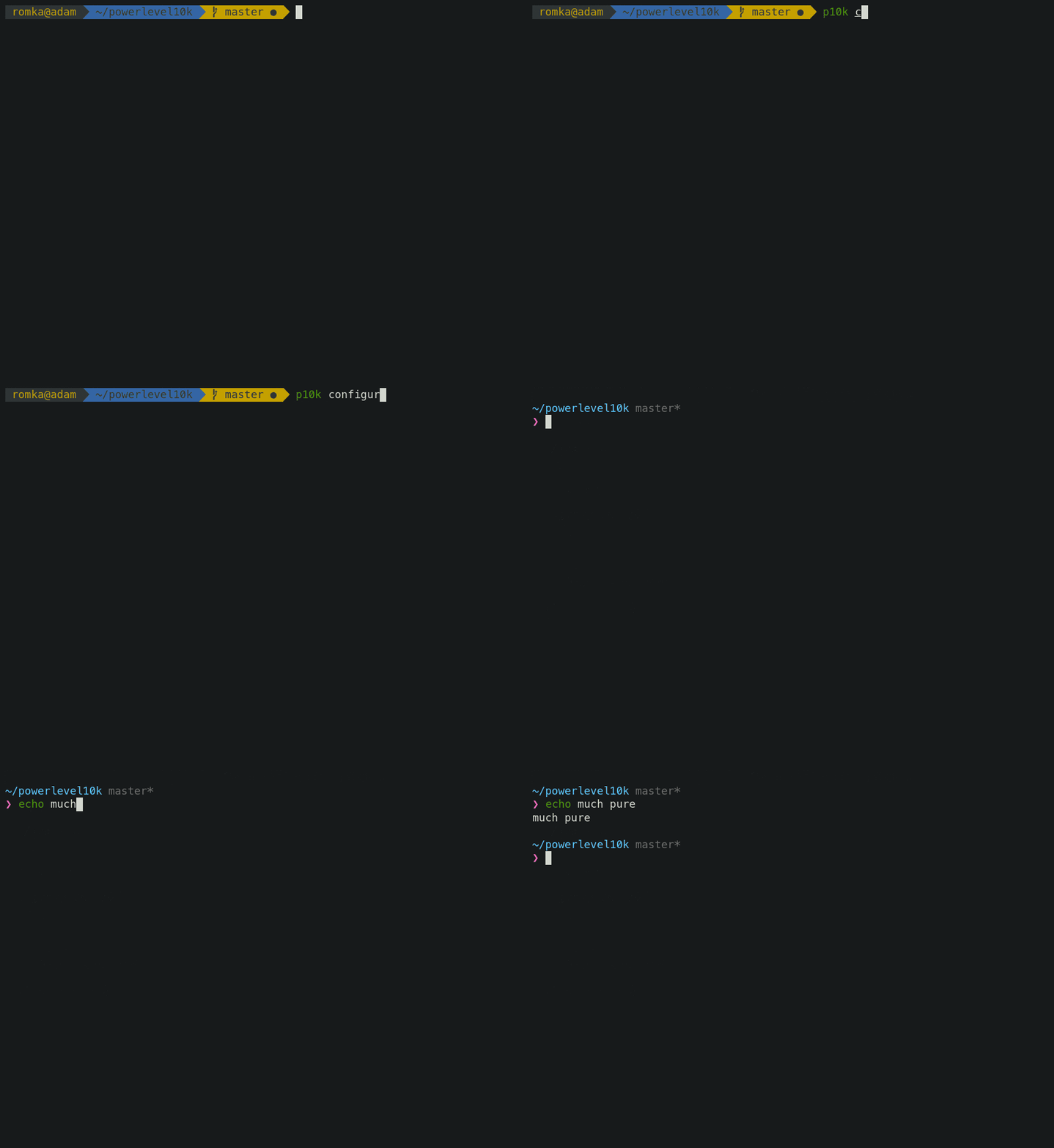
You can still use Powerlevel10k features such as transient prompt or
instant prompt when sporting Pure style.
To customize prompt, edit ~/.p10k.zsh. Powerlevel10k doesn't recognize Pure configuration
parameters, so you'll need to use POWERLEVEL9K_COMMAND_EXECUTION_TIME_THRESHOLD=3 instead of
PURE_CMD_MAX_EXEC_TIME=3, etc. All relevant parameters are in ~/.p10k.zsh. This file has
plenty of comments to help you navigate through it.
FAQ: What is the best prompt style in the configuration wizard?
Instant prompt
If your ~/.zshrc loads many plugins, or perhaps just a few slow ones
(for example, pyenv or nvm), you
may have noticed that it takes some time for Zsh to start.
Screen recording

Powerlevel10k can remove Zsh startup lag even if it's not caused by a theme.
Screen recording
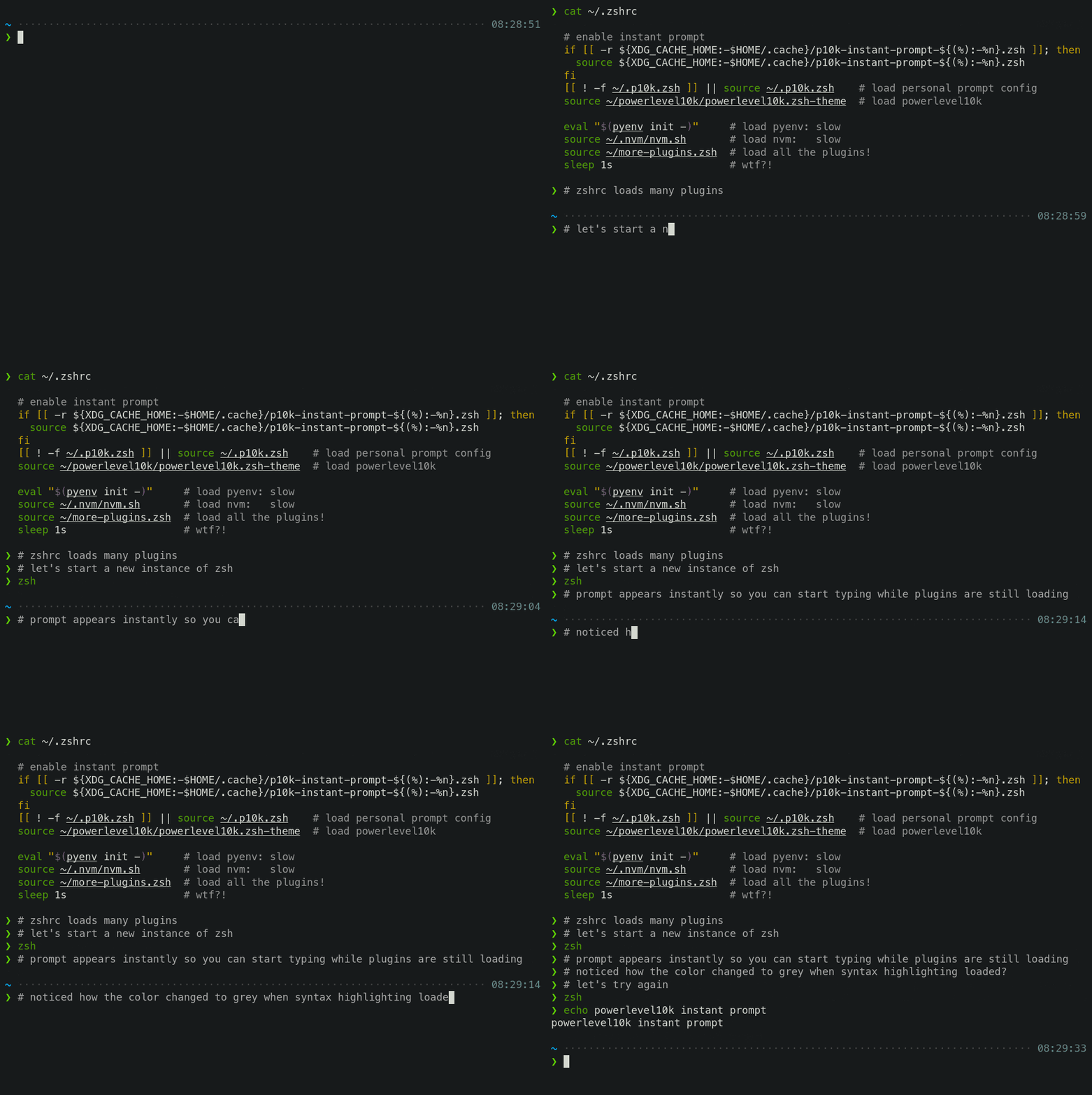
This feature is called Instant Prompt. You need to explicitly enable it through p10k configure
or manually. It does what it says on the tin -- prints prompt
instantly upon Zsh startup allowing you to start typing while plugins are still loading.
Other themes increase Zsh startup lag -- some by a lot, others by a just a little. Powerlevel10k
removes it outright.
If you are curious about how Instant Prompt works, see
this section in zsh-bench.
FAQ: How do I configure instant prompt?
Show on command
The behavior of some commands depends on global environment. For example, kubectl run ... runs an
image on the cluster defined by the current kubernetes context. If you frequently change context
between "prod" and "testing", you might want to display the current context in Zsh prompt. If you do
likewise for AWS, Azure and Google Cloud credentials, prompt will get pretty crowded.
Enter Show On Command. This feature makes prompt segments appear only when they are relevant to
the command you are currently typing.
Screen recording

Configs created by p10k configure enable show on command for several prompt segments by default.
Here's the relevant parameter for kubernetes context:
# Show prompt segment "kubecontext" only when the command you are typing invokes one of these tools.
typeset -g POWERLEVEL9K_KUBECONTEXT_SHOW_ON_COMMAND='kubectl|helm|kubens'
To customize when different prompt segments are shown, open ~/.p10k.zsh, search for
SHOW_ON_COMMAND and either remove these parameters to display affected segments unconditionally,
or change their values.
Transient prompt
When Transient Prompt is enabled through p10k configure, Powerlevel10k will trim down every
prompt when accepting a command line.
Screen recording
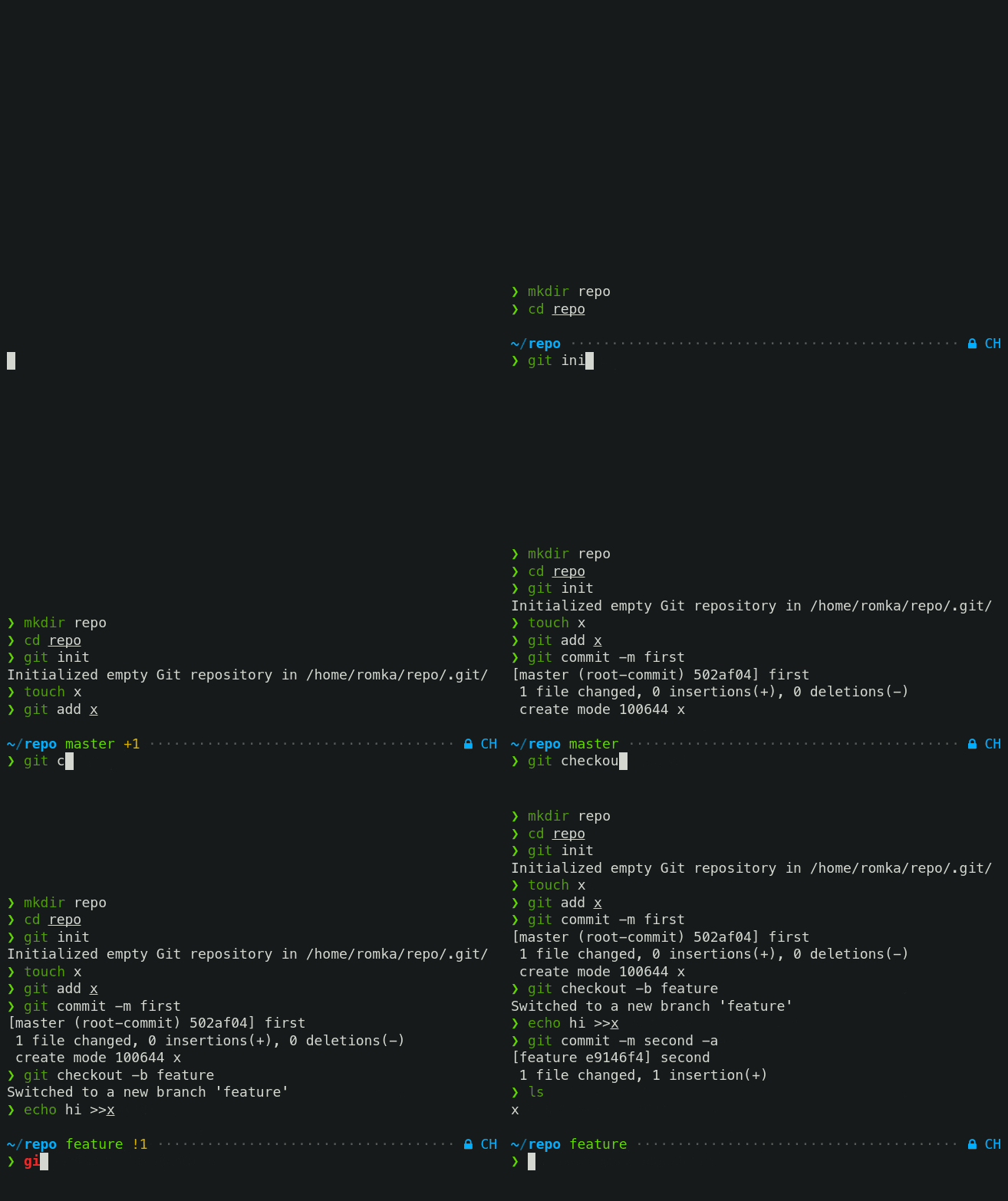
Transient prompt makes it much easier to copy-paste series of commands from the terminal scrollback.
Tip: If you enable transient prompt, take advantage of two-line prompt. You'll get the benefit of
extra space for typing commands without the usual drawback of reduced scrollback density. Sparse
prompt (with an empty line before prompt) also works great in combination with transient prompt.
Current directory that just works
The current working directory is perhaps the most important prompt segment. Powerlevel10k goes to
great length to highlight its important parts and to truncate it with the least loss of information
when horizontal space gets scarce.
Screen recording
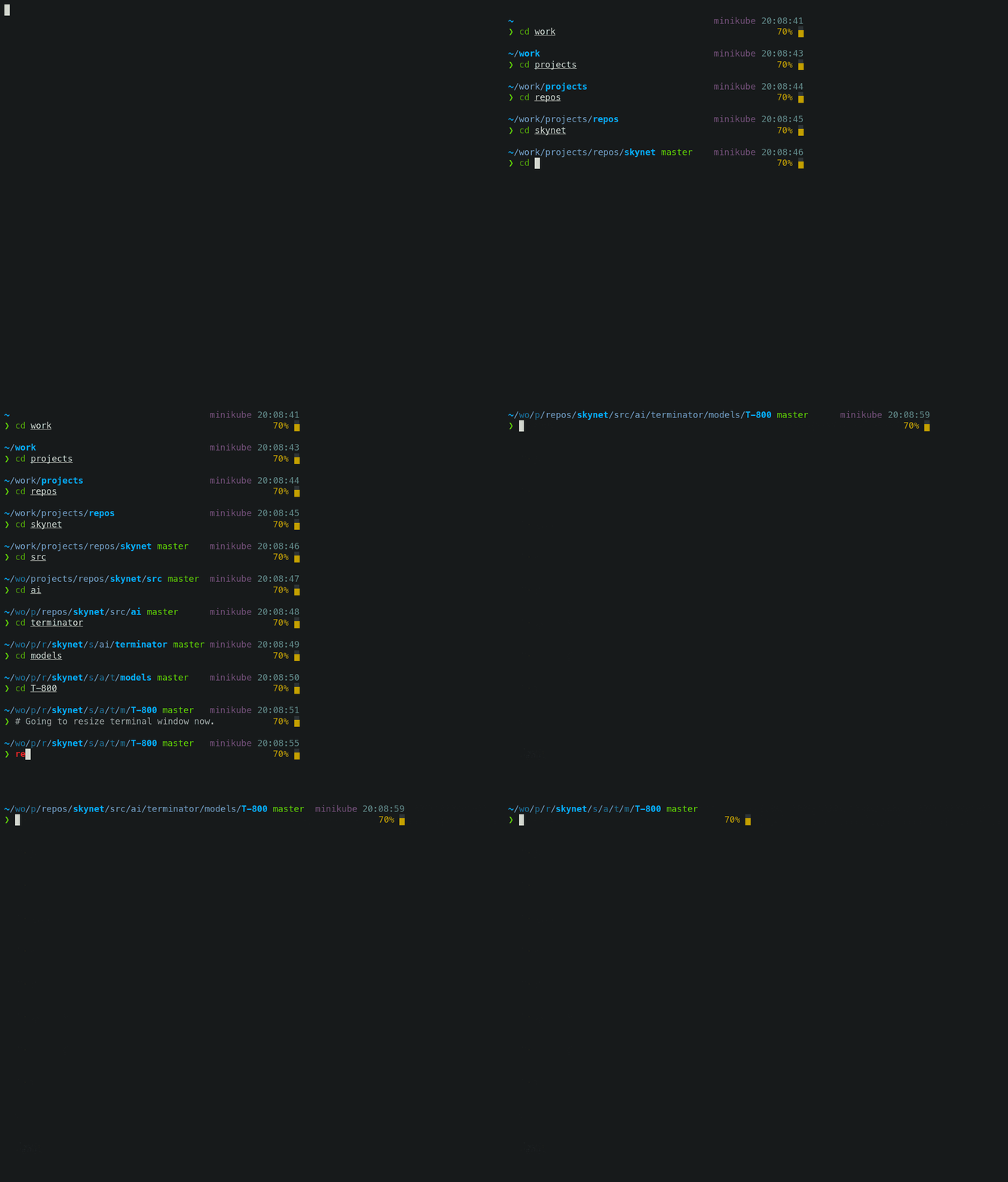
When the full directory doesn't fit, the leftmost segment gets truncated to its shortest unique
prefix. In the screencast, ~/work becomes ~/wo. It couldn't be truncated to ~/w because it
would be ambiguous (there was ~/wireguard when the session was recorded). The next segment --
projects -- turns into p as there was nothing else that started with p in ~/work/.
Directory segments are shown in one of three colors:
- Truncated segments are bleak.
- Important segments are bright and never truncated. These include the first and the last segment,
roots of Git repositories, etc.
- Regular segments (not truncated but can be) use in-between color.
Tip: If you copy-paste a truncated directory and hit TAB, it'll complete to the original.
Troubleshooting: Directory is difficult to see in prompt when using Rainbow style.
Extremely customizable
Powerlevel10k can be configured to look like any other Zsh theme out there.
Screen recording
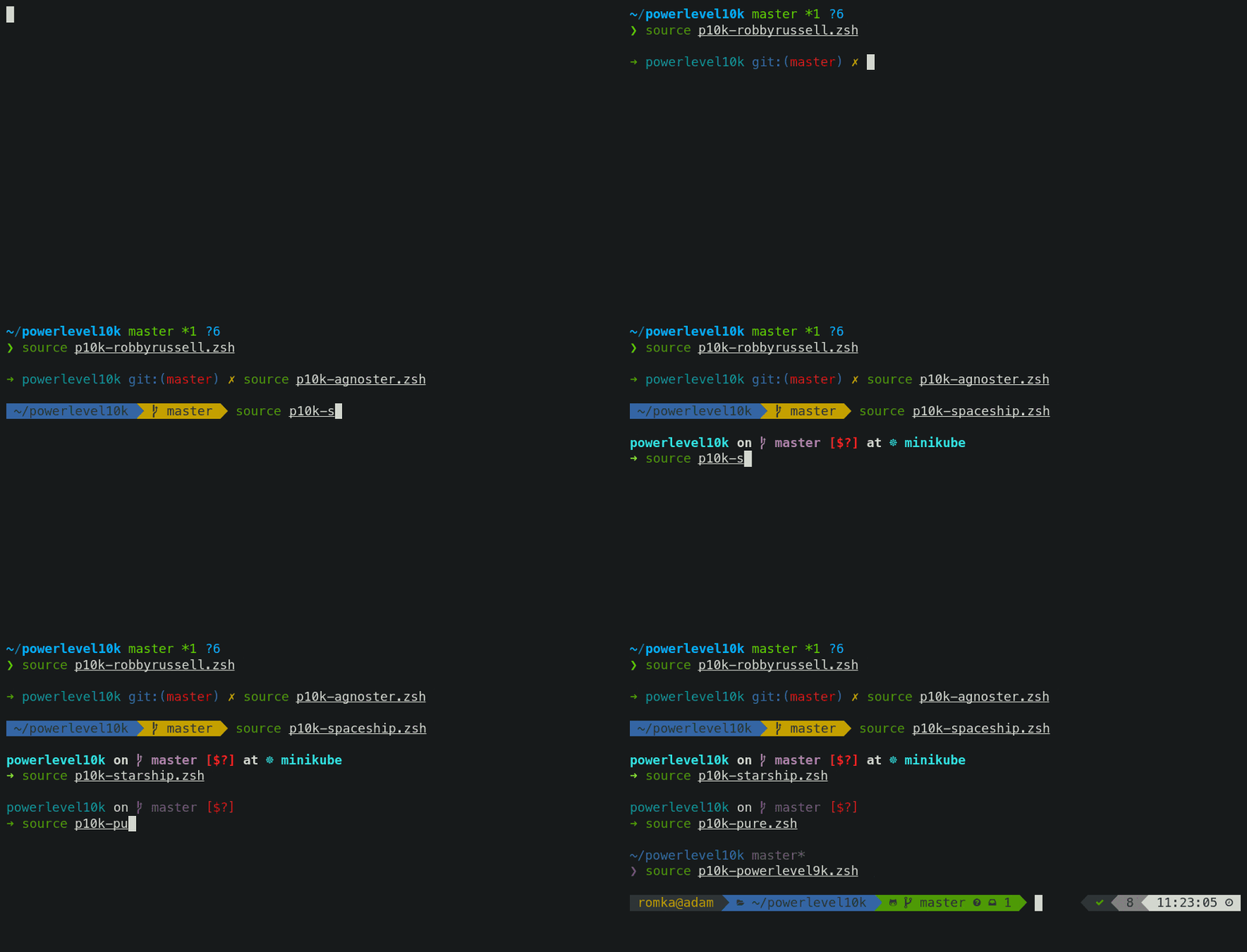
Pure, Powerlevel9k and robbyrussell emulations are built-in.
To emulate the appearance of other themes, you'll need to write a suitable configuration file. The
best way to go about it is to run p10k configure, select the style that is the closest to your
goal and then edit ~/.p10k.zsh.
The full range of Powerlevel10k appearance spans from spartan:

To ridiculous extravagant:

Batteries included
Powerlevel10k comes with dozens of built-in high quality prompt segments that can display
information from a variety of sources. When you run p10k configure and choose any style
except Pure, many of these segments get enabled by
default while others can be manually enabled by opening ~/.p10k.zsh and uncommenting them.
You can enable as many segments as you like. It won't slow down your prompt or Zsh startup.
| Segment |
Meaning |
anaconda |
virtual environment from conda |
asdf |
tool versions from asdf |
aws |
aws profile |
aws_eb_env |
aws elastic beanstalk environment |
azure |
azure account name |
background_jobs |
presence of background jobs |
battery |
internal battery state and charge level (yep, batteries literally included) |
command_execution_time |
duration (wall time) of the last command |
context |
user@hostname |
cpu_arch |
CPU architecture |
dir |
current working directory |
direnv |
direnv status |
disk_usage |
disk usage |
dotnet_version |
dotnet version |
fvm |
flutter environment from fvm |
gcloud |
google cloud cli account and project |
goenv |
go environment from goenv |
google_app_cred |
google application credentials |
go_version |
go version |
haskell_stack |
haskell version from stack |
ip |
IP address and bandwidth usage for a specified network interface |
java_version |
java version |
jenv |
java environment from jenv |
kubecontext |
current kubernetes context |
laravel_version |
laravel php framework version |
load |
CPU load |
luaenv |
lua environment from luaenv |
midnight_commander |
midnight commander shell |
nix_shell |
nix shell indicator |
nnn |
nnn shell |
lf |
lf shell |
chezmoi_shell |
chezmoi shell |
nodeenv |
node.js environment from nodeenv |
nodenv |
node.js environment from nodenv |
node_version |
node.js version |
nordvpn |
nordvpn connection status |
nvm |
node.js environment from nvm |
os_icon |
your OS logo (apple for macOS, swirl for debian, etc.) |
package |
name@version from package.json |
per_directory_history |
Oh My Zsh per-directory-history local/global indicator |
perlbrew |
perl version from perlbrew |
phpenv |
php environment from phpenv |
php_version |
php version |
plenv |
perl environment from plenv |
prompt_char |
multi-functional prompt symbol; changes depending on vi mode: ❯, ❮, V, ▶ for insert, command, visual and replace mode respectively; turns red on error |
proxy |
system-wide http/https/ftp proxy |
public_ip |
public IP address |
pyenv |
python environment from pyenv |
ram |
free RAM |
ranger |
ranger shell |
yazi |
yazi shell |
rbenv |
ruby environment from rbenv |
rust_version |
rustc version |
rvm |
ruby environment from rvm |
scalaenv |
scala version from scalaenv |
status |
exit code of the last command |
swap |
used swap |
taskwarrior |
taskwarrior task count |
terraform |
terraform workspace |
terraform_version |
terraform version |
time |
current time |
timewarrior |
timewarrior tracking status |
todo |
todo items |
toolbox |
toolbox name |
vcs |
Git repository status |
vim_shell |
vim shell (:sh) |
virtualenv |
python environment from venv |
vi_mode |
vi mode (you don't need this if you've enabled prompt_char) |
vpn_ip |
virtual private network indicator |
wifi |
WiFi speed |
xplr |
xplr shell |
Extensible
If there is no prompt segment that does what you need, implement your own. Powerlevel10k provides
public API for defining segments that are as fast and as flexible as built-in ones.
Screen recording
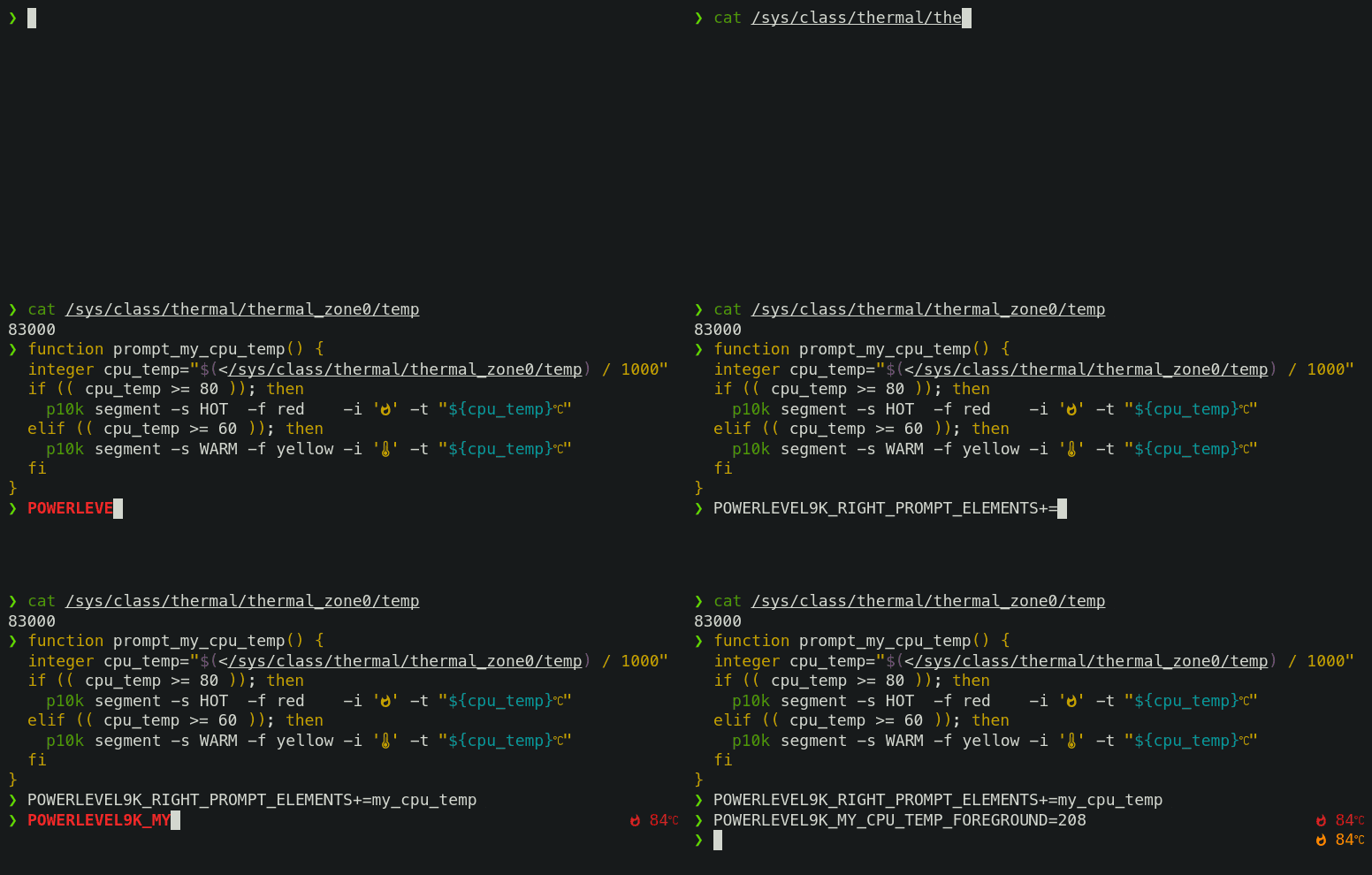
On Linux you can fetch current CPU temperature by reading /sys/class/thermal/thermal_zone0/temp.
The screencast shows how to define a prompt segment to display this value. Once the segment is
defined, you can use it like any other segment. All standard customization parameters will work for
it out of the box.
Type p10k help segment for reference.
Note: If you modify POWERLEVEL9K_* parameters in an already initialized interactive shell (as
opposed to editing ~/.p10k.zsh), the changes might not be immediately effective. To apply the
modifications, invoke p10k reload. Setting POWERLEVEL9K_DISABLE_HOT_RELOAD=false eliminates the
necessity for p10k reload but results in a marginally slower prompt.
Tip: Prefix names of your own segments with my_ to avoid clashes with future versions of
Powerlevel10k.
Installation

 Powerlevel10k is a theme for Zsh: it restyles your shell prompt with an emphasis on speed, flexibility and out-of-the-box experience.