DevBox runs on your infrastructure, with your model keys. It is built for a whole engineering org: one shared harness that picks up Linear, Jira and ClickUp tickets, answers on GitHub pull requests, works across your repos, and remembers what it learned in them. Join the community on rudderstack.com/devbox.
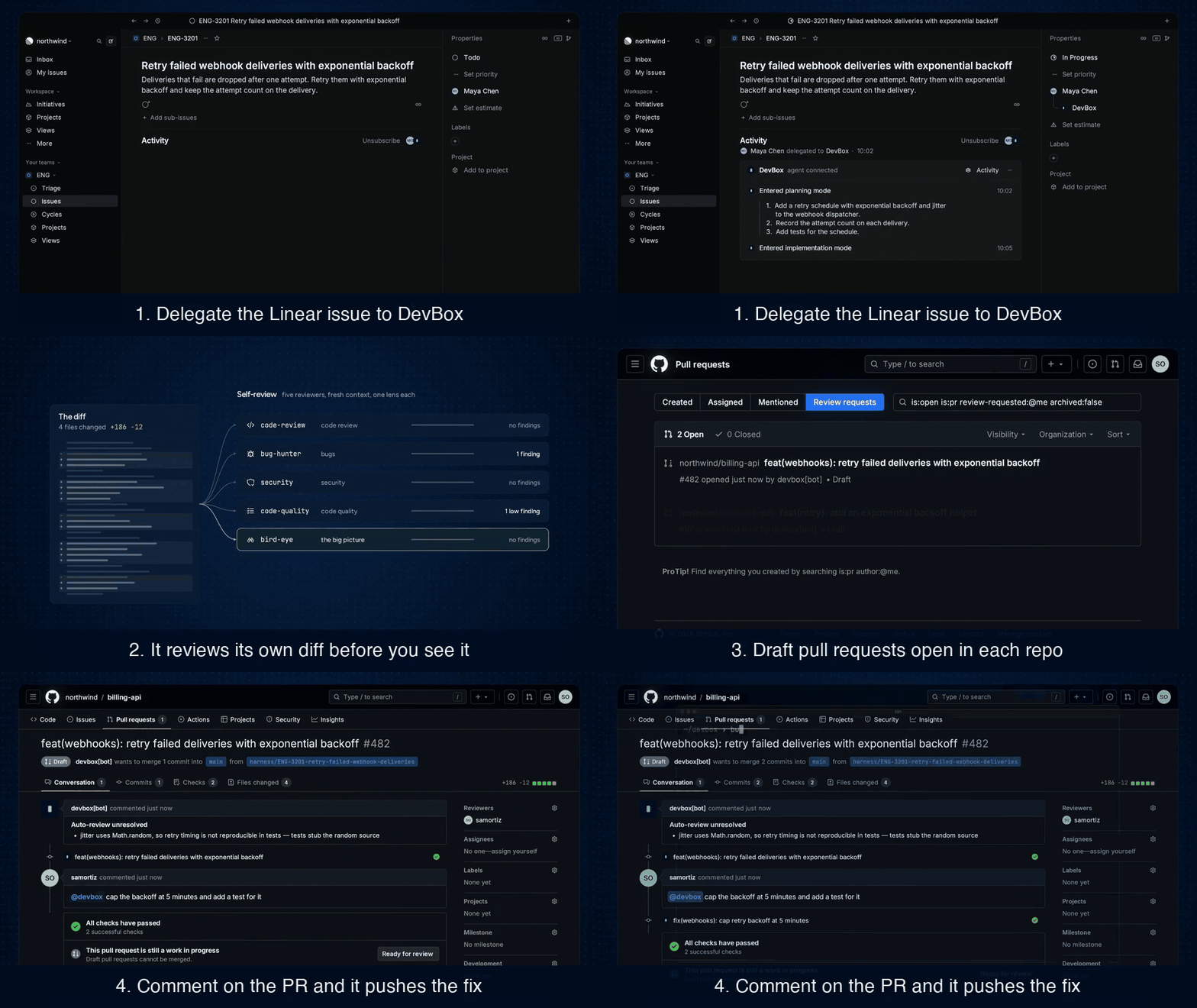
Hand DevBox a ticket. It plans the change, writes the code, runs the tests,
reviews its own work and opens a draft pull request. You review and merge.
Comment on the pull request, and it pushes the fix to the same branch.
We are RudderStack, a customer data infrastructure company. Since April our
engineers have handed tickets to DevBox. Today it merges about 35% of our
internal pull requests, with about an 80% merge rate.
Read the story behind it.
Coding tools like Claude Code and Codex make one developer faster. We wanted the
other half: a shared teammate the whole org can delegate to, that runs where our
code and secrets already live, and that gets better at our repos over time.
DevBox works alongside those tools.
Features
Staged pipeline. Orientation, planning, plan review, implementation, self-review. A reviewer checks the plan. If it finds issues, the planners of the affected repos revise once, and the revision is not reviewed again, before any code is written.
Closed feedback loop. Review comments, @mentions and failed CI runs route back to the running task (with the GitHub App).
Versioned memory. Learnings are distilled into your repo and land as a commit on the pull request, reviewed like code.
Credential isolation. Sandboxes hold placeholder tokens. An egress proxy injects the real ones and scopes writes to your repos.
Per-stage model routing. OpenAI or Anthropic, with model and reasoning effort set per stage.
Self-hosted. Docker Compose or Kubernetes, one isolated sandbox per task.
How it works
The control plane (control-plane/) stores tasks, starts a sandbox for
each one through OpenSandbox and
relays messages and progress. It makes no LLM calls.
The harness (harness/) runs in the sandbox, built on
DeepAgents, and takes the task
from plan to pull request.
iron-proxy sits between the sandboxes and GitHub and the LLM. It swaps
placeholder tokens for real ones and allows writes only to your repos.
About 15 minutes, most of it the first image build. The steps assume macOS; see the notes below for Linux.
You need:Docker Desktop
with 8 GB of memory for Docker (Compose 2.13 or newer),
Bun 1.4.4 or newer, make, openssl, a GitHub token or
gh logged in, and an OpenAI or Anthropic API key.
[!TIP]
Prefer to let an agent do it? Run claude in the cloned repo and ask it to
set up DevBox (other coding agents can read skills/devbox/). Run the
bun run quickstart command it gives you yourself, so your keys go to its hidden
prompts and never through the chat.
Get the code.
git clone https://github.com/rudderlabs/devbox.git && cd devbox
Pick your repo and model. Copy the example config, then set your repo's
URL and your LLM in it.
DevBox only ever writes to the repos listed here.
Anthropic and per-stage models: docs/configuration.md.
Or skip this step: when there is no devbox.config.json, bun run quickstart
asks for your repos and model and writes it.
Start DevBox.
bun run quickstart
It checks your config and the tools you need, and asks whether to run on Docker Compose or a local kind cluster and whether to set up Linear and the GitHub App now (say no for a first try; Next steps adds them later). Then it starts DevBox with bun run up, which asks for your GitHub token (or takes it from gh) and your LLM key, and offers to save them in the macOS Keychain, never in a file. It builds the images (about 10 minutes the first time) and logs the CLI in.
Give it a task.
bun run devbox create "Add a /health endpoint to your-org/your-repo"
It prints the task's key, for example DBX-API-1.
Watch it work.
bun run devbox logs -f DBX-API-1
You see it orient, plan, review its plan, implement, test and review its own diff. At the end, a draft pull request opens on your repo, under your GitHub account.
Ask for changes.
bun run devbox send DBX-API-1 "Also add a test"
It pushes new commits to the same pull request.
Stop it.
bun run down
Your tasks are kept for the next bun run up. bun run reset deletes them.
Explore the CLI:bun run devbox --help lists every command: ls,
show, wait, restart and more.
[!WARNING]
Linux: add your user to the docker group
(sudo usermod -aG docker $USER, then log out and back in). bun run up
uses the Secret Service (libsecret) instead of the Keychain.
[!TIP]
On a corporate network or VPN that blocks public DNS, run
bun run up --dns-resolver <host:port> with a DNS server that works there.
After you change devbox.config.json, run bun run up again. After you
change the model, try it on a new task.
Task lifecycle
Next steps
Run tasks from Linear (recommended)
Delegate an issue to DevBox, or @mention it, and it moves the issue to started, posts its progress in the issue's agent session and opens a draft
pull request. Follow-ups in the session reach the task. Nobody on the team
needs the CLI.
Linear sends webhooks, so it needs a public HTTPS URL that reaches port 3000
on your machine. With ngrok:
ngrok http 3000                                              # in another terminal
bun run linear:setup --public-url https://<your-tunnel-host> # registers the app in Linear
bun run up                                                   # applies it
bun run linear:status                                        # checks the URL reaches DevBox
linear:setup opens Linear's "create app" page, filled in for you. Click
Create, then paste the client ID and the two secrets it asks for.
[!IMPORTANT]
Tunnels on a laptop. A free tunnel gets a new URL each time it restarts,
and Linear keeps sending to the old one. Use a URL that doesn't change: a
free ngrok static domain
(ngrok http --url=<your-domain> 3000) or a named
Cloudflare tunnel.
If the URL changed anyway, see
When the public URL changes.
If delegating does nothing, bun run linear:status tells you whether the
URL reaches DevBox, and Troubleshooting
maps each message to a fix.
docs/linear.md covers Kubernetes, private teams and
rotating secrets.
Run tasks from Jira
Assign a Jira Cloud issue to DevBox's service account and it moves the issue
to started, links the draft pull request and replies in comments. Comments
that @mention it reach the task. It uses the same public URL as Linear.
bun run jira:setup --public-url https://<your-tunnel-host>   # checks the service account, prints the webhook
bun run up                                                   # applies it, once a Jira admin created the webhook
bun run jira:status
docs/jira.md covers the service account, the webhook, who is
trusted, and rotating the token.
Run tasks from ClickUp
Add DevBox's bot, a member of your ClickUp workspace, to a task's assignees and
it moves the task to started and replies in comments, with the draft pull
request's link. Comments that @mention it reach the task. Setup creates the
webhook through ClickUp's API, at the same public URL as Linear.
bun run clickup:setup --public-url https://<your-tunnel-host>   # checks the bot's token, creates the webhook
bun run up                                                      # applies it
bun run clickup:status
docs/clickup.md covers the bot, the webhook, who is trusted
(never guests or automations), and changing the bot.
Let your team @mention DevBox on pull requests (GitHub App)
Your token alone is enough for DevBox to open pull requests. A GitHub App adds:
commits from a bot instead of your account, tokens that refresh on their own,
and @<app> mentions, reviews and failed CI runs on its pull requests that
reach the task.
bun run github:setup --public-url https://<your-tunnel-host>   # same URL as Linear
bun run up
bun run github:status
docs/github.md covers the modes, trust lists and token scope.
Teach DevBox your repo
Put your conventions and build and test commands in AGENTS.md, CLAUDE.md
or .agents/knowledge/. DevBox reads them before every task and adds what it
learns there in each pull request
(docs/extending.md).
Run on Kubernetes
A Helm chart runs each task in its own pod, with the same egress proxy. Try it
locally with bun run k8s:kind, then follow
docs/kubernetes/README.md for the installer,
GitOps and the Amazon EKS guide.
Manage secrets
bun run secrets ls shows what DevBox saved in your keychain, and
bun run secrets rm <NAME> removes one. Environment variables
(GITHUB_TOKEN, LLM_API_KEY) win over saved values
(docs/configuration.md).
Secure by default
No real secrets in the sandbox. The proxy adds them on the way out
(where secrets go).
Writes only to your repos. Everything else on GitHub is read-only
(what iron-proxy allows).
Only trusted commenters. It reads pull request comments only from orgs
and users you list. The list is empty by default
(trust settings).
No keys in files. Your GitHub token and model key live in your keychain
or environment, never in the config (secrets).
Two LLM APIs: OpenAI's Responses API and Anthropic's Messages API. A
self-hosted model needs a server that speaks the Responses API with
reasoning, on port 80 or 443 under a DNS name.
New tasks come from the CLI, Linear, Jira and ClickUp. On GitHub, DevBox
only picks up follow-ups on its own pull requests; it doesn't start work
from GitHub issues. Slack gets only completion updates for Linear tasks.
Jira Cloud only, one ClickUp workspace per deployment, and no web UI.
Stopping a task from Linear, Jira or ClickUp isn't supported yet.
No stable extension interface. docs/extending.md shows where hooks would go.
FAQ
Can DevBox push to main or merge my pull requests?
It works on its own branch and opens draft pull requests. Merging stays with you, and your branch protection rules still apply.
Does my code leave my infrastructure?
Your code stays in your sandboxes and on GitHub. What the model needs to see goes to the LLM endpoint you configure, as with any coding tool.
Does DevBox send telemetry?
No. DevBox sends nothing to RudderStack. Tracing with Langfuse is optional, off by default, and goes to the Langfuse instance you set up.
Can a malicious issue or comment steal my keys?
The keys are never in the sandbox, so there is nothing to steal there. DevBox reads pull request comments only from people you trust. See Secure by default.
Why do the pull requests show up under my name?
With a personal token, DevBox acts as you. Set up the GitHub App to get a bot identity.
Do I need Linear, Jira or ClickUp?
No. The CLI does everything. Linear, Jira or ClickUp makes it a team tool: anyone can hand DevBox an issue without the CLI.
Does it replace Claude Code or Codex?
No. Those help one developer at the keyboard, and we use them every day.
DevBox is the org's shared harness that picks up tickets in the background.
Docs
docs/configuration.md: devbox.config.json, secrets and the keychain, environment variables, trust settings, per-stage models.
docs/architecture.md: the components, how the control plane and the harness talk, and the task states.




 DevBox 是一个开源的自主工程框架,需要部署在你自己的基础设施上。你把工单交给它,它会规划改动、编写代码、运行测试、审查自己的工作,然后为你打开一个草稿拉取请求(Pull Request),由你来合并。