
RocketRide is the open source AIDE: the AI Development Environment.
Build, deploy and harness production-ready AI solutions at light speed, all within your IDE or using the CLI in your terminal.


Your code editor just became the AIDE. RocketRide turns the classic IDE you already use into a full AI Development Environment: one place to compose, debug, observe, and deploy AI runtimes using any model, any tool, any framework, with zero vendor lock-in. Equipped with deep observability and backed by a battle-tested, high-throughput C++ engine, what you build is production-ready the moment it runs. It's the harness for everything behind your AI applications, not just the agents, but the whole stack beneath them.
Under the hood, RocketRide is an open source data pipeline builder and runtime built for AI and ML workloads. With 100+ pipeline nodes spanning 15+ LLM providers, 9 vector databases, OCR, NER, and more, pipelines are defined as portable JSON, built visually in VS Code, and executed by a multithreaded C++ runtime. From real-time data processing to multimodal AI search, RocketRide runs entirely on your own infrastructure.
Home |
Documentation |
Python SDK |
TypeScript SDK |
MCP Server


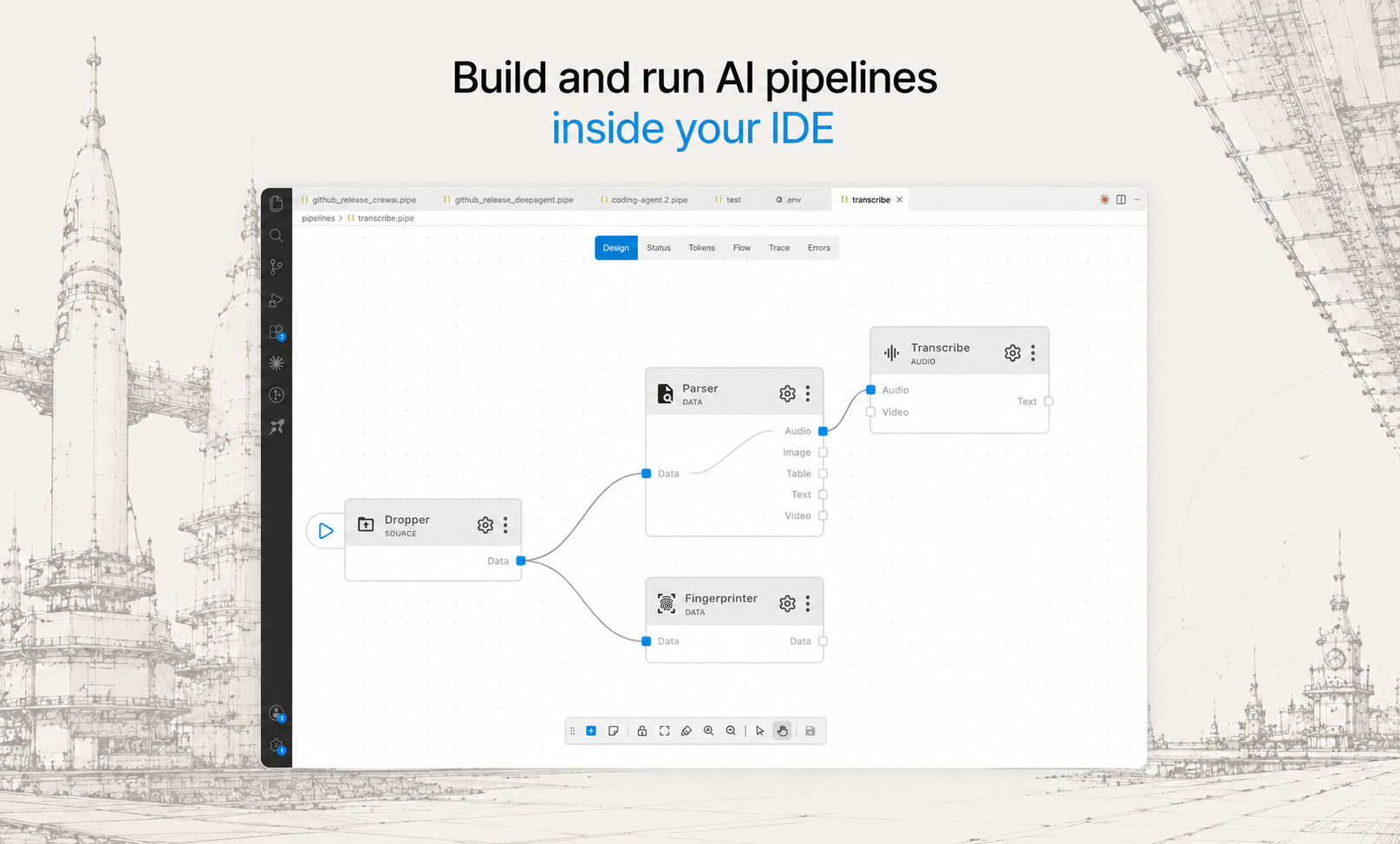
Design, test, and ship complex AI workflows from a visual canvas, right where you write code.
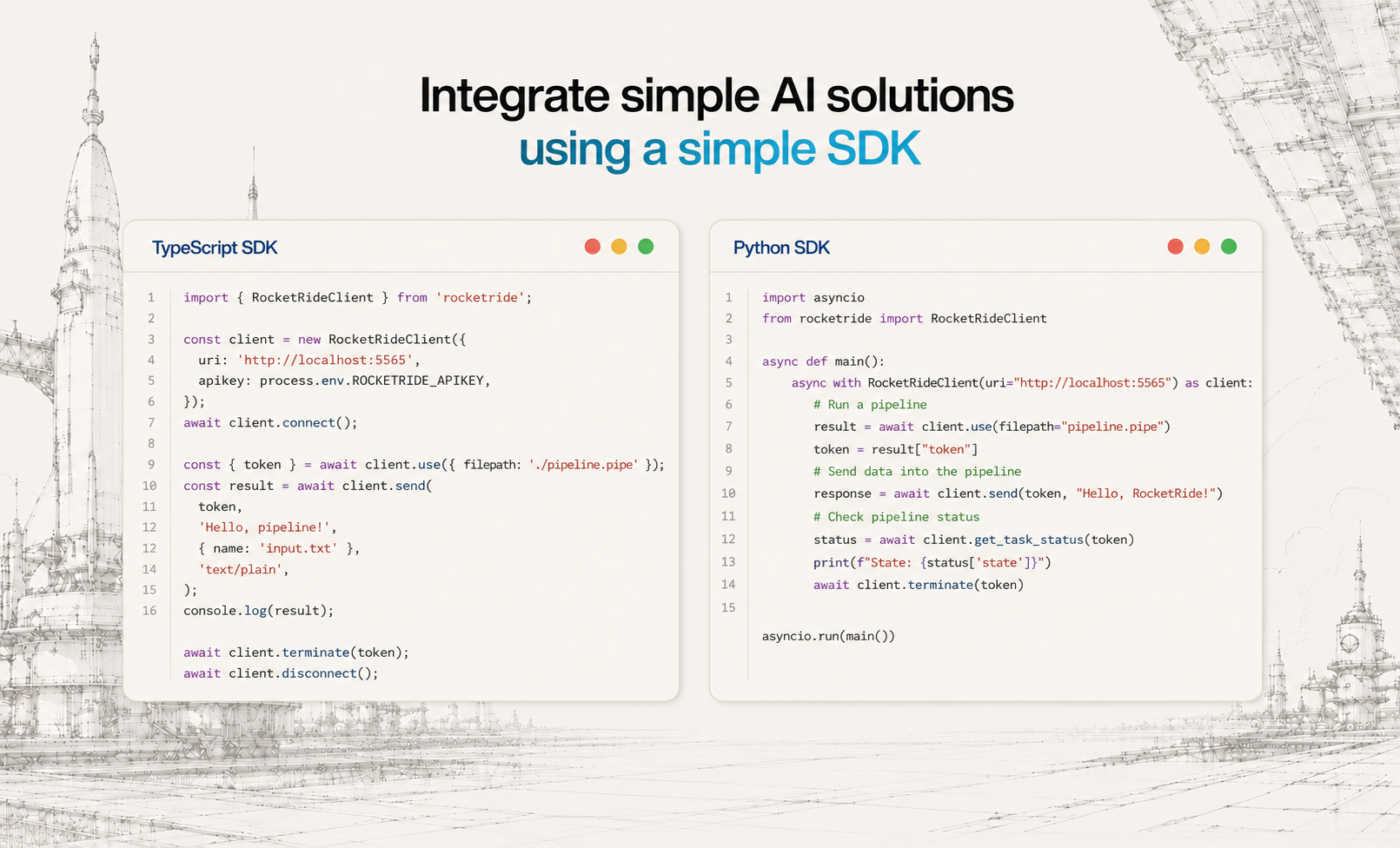
Drop pipelines into any Python or TypeScript app with a few lines of code, no infrastructure glue required.
Two ways to run RocketRide
Let us handle the infrastructure, or own every layer.
ROCKETRIDE CLOUD · NOW LIVE |
ON-PREM |
Let us run it, zero ops
The fastest way to get started. We operate the engine; you point a client at the endpoint and build. The same .pipe file runs unchanged, with no infrastructure to provision, from prototype to production. |
Run it yourself, free
Docker, on-prem, or local. Full control and data residency. Open source, MIT, no lock-in, ever. |
| Get Started |
Quick Start |
RocketRide Cloud NOW LIVE
Run pipelines, not infrastructure.
With RocketRide Cloud, offload the complex, heavy lifting of production AI.
Build your pipeline once, in the same portable .pipe format, and we run it, scale it, and keep it fast. No servers, no ops, no rewrite from prototype to production.
A fraction of the cost
Our patent-pending model server runs your AI workloads far more efficiently, so you pay a fraction of what standard hosting costs. |
Collaborate as a team
Work together on shared pipelines. Your whole team builds, runs, and iterates in one place. |
No-hassle infra
We handle everything: servers, scaling, upgrades, uptime. Nothing to provision, nothing to operate. |
Higher performance, built-in scale
More throughput on the multithreaded C++ engine, with automatic scalability built in. |
Connecting takes two lines. Same portable pipeline JSON, now hosted for you:
ROCKETRIDE_URI=https://api.rocketride.ai
ROCKETRIDE_AUTH=your-api-token
Get Started · Read the Cloud docs
On-Prem FREE & MIT
Own every layer.
Run the very same engine yourself, wherever your data lives.
Docker, on-premises, or a local process in your IDE. Full control, full data residency, and zero lock-in. The exact .pipe you build on Cloud runs unchanged on your own hardware.
Full control and data residency
Your data and model calls never leave your infrastructure. Run it behind your firewall, or fully air-gapped. |
Open source, MIT
The whole engine is MIT-licensed and OSI-compliant. No enterprise edition, nothing behind a paywall. |
Runs anywhere
Docker, on-premises, bare metal, or local. Scale out to a cluster with the Helm chart when you need to. |
The same C++ engine
Identical multithreaded runtime and execution semantics as Cloud. Move a pipeline between them anytime. |
Point a client at your local engine in one line:
ROCKETRIDE_URI=ws://localhost:5565
Quick Start · Read the On-Prem docs
Features
| Feature |
Description |
| Visual Pipeline Builder |
Drag, connect, and configure nodes in VS Code, no boilerplate. Real-time observability tracks token usage, LLM calls, latency, and execution. Pipelines are portable JSON, version-controllable, shareable, and runnable anywhere. |
| High-Performance C++ Runtime |
Native multithreading purpose-built for the throughput demands of AI and data workloads. No bottlenecks, no compromises for production scale. |
| 100+ Pipeline Nodes |
15+ LLM providers, 9 vector databases, OCR, NER, PII anonymization, chunking strategies, embedding models, and more. All nodes are Python-extensible, build and publish your own. |
| Multi-Agent Workflows |
Built-in CrewAI and LangChain support. Chain agents, share memory across pipeline runs, and manage multi-step reasoning at scale. |
| Coding Agent Ready |
RocketRide auto-detects your coding agent: Claude, Cursor, and more. Build, modify, and deploy pipelines through natural language. |
| TypeScript, Python & MCP SDKs |
Integrate pipelines into native apps, expose them as callable tools for AI assistants, or build programmatic workflows into your existing codebase. |
| Zero Dependency Headaches |
Python environments, C++ toolchains, Java/Tika, and all node dependencies managed automatically. Clone, build, run, no manual setup. |
| One-Click Deploy |
Run on Docker, on-prem, or RocketRide Cloud. Production-ready architecture from day one, not retrofitted from a demo. |
Quick Start
Install the extension for your IDE. Search for RocketRide in the extension marketplace:
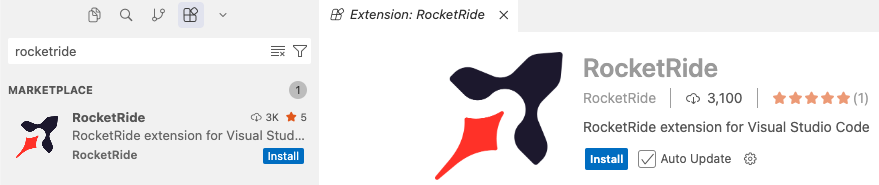
Not seeing your IDE? Open an issue · Download directly
Click the RocketRide extension in your IDE
Deploy a server - you'll be prompted on how you want to run the server. Choose the option that fits your setup:
- Local (Recommended) - This pulls the server directly into your IDE without any additional setup.
- On-Premises - Run the server on your own hardware for full control and data residency. Pull the image and deploy to Docker or clone this repo and build from source.
Building Your First Pipe
All pipelines are recognized with the *.pipe format. Each pipeline and its configuration are JSON objects - but the extension in your IDE will render within our visual builder canvas.
All pipelines begin with a source node: webhook, chat, or dropper. For specific usage, examples, and inspiration on how to build pipelines, check out our guides and documentation.
Connect input lanes and output lanes by type to properly wire your pipeline. Some nodes like agents or LLMs can be invoked as tools for use by a parent node as shown below:
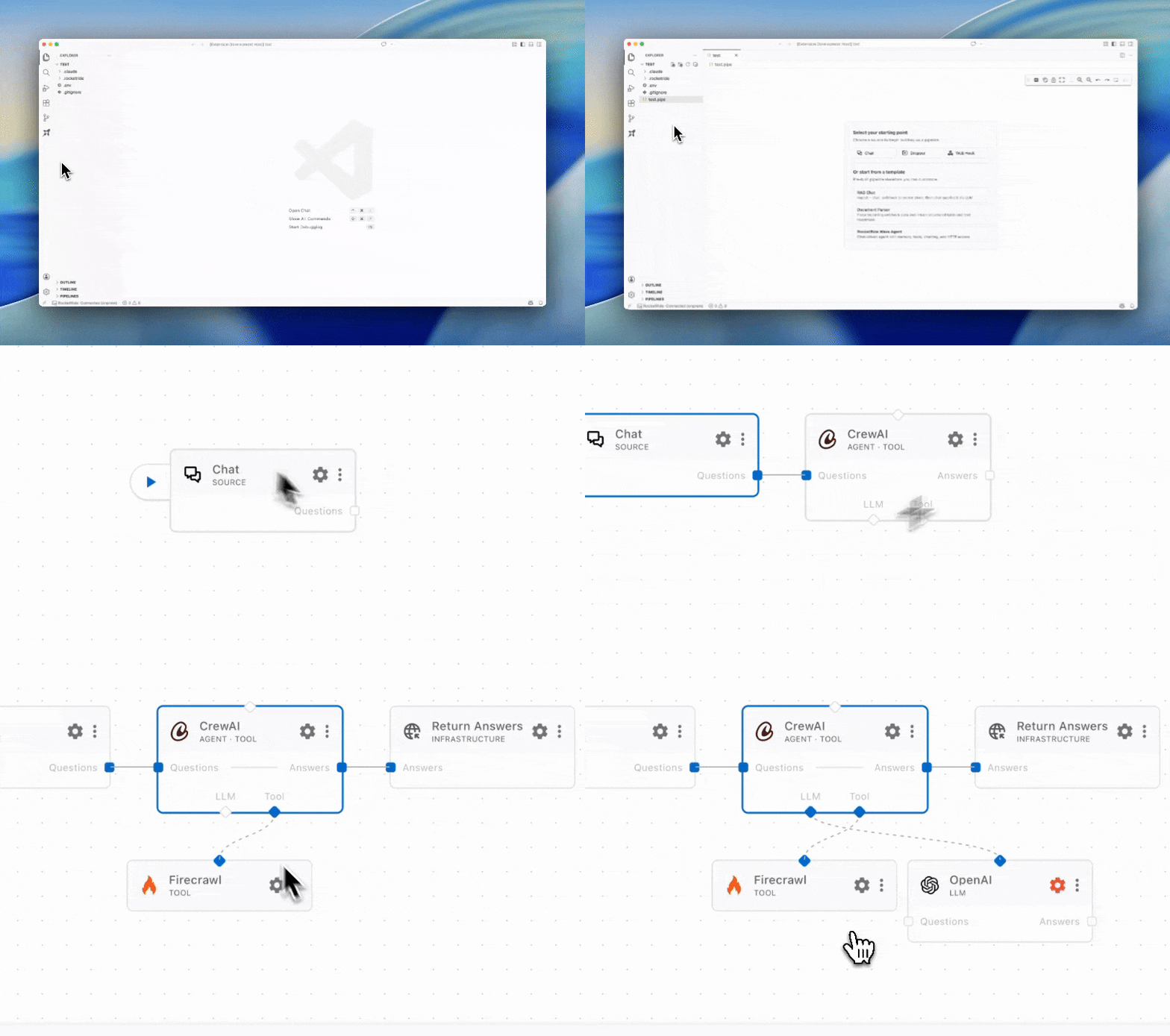
You can run a pipeline from the canvas by pressing the ▶ button on the source node or from the Connection Manager directly.
Deploy your pipelines - pick the path that fits:
Docker - Download the RocketRide server image and create a container. Requires Docker to be installed.
docker pull ghcr.io/rocketride-org/rocketride-engine:latest
docker create --name rocketride-engine -p 5565:5565 ghcr.io/rocketride-org/rocketride-engine:latest
Local Deployment - Download your preferred runtime as a standalone process from the Deploy page in the Connection Manager.
RocketRide Cloud - Skip the setup and ship straight to managed hosting. Same portable pipeline JSON, zero infrastructure to run, from prototype to production. Get started
Run your pipelines as standalone processes or integrate them into your existing Python and TypeScript/JS applications utilizing our SDK.
Observability
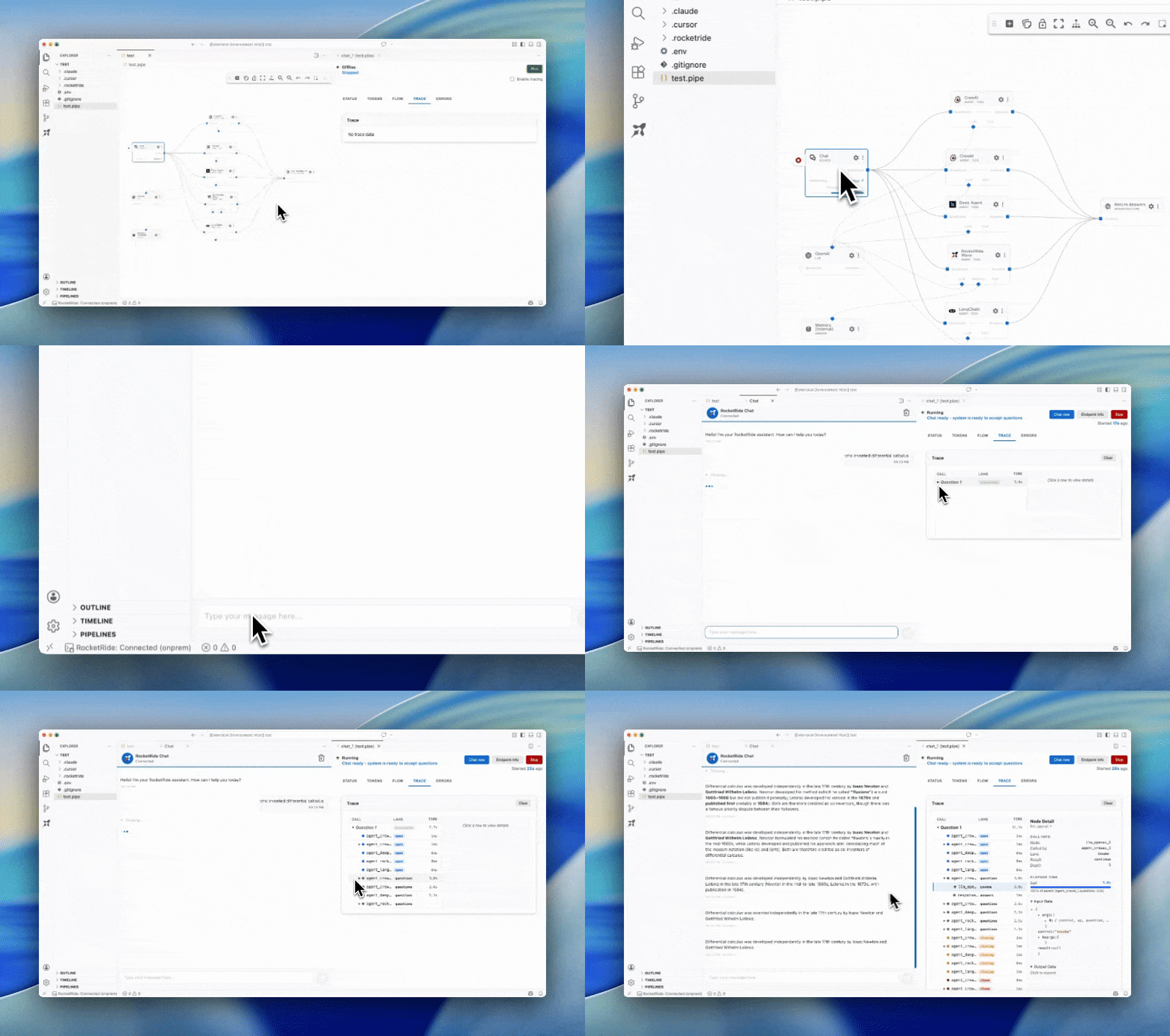
Selecting running pipelines allows for in-depth analytics. Trace call trees, token usage, memory consumption, and more to optimize your pipelines before scaling and deploying. Find the models, agents, and tools best fit for your task.
Contributors
RocketRide is built by a growing community of contributors. Whether you've fixed a bug, added a node, improved docs, or helped someone on Discord, thank you. New contributions are always welcome - check out our contributing guide to get started.

Ready to ship? Deploy your pipeline on RocketRide Cloud, or run on-prem, free.
Made with ♥ in SF & EU

 一个开源的 AI 开发环境:面向 AI/ML 工作负载的数据管道构建器和运行时。它把你现在用的 IDE 变成一个统一的平台,在多线程 C++ 引擎上编排、调试、观测和部署 AI 工作流。