BitBang
BitBang turns any machine into a URL.
Run BitBang, get a URL, and open it in any browser -- you're connected to the machine, peer-to-peer and end-to-end encrypted. There's no account, no port forwarding, and nothing to install on the connecting side.
This repository is the entry point to the BitBang project. The code lives in the repos below.
Try it (30 seconds)
On the machine you want to reach (Linux; other platforms are coming):
curl -sSfL bitba.ng/install | sh
bitbang serve
serve prints a URL. Open it in any browser for a terminal, a file browser, and a proxy to that machine's network. Full documentation, pairing, and the CLI client: bitbang-cli.
The repositories
bitbang-cli -- start here. Turns any machine into a URL: remote shell, file access, and web-app proxying, from a browser or another terminal. For you if you want remote access to a machine, now.
Octoprint-BitBang -- turns your 3D printer into a URL: the full OctoPrint UI, including hardware-encoded H.264 video from the printer's camera. For you if you have a 3D printer.
bitbang-python -- turns any Python program into a URL (pip install bitbang): wraps any WSGI or ASGI app (Flask, FastAPI, Quart), with live video streaming. For you if you're building something.
bitbang-server -- the machinery behind the URLs: the signaling server and browser runtime. It powers bitba.ng, and you can self-host it -- the whole stack, under your control. For you if you trust no one, which around here is considered a feature.
Read more
- Whitepaper -- the ideas: the problem, the design, and why a browser is all you need.
- Trustless Signaling -- the trust model: how browser and device authenticate each other without trusting the server that introduces them.
Why BitBang is needed
The Internet is often thought of as a fully connected network -- every machine accessible from every other machine. But there are rules governing accessibility...
Rules of Internet Accessibility
- Machines on the Internet are accessible by other machines on the Internet -- and by machines on your local network.
- Machines on your local network are only accessible by other machines on your local network.
Because of rule 2, machines on your local network aren't reachable from outside -- nor are the resources they hold: files, cameras, sensors, compute, or the web app you're currently developing. Cloud services exist to fill this gap: Dropbox for files, AWS IoT for sensors, Tailscale for compute, ngrok for web apps. These services apply rule 1, but each comes with the friction of account creation, fees, and your data living on someone else's server.
BitBang takes a different path: devices connect directly to browsers, peer-to-peer, with the server reduced to a brief introduction it can neither read nor tamper with. For a feature-by-feature comparison with ngrok, Cloudflare Tunnel, and Tailscale, see the bitbang-cli README.
How it works
Browsers normally connect to web servers over a TCP socket. BitBang replaces this with a WebRTC data channel.
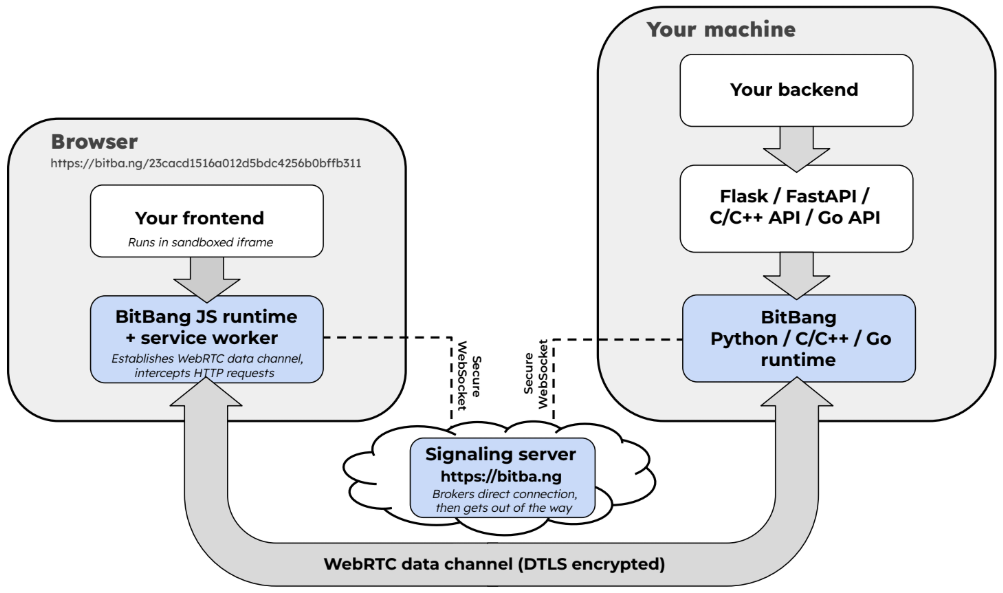
The signaling server (bitba.ng) brokers the WebRTC handshake, then has no further involvement and never sees application data.
WebRTC?
WebRTC is the technology behind Zoom and Google Meet. It was designed for real-time media -- sub-second latency, high bandwidth -- and it's mature, well-tested, and built into every major browser. Alongside media it carries raw data over "data channels," which is what BitBang uses to proxy HTTP and WebSockets. WebRTC is also notoriously unpleasant to use directly: signaling, SDP, ICE, DTLS fingerprints, TURN. Burying that is most of what BitBang does. You get an address, not a protocol project.
Signaling server
The signaling server (source) does four things:
- Serves the BitBang browser runtime
- Authenticates connecting devices via RSA challenge
- Maintains WebSocket connections to active devices
- Brokers ICE candidate and SDP exchange between browsers and devices
After the P2P connection is established, the signaling server is not involved. We provide one at https://bitba.ng; it mostly brokers connections, so its resource needs are small -- and you can run your own.
Security
WebRTC mandates encryption:
- Data channels: DTLS 1.2+
- Media streams: SRTP
- Signaling: HTTPS and WSS
Each BitBang device generates an RSA keypair. The public key hash becomes its unique 128-bit ID, used in its BitBang URL. A 64-bit access code rides in the URL fragment (after #), which browsers never send to a server -- so the signaling server can route connections but cannot initiate them. How the two ends authenticate each other without trusting the server, and exactly where that guarantee's boundary lies, is covered in Trustless Signaling.
Origin
In 2010, I gave a Google Tech Talk with Illah Nourbakhsh of Carnegie Mellon on TeRK (Telepresence Robot Kit), a Google- and Intel-funded project to make educational robotics accessible. Our conclusion had little to do with robots: the internet is broken for devices. NATs and firewalls make every device behind a home router invisible from the outside. Google had recently open-sourced libjingle -- the P2P engine behind Google Talk -- and we wanted to use it for zero-config device connectivity. But it was a C++ library tied to XMPP, and we felt strongly the technology should be browser-friendly. That was too big a problem for our resources.
In the years that followed, connected devices became "IoT" and converged on a single pattern: Platform-as-a-Service. Your device talks to a cloud, your browser talks to the same cloud, and they meet in the middle -- accounts, subscriptions, and your data on someone else's server. Meanwhile WebRTC, libjingle's direct descendant, quietly shipped in every major browser. But it was built for video calls, and by the time it arrived, IoT had already settled into its cloud pattern -- peer-to-peer never entered the picture. BitBang is what happens when it does: devices talk directly to browsers, with no cloud in the data path and no account required. BitBang was built for Goby, a tiny telepresence robot that launched on Kickstarter in 2025 -- the spiritual descendant of TeRK, realized with the technology we had wished for fifteen years earlier. We promised to open-source the networking stack that made it possible. BitBang is that stack.
License
MIT, across all repositories.
Contributing
Issues and PRs are welcome.

 BitBang 能把任何一台机器变成一个 URL:在设备上运行它,在任意浏览器里打开这个 URL,你就通过端到端加密的点对点方式连上了那台机器 —— 不需要注册账号,不需要端口转发,连接的一端也不用装任何东西。