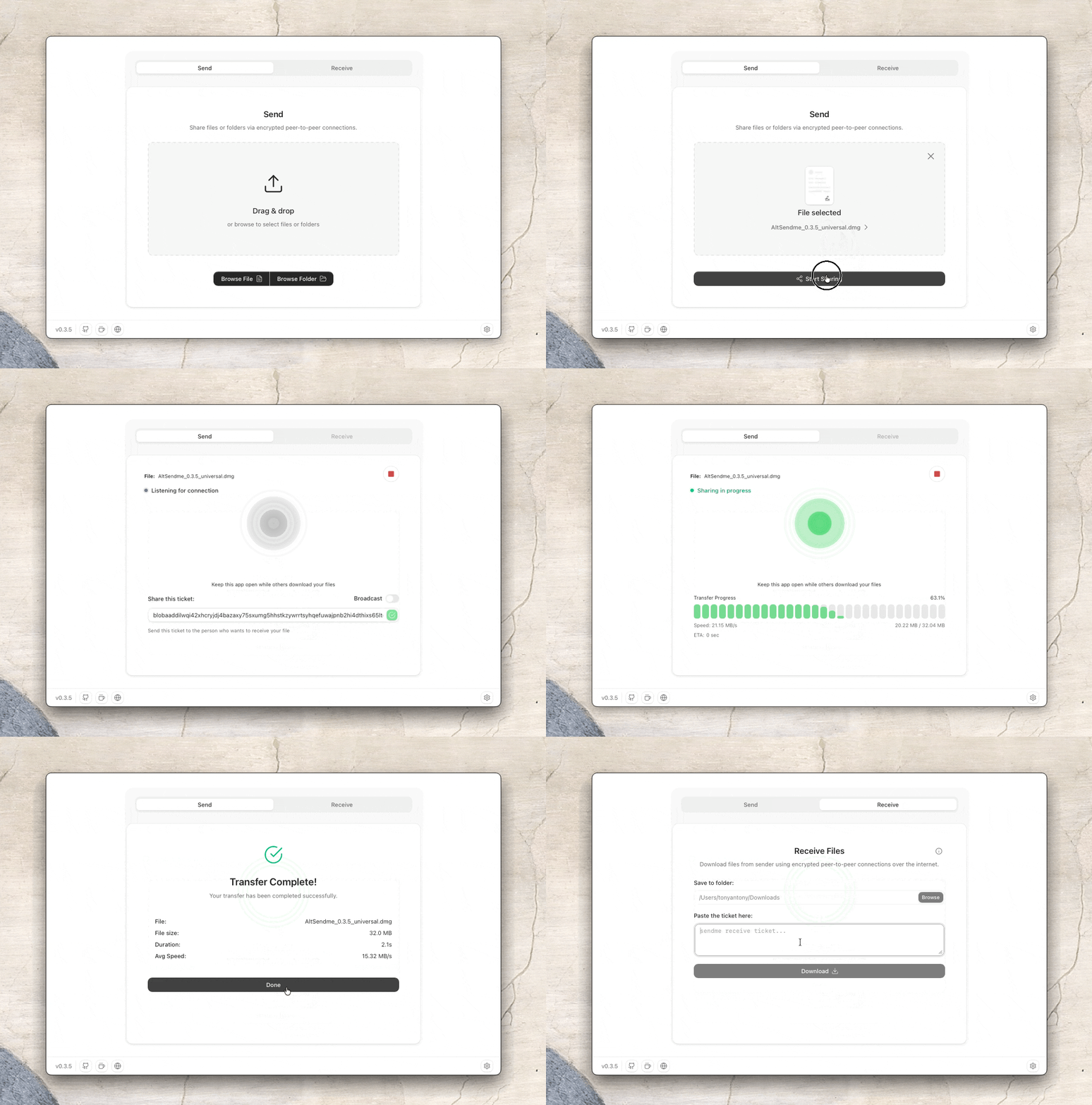
A free and open-source file transfer tool that harnesses the power of cutting-edge peer-to-peer networking, letting you transfer files directly without storing them on cloud servers.
Why rely on WeTransfer, Dropbox, or Google Drive when you can reliably and easily transfer files directly, end-to-end encrypted and without revealing any personal information?
Pick whichever route is closest to hand: send a link or a QR code that opens on any device, send to a device you paired once, or send to a device already on your network. All three move the same bytes the same way - directly, encrypted end to end.
Features
Cross-platform - Desktop, Android, CLI, and browser - no install on the web
Any file, any size - Files or folders, BLAKE3-verified
Multi-gigabit speeds - Saturates fast connections
Nearby - LAN auto-discovery; Pair & Send
Paired devices - Pair once with a code (remote) or Nearby; send without tickets
Trusted devices - Opt a paired device into auto-accept; its files land without a prompt
Resumable & multi-peer - Resume interrupted transfers; share to many at once
Dial by key - Connect by device identity, not IP address
Roaming - Switch Wi-Fi, cellular, or networks mid-transfer without dropping
Code, Link or QR - Receiver needs no install (browser or app)
Preview & history - See before download; local transfer log
Advanced debug mode - Opt-in diagnostics for under the hood transparency
Private - No accounts, tracking, or ads; direct device-to-device
Same-network apps appear under Nearby in Settings → Devices and in the Send to a device list while you're sharing. Pick a nearby device and Pair & Send to pair and start the transfer in one step - you can also pair from Settings without sharing. First contact shows a verification code on both screens. Set who can find you in Settings → Network → Your discoverability.
Uses mDNS - often blocked on guest Wi-Fi and VPNs. See Troubleshooting if the list stays empty.
Paired devices
Pair in Settings → Devices with a pairing code (works remotely, over the internet) or via a Nearby request on the same network. After pairing, Send appears next to that device while sharing - no ticket to copy. The receiver gets an in-app prompt. Desktop can keep running in the background and show online paired devices in the tray (Settings → General → Startup & background). Manual tickets and the sendme CLI still work.
Share ticket, link or QR code (One time transfer)
While sharing: QR for a camera scan, Share for the system sheet, Copy for the raw ticket. Links use https://app.dashbeam.net/receive?ticket=… - on Android they open the app; elsewhere the web app, so nothing to install (large files are better in the native app). Paste a ticket, link, or full share message into Receive.
Comparison
DashBeam
Blip
LocalSend
Magic Wormhole
PairDrop
Networking
QUIC via Iroh
Unknown
HTTPS/REST over TCP
encrypted TCP
WebRTC/DTLS (SCTP)
Works over the internet
✅
✅
LAN only
✅
✅
Saturates gigabit connections
✅
✅
LAN only
✅
❌ (SCTP/browser ceiling)
Discover devices on LAN
✅
❌
✅
❌
❌
Persistent paired devices
✅
✅ (account)
❌
❌
✅
Send folders
✅
✅
✅
✅
✅ (CLI only, not in browser)
Resumable transfers
✅
✅
❌
❌
❌
Roaming mid-transfer
✅
❌
❌
❌
❌
Send to multiple receivers
✅ (broadcast)
❌
✅
✅
❌
Unlimited file size
✅
✅
✅
✅
Limited by browser memory
Open source
✅
❌
✅
✅
✅
No account required
✅
❌
✅
✅
✅
End-to-end encryption
✅
✅
✅
✅
✅
Platforms
CLI + desktop + mobile + web
Desktop + mobile (no web/CLI)
Desktop + mobile (no web/CLI)
CLI only
Web/PWA + Android app + CLI
The catch
WIP
Closed source; data handling cannot be audited
Same-network only, no resume
CLI-only; GUI front-ends are separate, community-maintained
DashBeam is built on Iroh, a modern peer-to-peer networking stack that simplifies direct device-to-device communication. In practice, that means devices talk over encrypted QUIC, files move with content-addressed blobs, and relays help when a direct path isn’t available.
The long version:Under the hood walks the same architecture as a narrative - fingerprints instead of filenames, names instead of addresses, hole punching, roaming, and what each intermediary can and cannot see.
The building blocks
Piece
What it does here
Blobs (iroh-blobs)
Store and stream file data; every chunk is verified with BLAKE3
Tickets
One string that tells a peer who to dial and what to fetch
Endpoints
Each device’s Iroh identity (Ed25519 key → endpoint id)
QUIC + TLS 1.3
Encrypted transport; multiplexing without head-of-line blocking
Relays + hole punching
Bootstrap connections across NATs; the relay carries data while a direct path is negotiated
Control protocol (pairing)
Long-lived channel to remember devices and deliver share invites
Local discovery (mDNS)
Optional LAN advertising so Nearby devices can find each other without a ticket
Receive links
A ticket wrapped in an ordinary https URL - an App Link on Android, the web app everywhere else
Blobs
Files aren’t uploaded to a server. They’re published as blobs: opaque byte sequences addressed by a BLAKE3 hash.
A link is that 32-byte hash: if the hash matches, the content matches.
Folders and large files use a HashSeq (a blob that points at other blobs).
The sender is the provider; the receiver is the requester. Either side can do both.
Because that hash is a BLAKE3 tree rather than one digest over the whole file, every chunk verifies on its own against the root. That is what makes resume cheap: a receiver coming back after a dropped connection knows exactly which chunks it already holds and has verified, so it asks only for the gap. Nothing already received is re-sent, and nothing arriving is taken on trust.
Tickets
A share ticket is a single token that packs:
The sender’s endpoint id (so you know you’re talking to the right device)
Enough address / relay info to dial them
The blob hash to download
You only connect to people you share a ticket with: no broadcasting your IP to strangers. That’s the default “cozy network” model Iroh encourages, vs. flooding discovery to the whole swarm.
Tickets that carry only an endpoint id lean on public-key discovery (Pkarr) to find current addresses. Those records are signed by the endpoint key itself, so a tampered one fails verification rather than misdirecting you - the lookup service is trusted for availability, not integrity.
Connecting across networks
When two devices need to meet:
Each registers with a public (or self-hosted) relay so peers can find a path through firewalls and NATs.
Iroh tries QUIC hole punching to upgrade to a direct peer-to-peer link.
If a direct path works, traffic moves over to it. If not, the relay stays in the path as a fallback UDP hop.
Those steps overlap rather than queue. The relay is already carrying your data while hole punching negotiates, so nothing waits on the direct path to succeed - the transfer just gets faster if and when it does. Roughly one transfer in ten never gets a direct path at all (symmetric NAT, locked-down corporate networks) and rides the relay start to finish.
Either way, the payload is end-to-end encrypted. Relays see ciphertext, not your files. More on Iroh relays →
Roaming across networks
A connection is bound to the peer’s key, not to its IP address, so changing networks does not end it. Switch from Wi-Fi to cellular mid-transfer and iroh notices the address change, learns the new candidates, and republishes them to the peer. The relay carries the data throughout, and hole punching simply runs again on the new path.
Addresses are disposable hints, not identity. That is the practical payoff of naming devices by key instead of by location.
QUIC & encryption
QUIC (UDP-based, same foundation as HTTP/3) brings TLS 1.3 into the transport. For DashBeam that buys encryption and authentication, multiple streams with shared congestion control, and fast reconnects when you’ve talked to a peer before.
Paired devices
Pairing doesn’t replace tickets; it delivers them for you.
Devices exchange a short pairing code (the host’s endpoint id) over a dedicated control ALPN.
Each side proves identity by signing connection-bound keying material with its device secret, then remembers the peer locally.
A persistent control connection keeps presence (online/offline).
When you share, DashBeam still creates a normal one-time blob ticket; choosing a paired device ships that ticket as an in-app invite instead of making you copy-paste it.
Manual tickets and the sendme CLI keep working exactly as before.
Nearby (local discovery)
On the same local network, DashBeam can advertise and browse peers with mDNS (desktop and Android; not the web app).
When discoverability is Everyone, the device publishes enough metadata for others to show its name in Nearby.
Paired only still announces presence without exposing the display name to strangers on the LAN.
Off stops advertising; you can still browse and send to others who remain discoverable.
First-contact file invites show a short verification code derived from both devices' public keys so each side can confirm they're talking to the intended peer before accepting.
Accepting a Nearby pair request or file invite creates the same local paired-device records as code-based pairing.
Self-hosting relays and discovery
For how to run your own iroh relay and discovery server, configure DashBeam to use them, and how mixed public/self-hosted setups behave, see infra/README.md (relay: infra/relay/README.md, discovery: infra/dns/README.md).
For the illustrated version of everything above - including a full account of what a relay operator, your ISP, and the lookup service each learn from a transfer - read Under the hood.
Development
See CONTRIBUTING.md for prerequisites, local setup, build instructions, and testing.
The best way to contribute is to join our Discord and say hi. Introduce yourself and share what skills or interests you have - whether that’s coding, testing, design, or something else. You can also raise issues, suggest fixes, or pitch ideas. Maintainers are there to guide you every step of the way.
It’s the best place to get context, align on direction, and collaborate with the community.
License
AGPL-3.0
Privacy Policy
See PRIVACY.md for information about how DashBeam handles your data and privacy.
Contributors
Contact
Reach me here for suggestions, feedback or media related communication.
Thank you for checking out this project! If you find it useful, consider giving it a star and helping spread the word.
Built on
dashbeam (tonyantony300/dashbeam)
Choose a tag and it will appear here. With no tags selected, all catalog projects are shown.
Searching Database…
Choose a tag and it will appear here. With no tags selected, all catalog projects are shown.
What is this?A free, open-source file transfer tool: files go directly between devices over peer-to-peer connections, encrypted end to end, and are never stored on a cloud server.
Is it an app I install, or does it run in the browser?Both. There are native apps for Windows, macOS, Linux and Android, a ~4-5 MB CLI, and a ~2 MB web app that runs in the browser with no install - though the web version has limited throughput.
How do I actually send a file to someone?Pick a file or folder, then send it to a Nearby device on your network, to a device you paired once, or share a link, QR code or ticket - the receiver just scans or clicks to start the transfer.
Does the person receiving my file need to install anything?No. A link or QR code opens in any browser (or the Android app), so the receiver installs nothing - though very large files are better handled by the native app.
What are the gotchas I should know about?The web app has limited throughput; Nearby discovery uses mDNS, which guest Wi-Fi and VPNs often block; and about one transfer in ten never gets a direct path, riding a relay the whole way.
Do both devices have to be on the same Wi-Fi network?No. Nearby mode discovers devices on the same network, paired devices connect remotely over the internet, and links or QR codes work from any device - all peer-to-peer.
Do my files pass through a server, and who can see them?Files move directly between devices as BLAKE3-verified encrypted blobs - a relay, when needed, only sees ciphertext. There are no accounts, tracking, or ads, and you can self-host relays.
How fast is it in practice?The README reports a 452 GB largest transfer, a measured peak of 125 MB/s (~1 Gbps), and 328 GB moved at 93 MB/s. Real throughput depends on your devices, network, and connection path.
How does it compare to LocalSend, WeTransfer, or Magic Wormhole?Unlike LocalSend it works over the internet, not just the same network, and it resumes interrupted transfers. Unlike WeTransfer or Blip it is open source with no accounts, and unlike the CLI-only Magic Wormhole it ships GUI, mobile, and web apps.
What happens if the connection drops or I switch networks mid-transfer?Transfers resume from where they stopped: every chunk is verified against a BLAKE3 hash tree, so only the missing pieces are re-sent. Connections are tied to the device's key rather than its IP, so switching from Wi-Fi to cellular mid-transfer does not drop them.
What is Iroh?The peer-to-peer networking stack DashBeam is built on. It provides encrypted QUIC transport, content-addressed blobs for file data, pairing, mDNS discovery, and relays with hole punching for connecting across NATs and firewalls.











 A free, open-source file transfer tool: files go directly between devices over peer-to-peer connections, encrypted end to end, and are never stored on a cloud server.