Что это такое?
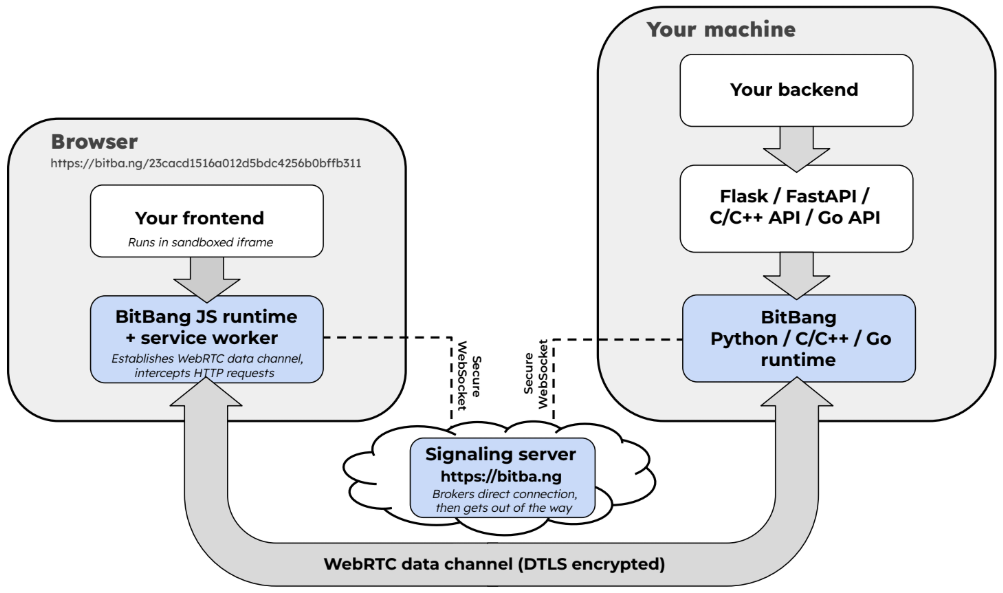
 BitBang превращает любую машину в ссылку: запустите её на устройстве, откройте ссылку в любом браузере — и вы подключитесь к этой машине напрямую, peer-to-peer, со сквозным шифрованием. Не нужен ни аккаунт, ни проброс портов, ни установка чего-либо на стороне, с которой вы подключаетесь.
BitBang превращает любую машину в ссылку: запустите её на устройстве, откройте ссылку в любом браузере — и вы подключитесь к этой машине напрямую, peer-to-peer, со сквозным шифрованием. Не нужен ни аккаунт, ни проброс портов, ни установка чего-либо на стороне, с которой вы подключаетесь.Это облачный сервис, в котором нужно регистрироваться, или программа, которую я запускаю сам?Это открытый (open-source, лицензия MIT) софт, который вы запускаете сами, а не сервис с аккаунтами. Этот репозиторий — входная точка целого набора подрепозиториев; публичный signaling-сервер доступен на bitba.ng, но весь стек можно развернуть у себя и полностью контролировать.
Это открытый (open-source, лицензия MIT) софт, который вы запускаете сами, а не сервис с аккаунтами. Этот репозиторий — входная точка целого набора подрепозиториев; публичный signaling-сервер доступен на bitba.ng, но весь стек можно развернуть у себя и полностью контролировать.Как подключиться к одной из своих машин?На машине, к которой хотите подключиться (сейчас это Linux), установите bitbang-cli и запустите serve — она выведет BitBang-ссылку. Открыв её в браузере, вы получите терминал, файловый менеджер и прокси к сети этой машины.
На машине, к которой хотите подключиться (сейчас это Linux), установите bitbang-cli и запустите serve — она выведет BitBang-ссылку. Открыв её в браузере, вы получите терминал, файловый менеджер и прокси к сети этой машины.Что нужно на устройстве, с которого я подключаюсь?Только современный браузер — WebRTC встроен в каждый крупный браузер, поэтому на подключающейся стороне ничего устанавливать не нужно.
Только современный браузер — WebRTC встроен в каждый крупный браузер, поэтому на подключающейся стороне ничего устанавливать не нужно.Есть ли текущие ограничения, о которых стоит знать?Сейчас поддержка на стороне устройства есть только для Linux; в README сказано, что другие платформы в планах. Точные границы гарантии отсутствия доверенного сервера описаны отдельно в статье Trustless Signaling.
Сейчас поддержка на стороне устройства есть только для Linux; в README сказано, что другие платформы в планах. Точные границы гарантии отсутствия доверенного сервера описаны отдельно в статье Trustless Signaling.Где это работает?Пока на стороне устройства — Linux; подключаться можно из любого крупного браузера на любой ОС, потому что на подключающейся стороне ничего не ставится.
Пока на стороне устройства — Linux; подключаться можно из любого крупного браузера на любой ОС, потому что на подключающейся стороне ничего не ставится.Могу ли я поднять серверную часть сам?Да — signaling-сервер можно развернуть у себя, и он в основном только сводит соединения, так что ресурсов требует немного. Можно запустить весь стек целиком, не полагаясь на bitba.ng.
Да — signaling-сервер можно развернуть у себя, и он в основном только сводит соединения, так что ресурсов требует немного. Можно запустить весь стек целиком, не полагаясь на bitba.ng.Мой трафик идёт через ваш сервер?Нет — signaling-сервер лишь помогает установить WebRTC-соединение (handshake) и после этого больше не участвует, никогда не видя данных приложений. Каналы данных защищены DTLS 1.2+, медиапотоки — SRTP, а код доступа находится в URL-фрагменте, который браузеры никогда не отправляют на сервер.
Нет — signaling-сервер лишь помогает установить WebRTC-соединение (handshake) и после этого больше не участвует, никогда не видя данных приложений. Каналы данных защищены DTLS 1.2+, медиапотоки — SRTP, а код доступа находится в URL-фрагменте, который браузеры никогда не отправляют на сервер.Чем это отличается от ngrok или Tailscale?Эти облачные сервисы преодолевают проблему NAT, но требуют создания аккаунта, платных тарифов и размещения ваших данных на чужом сервере. BitBang соединяет устройство напрямую с вашим браузером, peer-to-peer; сервер только знакомит стороны и не может ни читать трафик, ни вмешиваться в него. Поразрофильное сравнение с ngrok, Cloudflare Tunnel и Tailscale есть в README bitbang-cli.
Эти облачные сервисы преодолевают проблему NAT, но требуют создания аккаунта, платных тарифов и размещения ваших данных на чужом сервере. BitBang соединяет устройство напрямую с вашим браузером, peer-to-peer; сервер только знакомит стороны и не может ни читать трафик, ни вмешиваться в него. Поразрофильное сравнение с ngrok, Cloudflare Tunnel и Tailscale есть в README bitbang-cli.Если кто-то узнает мою ссылку, он сможет подключиться к моей машине?Нет. Каждое устройство генерирует пару ключей RSA, хеш открытого ключа которого становится его 128-битным ID, а 64-битный код доступа находится в URL-фрагменте после # — браузеры никогда не отправляют его на сервер. Поэтому signaling-сервер может маршрутизировать соединения, но не может инициировать их; документ Trustless Signaling подробно описывает, где проходят границы этой гарантии.
Нет. Каждое устройство генерирует пару ключей RSA, хеш открытого ключа которого становится его 128-битным ID, а 64-битный код доступа находится в URL-фрагменте после # — браузеры никогда не отправляют его на сервер. Поэтому signaling-сервер может маршрутизировать соединения, но не может инициировать их; документ Trustless Signaling подробно описывает, где проходят границы этой гарантии.Зачем автор это создал?Проект вырос из TeRK — образовательного робототехнического проекта 2010 года, который пришёл к выводу, что интернет сломан для устройств за NAT. Позже WebRTC появился во всех браузерах, но разрабатывался для видеозвонков, поэтому peer-to-peer так и не вошёл в картину интернета вещей. BitBang — это открытый сетевой стек, стоящий за Goby, крошечным телеприсутственным роботом, запущенным на Kickstarter в 2025 году.
Проект вырос из TeRK — образовательного робототехнического проекта 2010 года, который пришёл к выводу, что интернет сломан для устройств за NAT. Позже WebRTC появился во всех браузерах, но разрабатывался для видеозвонков, поэтому peer-to-peer так и не вошёл в картину интернета вещей. BitBang — это открытый сетевой стек, стоящий за Goby, крошечным телеприсутственным роботом, запущенным на Kickstarter в 2025 году.What are similar projects?tailcat, dsh-remote-web-gateway, MeshLAN, nebula, dsh-bridge, snapdrop, dashbeam, xpra
tailcat, dsh-remote-web-gateway, MeshLAN, nebula, dsh-bridge, snapdrop, dashbeam, xpraWhich topics is it in?nat-traversal, 3d-printing, end-to-end-encryption, remote-control, remote-access, file-sharing, video-streaming, webrtc, tunnel, p2p, robotics, iot
nat-traversal, 3d-printing, end-to-end-encryption, remote-control, remote-access, file-sharing, video-streaming, webrtc, tunnel, p2p, robotics, iot