What is this?
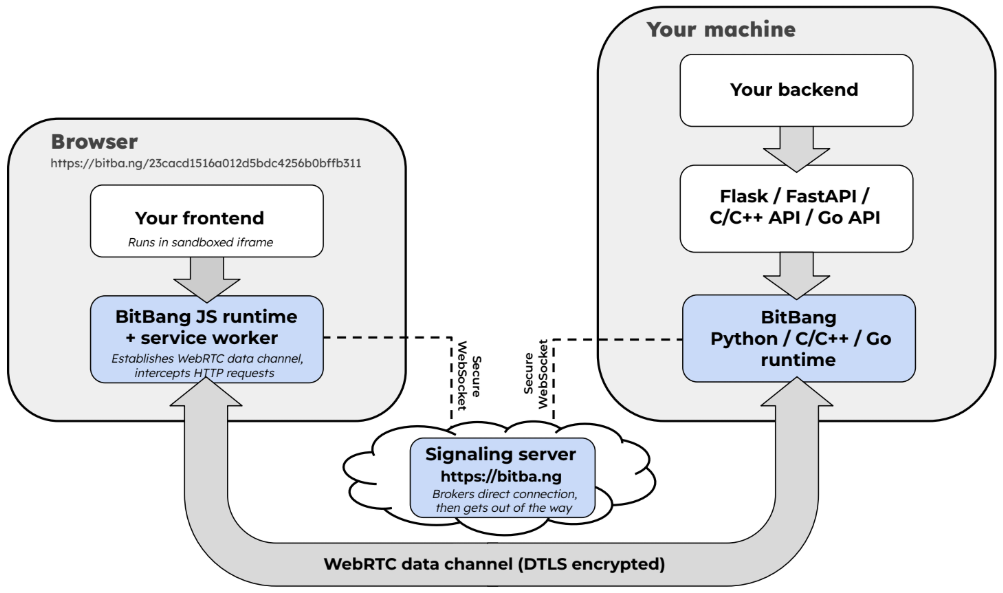
 BitBang turns any machine into a URL: run it on the device, open the URL in any browser, and you are connected to that machine peer-to-peer with end-to-end encryption — no account, no port forwarding, nothing to install on the connecting side.
BitBang turns any machine into a URL: run it on the device, open the URL in any browser, and you are connected to that machine peer-to-peer with end-to-end encryption — no account, no port forwarding, nothing to install on the connecting side.Is this a hosted service I sign up for, or software I run myself?It is open-source software (MIT) you run yourself, not an account-based service. This repo is the entry point to a stack of sub-repos; there is a public signaling server at bitba.ng, but you can self-host the whole thing under your own control.
It is open-source software (MIT) you run yourself, not an account-based service. This repo is the entry point to a stack of sub-repos; there is a public signaling server at bitba.ng, but you can self-host the whole thing under your own control.How do I connect to one of my machines?On the machine you want to reach (Linux today), install bitbang-cli and run serve — it prints a BitBang URL. Opening it in a browser gives you a terminal, a file browser, and a proxy to that machine's network.
On the machine you want to reach (Linux today), install bitbang-cli and run serve — it prints a BitBang URL. Opening it in a browser gives you a terminal, a file browser, and a proxy to that machine's network.What do I need on the device I'm connecting from?Just a modern browser — WebRTC is built into every major browser, so nothing gets installed on the connecting side.
Just a modern browser — WebRTC is built into every major browser, so nothing gets installed on the connecting side.Any current limitations I should know about?Device-side support is Linux-only right now; the README says other platforms are coming. The exact boundary of the no-trusted-server guarantee is documented separately in the Trustless Signaling paper.
Device-side support is Linux-only right now; the README says other platforms are coming. The exact boundary of the no-trusted-server guarantee is documented separately in the Trustless Signaling paper.Where does it run?Linux on the device side for now; you connect from any major browser on any OS, since the connecting side installs nothing.
Linux on the device side for now; you connect from any major browser on any OS, since the connecting side installs nothing.Can I run the server side myself?Yes — the signaling server is self-hostable and mostly brokers connections, so its resource needs are small. You can run the whole stack instead of relying on bitba.ng.
Yes — the signaling server is self-hostable and mostly brokers connections, so its resource needs are small. You can run the whole stack instead of relying on bitba.ng.Does my traffic go through your server?No — the signaling server only brokers the WebRTC handshake and then has no further involvement, never seeing application data. Data channels are DTLS 1.2+, media streams are SRTP, and the access code sits in the URL fragment, which browsers never send to a server.
No — the signaling server only brokers the WebRTC handshake and then has no further involvement, never seeing application data. Data channels are DTLS 1.2+, media streams are SRTP, and the access code sits in the URL fragment, which browsers never send to a server.How is this different from ngrok or Tailscale?Those cloud services bridge the NAT gap but come with account creation, fees, and your data living on someone else's server. BitBang connects the device directly to your browser peer-to-peer; the server only makes the introduction and can neither read nor tamper with the traffic. A feature-by-feature comparison with ngrok, Cloudflare Tunnel, and Tailscale lives in the bitbang-cli README.
Those cloud services bridge the NAT gap but come with account creation, fees, and your data living on someone else's server. BitBang connects the device directly to your browser peer-to-peer; the server only makes the introduction and can neither read nor tamper with the traffic. A feature-by-feature comparison with ngrok, Cloudflare Tunnel, and Tailscale lives in the bitbang-cli README.Can anyone who gets hold of my URL connect to my machine?No. Each device generates an RSA keypair whose public-key hash becomes its 128-bit ID, and a 64-bit access code rides in the URL fragment after # — which browsers never send to a server. So the signaling server can route connections but cannot initiate them; the Trustless Signaling doc covers exactly where the guarantee's boundary lies.
No. Each device generates an RSA keypair whose public-key hash becomes its 128-bit ID, and a 64-bit access code rides in the URL fragment after # — which browsers never send to a server. So the signaling server can route connections but cannot initiate them; the Trustless Signaling doc covers exactly where the guarantee's boundary lies.Why did the author build this?It grew out of TeRK, a 2010 educational robotics project that concluded the internet is broken for devices behind NATs. WebRTC later shipped in every browser but was designed for video calls, so peer-to-peer never entered the IoT picture. BitBang is the open-sourced networking stack behind Goby, a tiny telepresence robot that launched on Kickstarter in 2025.
It grew out of TeRK, a 2010 educational robotics project that concluded the internet is broken for devices behind NATs. WebRTC later shipped in every browser but was designed for video calls, so peer-to-peer never entered the IoT picture. BitBang is the open-sourced networking stack behind Goby, a tiny telepresence robot that launched on Kickstarter in 2025.What are similar projects?tailcat, dsh-remote-web-gateway, MeshLAN, nebula, dsh-bridge, snapdrop, dashbeam, xpra
tailcat, dsh-remote-web-gateway, MeshLAN, nebula, dsh-bridge, snapdrop, dashbeam, xpraWhich topics is it in?nat-traversal, 3d-printing, end-to-end-encryption, remote-control, remote-access, file-sharing, video-streaming, webrtc, tunnel, p2p, robotics, iot
nat-traversal, 3d-printing, end-to-end-encryption, remote-control, remote-access, file-sharing, video-streaming, webrtc, tunnel, p2p, robotics, iot