
rec README

项目的 README,来自 github.com/recursive-oss/rec。合并为一个 markdown 文件:README.md。

Recursive

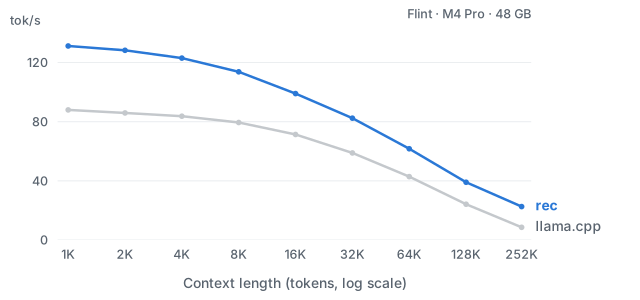
rec is our custom inference engine for running Recursive's language models locally on your machine. It provides lightning-fast inference for single-session usage. Compared to llama.cpp, rec delivers 1.4–2.6× the token throughput across the context lengths shown below on M4 Pro. Use it with pi, OpenCode, or connect your own client through the local API.

Flint decode throughput: rec vs. llama.cpp at context lengths from 1K
    to 252K tokens

Flint on Apple M4 Pro (48 GB), 4-bit weights, 1K–252K-token prompts and 1,024 output tokens. Five runs per context; prefill excluded.

Requirements

Install

Install using:

curl -fsSL https://raw.githubusercontent.com/recursive-oss/rec/main/install.sh | bash

This installs rec in ~/.local/bin and adds it to your PATH for new terminals. All other data lives under ~/.local/share/rec.

Usage

We find the best performance from our models when paired with the pi harness. For convenience, rec provides pre-configured recipes for running pi and OpenCode harnesses. Run them using:

rec launch pi  # preferred
rec launch opencode

⚠️ rec is optimized for single-session usage. To run multiple agents at a time, see our documentation for other ways to run our models.

This starts our inference server and connects to it automatically. The first run downloads the model and harness. The model server continues to run after you close the terminal. Run rec stop to stop it.

These harnesses are kept separate from anything on your system. Use rec exec pi|opencode ARGS to run their own commands, for example:

rec exec pi install npm:PACKAGE

Use your own harness

rec exposes OpenAI and Anthropic-compatible chat-completion APIs. Start the server:

rec serve

Keep this terminal open. When flint is ready. appears, connect a client from another terminal.

To use your own install of pi or OpenCode, run:

rec launch --args pi
rec launch --args opencode

Each command prints the environment and command line that rec launch uses, instead of running it. Replace the harness path with the path to your own harness. The command also points the harness at rec's own settings and sessions; remove those variables to keep yours.

To send a request directly to the OpenAI-compatible API:

curl -fsS http://127.0.0.1:11500/v1/chat/completions \
  -H "Authorization: Bearer $(rec auth token)" \
  -H 'Content-Type: application/json' \
  -d '{"model":"flint","messages":[{"role":"user","content":"Say hello."}],"max_tokens":128}'

The response contains generated text in choices. For other clients, use base URL http://127.0.0.1:11500/v1, model flint, and the API key from rec auth token.

The Anthropic-compatible API is available at http://127.0.0.1:11500/v1/messages. Point ANTHROPIC_BASE_URL at http://127.0.0.1:11500 and send the token from rec auth token as a bearer token or as x-api-key. The model is flint.

Commands

Command What it does
rec launch pi|opencode Start the server if needed and open a harness
rec exec pi|opencode ARGS Run a harness command, such as installing a plugin
rec serve Start the model server in this terminal
rec status Show whether the server is running
rec stop Stop the server
rec auth token Print the local API key
rec pull Download the model without starting the server
rec doctor Check your hardware and installation
rec update Update rec to the latest release
rec uninstall Remove rec, its models and its settings

Run rec COMMAND --help for a command's options.

Help and contributing

rec (recursive-oss/rec)

正在搜索数据库…

286 ·GitHub
这是什么?rec 是 Recursive 自研的推理引擎,用于在你的 Mac 上本地运行他们的语言模型,针对单会话的快速使用做了优化。
这是命令行工具还是后台服务?这是一个命令行工具:你安装 rec 可执行文件,然后在终端中运行它,它会启动一个本地模型服务器,你可以把 harness 或自己的客户端连接上去。
怎样安装并启动 rec?运行安装命令,它会把 rec 放到 ~/.local/bin 并加入 PATH,然后使用 'rec launch pi' 或 'rec launch opencode' 启动,即可启动服务器并打开 harness。
需要什么硬件和软件?需要搭载 M4 Pro、M4 Max、M5 Pro 或 M5 Max 芯片的 Apple Silicon Mac,至少 48 GB 统一内存,约 30 GB 可用磁盘空间;如果想使用 pi harness,还需要 Node.js 22 和 npm。
我能同时运行多个 agent 会话吗?不能,rec 是为单会话使用而设计的;若要同时运行多个 agent,需要另一种配置,详见 rec 的单独文档。
任何 Mac 都能运行吗?不能,只支持特定的较新 Apple Silicon 芯片(M4 Pro/Max 或 M5 Pro/Max),且统一内存至少 48 GB;配置较低的或 Intel 芯片的 Mac 不受支持。
运行时需要联网吗?只有首次运行需要联网,用于下载模型和 harness;之后推理完全在你的本机上进行。
flint 是什么?flint 是随 rec 一起提供的语言模型。连接 rec 的本地 OpenAI 或 Anthropic 兼容服务器时,你在 API 客户端中指定的模型名称就是它。
rec 比 llama.cpp 快多少?在搭载 M4 Pro、使用 4 位权重的 Apple Mac 上,从 1K 到 252K 个 token 的各种上下文长度下,rec 的 token 吞吐量是 llama.cpp 的 1.4 至 2.6 倍。
能用自己的编程 agent 代替 pi 或 OpenCode 吗?可以。rec 提供 OpenAI 和 Anthropic 兼容的 chat-completion API,因此任何兼容的客户端,或你自己安装的 harness,都可以通过 'rec auth token' 获取的 token 连接到 rec 的本地服务器。
有哪些类似的项目?kapitsa, Locals, apfel, ordewell, deltafin, Strata, OmniInfer, headroom
大小
0.2 MB
星标
286
时长
28天
提交 · 90 天