The installers download the latest CLI-only GitHub Release, verify its SHA-256 checksum, and install it for the current user. For fixed versions, custom paths, manual installation, source setup, and removal, see Installation.
Start in three steps
Run omniinfer in a terminal.
Choose a compatible backend. The TUI can install an available prebuilt runtime for you.
Select a local model and start chatting.
To run the local OpenAI- and Anthropic-compatible service, start omniinfer serve and follow the CLI Guide or API Reference. Source builds and mobile embedding are documented separately.
News
2026-08-28 — Qwen3.8-Flash-Next support. OmniInfer now tracks llama.cpp b10665 and can load split GGUF model directories directly. Use a source-built llama.cpp backend until the matching prebuilt runtime is published in OmniInfer.
2026-08-14 — 🚀 Day-0 support for Qwen3.8-27B. OmniInfer is ready for Qwen's latest 27B vision-language model from day one.
Demo
Short, focused recordings of the main entry points. Each demo covers one capability.

Terminal UI — choose a backend, load a model, chat locally
Running omniinfer opens a terminal UI that recommends a compatible backend, loads a local model, and starts a fully local chat session.

The optional vla-libero example runs a SmolVLA policy through a managed vla.cpp runtime in the LIBERO simulator, showing live camera views, the predicted action, and latency in a browser dashboard.
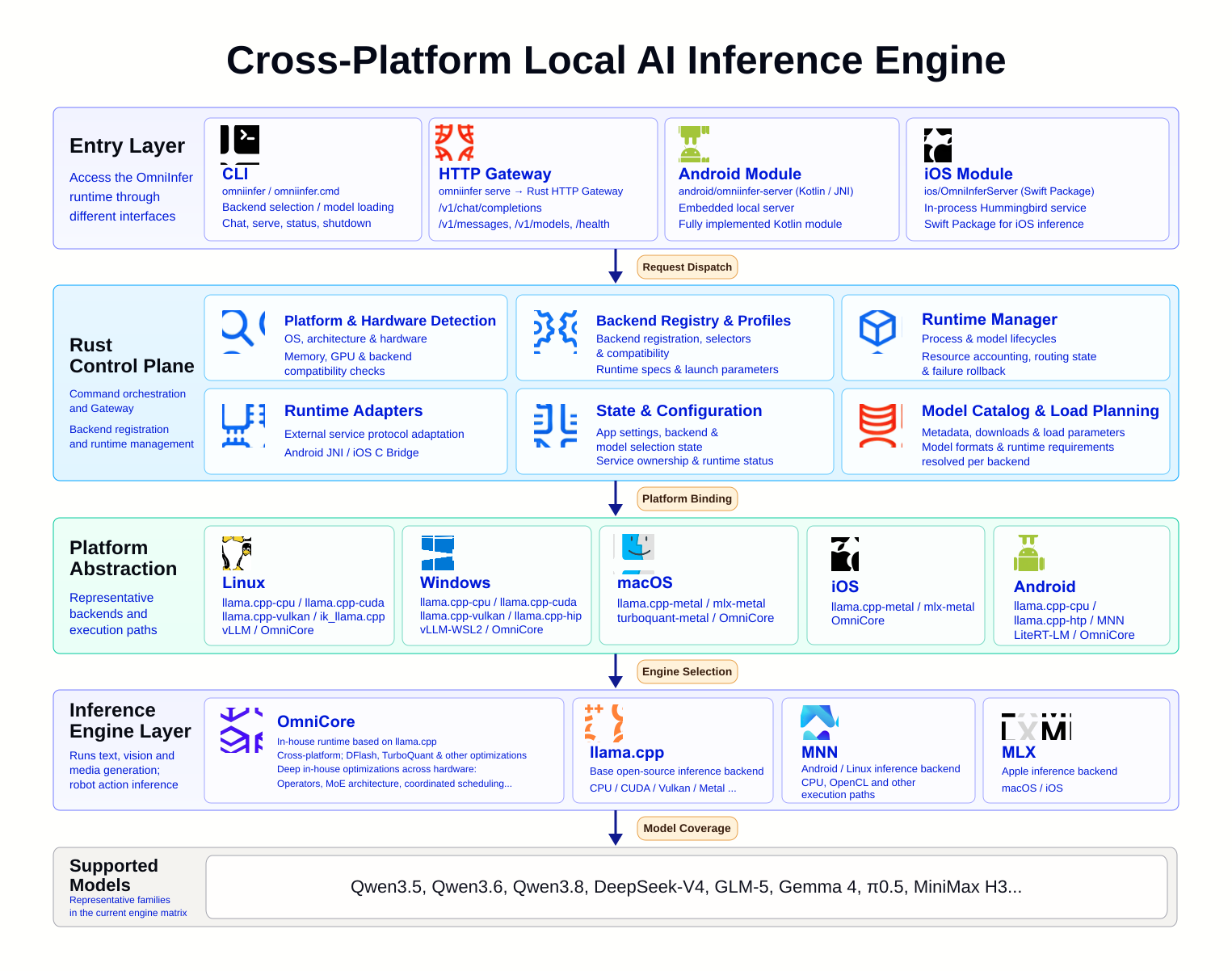
OmniInfer is a high-performance, cross-platform inference engine for running Large Language Models (LLM) and Vision-Language Models (VLM) locally. It abstracts away model compilation, hardware adaptation, and deployment complexity, enabling efficient local inference with minimal configuration.
OmniInfer powers the inference layer of Omni Studio, a unified model orchestration platform.
OmniInfer is fast with:
Optimized token generation speed and minimal memory footprint
Multiple backend engines, including llama.cpp, stable-diffusion.cpp, ik_llama.cpp, MNN, MLX, TurboQuant, LiteRT-LM, ExecuTorch QNN, and OmniInfer Native where supported
Hardware-aware adaptation and optimization
OmniInfer is flexible and easy to use with:
Seamless multi-backend switching for the best available engine on each device
OpenAI-compatible and Anthropic-compatible local API endpoints
Support for text and vision-language workloads
Fine-grained parameter control for context length, GPU offloading, KV cache, and backend-native launch options
OmniInfer runs everywhere:
Linux, macOS, Windows — desktop and server
Android and iOS — mobile and edge devices
One codebase across CLI, HTTP gateway, and mobile modules
llama.cpp, stable-diffusion.cpp, vLLM through WSL2
Android
Gradle module
llama.cpp, MNN, LiteRT-LM, ExecuTorch QNN
iOS
Swift package
Embedded native inference service
Runtime availability depends on the device and accelerator. Use omniinfer backend list for the current machine; backend names explains selectors and legacy compatibility and see the Build Guide for the full platform matrix.
Documentation
Start here
Installation: Release installers, version pinning, source setup, manual installation, and removal
CLI Guide: Backend installation, model loading, chat, serving, and desktop integration
API Reference: Local OpenAI- and Anthropic-compatible HTTP APIs
Operate and integrate
Model Loading: Model discovery, parameters, and backend-specific behavior
Remote Access: LAN access, Cloudflare Quick Tunnel, reverse proxies, and security
Benchmark Results: Generate and archive submission-compatible benchmark JSON
The installers download the latest CLI-only GitHub Release, verify its SHA-256 checksum, and install it for the current user. For fixed versions, custom paths, manual installation, source setup, and removal, see Installation.