
Что это такое?
 rec — это собственный движок инференса от Recursive для локального запуска их языковых моделей на вашем Mac, оптимизированный для быстрой работы в одной сессии.
Это CLI-инструмент или фоновый сервис?Это инструмент командной строки: вы устанавливаете бинарный файл rec и запускаете его из терминала. Он поднимает локальный сервер модели, к которому вы подключаете обвязку (harness) или свой клиент.
Это инструмент командной строки: вы устанавливаете бинарный файл rec и запускаете его из терминала. Он поднимает локальный сервер модели, к которому вы подключаете обвязку (harness) или свой клиент.Как установить и запустить rec?Выполните команду установки, которая поместит rec в ~/.local/bin и добавит его в PATH, а затем запустите 'rec launch pi' или 'rec launch opencode', чтобы поднять сервер и открыть обвязку.
Выполните команду установки, которая поместит rec в ~/.local/bin и добавит его в PATH, а затем запустите 'rec launch pi' или 'rec launch opencode', чтобы поднять сервер и открыть обвязку.Какое железо и программы нужны?Mac на Apple Silicon с чипом M4 Pro, M4 Max, M5 Pro или M5 Max, не менее 48 ГБ унифицированной памяти, около 30 ГБ свободного места на диске, а также Node.js 22 с npm, если вы хотите использовать обвязку pi.
Mac на Apple Silicon с чипом M4 Pro, M4 Max, M5 Pro или M5 Max, не менее 48 ГБ унифицированной памяти, около 30 ГБ свободного места на диске, а также Node.js 22 с npm, если вы хотите использовать обвязку pi.Можно ли запускать несколько агентских сессий одновременно?Нет, rec рассчитан на работу в одной сессии. Для запуска нескольких агентов одновременно нужна другая конфигурация, которая описана в отдельной документации rec.
Нет, rec рассчитан на работу в одной сессии. Для запуска нескольких агентов одновременно нужна другая конфигурация, которая описана в отдельной документации rec.Будет ли это работать на любом Mac?Нет, только на определённых новых чипах Apple Silicon (M4 Pro/Max или M5 Pro/Max) с не менее чем 48 ГБ унифицированной памяти. Маки со слабее конфигурацией или на Intel не поддерживаются.
Нет, только на определённых новых чипах Apple Silicon (M4 Pro/Max или M5 Pro/Max) с не менее чем 48 ГБ унифицированной памяти. Маки со слабее конфигурацией или на Intel не поддерживаются.Нужен ли интернет для работы?Интернет нужен только при первом запуске, чтобы скачать модель и обвязку. После этого инференс полностью выполняется локально на вашем компьютере.
Интернет нужен только при первом запуске, чтобы скачать модель и обвязку. После этого инференс полностью выполняется локально на вашем компьютере.Что такое flint?flint — это языковая модель, которая поставляется вместе с rec. Это имя модели, которое вы указываете в своём API-клиенте при подключении к локальному серверу rec, совместимому с API OpenAI или Anthropic.
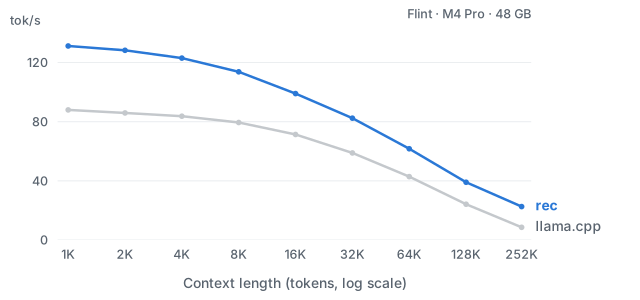
flint — это языковая модель, которая поставляется вместе с rec. Это имя модели, которое вы указываете в своём API-клиенте при подключении к локальному серверу rec, совместимому с API OpenAI или Anthropic.Насколько rec быстрее llama.cpp?На Apple M4 Pro с 4-битными весами rec выдаёт в 1,4–2,6 раза большую скорость генерации токенов, чем llama.cpp, при длине контекста от 1 тыс. до 252 тыс. токенов.
На Apple M4 Pro с 4-битными весами rec выдаёт в 1,4–2,6 раза большую скорость генерации токенов, чем llama.cpp, при длине контекста от 1 тыс. до 252 тыс. токенов.Можно ли подключить свой кодинг-агент вместо pi или OpenCode?Да. rec предоставляет API chat-completion, совместимые с OpenAI и Anthropic, поэтому любой совместимый клиент или ваша собственная обвязка может подключиться к локальному серверу rec, используя токен из команды 'rec auth token'.
Да. rec предоставляет API chat-completion, совместимые с OpenAI и Anthropic, поэтому любой совместимый клиент или ваша собственная обвязка может подключиться к локальному серверу rec, используя токен из команды 'rec auth token'.В каких он темах?harness, local-llm, openai-compatible, apple-silicon, inference, anthropic, local-first, coding-agent, performance, command-line-tool, api, terminal
harness, local-llm, openai-compatible, apple-silicon, inference, anthropic, local-first, coding-agent, performance, command-line-tool, api, terminal- Автор
- recursive-oss
- Размер
- 0.2 MB
- Звёзды
- 286
- Обновлён
- КоммитOct 27Релизv0.1.1Oct 26
- Возраст
- 28 д
- Коммиты · 90 дней