✨ Features
| Feature |
Details |
| 🧠 AI Research |
Gemini scans for trending topics tailored to your channel niche |
| ✍️ Script Writing |
Full narrated script with hook, sections, and CTA — in JSON |
| 🎙️ Free Voice |
Microsoft Edge TTS (no API key, no cost, word-level timing) |
| 🖼️ Stock Images |
Auto-downloads from Pexels with topic-aware search |
| 🎞️ Animated Video |
Ken Burns zoom, smooth crossfades, captions, progress bars |
| 📱 Shorts Support |
Generates vertical 9:16 Shorts alongside the main video |
| 🕵️ Human Review |
Local web dashboard to watch and approve before publishing |
| 🚀 Auto Upload |
Publishes to YouTube with SEO tags, description, and thumbnail |
| 🔄 Smart Fallback |
8-model chain auto-switches if any model hits quota |
| 🎵 Background Music |
Drop MP3s in music library/ — auto-looped to fit video length |
🖥️ Screenshots
|
|
 |
 |
| Main dashboard — generate videos with one click |
Settings panel — configure every aspect |
 |
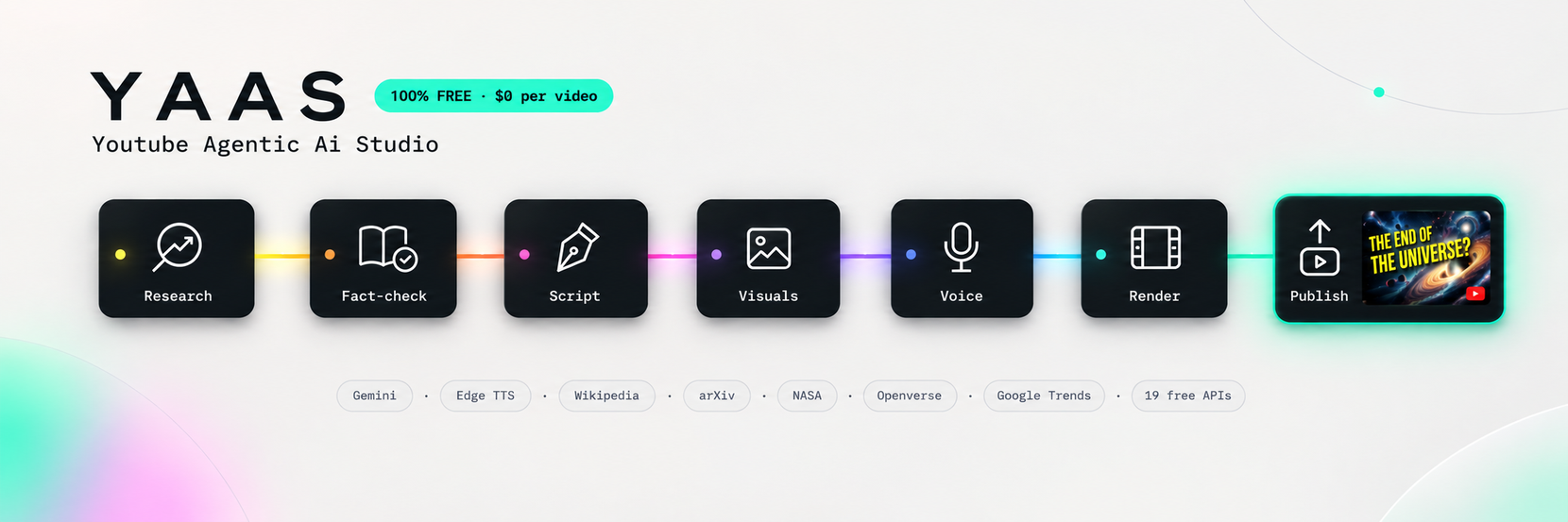 |
| Review dashboard — watch before you publish |
Pipeline overview |
This repo powers Eldritch Lore — a real YouTube channel running entirely on this pipeline.

"What if Napoleon had nukes? What if Earth was flat... and spinning?"
Every video on this channel was researched, scripted, narrated, and uploaded using exactly this code.
→ See what this tool can actually produce
⚡ Quick Start
# 1. Clone
git clone https://github.com/raunakpatil/youtube-agentic-ai-studio.git
cd youtube-agentic-ai-studio

# 2. Install dependencies
pip install -r requirements.txt

# 3. Set your API keys (copy and edit .env.example)
cp .env.example .env
# Edit .env and add your GEMINI_API_KEY and PEXELS_API_KEY

# 4. Run the GUI
python gui.py
# → Opens at http://localhost:7842

# — OR — run the pipeline directly from the terminal
python pipeline.py
First run? Read the full Setup Guide — it takes about 10 minutes.
🏗️ How It Works
The pipeline runs 6 sequential phases:
python pipeline.py  ──►  Research  ──►  Script  ──►  Narration
                                                          │
              YouTube ◄── Upload ◄── Review ◄── Video ◄──┘
| Phase |
Agent |
What it does |
| 1 · Research |
agents/researcher.py |
Gemini brainstorms trending topics for your niche and outputs a structured brief |
| 2 · Script |
agents/scriptwriter.py |
Expands the brief into a full narrated script with image queries per section |
| 3 · Narration |
video/narrator.py |
Edge-TTS converts the script to a cinematic MP3 voiceover |
| 4 · Images |
video/stock.py |
Downloads high-res stock photos from Pexels, topic-aware per section |
| 5 · Video |
video/creator.py |
Renders animated slides with Ken Burns, crossfades, captions, and music |
| 6 · Review |
review/app.py |
Spins up a local dashboard — you watch and approve before anything is published |
| 7 · Upload |
uploader/youtube.py |
Publishes to YouTube with full SEO metadata on your approval |
📁 Project Structure
youtube-ai-agent/
├── 📄 pipeline.py              ← Run this to start the full pipeline
├── 🖥️  gui.py                  ← Run this for the visual GUI
├── ⚙️  config.py               ← All settings: keys, colors, voice, video
├── 📦  requirements.txt
├── 🔑  client_secret.json      ← YouTube OAuth (you add yours — see SETUP.md)
├── 📝  .env.example            ← Copy to .env and fill in your API keys
│
├── agents/
│   ├── gemini_client.py        ← Shared AI client with 8-model fallback chain
│   ├── researcher.py           ← Topic research agent
│   └── scriptwriter.py        ← Script writing agent
│
├── video/
│   ├── narrator.py             ← Edge-TTS voiceover generator
│   ├── stock.py                ← Pexels image downloader
│   ├── creator.py              ← Full video renderer (Ken Burns, captions, etc.)
│   └── music.py                ← Background music mixer
│
├── review/
│   ├── app.py                  ← Flask review server
│   └── templates/review.html  ← Review dashboard UI
│
├── uploader/
│   └── youtube.py              ← YouTube Data API v3 upload
│
├── gui_templates/
│   └── index.html              ← Full GUI (served by gui.py)
│
├── music library/              ← Drop your MP3/WAV tracks here
│
└── output/                     ← Auto-generated (gitignored)
    ├── research.json
    ├── script.json
    ├── narration.mp3
    ├── images/
    └── final_video.mp4
🤖 AI Model Fallback Chain
The system automatically tries models in order, rotating from your Starting Model preference:
gemini-2.5-flash  →  gemini-2.5-flash-lite  →  gemma-4-31b-it
       ↓
gemini-2.0-flash  →  gemini-2.0-flash-lite  →  gemma-3-27b-it
       ↓
gemini-1.5-flash-001  →  gemini-1.5-pro-001
If a model hits quota (429) or is overloaded (503), it automatically retries up to 3 times then advances to the next model — so your pipeline never stops mid-run.
Set your preferred starting model in the GUI under Settings → AI Model, or in config.py:
GEMINI_MODEL = "gemini-2.0-flash" # 1500 free req/day — recommended default
🔑 API Keys Required (All Free)
Total cost: $0 per video. All required services have free tiers that comfortably cover daily video production.
🎨 Customising Your Channel
Edit config.py to make the output yours:
# 1. Describe your channel — the more specific, the better the topics
CHANNEL_DESCRIPTION = """
An educational channel covering the psychology of decision-making.
Target audience: adults 25-40 who enjoy Lex Fridman and Hidden Brain.
"""
CHANNEL_NAME = "Mind Mechanics"

# 2. Pick your voice
VOICE_ID = "en-GB-RyanNeural"   # British, deep, cinematic

# 3. Brand colours (RGB tuples)
COLORS = {
    "primary":   (99, 102, 241),   # your brand colour
    "highlight": (251, 191, 36),   # accent / titles
    ...
}

# 4. Video style
CROSSFADE_DURATION = 0.7   # image transition smoothness
OVERLAY_OPACITY    = 0.62  # how dark the image overlay is
❓ FAQ
Does this cost anything to run?
No. The entire stack uses free tiers:
- Gemini — 1500 req/day free on the 2.0-flash model
- Pexels — 200 req/hour free
- Edge TTS — completely free, no account needed
- YouTube Data API — free for uploads
- Video rendering — runs locally on your machine (CPU/GPU)
How long does one video take to generate?
On a mid-range machine (i7 + 16GB RAM):
- Research + Script: ~30 seconds
- Narration: ~10 seconds
- Image downloads: ~20 seconds
- Video render (10 min video): ~3–8 minutes depending on
RENDER_PRESET
- Upload: ~2–5 minutes depending on internet speed
Can I use this without the YouTube upload?
Yes. The review step lets you click "Reject" to skip the upload — the rendered MP4 will still be saved in output/. You can also comment out the upload step in pipeline.py entirely.
Why is moviepy pinned to 1.0.3?
MoviePy v2.0 removed the moviepy.editor module and changed the entire API. v1.0.3 is required. Similarly, NumPy must be <2.0.0 because MoviePy's underlying C extensions were compiled against NumPy 1.x. Do not upgrade either.
The video renders with tiny/ugly text
Your system is missing the fonts the renderer looks for. Install DejaVu fonts:
- Ubuntu/Debian:
sudo apt install fonts-dejavu
- Mac:
brew install --cask font-dejavu-sans-mono-nerd-font
- Windows: fonts are already present in
C:/Windows/Fonts/
YouTube upload fails with "access denied"
Delete youtube_token.pickle and re-run. This forces a fresh OAuth flow. Make sure your Google account is added as a Test User in Google Cloud Console → OAuth consent screen.
🗺️ Roadmap
- Thumbnail generator (AI-designed cover art)
- Scheduler (auto-post at peak times)
- Multi-channel support
- Custom intro/outro clips
- Analytics dashboard
- Voice cloning via ElevenLabs
🤝 Contributing
Pull requests are welcome! Please open an issue first to discuss major changes.
- Fork the repo
- Create a feature branch:
git checkout -b feature/my-feature
- Commit:
git commit -m 'Add my feature'
- Push:
git push origin feature/my-feature
- Open a Pull Request
Eldritch Lore — science, history, and "what if" scenarios.
Running 100% on this pipeline. Subscribe to see it in action.







 一条全自动、免费的 AI 流水线:调研热门话题、撰写带旁白的脚本、生成配音和使用图库图片的动画视频,并把成品视频上传到 YouTube——全部由一条命令触发。